I am experiencing slow charging after Watch OS 10 upgrade

my Apple Watch is charging very slowly after upgrading to Watch OS version 10.

After hours on a good charging cable it has reached only 80% charge. Never took more than an couple of hours prior to Watch OS 10 upgrade.

Posted on Sep 22, 2023 11:33 AM

Reply
Question marked as Top-ranking reply

Posted on Oct 1, 2023 4:21 PM

Just a reminder...

You can make your watch charge to full before it's scheduled to do so:

  1. Make sure that your Apple Watch is connected to its charger.
  2. Tap your watch to show the charging screen, then tap the circle with the green or yellow charging icon .
  3. Tap Charge to Full Now.

Your Apple Watch takes time to learn your charging patterns before it uses Optimized Battery Charging. If your Apple Watch is new, or if you recently updated to watchOS 7 or later, the charging screen will say Charging to full.

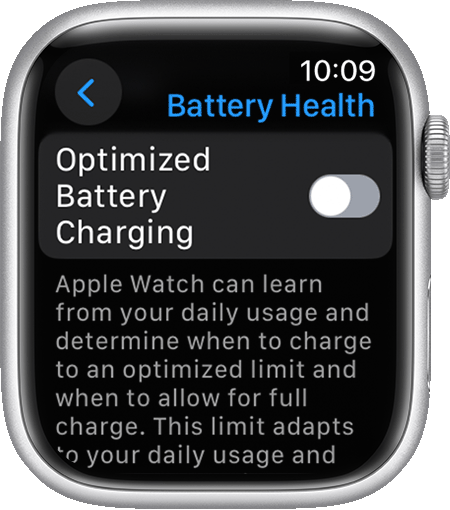
If you want to turn off Optimized Battery Charging:

  1. Open the Settings app on your Apple Watch.
  2. Scroll down, then tap Battery.
  3. Tap Battery Health.
  4. Turn off Optimized Battery Charging.

5 . Choose Turn Off Until Tomorrow or Turn Off.

23 replies
Question marked as Top-ranking reply

Oct 1, 2023 4:21 PM in response to jlberry48

Just a reminder...

You can make your watch charge to full before it's scheduled to do so:

  1. Make sure that your Apple Watch is connected to its charger.
  2. Tap your watch to show the charging screen, then tap the circle with the green or yellow charging icon .
  3. Tap Charge to Full Now.

Your Apple Watch takes time to learn your charging patterns before it uses Optimized Battery Charging. If your Apple Watch is new, or if you recently updated to watchOS 7 or later, the charging screen will say Charging to full.

If you want to turn off Optimized Battery Charging:

  1. Open the Settings app on your Apple Watch.
  2. Scroll down, then tap Battery.
  3. Tap Battery Health.
  4. Turn off Optimized Battery Charging.

5 . Choose Turn Off Until Tomorrow or Turn Off.

Feb 6, 2024 8:46 AM in response to Ferd II

We were having the same charging issue, two hours to charge on one watch. Followed the suggestions, no change. Then I looked at the charging stand (not Apple) and noticed that the charging puck was not in all the way, pushed it back in and all’s well. It’s only a fix if you have a charging stand that uses the Apple OEM charging puck. It was. “Duh” moment.

May 13, 2024 6:31 AM in response to Joey Jo Jo Jr. Shabadoo

Are you charging with the original cable or a 3rd party? I've got a 3rd party charger that I've used for a long time (the plug I need to plug into is a stretch for the standard cable). I drop it on there when I get in the shower, and when I get out, I'm up around 80-90% and good for the day. Now if I put it on that charger, I'm lucky to get 5% more charge while I'm getting ready for the day.


On a whim I plugged in the apple charger, which BARELY reaches my night stand. One false move and the watch is gonna hit the floor.... but, it seems to charge like the 3rd party charger used to. I've seen past threads around here where 3rd party charging got messed up with software updates, and wondering if that's whats going on again?


Apr 30, 2024 10:07 PM in response to jlberry48

I’m also experiencing a sudden plummet in charging speed in my Ultra 2. It’s not a subtle difference, it’s huge.


I used to be able to plug my watch in before taking a shower, and by the time I was ready for bed it’d be ether fully charged or almost charged. Now in the same time period I’m lucky if it hits a 40% charge. Even after hours more it won’t even make it to 80%.

This thread has been closed by the system or the community team. You may vote for any posts you find helpful, or search the Community for additional answers.

I am experiencing slow charging after Watch OS 10 upgrade

Welcome to Apple Support Community
A forum where Apple customers help each other with their products. Get started with your Apple Account.