Apple Music broken after Sonoma 14.0 update

I've been having a handful of issues with Apple Music on my MacBook Pro 14"


1) Music will randomly stop halfway through the song and after pausing and resuming a handful of times it will continue to play, but when the next song is ready to play, it'll jump back to where it stopped halfway through the song. I noticed this specifically when wearing AirPod Pros.


2) I can't listen to music in my library and click on any other tab or the music will stop playing. For example, I'll play a song from an album and then click the search bar to search another artist and then the song will stop playing and my queue is cleared.


3) Album art does not show up next to the song at the top on the Apple Music currently playing bar.


Hopefully these issues can be fixed in a bug fix update!

MacBook Pro 14″, macOS 14.0

Posted on Oct 3, 2023 9:56 AM

Reply
Question marked as Top-ranking reply

Posted on Mar 16, 2024 1:37 PM

My issue with this was that after I force-quit Apple Music it refused to launch; it would start, wait a few seconds, not allowing me to do anything, then in the "Force Quit Applications" window it would suddenly light up as red, then crash and give me a crash report (which does me absolutely NO good!). I tried restart, safe mode, nothing.


Reading from one help page, I deleted the "plist" preference files and viola!, it came back! And, all my imported CDs AND Music Store purchases were available!


From Finder, go to the "Go" in the menubar and select "Go To Folder" (near the bottom).

Copy this line, and paste it in the window that opens:


~/Library/Preferences


And hit return


In the window that opens, I selected these two files and put them in the trash:


com.apple.Music.eq.plist

com.apple.Music.plist


Restarted, launched Music, and it worked! My view settings had reset, but otherwise, I'm back using again, and best of all didn't lose anything.


Your mileage may vary, but I hope this helps...


iMac Retina 5k, 27-inch, 2019, 3 GHz 6-Core Intel Core i5, Sonoma 14.4 (23E214)

Similar questions

32 replies
Question marked as Top-ranking reply

Mar 16, 2024 1:37 PM in response to lanezh04

My issue with this was that after I force-quit Apple Music it refused to launch; it would start, wait a few seconds, not allowing me to do anything, then in the "Force Quit Applications" window it would suddenly light up as red, then crash and give me a crash report (which does me absolutely NO good!). I tried restart, safe mode, nothing.


Reading from one help page, I deleted the "plist" preference files and viola!, it came back! And, all my imported CDs AND Music Store purchases were available!


From Finder, go to the "Go" in the menubar and select "Go To Folder" (near the bottom).

Copy this line, and paste it in the window that opens:


~/Library/Preferences


And hit return


In the window that opens, I selected these two files and put them in the trash:


com.apple.Music.eq.plist

com.apple.Music.plist


Restarted, launched Music, and it worked! My view settings had reset, but otherwise, I'm back using again, and best of all didn't lose anything.


Your mileage may vary, but I hope this helps...


iMac Retina 5k, 27-inch, 2019, 3 GHz 6-Core Intel Core i5, Sonoma 14.4 (23E214)

Oct 9, 2023 12:33 PM in response to lanezh04

lanezh04,


Since Apple Music is built in, you might want to try some other fixes as it may be temporary. We know you mentioned wanting an update, so be sure to check for those: Update macOS on Mac - Apple Support


1. Before installing new software, it's a good idea to back up your Mac. If you have an external storage device, you can use it to back up your Mac with Time Machine.
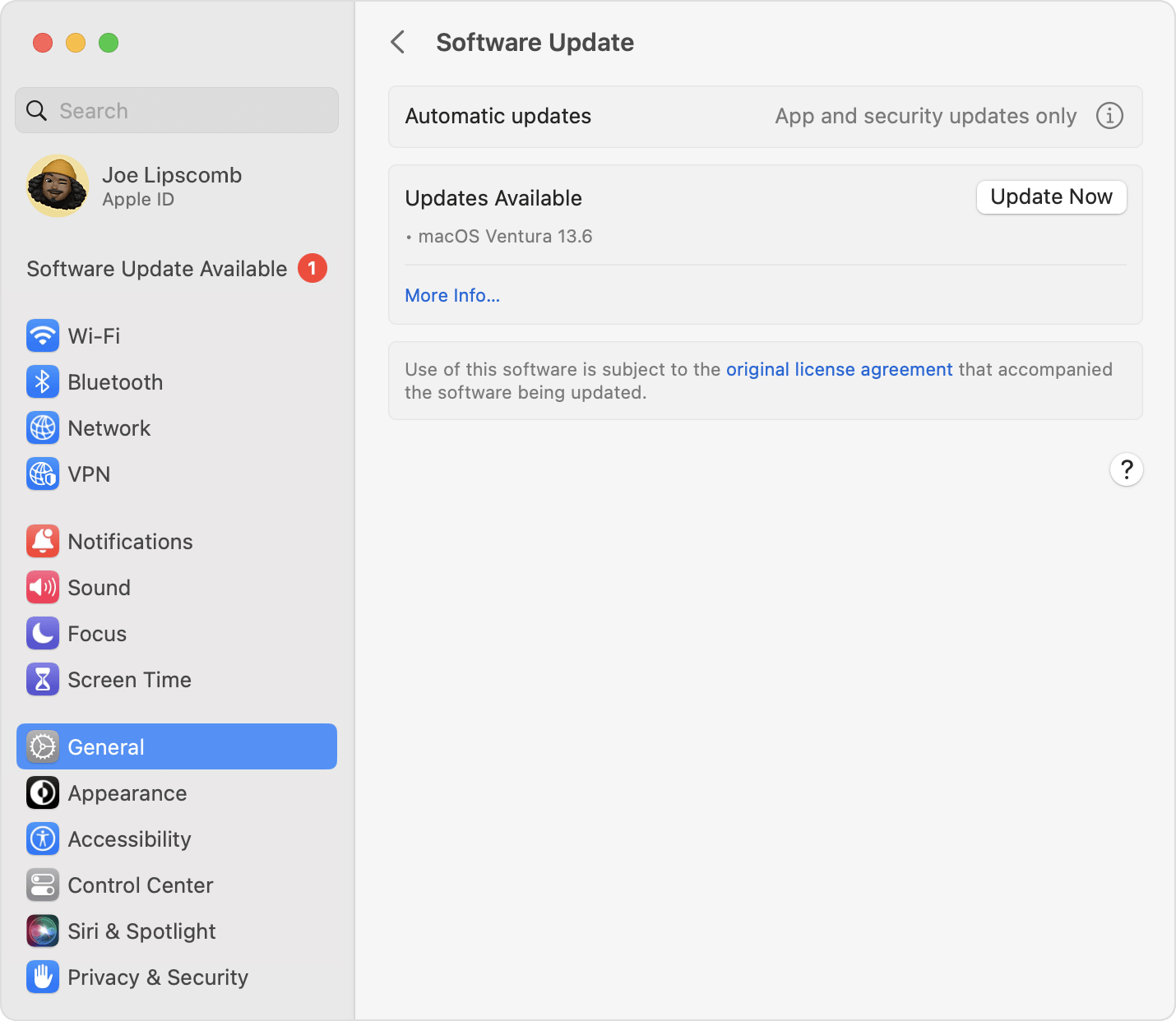
2. To check for new software, open Software Update:
* From the Apple menu  in the corner of your screen, choose System Settings. Click General in the sidebar, then click Software Update on the right.
* Or in earlier versions of macOS, choose Apple menu  > System Preferences, then click Software Update.
3. If Software Update finds new software, click the Update or Upgrade button to download and install it. You will be asked to enter your administrator password, which is the password you use to log in to your Mac. During installation, your Mac might show a progress bar or blank screen several times.
Software Update settings


If you want to do more troubleshooting, you can also isolate this further using a new temporary user and check to see if the same issues happen there: Add a user or group on Mac - Apple Support


If they are, as a last step, you can reinstall Music which will refresh the Music app itself. Since Music is built in, the way to do this is through reinstalling macOS: How to reinstall macOS - Apple Support


Take care.


Nov 18, 2023 2:36 PM in response to dhelton

Similar to @me_ct, this problem was caused for me by my network settings. I would test by setting all of your network settings to automatic to start. Maybe use the Mac's "Automatic" location (as long as you haven't changed its defaults).


For me, it was actually under the Ethernet Hardware settings. I use Jumbo Frames, but by setting up the hardware configuration manually, it basically just disconnects Apple Music. Actually, the Mac App Store becomes unreliable too.


This is despite the fact that everything else works normally.

Feb 24, 2024 2:28 PM in response to Cheeky Fudge

I had a similar issue, and a similar solution, but rather than create a new playlist, dragging the songs from the old one,I would right click the playlist and select 'duplicate'. This creates a duplicate playlist containing all the same songs but with the word 'copy' appended to the end of the playlist name. Then it was just a matter of deleting the old playlist and removing the word copy from the title of the duplicate.

Nov 22, 2023 9:12 PM in response to lanezh04

This is not a problem with settings. This is a genuine bug with Sonoma. I'm updated to 14.1.1. and this problem is still an issue. I can't play a full song in Apple Music. The OS keeps pushing some kind of command that not only skips tracks half way through, but also disconnects bluetooth headsets. I have to keep reselecting my headphones in the sound menu. We should not have to keep restarting in safe mode, when this is a basic functional issue. Please address this and not pass it off as a non issue.


Jan 5, 2024 3:37 AM in response to gavsky

Another workaround I’ve been using is creating a new playlist, dragging the entire old playlist into it, deleting the old playlist, and then renaming the new one to the old playlist’s name. This then allows you to right-click add songs again for some reason. I’ve done this to half my playlists and had to update my smart playlists accordingly. It’s really time consuming but certainly works and I’ve had no issues with the new playlists over the past week. Hope that helps.

Oct 21, 2023 6:38 AM in response to lanezh04

Yeah, it's just hanging on the blank box with a cancel button screen. Reminds me of 2007 itunes debacle. [edit: the only way to get rid of it, is to do a killall or force quit, pressing cancel doesn't work] [edit: irony, I just want to buy some music, I bought an album the other day before the upgrade, and want to get an EP, so we're annoyed and they're losing money]

This thread has been closed by the system or the community team. You may vote for any posts you find helpful, or search the Community for additional answers.

Apple Music broken after Sonoma 14.0 update

Welcome to Apple Support Community
A forum where Apple customers help each other with their products. Get started with your Apple Account.