amazon login stopped working. I need Apple support for my MacBookAir

My MacBook Air suddenly stopped being able to log in to Amazon prime. I have to call them on the phone to reset my password because I never receive te texts on my iPhone or my email with their secondary verification code. I have done this repeatedly and once we get it reset via the phone conversation, when I try logging in online, it fails at the text message communication link. Amazon now says there is something funky with my computer. Any ideas? This has happened on all of hardware: 2 MacBook Airs, iPhone & iPad.

Any ideas would help. Thank you. Nov 1/2023

Posted on Nov 1, 2023 6:37 PM

Reply

Similar questions

13 replies

Nov 1, 2023 6:53 PM in response to Sara MacApple

Sara MacApple Said:

"amazon login stopped working. I need Apple support for my MacBookAir"

-------


Troubleshooting Logins:


A. Try Another Browser:

Download a different Web browser, and see if you can log in with that. Get Google Chrome.


B. Clear Temporary Internet Files

Try clearing your Temporary Internet Files (Cookies & Cache) of Safari. Cookies perform remembrance of certain site-entered data. Whereas Cache keeps a snapshot of the last time you visited a site.  Use this Link: Clearing History and Cache - Apple Communities

Nov 5, 2023 2:54 PM in response to Sara MacApple

question: is clearing Safari’s history every time I close Safari sufficient for erasing cache and cookies? Maybe not?


You shouldn't have to do that.


Something just isn't right. I understand you log into Amazon, provide your Amazon login information, and are subsequently challenged to provide their two-factor authentication code they sent to the phone number they have on file. It provides a dialog box asking for it like the one shown below:
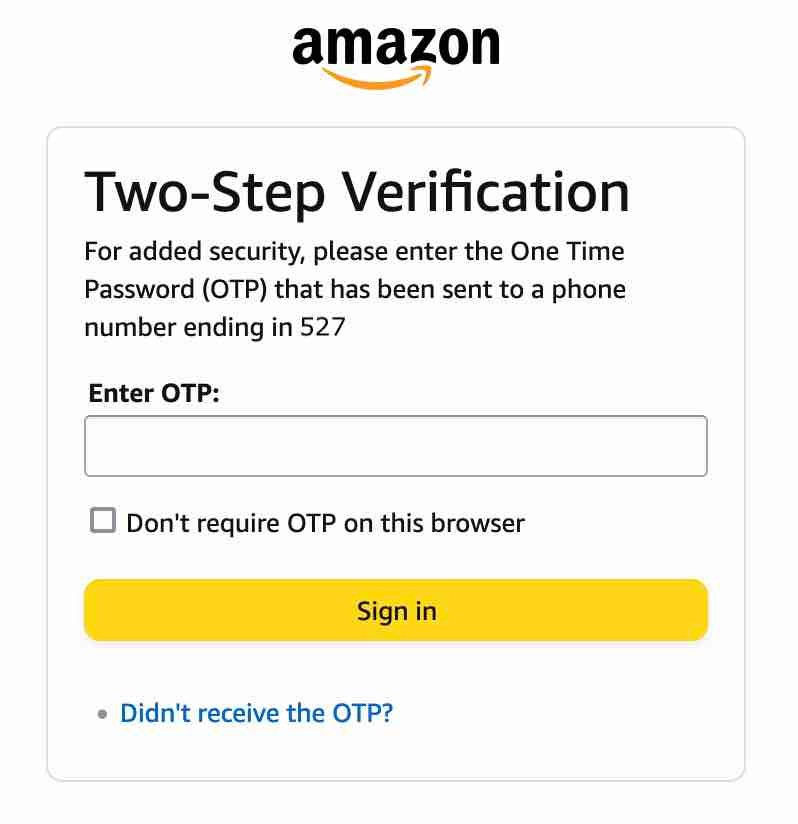


Yet you do not receive that code, or you receive it once and never again until you clear Safari's history.


Is all of that correct? If anything is different about your experience please explain.


Then please do me a favor. Download and run EtreCheck and post its report in a reply to this Discussion.


Instructions are here: How to use the Add Text Feature When Posting Large Amounts of Text, i.e. an Etrecheck Report - Apple Community


EtreCheck is a general purpose data-gathering and -reporting tool. It does not gather or report anything of a personal nature, and can just be dragged to the Trash when you're finished with it if you want.


It may not reveal anything actionable, but for now I am willing to give Amazon the benefit of the doubt and consider the possibility of something amiss with that Mac. Let's find out what that might be.


Nov 5, 2023 5:53 PM in response to Sara MacApple

Usually, if one doesn't receive the OTP and then checks the "Didn't receive the OTP?" box, there is then a choice of other ways to receive the OTP, including to an email address or by text to a different device (e.g. iPad or computer.) Have you tried that? Also, don't delete cookies -- that's how Amazon and other sites recognize you when you try to log in.

Nov 6, 2023 5:53 AM in response to Sara MacApple

So both computers are spick and span clean and have Malwarebytes and I have this issue with Amazon .


Although I doubt it is causing the problem you don't need "Malwarebytes" or anything like it. Terminology such as "clean" or "safe" is often used to intimidate or gaslight people into doing something that lacks justification. No one wants their Macs to be "unclean" or "unsafe" so here, install this and you'll be fine. Right? It's not that simple.


Fundamental troubleshooting requires uninstalling things you don't know a lot about or that you were simply told to install without any rational basis for installing them.

Nov 14, 2023 6:41 PM in response to Sara MacApple

Maybe is it my Malwarebytes that is interfering? I had not intended on taking it off. the whole point of adding it was to have one more tiny bit of protection since my bank accounts got hacked because they are linked to an account that got hacked and that totally freaked me out.


I can't conceive of any circumstance in which "Malwarebytes" would be interfering with Amazon's two-factor authentication, but it won't help in circumstances such as what you describe. Uninstalling things you don't need is just a fundamental troubleshooting step.


There is no justifiable reason to leave it installed and running all the time. Mac malware certainly exists, but it has to be installed deliberately and with conscious effort. It is not the product of spontaneous generation.


Nothing else stands out as particularly noteworthy.


stumpy1946 wrote:

FWIW ... I abandoned 2FA at Amazon long ago because it was always faulting. Just the pits to try and use.


stumpy1946 has a point. If something isn't working for you; if it is not providing a tangible benefit, and is just preventing you from using your Mac, get rid of it. To my knowledge Amazon does not require its use... yet.

Nov 2, 2023 3:20 AM in response to Sara MacApple

Amazon says there is something funky with your computer... but that funkiness is affecting all your devices? That should make about as much sense to you as it does to me.


... when I try logging in online, it fails at the text message communication link.


Can you explain further? As I understand it, Amazon uses two-factor authentication that sends a code to a phone number. Do you receive that code? What happens when you provide it upon attempting to log in to their website? I get the impression some details are missing, so please explain in as much detail as you can provide. Don't divulge anything personal.

Nov 5, 2023 10:48 AM in response to John Galt

Thank you for the detailed critical think here.

yes, it is the 2 factor authentication text from Amazon to me that I never receive. Wait the specified Amazon countdown seconds and submit the Resend request, no reply received. I can do that multiple times.

when I get on the phone with Am.Cust service they somehow unblock or unfamiliar it and get their system to sometimes send that second authentication text, then I set up a new password, try it and it works once. And after I log out and quit Safari, clear all history, I can never get that second step text again. ( I really have spent so many ridiculous hours with knowledgeable and idiot Amazon support people, some nice to work with and some total rude-dudes that my 20 hrs of phone time with Amazon friendly skies is burning up). Any help is apreciated.


question: is clearing Safari’s history every time I close Safari sufficient for erasing cache and cookies? Maybe not?

thank you for your help

Nov 5, 2023 3:42 PM in response to John Galt


Yep, I think you have the facts correct.

Since my last contact with you I have downloaded the OS and Safari upgrade, subsequently tried Amazon login, same routine: won't accept my password. So I tried to change my password, and I get the first code from Amazon via email, but the second verification that they send to my phone text never comes (tried it twice). I know that after too many attempts at Amazon doing this change of password and Resend requests they will lock my account, if it was open in the first place. I believe it was open to start with today.

So updating Safari 17.1 did nothing to improve things.


I am now wondering if Malwarebytes could be interfering? In August I loaded Malwarebytes onto by MacBook Air's plural. I don't suppose there is some setting that is blocking ? I don't know a lot about Malwarebytes except my apple store recommended it, loaded on the freeware and I upgraded to the real one after I had them clean my two laptops because of possible hack. So both computers are spick and span clean and have Malwarebytes and I have this issue with Amazon . I don't know if they are connected in any way. I don't remember the beginning of the Amazon annoyance.


so, I will try EtreCheck as you recommend and get back to you. If it is a hack all fury on me and you.

Sara


Nov 10, 2023 7:12 AM in response to John Galt

OK.

So here is what happens when I do EtreCheck: it says nothing is much out of whack.

I download EtreCheckPro, but I don't want to buy so here is a screen shot of the once and only page it will produce for me: No, seriously, here it is, I lost it for a moment:


Next I will post the "report" from EterCheck as soon as I figure out how.... I have just read it in detail and it didn't help me figure any thing out.. I hope it will help you John Galt. Thanks for the help.


Nov 14, 2023 11:16 AM in response to Sara MacApple

Hi John, sorry, here it is again. no major issues. significant users of CPU are EtreCheck and ridiculous never used on purpose Microsoft "office"... I suppose I should just delete that from this beast, except I use WORD and Excel. so the MINOR issues don't scream at me.

Maybe is it my Malwarebytes that is interfering? I had not intended on taking it off. the whole point of adding it was to have one more tiny bit of protection since my bank accounts got hacked because they are linked to an account that got hacked and that totally freaked me out.

so now I would like to continue to do business with Amazon, though for the life of me, I am not sure why. Thank you for the help. Sara


Here is today's EtreCheckPro run.


This thread has been closed by the system or the community team. You may vote for any posts you find helpful, or search the Community for additional answers.

amazon login stopped working. I need Apple support for my MacBookAir

Welcome to Apple Support Community
A forum where Apple customers help each other with their products. Get started with your Apple Account.


