FCPX not working with prores raw

I'm shooting with a sony a1 raw output to a atamos ninja v+ set to prores raw. when i import the clips to fcpx they appear black unless i hover over them and when i drag a clip into the editing timeline it keeps looping render and when i try to play it, it's just black. when i export the clip to rec709 it gives me an error message and wont export.

Mac Pro (2019)

Posted on Dec 15, 2023 4:57 PM

Reply
Question marked as Top-ranking reply

Posted on Mar 14, 2024 4:02 PM

This has been happening since December and is an FCP 10.7 bug which has not been fixed. It does not relate to the OS directly. It happens on Sonoma and Ventura (Tom reported this) but is mainly reported for Sonoma primarily I presume because those who tend to update FCP also tend to update the OS.


It is a complex bug. It is only observed on some computers and not others so some Intel Macs and M1 Mac Minis seem to be the main ones affected. It affects some ProRes Raw files and not others even from the same camera. It relates to frame size and not frame rate so, for example, 4.1K ProRes Raw files from the Nikon Z8 and Z9 are affected regardless of frame rate but not 5.3K ProRes Raw files from the same cameras.


It will take an FCP update to fix. I think it is pointless to try to go back to an earlier version of the OS. The only fix for affected computers is to install FCP 6.x. There are workarounds such as using Compressor to transcode to ProRes.

Similar questions

67 replies
Question marked as Top-ranking reply

Mar 14, 2024 4:02 PM in response to felixmizioznikov

This has been happening since December and is an FCP 10.7 bug which has not been fixed. It does not relate to the OS directly. It happens on Sonoma and Ventura (Tom reported this) but is mainly reported for Sonoma primarily I presume because those who tend to update FCP also tend to update the OS.


It is a complex bug. It is only observed on some computers and not others so some Intel Macs and M1 Mac Minis seem to be the main ones affected. It affects some ProRes Raw files and not others even from the same camera. It relates to frame size and not frame rate so, for example, 4.1K ProRes Raw files from the Nikon Z8 and Z9 are affected regardless of frame rate but not 5.3K ProRes Raw files from the same cameras.


It will take an FCP update to fix. I think it is pointless to try to go back to an earlier version of the OS. The only fix for affected computers is to install FCP 6.x. There are workarounds such as using Compressor to transcode to ProRes.

Dec 19, 2023 6:59 AM in response to felixmizioznikov

I just got off the phone with an apple final cut specialist who was able to log into my computer to assist. At the end it basically boiled down to the atomos ninja v+ not being supported. it's the + thats the problem. The regular ninja v are apparently working fine. The apple guy recommended me to contact atomos so they could fix encoding.

I still dont get why it does work on my macbook air.

Dec 19, 2023 7:14 AM in response to felixmizioznikov

felixmizioznikov wrote:

I just got off the phone with an apple final cut specialist who was able to log into my computer to assist. At the end it basically boiled down to the atomos ninja v+ not being supported. it's the + thats the problem. The regular ninja v are apparently working fine. The apple guy recommended me to contact atomos so they could fix encoding.
I still dont get why it does work on my macbook air.

That's not accurate. Internall recorded ProRes Raw files from the Nikon Z8 (and Z9) don't work either on the same Intel machines that have problems with the Ninja V+ files. So key point - it is not just a Ninja problem.


So it is far more likely that something has changed at Apple's end in Sonoma. There appears to be no problem with Apple Silicon Macs (M1 etc) which is why your MacBook Air is not affected and not all Intel machines are affected either. Apple need to sort this out, perhaps in conjunction with Atomos, Nikon and any other companies whose ProRes Raw files are not showing up in the FCP viewer.


Dec 19, 2023 4:26 PM in response to felixmizioznikov

I just ran the ProRes Raw sample files on Assimilate Play Pro Studio (latest version 9.7 mid-November 23), on the Intel iMac and all files play and export fine, including the ones that showed black in FCP 10.7 on the same machine.


Interestingly, in the Assimilate 9.7 release notes, it says there has been a ProRes Raw decoder update and it says it uses the new Apple ProRes Raw SDK with support for camera plugins. Understanding this in detail is well above my level of knowledge but the fact that there has been a new Apple ProRes Raw SDK suggests that the problem lies in there somewhere. FCP needs to catch up I guess (it would seem unlikely that the camera manufacturers would have to provide a firmware update for ProRes Raw but perhaps that might be the case as well).


Assimilate Play Pro was provided for a time in early 2022 as a free app accompanying Ninja V purchases which is how I came to have it. I use it mainly to grab metadata as it can read stuff that FCP and Resolve can't or don't access.


So Ninja V users who have a copy of Assimilate Play Pro could use it to decode and render ProRes Raw to ProRes 422 HQ or 4444 and import the exported files into FCP. This could be a temporary workaround until FCP gets fixed as an alternative to going back to an earlier version.


Dec 23, 2023 12:53 AM in response to felixmizioznikov

felixmizioznikov wrote:

Ok so today I received a atomx 2tb ssd and tested in the ninja v+ and same failure. I also got another ninja regular V and all cards and all tests also failing. same ol blacked out clips. I started the ninja v with the factory firmware of 10.92.00 and tested with same results and upgraded to latest 10.94.01 and also same results. Since the clips work fine on the macbook I think it's 100% something to do with my imac pro intel and or combination with fcpx.


I'm not at all surprised. As I said several times here and in the other thread in the forum, it's not just about the Ninja. The ProRes Raw files from recorded internally on the Nikon Z8 (which has never seen a NInja) have the same problem and you actually tested these and founfd they didn't work. This is a bug in FCP 10.7 on some Intel Macs (I also saw a report of it happenjng on an M1 Mac). At least you can work on your M1 Mac. I guess you could send the new stuff you bought back for a refund if you don't need it.

Dec 16, 2023 6:54 PM in response to Clint Gryke

So I just tried the clips on a 2020 macbook air running sonoma 14.1.1 and they work perfectly. I then updated the macbook air to the latest 14.2 and final cut to latest 10.7 and they still work fine. so this would be something to do with my imac pro. i'll try backing it up and setting it up as new. Thank you everyone for helping with all this.

Dec 19, 2023 8:25 AM in response to felixmizioznikov

I think the problem is in Ventura on Intel as well. Seems 10.7 wants a faster processor to decode done PRRAW


Yes you're correct. I forgot you said that already about Ventura. The problem is in FCP10.7 not Sonoma. The Intel Mac Pro I tested on has an Afterburner card which might explain why there is no problem on that machine. I have a copy of Assimilate PlayPro which I got free with the Ninja some time back and it can decode and export ProRes Raw to ProRes. I'll see if I can install it on the Intel iMac and check it out when I get a chance.

Dec 16, 2023 6:48 AM in response to felixmizioznikov

Does it play in QuickLook? Select the file in the Finder and press the spacebar.


Would it be possible to get a short clip? Perhaps you could upload it to Dropbox or WeTransfer and post the link? The link will not be shared on the forum, but will appear in notification emails.


I have other PRRAW media that plays fine on Intel, but I don't know if it was recorded on Ninja V.

Dec 16, 2023 6:26 PM in response to felixmizioznikov

/ Test environment: MacBookPro2020, Intel Core i5, Ventura13.6, FCP10.6.10, FCP10.7 /

--

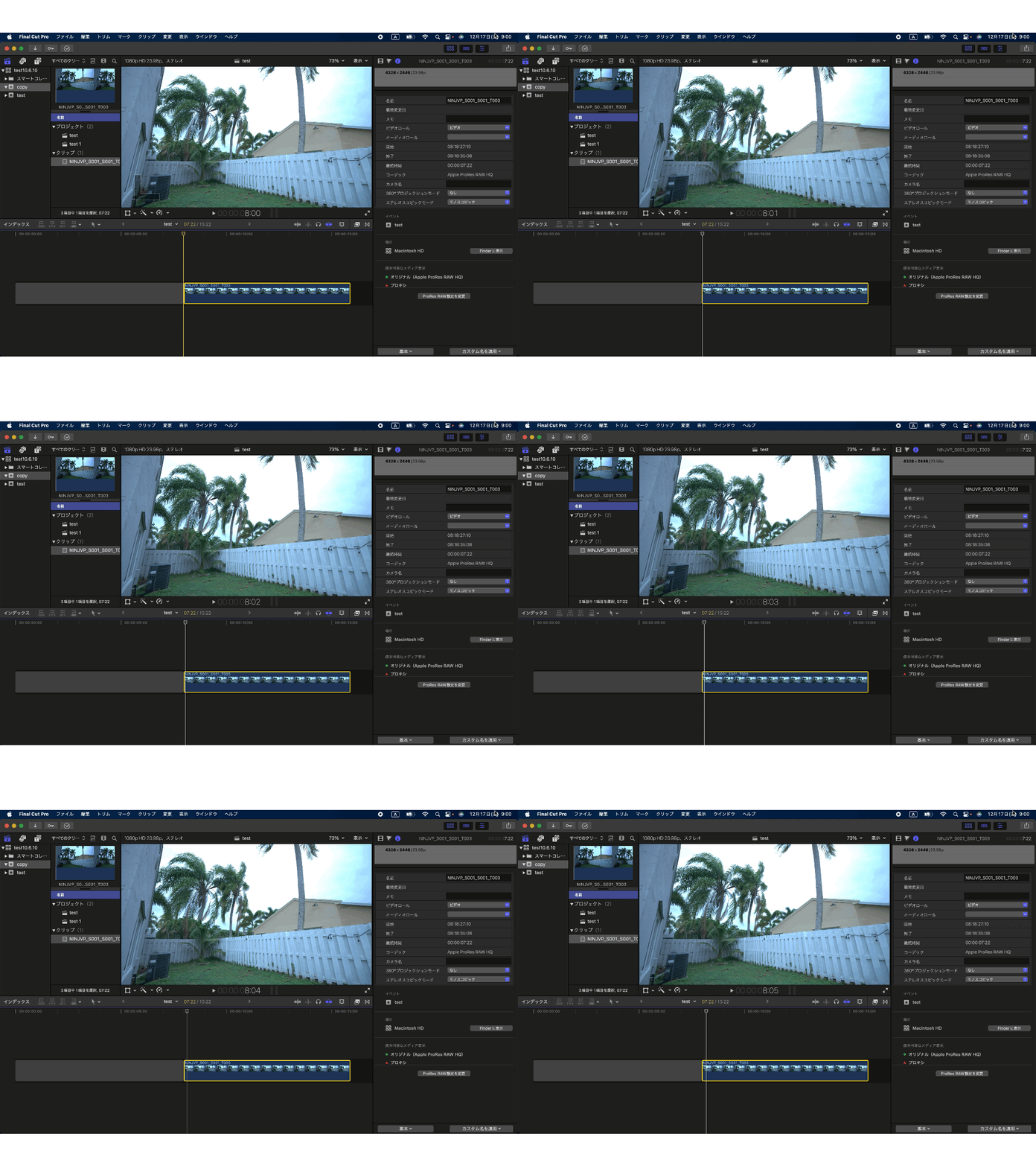
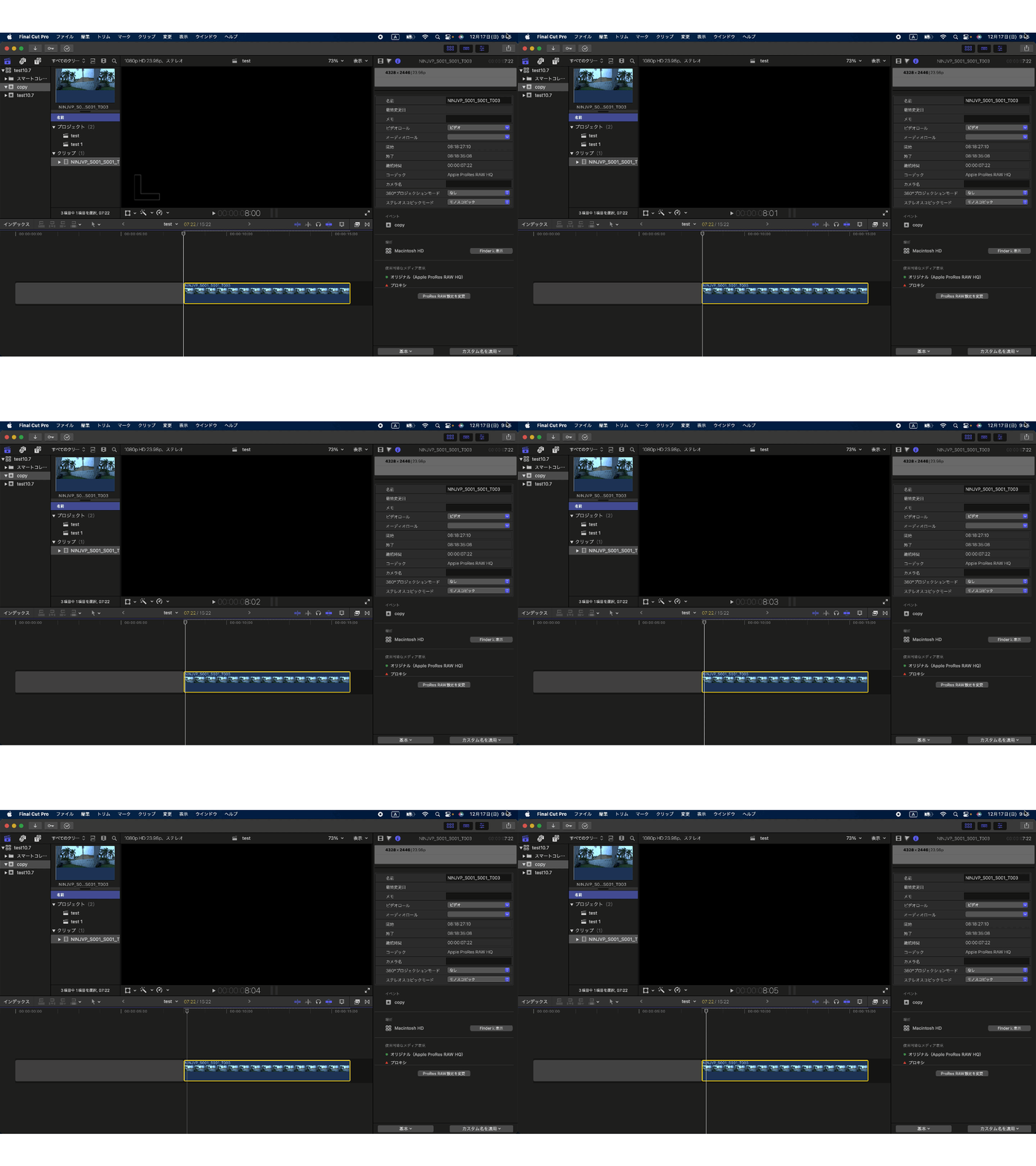
There were no problems with QuickLook/QuickTime/both FCP (project: HDR) playback. There were two problems: viewer display on Intel Mac+FCP10.7 and export error. There is no problem with playback in the viewer, but there is a bug that causes the page to appear black during frame-by-frame playback.


▼FCP10.6.10 Frame-by-frame playback *Pay attention to the time code


▼FCP10.7 frame-by-frame playback *Pay attention to the time code
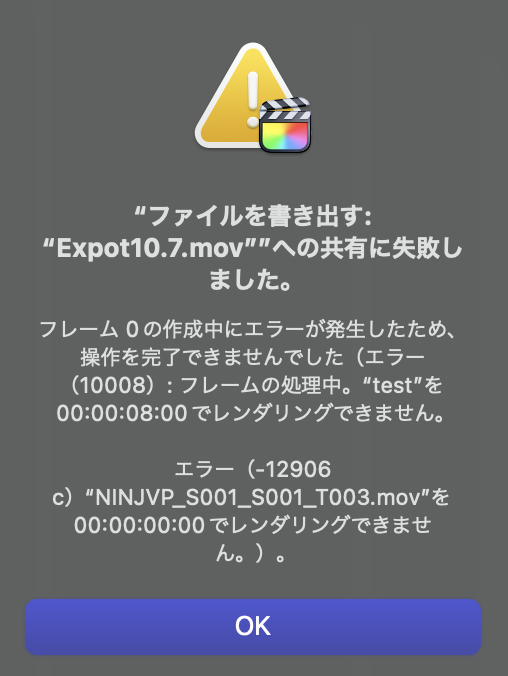
When exporting with FCP10.7, a warning will appear saying "rendering is not possible". Even if I selected a clip on the timeline and rendered it with control+R, the white dotted line did not disappear.


i exported to the older version and same problem.

Items to suspect:

  • Intel Mac model
  • FCP10.7 bug
  • Ninja V recording method and firmware update
  • Trouble in old PC →Diagnose with EtreCheck →Copy the report →Paste it in the text box and post it


As Clint Gryke says, it may not be just a matter of macOS and FCP versions. Old PCs are loaded with complex problems. It may take some courage, but I think that resetting your PC and deleting old applications that you no longer use can improve some aspects.

I think it would be a good idea to first post an EtreCheck report and understand the current situation inside the PC.

Jan 2, 2024 8:43 AM in response to felixmizioznikov

felixmizioznikov wrote:

I think I may have just figured this out. according to the (*) when downloading pro video formats they are not actually downloading and installing. I think my video graphics card may not be compatible..


It's not a simple case of what Macs have Metal support. A range of Macs including some M1 Macs are affected and most or all of them support Metal 3 as far as I can see.


Not sure what you mean about Pro Video formats not installing. You need to look under System Report-Software-Installations and scroll down to P. You should see all versions that you have installed up to now in the report.

Dec 17, 2023 10:07 AM in response to felixmizioznikov

Here's a link to a few ProRes Raw sample files if anyone would like to check what they do on their own systems. It would be interesting to hear what they do.


The NinjaZ6II files are normal and high quality ProRes Raw from a Nikon Z6II, Ninja V, Firmware 10.74. I've not updated the Ninja firmware in the last year or so as there has been nothing in the updates that is of any interest to me. These clips were shot today. I notice that the file Felix posted is from a Ninja V+. They play and export properly in FCP 10.7 macOS Sonoma 14.2 on all three machines I've tested them on (MacPro 2019, iMac2019 and M1 Max 14" MBP). I've also tested several older clips from this setup as well as NikonZ6 files and there are no problems on any of the machine.


The Nikon Z8 files are internal ProRes Raw clips with SDR and Log tone modes (Nikon terminology). These play and export normally on the MacPro and the MBP but do the black viewer window trick on the iMac and give an error when trying to export.


WeTransfer download


Dec 19, 2023 11:59 PM in response to felixmizioznikov

felixmizioznikov wrote:

Thank you Clint. Sounds like a good program but it's currently $299 for a license. I just ordered a regular ninja v which I think should work fine. I went for the + and needed none of the + features. I should have gone for the regular v.

It is expensive and I wasn't suggesting anyone should buy the app just for this problem. I got it free with a Ninja V in 2022 when there was a special offer from Atomos and Assimilate. I was just suggesting it as a temporary workaround until this all gets fixed for anyone who might have gotten it free like I did under the special offer.


I think it's risky buying a new Ninja in the hope that it might work, given that the problem is clearly not just about the Ninja as I said several times already in this thread. But do let us know if that solves the issue for you. If it doesn't, the simplest solution for you is to transcode the ProRes Raw to ProRes on your M1 MacBook Air and copy the files to your iMac.

Dec 22, 2023 8:37 PM in response to felixmizioznikov

Ok so today I received a atomx 2tb ssd and tested in the ninja v+ and same failure. I also got another ninja regular V and all cards and all tests also failing. same ol blacked out clips. I started the ninja v with the factory firmware of 10.92.00 and tested with same results and upgraded to latest 10.94.01 and also same results. Since the clips work fine on the macbook I think it's 100% something to do with my imac pro intel and or combination with fcpx.


This thread has been closed by the system or the community team. You may vote for any posts you find helpful, or search the Community for additional answers.

FCPX not working with prores raw

Welcome to Apple Support Community
A forum where Apple customers help each other with their products. Get started with your Apple Account.


