Neither the Shuffle All nor the blue button are "Shuffle off" buttons. They are two options related to Playlists:
- the text saying Shuffle All and the intertwined arrows: - start playing this list in shuffle mode. If you are already playing the list in Shuffle mode and you tap that text, it will re-start the same list, again in Shuffle mode
- the blue three-dot button: - is the Playlist Menu button - (and it's always in blue in the same way that the word Library is in blue and because Apple chose to make it that way. I don't know why). Tapping on the three-dot button reveals a menu specifically designed for Playlists*:
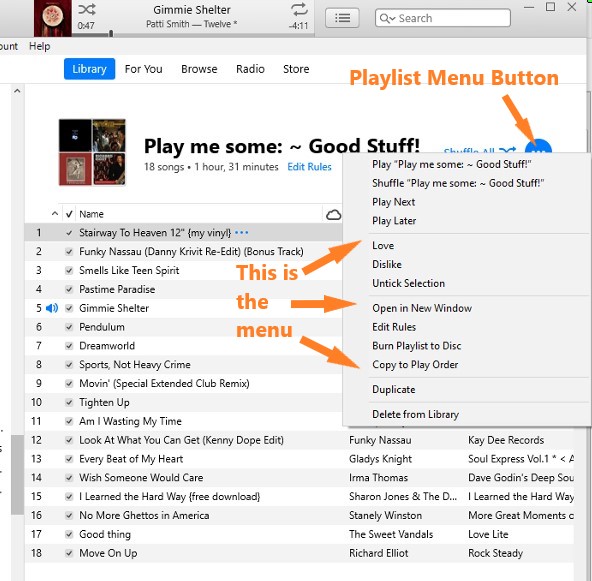
- on the menu are options specifically tailored for Playlists. If the player is already in shuffle mode:
- when you tap the Shuffle "Play me some: ~ good stuff!" line, the player will start shuffling that list again (in other words, every song will be listed to be played)
- if you tap the Play "Play me some: ~ good stuff!" line the player will start playing a different song but still in Shuffle mode, because you have not turned Shuffle off
- if you tap the Shuffle All (double arrow) icon, the list will start again, still in Shuffle mode
You cannot turn off shuffle mode from either of these two options
The way to turn Shuffle off is either:
- to use the top bar menu option Controls/Shuffle>Off (as pictured in a previous post) or
- to tap the Shuffle on/off icon in the Now Playing window (as shown below):
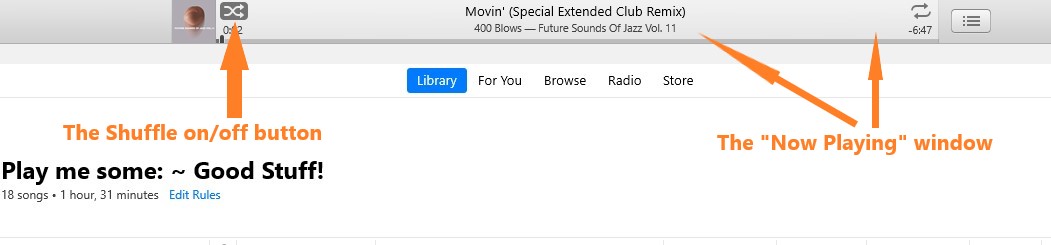
- When the arrows are white on a dark grey background (as shown above), Shuffle is on.
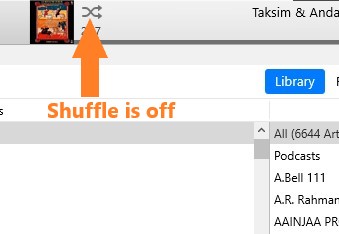
- When the arrows are grey with the standard background (as shown below),Shuffle is off:
* Note that the Playlist Menu button is tailored specifically for Playlists and even then, it will be different depending on whether you are looking at a Regular Playlist or a Smart Playlist. Smart Playlists have rules, which can be edited, so there is an option in the menu to Edit Rules. That command is not present in the same menu when looking at a Regular Playlist


