Unable to load iCloud mail

Are there any known incompatibilities with Apple products/Att&t wireless/infinity prepaid internet/and the iCloud mail? iPhone and IPad does the same thing… displays the above error message at “iCloud mail” screen. When I go to iCloud.com, sign in, it recognizes me and my account, my synced photos and everything is all there but when clicking on “mail” it says it is unable to load.


[Re-Titled by Moderator]


iPhone 15 Pro Max

Posted on Jan 21, 2024 5:38 PM

Reply
Question marked as Top-ranking reply

Posted on Aug 12, 2024 12:07 AM

Problem solved.

If anyone faces to the same issue, try to check the iCloud Mail via webview of iCloud service.

If it happends on the webview, create a ticket for the issue on Apple Assistance, with all screenshots: Error message in Mail app (one for the bottom error, the other for the detail), error message in web view, and one more error message saying that your alias is disabled (use another mail sends yourself an email).

Then, an Apple assistance will come to you with some basic checking steps. Later, they will collect some logs on your device, (and/or the case will be transfer to a senior assistance), then transfer to an engineer.


You will need to reset your password (with iforget apple com), then, the next day, your alias will be back.

58 replies
Question marked as Top-ranking reply

Aug 12, 2024 12:07 AM in response to AUTH_ERROR_INVALID_USR_TOKEN

Problem solved.

If anyone faces to the same issue, try to check the iCloud Mail via webview of iCloud service.

If it happends on the webview, create a ticket for the issue on Apple Assistance, with all screenshots: Error message in Mail app (one for the bottom error, the other for the detail), error message in web view, and one more error message saying that your alias is disabled (use another mail sends yourself an email).

Then, an Apple assistance will come to you with some basic checking steps. Later, they will collect some logs on your device, (and/or the case will be transfer to a senior assistance), then transfer to an engineer.


You will need to reset your password (with iforget apple com), then, the next day, your alias will be back.

Oct 2, 2024 12:19 AM in response to AUTH_ERROR_INVALID_USR_TOKEN

so basically, your iCloud has been disabled, i don’t know how that came about but that’s what i was told

The thing is i had this same issue a while back, for the first week I didn’t notice anything wrong but then after a while I noticed no mails were coming in, mind you this was in July, but I was finally able to get it fixed last week

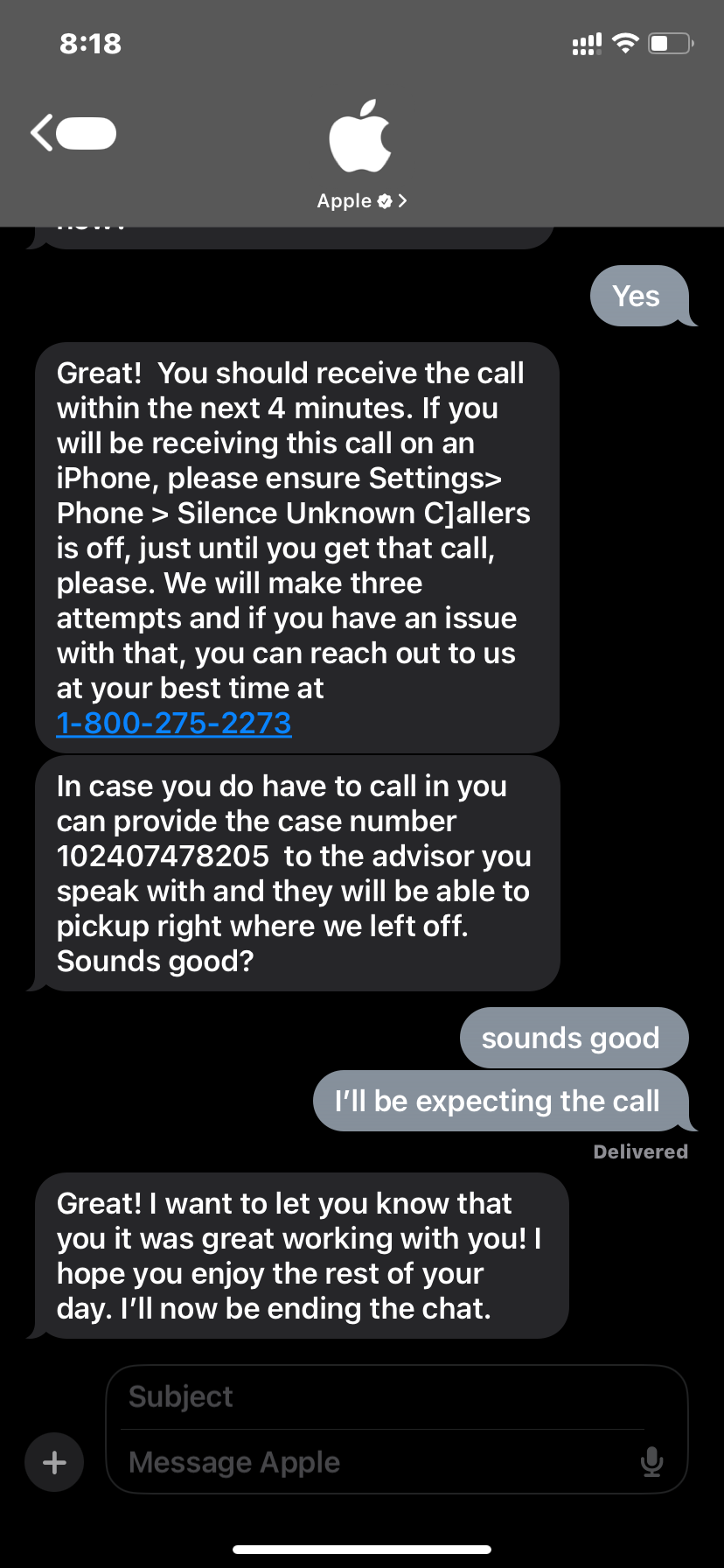
what I did was that I called Apple support, then I told the Apple employee that attended to me that I had already tried all trouble shooting methods I could find on the Apple support app and prior to that i was already given a case id because i contacted them through Apple message, so i just gave her the case id and she was able to read the chat to see what trouble shooting methods i had done already

After about 30 minutes on the call, she concluded that my iCloud was disabled and then she filed a complaint that was forwarded to the senior engineering team, she also asked me if i had an alternative email in which she could contact me and keep me updated on the situation

she then forwarded the complaint and then my Apple ID was back to normal after two days. She was really nice and she took her time to attend to me

NOTE: i did have to screen share so she could see exactly what the problem was.

The number i called was this: 1-800-275-2273

and below is a screenshot of my chat with Apple support through which i got the case id and the call back


Aug 6, 2024 1:16 PM in response to AUTH_ERROR_INVALID_USR_TOKEN

Такая же проблема


SMTP ответ - said: 550 5.2.1 user disabled; cannot receive new. 


Я не знаю ни одного почтового сервиса который бы блокировал аккаунты, благодаря Apple я потерял доступ к сервисам, где у меня хранились деньги


Вместо решения проблемы, тех поддержка задает глупые вопросы, просто подключите разработчиков к проблеме


Худший сервис

Aug 8, 2024 7:44 PM in response to ptrtoj

[SOLVED]

The Korean senior consultant reported the issue to the US engineering team, and it took approximately 3-4 working days to resolve. (BTW, they first tried to resolve the issue by resetting my password, as posted here by other person. And as you know it didn't do anything. That just took 1 day)


The Korean team informed me that the issue was related to the iCloud server side. While the exact cause of the problem was not communicated, it has been resolved.


[EDIT: on original post]

The iOS version was 17.6, not 14.6. typo.


Jul 8, 2024 1:50 AM in response to fametex

Your only chance is to get ask to be contacted by support guys via phone. Then follow their diagnosis procedures and escalate the issue up to the engineers. It took me one and a half month to have this solved. And needed to restart the whole procedure four times with different guys answering from different nations within the EU. Since apple’s is my main email it has been really a pain, with countless important communication lost. Insist, the’ll fix, but it won’t be fast.

Apr 29, 2024 6:37 AM in response to AUTH_ERROR_INVALID_USR_TOKEN

The same for me.


After weeks of troubleshooting by phone with three different advisors...screenshots, video of the errors, change of password, nothing new and the problem always there. it is obviously a server side problem, but it seems that it is not so obvious to have someone in the engineering team fix it. Meanwhile I'm stuck out from important mail, not knowing how to get out of this....oh by the way, I've 30 years experience as a sysadm and developer...so you can imagine the frustration...

Aug 2, 2024 11:16 PM in response to AUTH_ERROR_INVALID_USR_TOKEN

Same problem. From 28 or 29 of July, because I have no fresh incoming emails after then.


iOS mail app: after long refresh it says “Account Error: iCloud details…” on the bottom, when I click ‘details’ it says “The connection to the server failed”.


iOS settings>mail>accounts>iCloud(which goes to Apple ID” page)>icloud>iCloud mail> after long refreshing it says “AUTH_ERROR_INVALID_USR_TOKEN”


iCloud webpage> mail section> “There was a problem loading this content.”


Also iCloud webpage redirects to “sign in” page when I click the ‘custom domain’ settings.


Korean support team failed and senior also didn’t gave me any solution. It was quite embarrassing that they just surprised and couldn’t provide any potential solution.


Wrote the symptoms here because I’m sick and tired of providing the whole story again.


iOS version doesn’t really matter because the problem isn’t just related to the iPhone but same on macOS and iCloud webpage, but NO, I don’t use beta version anywhere with my devices. It’s v14.6.

Jan 27, 2024 1:26 PM in response to AUTH_ERROR_INVALID_USR_TOKEN

Went through quite a bit of troubleshooting with a Senior Advisor, and submitted multiple tickets to engineering. It seems like my @iCloud.com address has totally dropped off of my account/Apple ID as a whole.


Any incoming emails to the address are met with an immediate 550 5.2.1 user disabled; cannot receive new.


If anyone solves this, please share how!

Aug 2, 2024 11:56 PM in response to GillesDeSi

I’m really sorry to say this, but I don’t believe that anything I did or the support service did was really useful in *actually* solving the issue. My 20+ years experience as a system engineer in IT lend me to believe that this is an issue that may happen within Apple backend systems, of which Apple engineers are aware and it is just a matter of them manually fixing the issue with the user account when this get escalated to engineers. Th problem is That it requires time to actually land on the desk of somebody who actually know how to solve it and can do it.

This must not be some sort of alibi for Apple. To me being stuck out of iCloud email for one and a half month resulted in big headache and many missed fundamental mail. This sort of issues may happen, but should be solved way way more fast than it is.

Aug 12, 2024 1:02 AM in response to GillesDeSi

The issue has finally been solved for my iCloud mail. It is still unclear as to why this happened. Apparently, the mail system encountered a security flaw and was automatically shut down by Apple. All messages sent to my iCloud address during that time have been lost, and they can't be retrieved. What are they not telling us, we ask ourselves… Good luck to everyone!

This thread has been closed by the system or the community team. You may vote for any posts you find helpful, or search the Community for additional answers.

Unable to load iCloud mail

Welcome to Apple Support Community
A forum where Apple customers help each other with their products. Get started with your Apple Account.