iMovie library

Does anyone know how reduce the size of iMovie library on Mac? I have tried deleting all the files and events I no longer need, but the library is still using 18.25GB whereas iMovie itself is 3.58GB. I really need that extra space on my Mac. Grateful for any advice. Thanks.

Posted on Feb 14, 2024 4:53 AM

Reply
Question marked as Top-ranking reply

Posted on Feb 14, 2024 9:36 AM

If you delete from the iMovie app itself a project that contains media, a new event with the same name as your project is created in the currently open library, containing the media from that project. So you are not saving any space. That is because the iMovie app does not contain any original media. It contains only small sized thumbnails that refer to the Original Media in the iMovie library. To delete the original media you would need to do the additional step of deleting the Event from the iMovie media sidebar. You would need to delete the Event, not just the clips in the event.


You should not delete anything from the iMovie library Show Package Contents, or you risk corrupting the whole library. The Show Package Contents are displayed when one control-clicks on the library's icon in the Movies folder, or wherever other place it might be stored. .


Be aware that when you delete media from the iMovie library you are removing the media from all projects that may be referring to it. Therefore, you may be disabling projects that you do not intend to disable.


Most people who work with videos to any extent purchase an external drive to store the iMovie library. That way the space consuming videos are stored on the external drive instead of your internal drive. The external drive must be formatted Mac OS Extended (Journaled) or APFS.


-- Rich


10 replies
Question marked as Top-ranking reply

Feb 14, 2024 9:36 AM in response to isabelle4723

If you delete from the iMovie app itself a project that contains media, a new event with the same name as your project is created in the currently open library, containing the media from that project. So you are not saving any space. That is because the iMovie app does not contain any original media. It contains only small sized thumbnails that refer to the Original Media in the iMovie library. To delete the original media you would need to do the additional step of deleting the Event from the iMovie media sidebar. You would need to delete the Event, not just the clips in the event.


You should not delete anything from the iMovie library Show Package Contents, or you risk corrupting the whole library. The Show Package Contents are displayed when one control-clicks on the library's icon in the Movies folder, or wherever other place it might be stored. .


Be aware that when you delete media from the iMovie library you are removing the media from all projects that may be referring to it. Therefore, you may be disabling projects that you do not intend to disable.


Most people who work with videos to any extent purchase an external drive to store the iMovie library. That way the space consuming videos are stored on the external drive instead of your internal drive. The external drive must be formatted Mac OS Extended (Journaled) or APFS.


-- Rich


Feb 14, 2024 9:21 AM in response to Ian R. Brown

Thank you. I'm feeling chuffed as I finally managed to copy the projects I wanted to keep to a new Movie folder and then deleted the previous Movie folder to save myself a lot of GB. For anyone else with this issue, I noticed I had to keep both the old and the new Movie folders open whilst copying. I then moved the old folder to the bin so I could still check that my new folder had all the projects I wanted to save in place.

Feb 14, 2024 8:37 AM in response to isabelle4723

If you are finished with the library and will never need it again you can delete it.


CHECK THERE IS NOTHING YOU NEED IN THE OLD LIBRARY BEFORE DELETING AS THERE IS NO WAY YOU WILL BE ABLE TO RECOVER IT.


Unless you have specified somewhere different, the Library will be in your Movies folder.


Drag it to the trash and empty it.


A new (empty) library will be created when you launch iMovie.


Feb 15, 2024 7:30 AM in response to isabelle4723

FWIW, I consider it best practice to create a new iMovie Library for each of my projects. I detest having clips, etc. in an iMovie Library that are irrelevant to my current project. It also prevents the kind of bloat you have accumulated in your iMovie Library.


To create a new iMovie Library just follow the instructions in the iMovie User Guide. You can have as many iMovie Libraries as you want.


You can also transfer projects (or just selected assets) between Libraries ... and break up an existing large iMovie Library into separate smaller Libraries ... there is a good video on YouTube about how to do this.

Feb 14, 2024 10:24 AM in response to isabelle4723

When you control-click on the library's icon in the Movies folder, you will get a drop down menu that contains Show Package Contents as an option.
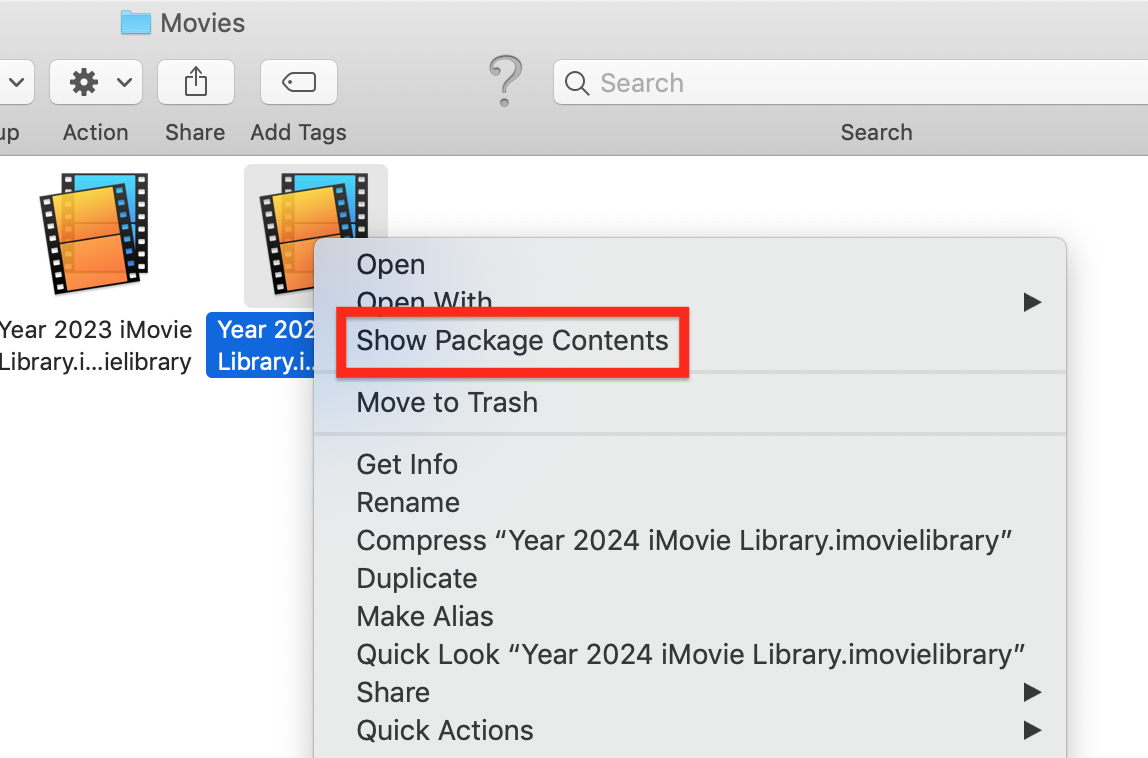


Clicking on Show Package Contents will display a folder that contains subfolders for of all of the projects and events in the library.


You cannot play the projects in the Show Package Contents. When you click on a project's subfolder, it will display additional subfolders that contain the media in the project. The project subfolder titled Original Media shows all of the clips that have been used in the project. You can play the media there, or copy (not move) the clips to your desktop to play. But you should not delete them from the project Original Media folder.


For example, the project folder for the project titled My Movie 1 is as follows:


The highlighted Original Media subfolder of the project shows the two clips that are in the project.


As mentioned in my previous post, you should not delete, alter, or move anything contained in the Show Package Contents and Project subfolders. To do so risks corrupting the library.


-- Rich


This thread has been closed by the system or the community team. You may vote for any posts you find helpful, or search the Community for additional answers.

iMovie library

Welcome to Apple Support Community
A forum where Apple customers help each other with their products. Get started with your Apple Account.

