Junebug172 wrote:
Is there any way to stop spam from reaching my Junk Mail folder?
Not if you have purposefully enabled the Setting in Mail >> Setting >> " Move it to Junk Folder "
" I've blocked many addresses and most coming in now are the ones I've previously blocked. "
That is a good thing is it not ?
Instead of fighting with Junk Mail in Junk Folder
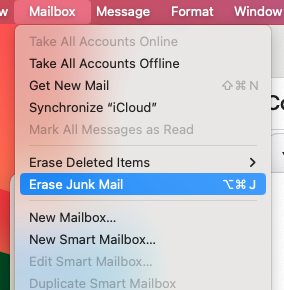
Use the Mailbox >> Erase Junk Mail
This will immediately remove the Junk Mail and will not be put in " Trash " / " Bin "
Or you can spend some time developing an Apple Rule to perform some specific actions on Known & Already Blocked Senders
Since one is hoping for some Al to fulfill this request in the New Version of macOS Yet to the named or released
Am including a Test from an existing Non Apple AI / LLM
Setting up rules in Apple Mail to delete emails from specific senders is a useful way to manage your inbox. Here's how you can set up such a rule:
Open Apple Mail: Launch the Mail application on your Mac.
Go to Preferences: Click on "Mail" in the menu bar at the top left corner of the screen, then select "Preferences."
Select Rules Tab: In the Preferences window, click on the "Rules" tab.
Add a New Rule: Click the "Add Rule" button.
Name Your Rule: Give your rule a name, like "Delete Emails from Blocked Senders."
Set Conditions: In the conditions section, choose "From" from the first dropdown menu, then select "Contains" from the second dropdown menu. Enter the email address or domain of the sender you want to block in the text field.
Set Action: In the actions section, choose "Delete Message" from the dropdown menu.
Save the Rule: Click "OK" to save the rule.
Apply the Rule: Close the Preferences window.
Now, any emails you receive from the specified sender will be automatically deleted upon arrival.
Make sure to review your rules periodically to ensure they're still relevant to your needs.

