Nordic ring (A with a circle on top) in Mac Monterey 12

I can use Option ' and option o to get æ and ø respectively but option a does not work for the third norwegian vowel (a with a circle on top, pronounced "or")

Can anyone help please?

MacBook Air 13″, macOS 12.7

Posted on Sep 4, 2024 3:25 PM

Reply
Question marked as Top-ranking reply

Posted on Sep 4, 2024 4:00 PM

When keys have variant letters, I believe if you press and hold the key (a in your case) you get a pop-up with all the variants numbered (a with a Nordic ring is variant 7 I believe) and you can enter it by then pressing the number key.


i.e., press and hold 'a' until the pop-up appears, then while still holding the 'a' press '7'.

12 replies
Question marked as Top-ranking reply

Sep 4, 2024 4:00 PM in response to Andreamargaretgray

When keys have variant letters, I believe if you press and hold the key (a in your case) you get a pop-up with all the variants numbered (a with a Nordic ring is variant 7 I believe) and you can enter it by then pressing the number key.


i.e., press and hold 'a' until the pop-up appears, then while still holding the 'a' press '7'.

Sep 5, 2024 3:09 AM in response to Andreamargaretgray

Option-a gives me å.

Not sure if that is specific for my keyboard or keyboards settings or language settings (all non-Norwegian), but I don’t think so. [MacBook Pro]


The Keyboard Viewer allows showing these key combinations, from being dynamic to the modifier keys, like a cheat sheet before you know the important ones by heart.

(This doesn’t show fully for extended combinations, like {option-e, then e, to give é} or {option-u, then u, to give ü}. But that’s a different learning curve. It gives hints with the orange outlines though.)
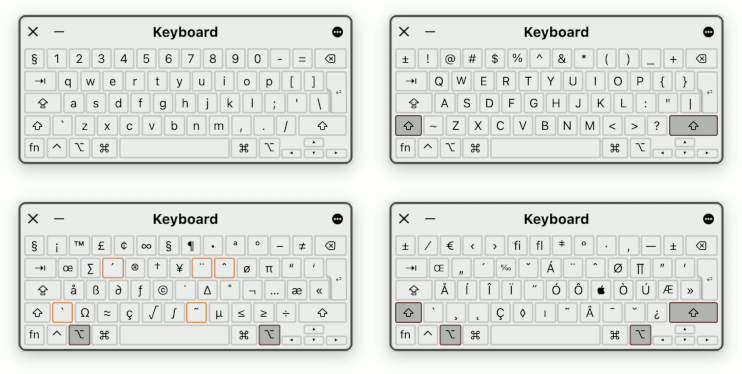

Sep 4, 2024 4:17 PM in response to g_wolfman

Thanks for trying to help!

Unfortunately that hasn't worked. I can't get any pop-ups oddly, and therefore no ability to choose!

I'm have Norsk Bokmal added to Languages but English is primary language, and the keyboard is on ABC Extended which enables the ø and æ to work and does not affect other keys (which happens when the keyboard is switched to Norsk and makes normal writing in English very unwieldy!)

Regards

Sep 5, 2024 4:24 AM in response to Andreamargaretgray

Andreamargaretgray wrote:

I can't get any pop-ups oddly, and therefore no ability to choose!

That pop-up display is something ported from the iPhone. It's not reliable. I've seen many people report that it stops working randomly.

I'm have Norsk Bokmal added to Languages but English is primary language, and the keyboard is on ABC Extended which enables the ø and æ to work and does not affect other keys (which happens when the keyboard is switched to Norsk and makes normal writing in English very unwieldy!)

If you are going to state that "English in primary" and "normal writing in English", then you should really be using the default keyboard. This keyboard is designed for English and has hotkey support for virtually all other European languages.


You can try Tom Gewecke's suggestion to fix the pop-up keyboard. But personally, I find that method slower than just using the hotkeys. I understand that some people are extremely attached to that pop-up and seem to get very angry when I suggest an alternative method.

This thread has been closed by the system or the community team. You may vote for any posts you find helpful, or search the Community for additional answers.

Nordic ring (A with a circle on top) in Mac Monterey 12

Welcome to Apple Support Community
A forum where Apple customers help each other with their products. Get started with your Apple Account.


