Slow transfer from iPad mini 2 to 2021 iPad 10.2

Apple talked me through how to backup my old iPad which completed very quickly. Then they talked me through how to set up the transfer from the backup but it is not appearing tom be transferring . It has been sitting there from Monday morning. Is there any reason why it isn't instant? Or, can I stop the transfer and transfer from my iPhone or would that take just as long?


[Re-Titled by Moderator]

iPad, iPadOS 17

Posted on Jan 30, 2025 2:31 AM

Reply
Question marked as Top-ranking reply

Posted on Jan 30, 2025 2:44 AM

If the process has stalled, you may need to restart both iPads - and then start again.


Force restart iPad (models with Face ID or with Touch ID in the top button)

If your iPad doesn’t have the Home button, do the following:

  1. Press and quickly release the volume button nearest to the top button.
  2. Press and quickly release the volume button farthest from the top button.
  3. Press and hold the top button.
  4. When the Apple logo appears, release the top button.


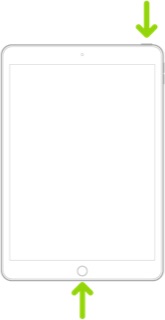
Force restart iPad (models with the Home button)

Press and hold the top button and the Home button at the same time. When the Apple logo appears, release both buttons.


Keep both iPad's connected to their respective Power Adapters throughout the transfer process - as this will keep their WiFi connections active. Similarly, ensure that you have a good WiFi connection throughout.


These support pages should get you started with setup of your new iPad - and the methods of transferring your data from old to new iPad:

Set up your iPhone, iPad or iPod touch – Apple Support

Transfer data from your previous iOS device to your new iPhone, iPad, or iPod touch - Apple Support

Use Quick Start to transfer data to a new iPhone, iPad or iPod touch – Apple Support


If the donor iPad, from which you are transferring your data precedes iOS12.4, QuickStart will not be available.


“Transfer” is rather a misnomer. In reality, your data and setup is merely cloned to the new device. Nothing is moved or removed from the original device.


An alternative is to restore either an iCloud or iTunes backup to the new device:

How to back up your iPhone, iPad and iPod touch – Apple Support

Restore your iPhone, iPad, or iPod touch from a backup - Apple Support


Apps are not directly transferred between devices. For Apps, the transfer process creates a record of the Apps that are installed on the donor iPad - and it is this record of installed Apps that is transferred to the target (new) device. For Apps that are still available for download from the App Store, the corresponding Apps are automatically downloaded and installed from the App Store.


If you need assistance, you can make an appointment for the Genius Bar of your local Apple Store or Apple Authorised Service Provider (AASP) here:

Genius Bar Reservation and Apple Support Options - Apple


3 replies
Question marked as Top-ranking reply

Jan 30, 2025 2:44 AM in response to Geoffrb

If the process has stalled, you may need to restart both iPads - and then start again.


Force restart iPad (models with Face ID or with Touch ID in the top button)

If your iPad doesn’t have the Home button, do the following:

  1. Press and quickly release the volume button nearest to the top button.
  2. Press and quickly release the volume button farthest from the top button.
  3. Press and hold the top button.
  4. When the Apple logo appears, release the top button.


Force restart iPad (models with the Home button)

Press and hold the top button and the Home button at the same time. When the Apple logo appears, release both buttons.


Keep both iPad's connected to their respective Power Adapters throughout the transfer process - as this will keep their WiFi connections active. Similarly, ensure that you have a good WiFi connection throughout.


These support pages should get you started with setup of your new iPad - and the methods of transferring your data from old to new iPad:

Set up your iPhone, iPad or iPod touch – Apple Support

Transfer data from your previous iOS device to your new iPhone, iPad, or iPod touch - Apple Support

Use Quick Start to transfer data to a new iPhone, iPad or iPod touch – Apple Support


If the donor iPad, from which you are transferring your data precedes iOS12.4, QuickStart will not be available.


“Transfer” is rather a misnomer. In reality, your data and setup is merely cloned to the new device. Nothing is moved or removed from the original device.


An alternative is to restore either an iCloud or iTunes backup to the new device:

How to back up your iPhone, iPad and iPod touch – Apple Support

Restore your iPhone, iPad, or iPod touch from a backup - Apple Support


Apps are not directly transferred between devices. For Apps, the transfer process creates a record of the Apps that are installed on the donor iPad - and it is this record of installed Apps that is transferred to the target (new) device. For Apps that are still available for download from the App Store, the corresponding Apps are automatically downloaded and installed from the App Store.


If you need assistance, you can make an appointment for the Genius Bar of your local Apple Store or Apple Authorised Service Provider (AASP) here:

Genius Bar Reservation and Apple Support Options - Apple


This thread has been closed by the system or the community team. You may vote for any posts you find helpful, or search the Community for additional answers.

Slow transfer from iPad mini 2 to 2021 iPad 10.2

Welcome to Apple Support Community
A forum where Apple customers help each other with their products. Get started with your Apple Account.