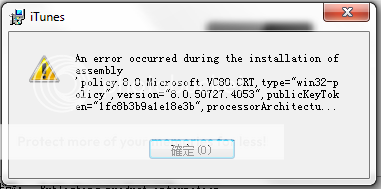
win7 x64 can't install iTunes 10.5
Win7 x64 and havent updated the windows 7 service pack 1
I tried to find the Microsoft.VC80.CRT and uninstall the win32 version, but still iTunes won't allow me to install.
Windows 7
Win7 x64 and havent updated the windows 7 service pack 1
I tried to find the Microsoft.VC80.CRT and uninstall the win32 version, but still iTunes won't allow me to install.
Windows 7
I can't install itunes 10.5 on my Windows 7 64-bit Lenovo laptop. This is very frustrating. I get the following message:
"There is a problem with this Windows Installer package. A program required for this install to complete could not be run. Please contact your support personnel or package vendor."
So, now I can't update my brand new iPhone 4s with all may apps. I have to use my old iPhone 3GS for my apps (calendar, to do, etc.) and my brand new supposedly better iPhone 4s as just a phone. Did Apple not run a compatibility check when it updated iTunes? Why release a new phone if people can't download iTunes to update the phone with all their apps? I read through this board and someone said we have to wait several weeks for a complete OS rebuild. Are you kidding me? What's the guarantee they will EVER fix the problem? There has been no communication from Apple regarding the problem or assurance that they are working on a fix. This problem has been going on since October 12th (the first post to this board). It is now October 22nd (10 days later) and it is still not fixed. My iPhone 4s is being returned today. I'm going Android. I don't need this hassle.
After trying many work arounds and uninstalls/installs, this method worked for me. When prompted for the deep scan by the IObit uninstaller, I deleted 4,700+ iTunes registry entries. Once completed iTunes 10.5 and iPhone update worked seamlessly. Everything is now synced and working. Didn't lose any data.
Thanks scot TC!
I am glad to see someone actually used the IOBIt uninstaller that I had suggested and got the same great results as I did, because just going to My computer and doing the add/remove thing will work most of the time but it truly doesn't always clear all registry files and or entries which can become corrupt and or mostly add unnecessary files onto your PC that you no longer require. Then over time when you add and remove many other programs and don't do a deep registry scan and or cleaning of your PC or Laptop it becomes sluggish and even unstable over time prompting for a full OS redo (not a good thing) So a true uninstaller and registry scanner like this free IOBit one does the job quite effectively. (but always use caution 😮 and make sure you are deleting only files that you know are associated with or to the program you are removing!!) Also I see from this thread that there are still a few unrelated and or newer types of issues or errors coming to light here (as can be expected when a major new Itunes upgrade like 10.5 is and associated with the new IOS5 for Iphones) that I did not come across. So I really have no input or ideas for those because I did not experience these other ones,But I do hope other people may have and maybe found a solution for these other types of issues. Lastly, there really is no blame (well maybe just a littel) to throw around here either as Apple designs their products (and or devices) or software to firstly and most importantly work with their operating systems, as does everyone really. Then, if their devices don't work say on a Windows based OS system computer or laptop they will get around to making and or finding a fix for that also. Because they really don't want their product end users to be un-happy either, but really, it isn't at the top of their things to do list I suppose. Now for Windows 7 OS (Microsoft) - do you really think they care if an Apple device doesn't work on their OS based PC's or laptops? They are probably hoping NOT!! so with that, they are hoping you will buy a lack luster Nokia phone or something with Meego (hahaha) or even an Android based phone because they get $15.00 from almost every manufacturer handset out there sold with Android on it. So don't expect Mircrosoft to come to the rescue to quickly here either becasue they won't, not with this problem because they will blame the manufacturer (Apple) and their software and that they are the problem with this and to a certain degree it is their (Apple's) issue and it will be resolved soon I assure you but you can actually call their customer support or even book an appointment through their support expressline system because they don't want people using their products being frustrated or not being able to enjoy their software and or devices either. So until then Folk's, it's up to US in these type of community forums to figure these types of things out (with help from hopefully both sides of the fences, Apple people and Window's people, Can't we all just get along and play nicely together 😉) while all the CEO's are counting their billions and billions!!
It's not really the point though is it. And they reckon Microsoft is bad. I never have these issues when I install new versions of Microsoft software. They might not look cool, but they're usually reliable. Sighs really should just buy a zune.
(1). Repair Apple softwares in control pannel
(2). Uninstall Bonjour
(3). install the itunes you have downloaded.
thanks for help, but unforunitely it didnt work..
i still having the problem😟
[IMG]http://i309.photobucket.com/albums/kk372/yimzz/Untitled1.png[/IMG]
im using win7 64-bit Dell
Same problem - - No success with installing iTunes 10.5 on Win 7, 64 bit. Read loads of posts, here and elsewhere. Some lucky few seem to solve the problem after much deleting and reinstalling... either iTunes or Win 7 or both.😕 But I gave up for now. Time is much too valuable. MY SOLUTION: after removing all Apple Software as described so often in these threads, I downloaded a slightly older version of iTunes (vers 10.4.0.80) and everything works again as expected. OK, I can't upgrade my iPhone to os5 just yet. I'll somehow manage. I'll just try to be patient and wait for the next bug fix in iTunes 10.5.1 At least I've got a working system again. 😉 Good luck to you all.
Still no luck, I have tried EVERYTHING posted here (except a reinstall of Windows 7). I tried installing older versions of Itunes but the result is always the same, they roll back and I get the originall error message as when I first and subsequently tried insatlling Itunes 10.5. I'm using a Dell Studio 1747 laptop running Windows 7 Home Premium 64 bit with Service Pack 1. It recognizes my Iphone, but only the stroed photos. I'm going to hold off doing a fresh insatll in the hopes that there will be an upcoming fix.
Same here done everything other than win7 reinstall which is out of the question ! When are you going to resolve this apple. What good is a phone, that can't be synced ? Sure it's great having a phone with all these features but if you can't use half of them ?
Octavian6, you have it exactly right and are doing the right thing by having some patience. I have spent two long sessions on the phone with Apple techs who are themselves working with Apple engineers as they attempt to fix this problem. As you said, some lucky people have been able to fix their update problem by applying posted solutions, but some of us, myself included, apparently have a more complex problem that needs a fix from Apple or possibly Microsoft. I can tell you with certainty that Apple is working hard to understand the cause of this bug and we have an additional work session planned for tomorrow. Basically, we started by applying previous known fixes without success and have now created several log files in order to get the details of what is happening during the attempted upgrade to iTunes 10.5. I am confident that Apple will get to the bottom of this issue and hopeful that the solution will not require a reinstall of Windows. Keep the faith.
i managed to update my itunes. Just repaired all apple inc software in control panel and it worked!
Please add me to the list of people that cannot download I tunes 10.5 with Windows 7 64 bit. I have a new I phone and cannot use all the things that I was promised my Apple.
I have removed everything from Apple on my computer and 10.5 will not load I get the error about register. Shame on you Apple you obviosly have a problem and have done nothing about it.
Maybe I should go back to my old blackberry
Ok i just finished fixing iTunes 10.5 on a Windows7(64) pc. Here are the steps. This is not heresay, i literally JUST finsihed doing it and wrote it down.
1. you *HAVE* to repair the Apple Software Updater (located in programs where you go to uninstall stuff) before you can remove it (it is broken for Win7 for some reason). You do this by right clicking on the application and selecting "repair" from the context menu.
2. then right click again after it is done and choose uninstall Apple Software Updater, *then* you can install the new iTunes 10.5 as well as the iOS (download today's build).
Thanks to Will Harris
< Edited By Host >
Having tried numerous things over the last two weeks, and everytime getting as far as 'Publishing Product Information' before getting the message mentioned earlier, I finally fixed it tonight. I have an acer laptop running Windows 7 64bit. I backed up all important files and did a full restore using acer recovery managment. After that it worked first time and I simply added all my backed up files to the laptop. Good as new!.....But Im still gonna get an Android phone. Apple your customer service was shocking, basically told straight away to contact Microsoft after waiting on hold over two days for two hours! Not even prepared to listen fully to the problem. This comes from a lifelong Apple fan who has had every iPhone since day one, and my wife and iPad 1 and iPad 2 and various Apple computers (one of which broke within 12months, once again poor customer service which I disregarded at the time).
Thank you Apple for the tech it was good while it lasted, goodbye and hello Android pleased to meet you!
I´ve tried every single tread that all of you exposed here. Thank you very much, but nothing worked for me. Today, two weeks later, I restore my laptop with recovery disks and finally I can use itunes 10.5 on my iphone 4. I don´t know what to do know, because i don´t want to have the same issue in the future with any apple device, so now i´m not sure if I´m going to buy the iphone 4s.
Good luck for everyone, and thanks again for your help.
win7 x64 can't install iTunes 10.5