Itunes radio error message.

Radio worked fine...now it does not.

Get the following error message:

An error occurred while contacting the radio tuning service. Check your Internet connection, or try again later.


No changes to any network settings. No changes to anything. Internet working perfectly. Itunes store working perfectly. Radio worked fine everyday since I got this machine and now get this error message.

MacBook Pro, Mac OS X (10.7.3)

Posted on Feb 24, 2012 8:12 AM

Reply
241 replies

Mar 2, 2012 8:14 AM in response to Danger Cell

It's been a long time since this problem first arose. Until it is fixed may I suggest the following workaround (cross posted from a similar thread):


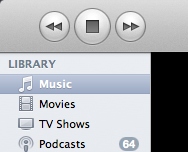
Go to your iTunes and select your Music library from the leftmost column:


User uploaded file


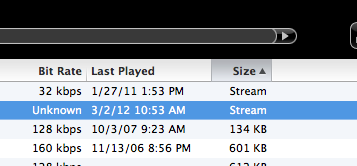
In the main window, sort the list by clicking on "size": (see *** below if you don't see it)

User uploaded file


*** IF *** you are lucky enough to have played your favorite radio station recently, youmay see it included in your library, with the size indicating "stream". You can then play it normally, even though the "radio tuning service" is not working.


To make this even easier, drag the entry to your Dock, your desktop, or someplace else convenient. Opening it will open iTunes and start streaming.


Hope this works for everyone until Apple fixes things.


FYI this problem occurs on every one of my Macs and Windows machines running all manner of iTunes versions. It affects OS X Panther, Tiger, Snow Leopard, Lion, OS 9, Windows XP, Vista and 7. There is nothing we can do about it.


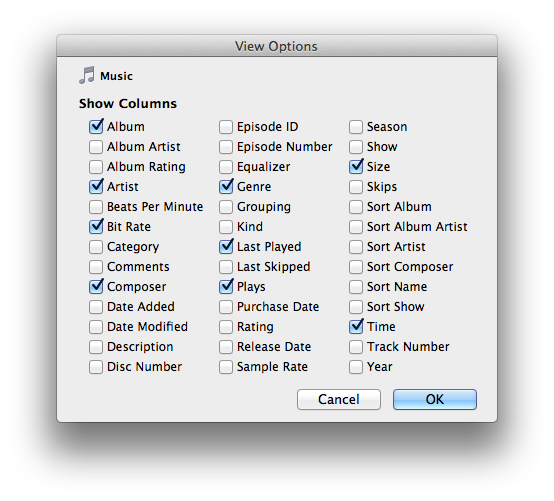
*** If you do not see "Size" then select "View Options..." from the "View" menu and select it:

User uploaded file

Mar 3, 2012 9:53 AM in response to Danger Cell

There is an additional dimension of this problem, which I have mentioned once or twice before, but seems to be quickly forgotten. Forgotten especially by those who wish to run off at the mouth (or keyboard) and ridicule those in this thread as having nothing to do but complain they cant have internet radio.


This problem goes BEYOND internet radio. This problem extends to EVERYONE who uses iTunes and the Remote-type apps. Whether it is the Apple 'Remote' app, or any of the multitude of other similar apps which control iTunes from afar. Most ESPECIALLY those of us who not only rely on the Remote apps...but do so because our audio/remote implementations include a "headless" Mac. (IOW.....a singularly dedicated Mac running iTunes but having no monitor or display and no keyboard of any sort.)


User uploaded file


When any of these remote apps handshake with iTunes, it triggers iTunes to go out and do this iRadio inventory dump (presumeably to update the Remote app). Even though there is no direct attempt to tune any of the iRadio stations, this still occurs automatically upon first handshake.


So, when this causes iTunes to crap out....it disables our entire installation until such time as one either screen-shares from a networked computer or attaches the necessary hardware in order to dismiss the dialog box and thereby return the system to an operable state. Inconvenient, though diplomatic, does not begin to describe this hassle.


Yes....this is a clumsy (if not incredibly LAZY) way for Apple to have coded the whole process in the first place. But....it is what it is.


So yes, I have nothng better to do than become upset that a third of my entire audio system is being rendered very nearly unusable by this problem.


...sT

Mar 6, 2012 4:45 PM in response to music_is_her_name

music_is_her_name wrote:


Simon,


I went through in detail yesterday your point that ANY remote device handshake w/ iTunes triggers this error--regardlesss of whether you want to access iTunes radio or not.


[As a result the SSA filed his OWN bug report to Apple engineering since his domain is IOS devices.]


Anyway, do you participate in any forums regarding high-end audio and/or music production with Apple products?


We are just finishing a major addition to our house and it includes and integrated sound system. Up to this point, I was considering using iPads as my in-room control devices. I am [partly] in the music production business: sound quality and reliability are a must.


Music....


There are a number of audiophile forums out there which I frequent. Probably the two I hit most often are audioasylum.com and computeraudiophile.com. There are many others, however.


I sometimes use an iPad2 for my system. In fact, at one point I even started cruising eBay and Craigslist looking for an iPad 1 which I thought might be had cheap, still in decent condition, and could be turned into a serviceable dedicated remote. Alas....they aren't. Or at least not at a price I would consider resonable for discontinued technology.


Also, as I keep my listening room in reduced (read: cinema) lighting, I found that the glare from my lit iPad2 was somewhat distracting. And turning the brightness down on the iPad wasn't visually appealing either. So, I eventually ended up purchasing an iPod Touch (the cheap 8gb version does fine) and a Universal Dock. This way, it is not so big as for the light to be distracting (or can at least be turned face-down) and it can be set up as a dedicated remote with nothing else on it.


User uploaded file


If I have guests that need to be wowed....I still have the iPad at the ready. Otherwise, this suits my needs perfectly.


But....all of this is going astray fom the subject at hand. Email me at simontemplar@macdotcom ....I'd love to continue this discussion!


....sT

Mar 2, 2012 4:06 PM in response to Danger Cell

OK guys....it is time for some creative whining to be done......


Go to the Express Lane Support for iTunes ( https://expresslane.apple.com/GetproductgroupList.do?PRKEYS=PF4 )


Go through all the steps of adding your hardware serial number and etc (even better if you're still under 90 day warranty or have an active Applecare policy)


And when you get to the part to enter a description of your problem......just enter the URL for this discussion. Additional snarky remarks are, as always, at your option.


If we can get enough people to whine and moan and, in the process, bury their customer support people with this problem....perhaps they might consider doing something about it.


Just a thought,


.....sT

Mar 3, 2012 7:36 AM in response to torndownunit

I have logged an Apple Express Case (#295081089).


Phone support was very receptive to my input and helpful.


Since it appears to be a widespread issue, phone support has escalated the problem to engineering (including references to this support stream and specific examples which I worked through with them while on the phone).


So Apple is aware of the problem.


For now, I suggest specific input which may help them debug and resolve the issue.


Peace!

Mar 3, 2012 4:15 PM in response to Prabhu C

Wow! This like Angry Birds!!!


I opened an official request with Apple. Case # 295081089


and referred them to this thread. I also requested a follow up contact at 9:00 tomorrow (Sunday).


I will TRY to post an update...please don't have and aneurism if I don't.


[BTW: ST...nice pic...what is your D/A? I run my mac into a Tri-Vista tube D/A with great results...]

Mar 4, 2012 4:57 PM in response to SimonTemplar

Simon,


Agree 100%.


I logged in to see the status of my Express Lane Case # 295081089 and found that they have 'closed' it.


Part of my background involces global, real-time, double-fault-tolerant trading and risk systems...where 10 seconds of outage is a long time.


I agree with your point on the requirements of the High-End Audio and Home Entertainment audience/market and plan to speak with Apple on a daily basis regarding this event.


In the olden days you could fax Steve Jobs directly at his office. I only did it once but I did get a response.


...and I am on the phone with them right now....


Best,

Mar 4, 2012 6:32 PM in response to music_is_her_name

music_is_her_name wrote:


bru2...


...call Apple Support...communicate with them directly...tell them how to fix the bug!...open a case...


...you can reference the case that I opened:

295081089

and I included a link to this support thread as part of my case file....

Yea right, like I have a clue how to fix a problem with a major component of a media player program. Unfortunately it seems Apple doesn't either. 11 days and counting.

Mar 5, 2012 7:51 AM in response to music_is_her_name

...no great news...but I have a better understanding of the process and what I need to do next....


1. I logged an Apple Express Lane case on 3/3/2012 through a Senior Support Advisor (SSA to save typing) Case # 295081089


2. the SSA can (and did) escalate the case to engineering (at that point the SSA can put a 2,3,4 bsiness day priority on it...I do not yet know how this case was prioritized...)


3. When the SSA escalates to engineering, they are supposed to give you their direct phone contact info. I did not get that from the intial advisor but now have it from a second SSA#2 (in CA).


4. Engineering is sort of a 'black hole' form the customer perspective: we wait until the SSA hears back from engineering... then the SSA contacts the person who submitted the case....


For now:


5. I will call SSA#2 directly tomorrow if I do not hear back today from SSA#1...


6. I will call corporate headquarters today to discuss the business procedures surrounding bugs like this (pls see my inital post and Simon Templar's posts)....there should be some way Apple provides acknowedgement/prognosis/temp-work-arounds of certain bugs to protect its products and reputation and so we can do other things....

Mar 5, 2012 4:17 PM in response to Danger Cell

cont....


1. Submit feedback at http://www.apple.com/feedback/


2. If you feel strongly enough [and if the situation warrants it] call corporate headquarters and they will give you a fax number direct to Tim Cook.


Anyway this has been a learning experience for me.


I have the name and phone contact info for 2 Senior Support Analysts who I will check with daily to see what progress is being made on this specific bug/problem/issue. I expect it will tak engineering a couple of days to sort it out; although I cannot believe I was the forst one to open a case on this issue.


...and Apple is aware that approx. 10,000 people have looked at the user forums regarding this problem.


Best.

Mar 8, 2012 5:31 AM in response to music_is_her_name

Music - thanks to you too. The iTunes 10.6 update that was released this AM makes no mention of radio tuning:


iTunes 10.6 adds the ability to play 1080p HD movies and TV shows from the iTunes Store.


This release also includes many improvements for iTunes Match, including:


• Improved song matching


• Improved album artwork handling, downloading, and display


• Addresses an issue where songs may skip when playing from iCloud


For information on the security content of this update, please visit: support.apple.com/kb/HT1222

Good luck with your music system. I'll look fwd to chatting some more with you. Meantime, all is once again well in my Airtunes network!

Feb 27, 2012 12:03 PM in response to Danger Cell

I've had the same problem for days and think I've found a workaround. Found the info below in the Help section of iTunes:


If you use Windows XP:


  1. Choose Edit > Preferences.
  2. Click Advanced.
  3. Click the Set button next to “Use iTunes as the default player for audio files.”

If you use Windows 7 or Windows Vista:


  1. Choose Start > Default Programs.
  2. Click “Set your default programs.”
  3. In the list on the left, click iTunes.
  4. Click “Set this program as default.”

I have Windows7 and after following the above instructions, my iTunes radio started working immediately as soon as I set it as the default player. Hope this helps.

This thread has been closed by the system or the community team. You may vote for any posts you find helpful, or search the Community for additional answers.

Itunes radio error message.

Welcome to Apple Support Community
A forum where Apple customers help each other with their products. Get started with your Apple Account.




