How do I copy text from other users' replies?

I have seen people post text from other replies in a discussion. Basically, it shows a screenshot of their reply and under it is your own. How do you do this? Is it something that unlocks at a future level?


Thanks,

Ethan7988

Posted on Feb 14, 2015 2:11 PM

Reply
20 replies

Feb 14, 2015 3:27 PM in response to Roger Wilmut1

Roger!!! I have been trying to figure this out forever! Let's see...


To quote a part of their post before or during your reply, select and copy the text in question, paste it into the composing field, select it, and press the same icon.

EUREKA!!! Thanks soooo very much, amigo!


here's one you may know already... ⌘ Command + S = [Reply] button (only while in the edit pane, of course)


Now, if you know how to set "Size" while in Simple Editor, ALL my problems will be solved 😉


best, as always

ÇÇÇ

⌘ Command + S

Feb 15, 2015 8:16 AM in response to Roger Wilmut1

Howdy Roger...


I said:


... if you know how to set "Size" while in Simple Editor, ALL my problems ...

😎 I knew about the Advanced Editor... I just wonder why that very cool feature would not be considered "Simple"? It's not like there is not enough space for it

User uploaded file


Also C O L O R would be nice...


Again plenty of room - for that matter, there is "almost enough room for ALL the tools on a single row. I'll let you switch to the Advanced Editor to compare


They could get rid of a couple of tools, IMHO. I'll speak to both Editors and once you see my point, you will see that all would definitely fit on one row.

  • Insert Video - I have NEVER seen even one video posted here
  • Table tool is NOT WYSIWYG when you post the reply (I tried but once and was so disappointed I gave up after that one attempt)
  • Spelling is pointless - all browsers worth using have their own built in spell active checker
  • Insert LINK is not nearly robust enough to warrant using it - except if one knows about the search capabilities in the pane's TABs
  • 'Style' can all be done with Command + "a number key"
  • I have used "Font Family" (only see the title of the menu as it is loading) only once that I can think of
    Why would a font appear different between Ppt for mac and mail? specifically the lower case "v"... spelled in a sequence
  • Justify = I have used TWICE

    to show that I could actually do it when pasting an Arabic GoogleTranslate reply = pasted translated composition of the the character order to begin with and got worse when right justified

  • HTML = I can never imagine needing to toggle this on and off but some one may👿


OR -- the Reply button could just invoke the Advanced Editor to begin with!!


best as always

ÇÇÇ

Feb 15, 2015 9:35 AM in response to Roger Wilmut1

Roger Wilmut1 wrote:


User uploaded file


Going straight into Advance Editor would be nice (oddly, it does this when you edit a reply) but I imagine it's part of Apple's attempts to keep things simple for the inexperienced.


I use the HTML editor from time to time, principally in order to position an image to the right or left of the text (as here).


Roger - the clever maestro


I am not sure that Apple's belief that they know best is warranted. if someone is not presented with twangers to punch, they will never learn by doing.


A "Preference" that could be changed like "Threaded" or "Flat" view of threads would be obscure enough for naive users to not even know existed! On this page would be perfect place

User uploaded file


Very clever, but I am afraid I have yet to think of this forum's posts as a venue for advanced page layout 😉 Much less my HTML skills. (I was thankful for WYSIWYG web-authoring apps like Dreamweaver as my previous experience was dominated by use of PageMaker)

User uploaded file


Have a good Sunday

best

ÇÇÇ

Feb 15, 2015 9:48 AM in response to ChitlinsCC

This may be because I used a 'br=clear "right" ' tag at the end of the text. This should present any following text on a fresh line clear of the image (I'd forgotten that we don't get a signature any more - the intention was to keep that clear of the image). Basically the actual post is doing what it should, and the editor isn't coping. It's not an entirely reliable guide to text sizes either, which tend to come out different in the actual post.

Feb 15, 2015 11:13 AM in response to Roger Wilmut1

I figured it was something along those lines...


RE: the Advanced Editor "Preference"


I think you may have countered your own opinion when you said the Simple Editor was for the inexperienced Target Audience... the HTML view is Decidedly NOT for the inexperienced 😉 I think all this was just cludged together. "Designed by a programmer" or "Programmed by a designer" we always say.


When one switches to or from the HTML view,

one gets this little ditty
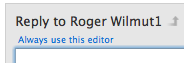
User uploaded file<- Always use this editor link


Some link/tool "tiny and placed thus" might be a handy place for the preference. The capability seems built-in as it does the HTML/Normal view handily.


I won't hold my breath for this though... Apple knows best


ÇÇÇ

Feb 15, 2015 12:46 PM in response to ChitlinsCC

I do not think apple thought about it. These forums are thoughtless & don't follow Apple UI guidelines ( I suspect. ). I wrote software. When the software made it to the marketing folks, the marketing folks dreamed up all sorts of reasons for how & why the software work the way it did.


For some reason, the software code to create a discussion and reply to a discussion isn't the some. Any decent implementation would be the same.


It would be nice to give the user a choice. I know I proposed it long ago when Jive came out. Instead, Apple spends time negating auto password from working in Firefox.


Robert

This thread has been closed by the system or the community team. You may vote for any posts you find helpful, or search the Community for additional answers.

How do I copy text from other users' replies?

Welcome to Apple Support Community
A forum where Apple customers help each other with their products. Get started with your Apple Account.


