Wifi keeps dropping in Windows 10 (BootCamp) on new tbMBP 15"

Keeps dropping and reconnecting. Pretty sure it's not the wifi because on MacOS and my iPhone, both have stable connections. It's probably a driver issue, anyone know a fix?

MacBook Pro with Retina display, macOS Sierra (10.12.1), 2016 15" w/ Touchbar

Posted on Nov 19, 2016 5:00 PM

Reply
298 replies

Dec 6, 2016 8:52 PM in response to mr.chill

Same results on my end. Could this just be a hardware related issue that we are thinking is software? Since some people are able to get theirs resolved by disabling their 802.11a mode?


See below, still choppy bands after disabling. It almost seems heat sensitive. Like once it warms up it gets worst.

Note, when you change a setting on the wireless adapter, it will effectively reset the adapter, that will let the adapter work for 30 seconds, then back to crappy again. You can get the same experience by turning on Airplane Mode and disabling it again. But like what was mentioned, it goes back to terrible slow speeds after a few seconds.


Still trying to dig out my other wifi router out of storage.
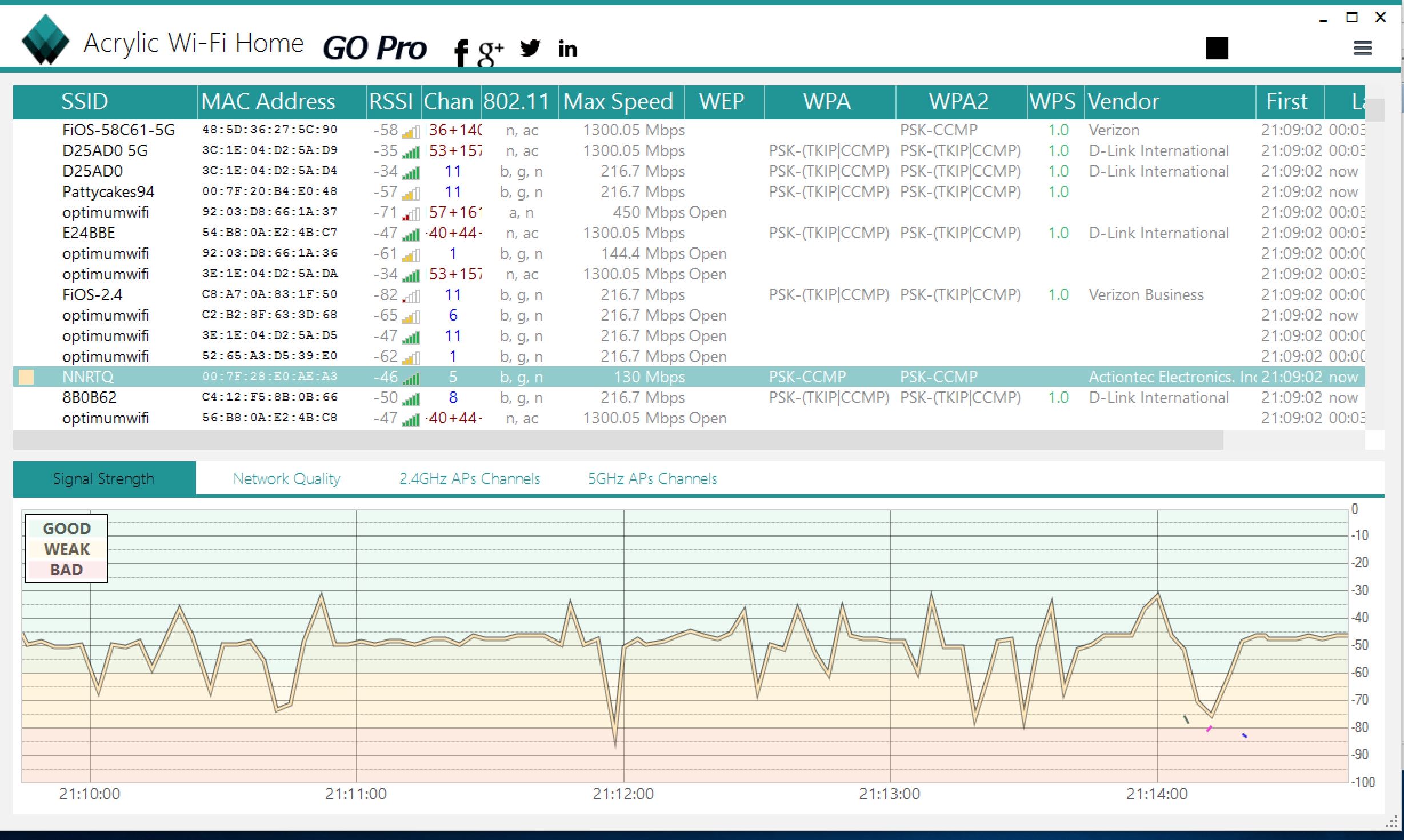

User uploaded file

Dec 6, 2016 9:55 PM in response to NYMunky

Some more interesting developments


Switched over to my Netgear Router which actually boasts 300 MBPS speeds... I believe it is using two channels on 2.4 ghz channels. Analysis of the wireless signals on OS X shows clean and the signal is actually stronger. However on Windows 10 side of things, still choppy!


Windows 10 64 bit (with 802.11 a enabled 00.26.00, then disabled 00.29.00 and on)

User uploaded file


Osx (CMI-LIVE channel 1 and 1+) 70% signal and better

User uploaded file


Notice how the channel spread is much wider with this router as well:


User uploaded file

As well as the signal is clean with no drops on the OS X side:

User uploaded file

Dec 7, 2016 4:54 AM in response to NYMunky

The OS X driver seems to be better behaved than the Windows driver. The same hardware/firmware is showing both behaviors, and hence it is hard to suspect. Is the tbMBP power adapter connected during both the Windows and OS X scans/tests? Some of these variations in values may be due to individual tool algorithms and calculations. RSSI/CINR values comparison may make more sense. Is it possible to re-run the test with a 1-second interval ping running in the background on the Windows side? Try and use the same type of network usage, for example, using the same website in browser, and following the same pattern of clicks. iPerf may be a bit of work to setup, but is another option.


What did AE ask for? It may help us in diagnosing this further, when they are on holiday.

Dec 7, 2016 6:36 PM in response to Cideo Productions

I have the same issue with my tbMBP 15" which I received yesterday. The wireless network adapter is working properly but when I try to connect to my wifi it's not working. The same issue accures even with a hotspot from my iPhone (yes I know the password for my wifi and hotspot). I tried the recommended solutions here e.g. Disable 802.11a, reinstall the driver or reactivate the wireless adapter but it's not working for me 😟


I got my drivers from the Bootcamp Supportsoftware which has the driverversion 7.35.11.64 from 09/15/2016.

Further I use Win10 v1607 (Built 14393.447) with the latest updates.


I hope there will be fix as soon as possible because bootcamp isn't useable in this state which really *****.

This thread has been closed by the system or the community team. You may vote for any posts you find helpful, or search the Community for additional answers.

Wifi keeps dropping in Windows 10 (BootCamp) on new tbMBP 15"

Welcome to Apple Support Community
A forum where Apple customers help each other with their products. Get started with your Apple Account.

