iPhone brightness keeps changing
I set brightness later it changes
[Re-Titled by Host]
iPhone 7 Plus, iOS 11
I set brightness later it changes
iPhone 7 Plus, iOS 11
Don’t worry man, I had the same issue on my iPad Air. If you can’t find the auto brightness setting on display and brightness, look on general-go to accessibilit-find display accommodation. That is where I found the auto brightness setting. Hope this helped!
Set brightness or use Auto-Brightness
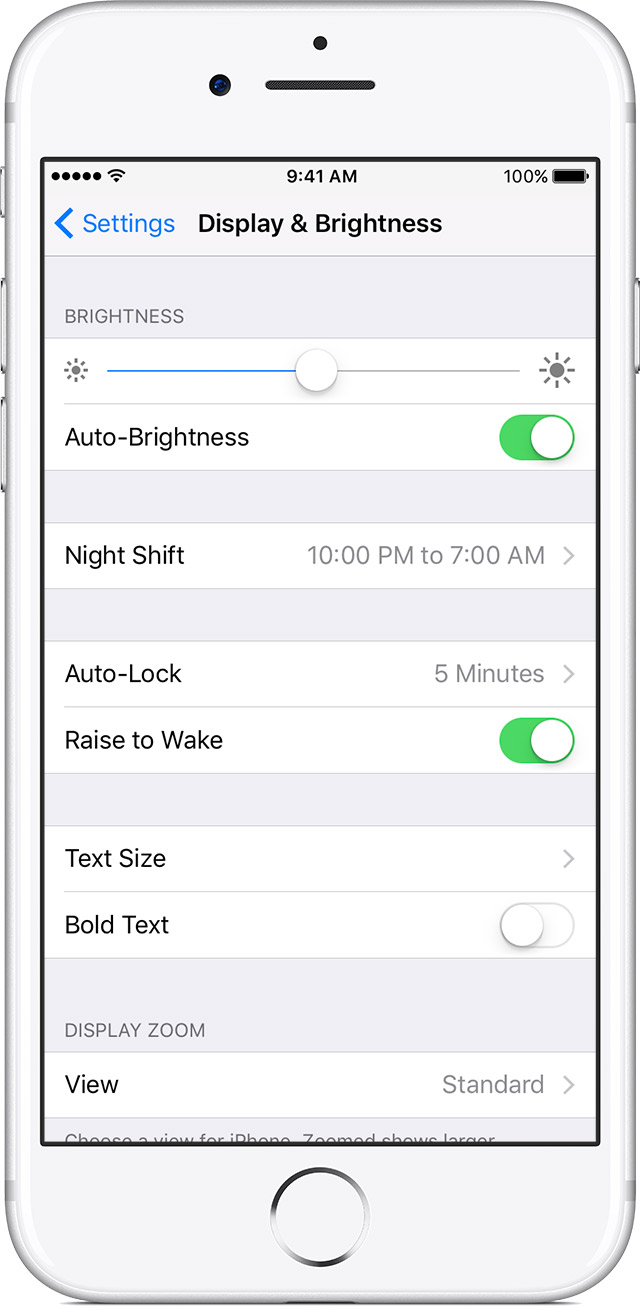
To adjust brightness, use Control Center. You can also do this from Settings, where you can find extra options like Auto-Brightness. Here's how:
- Go to Settings > Display & Brightness.
- Drag the slider to the right or left.
- If your iOS device has an ambient-light sensor, you’ll see an Auto-Brightness setting under the slider. Auto-Brightness
uses a light sensor to adjust brightness based on your surroundings. This setting can sometimes improve battery life.If you want to raise or lower the Auto-Brightness levels, you can customize the setting:
- Go to Settings > Display & Brightness and turn on Auto-Brightness. The brightness slider moves according to the lighting conditions.
- Use the slider to adjust the Auto-Brightness setting.
If Auto-Brightness isn’t working as expected, reset it. Go to Settings > Display & Brightness and turn off Auto-Brightness. Then turn it on again.
Want the colors of your display to automatically shift to the warmer end of the color spectrum after dark? Just turn on
Night Shift on youriOS device.
Have the same problem on a 6+ ever since I did the new iOS.. as i can see and was told by Apple support person I called today he told me that the auto bright was removed when the new iOS 11 came out...it was under display and brightness but is no longer there ?
I have an iPhone 7 Plus and was having an issue with the brightness auto adjusting. Thank you so much for answering this!!!! I have been looking for a way to stop it from automatically adjusting since the latest iOS update and couldn’t figure out where it was moved to. Thanks for posting!!!!
Except that this new horribly designed glitch worthy software no longer has an auto brightness switch rather it is automatically done. This is ridiculious, my phone continues to crash and this light bothers my eyes. I am really considering Androids at this point, it was not until this new update that everyone started having problems. You all need to do better!
I keep my phone near max brightness and I have exactly the same issue with my new iPhone X, running iOS 11.1.2.
There is no Auto-Brightness setting to turn off! True Tone is off. But it regularly resets itself to a lower setting.
Apple would move it because they want to tell us that anyone who can't read the screen at the auto-brightness level has an "accessibility" issue. When in fact some of us just like a little more background illumination.
Ultimately i think the apparatchiks at Apple are trying to pathologise as abnormal a personal choice. This in turn likely has something to do with power consumption and the virtues of minimising same. Only that "conservatives" not just progressives also like to conserve.
I just wish the "progressives" at Apple would stick to their knitting rather than subtly trying to influence our life choices. The left has become so totalitarian. They are doing themselves no favours.
I drive for uber eats and use my phone for maps etc. I cant stop the phone from going dark. The phone is fully up to
date running 11.4. I have turned off and on the auto brightness. I have tried everything I could find in accessibility. I have wiped and rebuilt the phone. It still goes so dark in the car that its hard to read even with the slider all the way up. If you bring the slider more than 1/3 down the screen is black. Im out of ideas .
Thank you so much, that was driving me nuts. Why would Apple move it? Makes no sense.
Thank you just rechecked and found it thanks very much
Thank you 👍-1F3FF; Found it
Thank you!!!! You have saved my eyes!
Thanks so much, fixed👍
Have mine set on auto brightness and it STILL changes on its own.
Mine keeps changing too and I’ve disabled the auto adjust. Seems like a bug.
iPhone brightness keeps changing