Remote Disk not working

Hi. On my 2017 MacBook Pro (high Sierra) the remote disk does not “see” my other MacBook Pro (Yosemite).

They are on the same WiFi network, and DVD sharing is engaged on the one that has an optical disk.

I can connect to the old computer using the “connect to” function.

Please advise

MacBook Pro TouchBar and Touch ID, macOS High Sierra (10.13.3)

Posted on Feb 4, 2018 5:18 AM

Reply
Question marked as Top-ranking reply

Posted on Feb 5, 2018 9:17 AM

Hi tfromgeorge,

I understand that you are trying to share a disc from one MacBook Pro to another, but they're not seeing each other. I'm happy to provide some help for this issue!

Make sure you follow the steps in the article below to connect to the shared disc:

Use the CD or DVD drive from another computer with your Mac - Apple Support


Use a shared DVD or CD

After you've enabled DVD or CD Sharing, you can use that computer's optical drive at any time. Insert a disc in the optical drive of the computer that's being shared. The disc should then be available on any Mac that's connected to the same network.

  1. On the Mac that doesn't have an optical drive, open a Finder window.
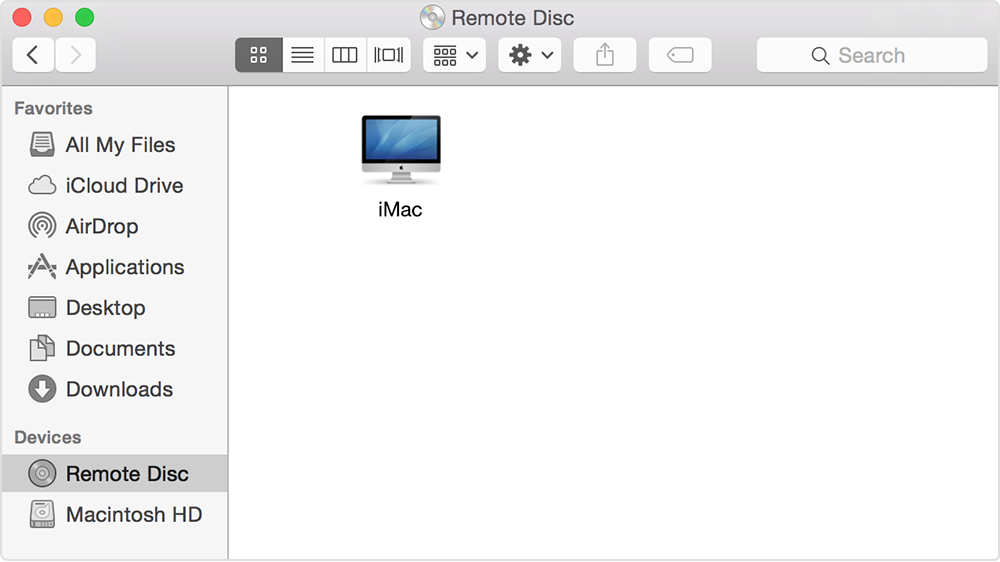
  2. Select Remote Disc in the Devices section of the sidebar. You should see the computer that has DVD or CD Sharing enabled.
  3. Double-click the computer's icon, then click Connect to see the contents of the CD or DVD available from that computer.

    User uploaded file

    If you can't use a shared disc

    If your Mac already has a built-in optical drive, or an external optical drive connected, you won't see the Remote Disc feature appear in the Finder or other apps.

    If you're using a compatible disc and you don't see it from Remote Disc, make sure the sharing computer is turned on, is connected to the same network as your Mac, and has a compatible CD or DVD in its optical drive. If you've enabled the option to ask for permission before using the drive, click Accept on the computer that is sharing its optical drive.


Thanks for using the Apple Support Communities. Cheers!

Similar questions

4 replies
Question marked as Top-ranking reply

Feb 5, 2018 9:17 AM in response to tfromgeorge

Hi tfromgeorge,

I understand that you are trying to share a disc from one MacBook Pro to another, but they're not seeing each other. I'm happy to provide some help for this issue!

Make sure you follow the steps in the article below to connect to the shared disc:

Use the CD or DVD drive from another computer with your Mac - Apple Support


Use a shared DVD or CD

After you've enabled DVD or CD Sharing, you can use that computer's optical drive at any time. Insert a disc in the optical drive of the computer that's being shared. The disc should then be available on any Mac that's connected to the same network.

  1. On the Mac that doesn't have an optical drive, open a Finder window.
  2. Select Remote Disc in the Devices section of the sidebar. You should see the computer that has DVD or CD Sharing enabled.
  3. Double-click the computer's icon, then click Connect to see the contents of the CD or DVD available from that computer.

    User uploaded file

    If you can't use a shared disc

    If your Mac already has a built-in optical drive, or an external optical drive connected, you won't see the Remote Disc feature appear in the Finder or other apps.

    If you're using a compatible disc and you don't see it from Remote Disc, make sure the sharing computer is turned on, is connected to the same network as your Mac, and has a compatible CD or DVD in its optical drive. If you've enabled the option to ask for permission before using the drive, click Accept on the computer that is sharing its optical drive.


Thanks for using the Apple Support Communities. Cheers!

Feb 5, 2018 2:37 PM in response to tfromgeorge

tfromgeorge,

Thanks for going through that and following up. Check out the top of the article that was shared before for some additional information about supported discs:

DVD or CD sharing isn't designed for some kinds of optical media. Connect a compatible optical drive directly to your Mac if you need to use one of these discs:

  • Audio CDs
  • Blu-ray or DVD movies
  • Copy protected discs (such as some game discs)
  • Recordable CDs or DVDs that you want to burn or erase
  • Microsoft Windows installation discs

Try one of the discs not mentioned here and let us know how it works out for you.

Cheers!

Feb 5, 2018 9:47 AM in response to rose_10

Hi sarah_s1


Thank you for your reply


I have done what mentioned above. I have been on the page you mentioned and try every step. However, it does not work.


Perhaps the only variable is a "compatible CD or DVD".


What does "compatible" refer to?


I test it with my Happy Feet DVD stuck in the drive of the other computer, is a normal Video DVD not considered "Compatible"?

Is compatible only a data DVD or data CD?


Thank you in advance

This thread has been closed by the system or the community team. You may vote for any posts you find helpful, or search the Community for additional answers.

Remote Disk not working

Welcome to Apple Support Community
A forum where Apple customers help each other with their products. Get started with your Apple Account.