Cannot add tones to itunes?

So I received some music files from my sister that are compatible to be iphone tones. I put them in the itunes media file and then moved them to the tones folder with my other tones. However, I cannot seem to add them to itunes at all.

Ive tried file>add folder and file>add file, dragging and dropping, making a brand new play list and trying to add them that way. No dice. I have a win 10 pc with the latest downloads and the latest download of itunes. The files are .m4rs and so they should be able to be added and uses as a ringtone. Itunes however will not let me add my new ringtones.

Please help me as to what I should do.

Thank you.

iOS 11.0.3

Posted on Feb 21, 2018 11:17 PM

Reply

Similar questions

2 replies

Feb 22, 2018 11:31 AM in response to Minushi

Hi Minushi,

I understand that you're trying to add some ringtones to your iPhone by using iTunes, but the files are not being added to your iTunes library. I'm happy to provide some help for this.

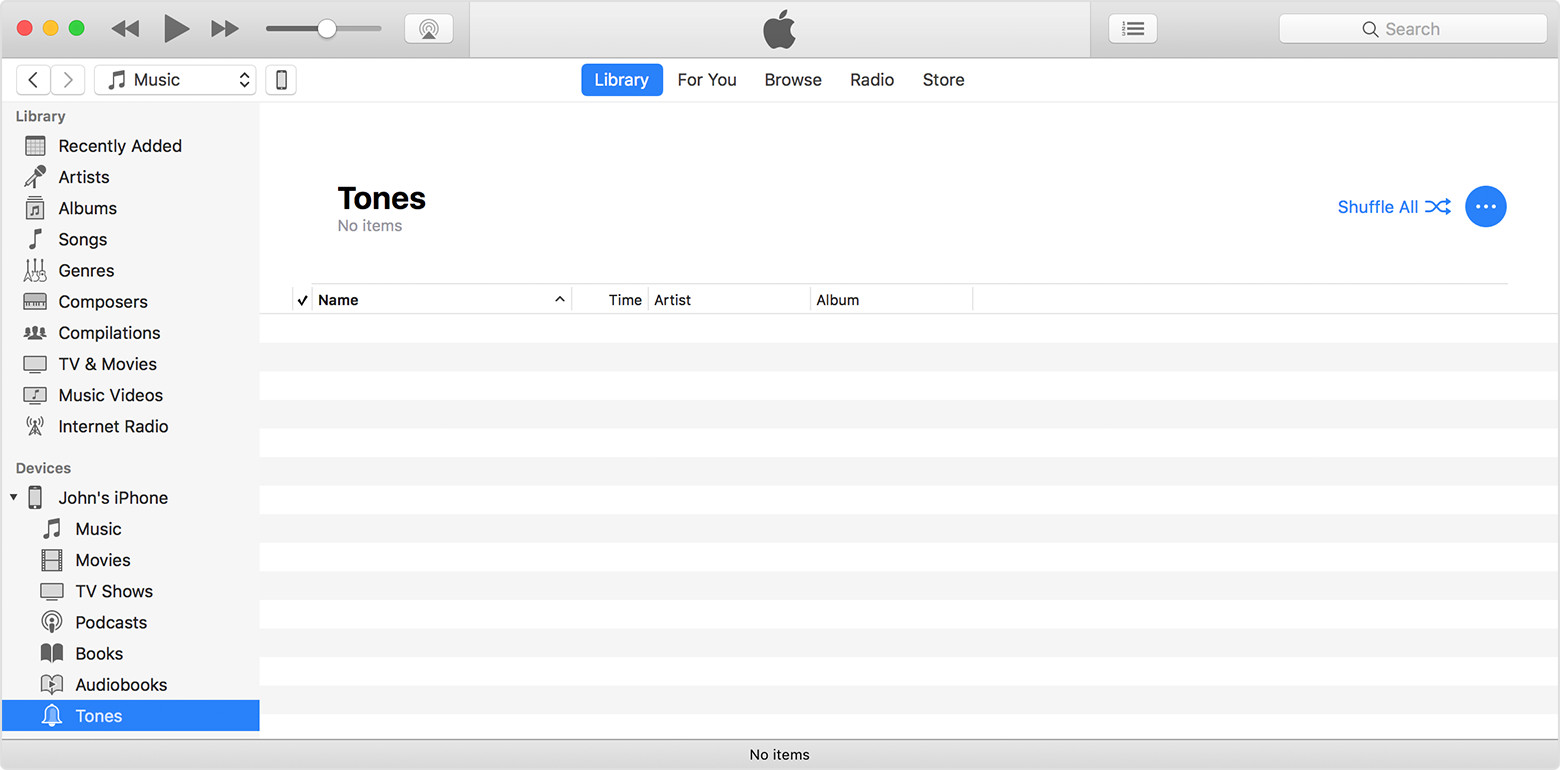
With some of the recent changes to how ringtones are handled, you do not add them to your iTunes library. Instead you can use iTunes to directly add them from your Tones folder:

Use tones and ringtones on your iPhone, iPad, or iPod touch - Apple Support


Move ringtones from iTunes to your iPhone, iPad, or iPod touch

If you have a ringtone or tone in iTunes on your Mac or PC that you want to move to your iOS device, you can manually add it to your device using iTunes.

  1. Connect your device to your computer.
  2. Open iTunes. Make sure that you have the latest version.
  3. On your computer, find the ringtone or tone that you want to add to your device. If the ringtone or tone previously appeared in your iTunes library, you can find it in the Tones folder of your iTunes media folder.
  4. Select the tone that you want to add to your device and copy it. (You can use a keyboard shortcut.)
  5. Return to iTunes and go to the Library tab of Music.
  6. Click on your device in the left sidebar, then click Tones.
  7. Paste your tone. (You can use a keyboard shortcut.)
    User uploaded file


Thanks for using the Apple Support Communities. Cheers!

This thread has been closed by the system or the community team. You may vote for any posts you find helpful, or search the Community for additional answers.

Cannot add tones to itunes?

Welcome to Apple Support Community
A forum where Apple customers help each other with their products. Get started with your Apple Account.