How to delete multiple Gmail drafts in HighSierra??

I know that this question has been asked many times, but I have not found an answer. My Gmail draft-box has reached 2'748 drafts today... Has anybody found a solution to permanently stop Mail saving drafts every word you type in an Email? This is so frustrating. Thanks a lot for any tips how to stop this!

MacBook Pro, iOS 10.3.3

Posted on Mar 8, 2018 3:53 PM

Reply
4 replies

Mar 8, 2018 4:07 PM in response to jinx0111

It's not at all clear what your real issue actually is.


Apple's Mail application saves drafts as you compose emails. When you send the message, the draft is deleted. You have not told us what method you actually use to compose these gmail messages. Do you use Apple's Mail application? If so, do you actually end up sending the messages?


You can always use Safari to go to http://www.gmail.com and delete all the messages in your draft mailbox from there.

Mar 8, 2018 5:54 PM in response to sberman

Thank you for your fast reply, sberman. Yes, I use Apple's Mail application and it looks like the drafts are not deleted once the Email is sent. It shows over 2000 drafts, but if I open the drafts, I can only see 5 to 10 Emails (which have been already sent...). Don't know where these other 2'700 drafts are... If I sign-in to my Gmail account, there are no drafts to be deleted.

Mar 8, 2018 10:16 PM in response to jinx0111

If you compose a mail in apple mail application and then type the credentials ( fill up the mail addresses and subject ) and then close the mail compose window they will be saved , and if you are saving thousands of mails with the same procedure they will get accumulated .


User uploaded file

They can be viewed if you click on drop arrows of drafts and select google , the drafts folder and its mails will appear in mail side bar , to delete them select them in fractions and press command and delete on the keyboard .

User uploaded file

The correct setting in mail preferences > mailbox behaviours is .
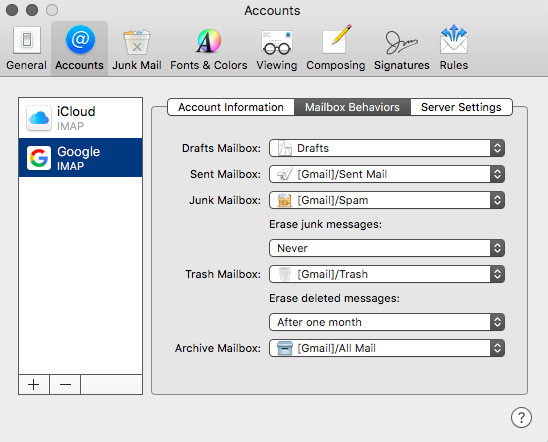
User uploaded file

If you enter in webmail account by entering the gmail address and password and compose a mail then close the window , the mail will be saved as draft .


In this example screen shot there are only two mails , select them and click on discard


User uploaded file

User uploaded file

User uploaded file

In your case if there are thousands of mails saved as draft , select all of them so they get a check mark and discard them .

This thread has been closed by the system or the community team. You may vote for any posts you find helpful, or search the Community for additional answers.

How to delete multiple Gmail drafts in HighSierra??

Welcome to Apple Support Community
A forum where Apple customers help each other with their products. Get started with your Apple Account.
