Photos keep saying “downloading” when going to edit them

Hi I just updated my phone to 11.3 and for some reason it had to restore all my photos once the update was done. Once all the photos were restored, I tried to edit them to put a filter on a couple and they just say “downloading“ and it never loads. How do I fix this?

Posted on Apr 1, 2018 6:19 AM

Reply
Question marked as Top-ranking reply

Posted on Apr 3, 2018 8:52 AM

Hey Troytulo5321,

I understand your photos aren't completing the download while restoring from iCloud Photo Library after updating. I'd love to help out.

The article below will provide information on iCloud Photo Library:

iCloud Photo Library - Apple Support

You'll want to follow this section specifically:

Make sure that you have enough storage

The photos and videos that you keep in iCloud Photo Library use your iCloud storage and your device storage. And as long as you have enough space in iCloud and on your device, you can store as many photos and videos as you like. When you sign up for iCloud, you automatically get 5GB of free storage. If you need more space, you can buy more iCloud storage. Plans start at 50GB for $0.99 (USD) a month. If you choose 200GB or 2TB plans, you can share your storage with family. Learn more about plans and prices in your region.

User uploaded file

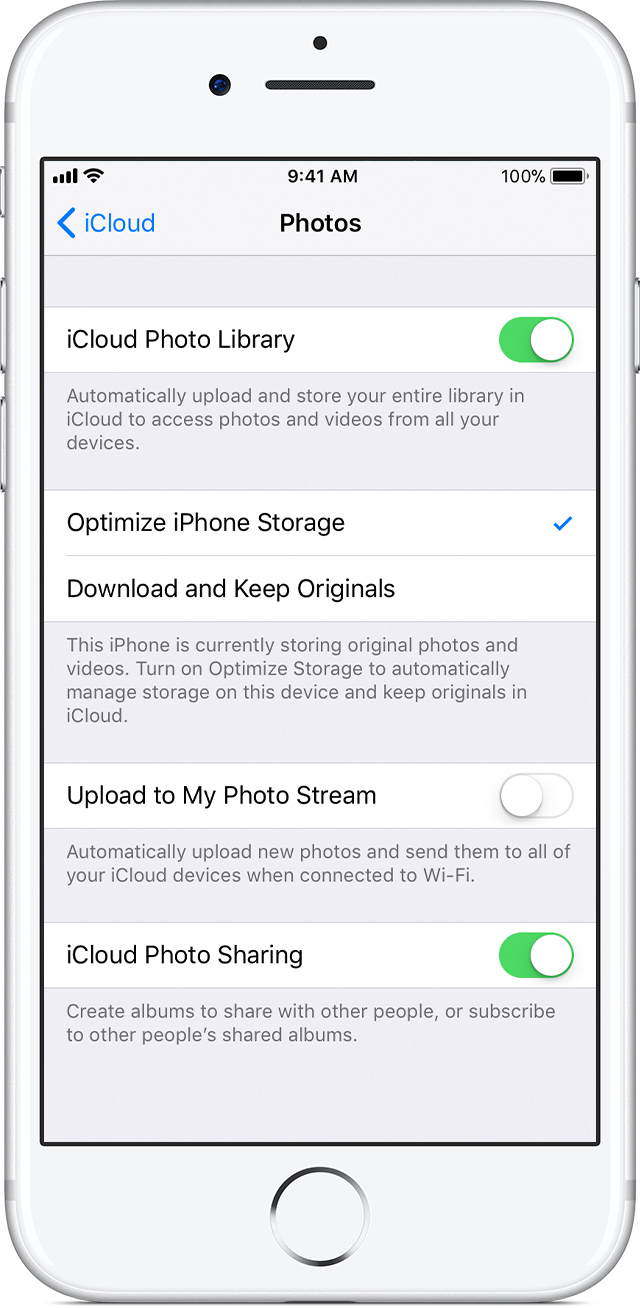
Save space on your device

iCloud Photo Library keeps all of your photos and videos in their original, high-resolution version. You can save space on your device when you turn on Optimize Storage.

On your iPhone, iPad, or iPod touch:

  1. Tap Settings > [your name] > iCloud. If you’re using iOS 10.2 or earlier, tap Settings > iCloud.
  2. Tap Photos.
  3. Choose Optimize [device] Storage.

On your Mac:

  1. Open the Photos app and click Photos in the menu bar.
  2. Click Preferences.
  3. Go to the iCloud tab and choose a storage setting.

User uploaded file

If you turn on Optimize Storage, iCloud Photo Library automatically manages the size of your library on your device. Your original photos and videos are stored in iCloud and space-saving versions are kept on your device. Your library is optimized only when you need space, starting with the photos and videos you access least. You can download the original photos and videos over Wi-Fi or cellular when you need them. You can use Optimize Storage on your iPhone, iPad, iPod touch, and Mac.

If you turn on Download Originals, iCloud Photo Library keeps your original, full-resolution photos and videos in iCloud and on your device.

Cheers!

1 reply
Question marked as Top-ranking reply

Apr 3, 2018 8:52 AM in response to Troytulo5321

Hey Troytulo5321,

I understand your photos aren't completing the download while restoring from iCloud Photo Library after updating. I'd love to help out.

The article below will provide information on iCloud Photo Library:

iCloud Photo Library - Apple Support

You'll want to follow this section specifically:

Make sure that you have enough storage

The photos and videos that you keep in iCloud Photo Library use your iCloud storage and your device storage. And as long as you have enough space in iCloud and on your device, you can store as many photos and videos as you like. When you sign up for iCloud, you automatically get 5GB of free storage. If you need more space, you can buy more iCloud storage. Plans start at 50GB for $0.99 (USD) a month. If you choose 200GB or 2TB plans, you can share your storage with family. Learn more about plans and prices in your region.


User uploaded file

Save space on your device

iCloud Photo Library keeps all of your photos and videos in their original, high-resolution version. You can save space on your device when you turn on Optimize Storage.

On your iPhone, iPad, or iPod touch:

  1. Tap Settings > [your name] > iCloud. If you’re using iOS 10.2 or earlier, tap Settings > iCloud.
  2. Tap Photos.
  3. Choose Optimize [device] Storage.

On your Mac:

  1. Open the Photos app and click Photos in the menu bar.
  2. Click Preferences.
  3. Go to the iCloud tab and choose a storage setting.

User uploaded file

If you turn on Optimize Storage, iCloud Photo Library automatically manages the size of your library on your device. Your original photos and videos are stored in iCloud and space-saving versions are kept on your device. Your library is optimized only when you need space, starting with the photos and videos you access least. You can download the original photos and videos over Wi-Fi or cellular when you need them. You can use Optimize Storage on your iPhone, iPad, iPod touch, and Mac.

If you turn on Download Originals, iCloud Photo Library keeps your original, full-resolution photos and videos in iCloud and on your device.

Cheers!

This thread has been closed by the system or the community team. You may vote for any posts you find helpful, or search the Community for additional answers.

Photos keep saying “downloading” when going to edit them

Welcome to Apple Support Community
A forum where Apple customers help each other with their products. Get started with your Apple Account.