How to sort only a selection of cells in numbers?

I found this question posted in 2010 and the solution (or should I say the way around it) was kind of complicated.

We are in 2018 and the designers of numbers have not provide us with an easy way to do this simple task?

Is there something new, since then, that I can use? Thanks

MacBook Air, iOS 10.3.3

Posted on Apr 2, 2018 9:47 AM

Reply
Question marked as Top-ranking reply

Posted on Apr 2, 2018 4:22 PM

frustratedsergio wrote:


In excell you can sort ONLY the cells you select.


In you can indeed sort only the cells you select. It requires wading through a few dialog boxes that ask you what you want to do.


In Numbers you can easily achieve the same thing! It's just a little different. Select the cells you want to sort and (with them selected) move your mouse (or trackpad equivalent) slightly until they "lift up." Keeping the mouse button down just drag them onto the canvas of the sheet and release. They will automatically form a new table. Sort that table as wanted. Then select the sorted cells and just drag them back into position in the original table. Done in a few seconds.


SG

7 replies
Question marked as Top-ranking reply

Apr 2, 2018 4:22 PM in response to frustratedsergio

frustratedsergio wrote:


In excell you can sort ONLY the cells you select.


In you can indeed sort only the cells you select. It requires wading through a few dialog boxes that ask you what you want to do.


In Numbers you can easily achieve the same thing! It's just a little different. Select the cells you want to sort and (with them selected) move your mouse (or trackpad equivalent) slightly until they "lift up." Keeping the mouse button down just drag them onto the canvas of the sheet and release. They will automatically form a new table. Sort that table as wanted. Then select the sorted cells and just drag them back into position in the original table. Done in a few seconds.


SG

Apr 2, 2018 10:33 PM in response to frustratedsergio

Hi Sergio,


'there is no way to exclude cells G1 and above from the sort.'


There are no cells "above" G1. It is in the first row of its table.


If you mean cells to the right of column G, then the advice offered in 2010 still applies.


Select and copy cells A1-F7.

Copy
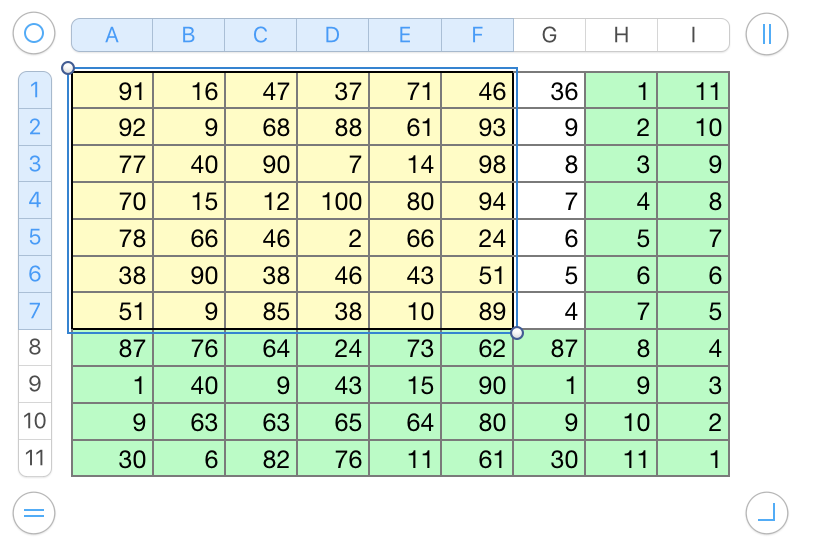
User uploaded file

Click on an empty space in the canvas.

Paste.
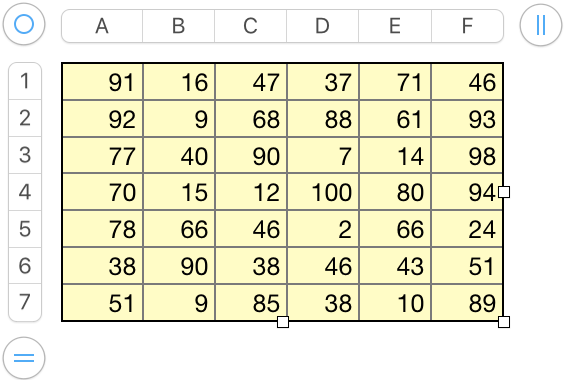
User uploaded file

Select all cells of the new table that is created.

Sort on one or more columns. (example: ascending on column D)

Select all cells of the new table.

Copy.
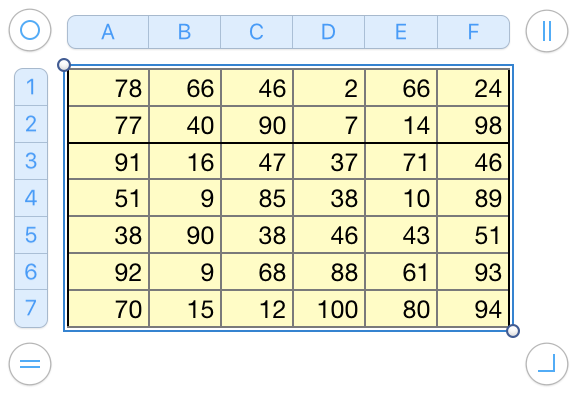
User uploaded file

Select cell A1 of the original table (single click).

Paste.
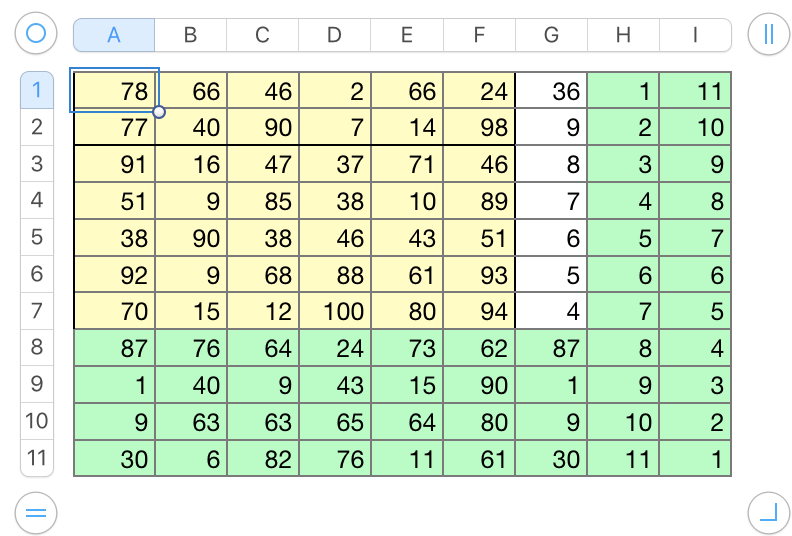
User uploaded file

Select new table.

Press delete.


Done.


Tried it a second time, without the stops to create all the screen shots. Start to finish took less than 40 seconds.

EDIT: Re-read SG's updated procedure. Could take even less time, without having to rush.


Regards,

Barry

Apr 3, 2018 9:33 AM in response to frustratedsergio

Have you actually tried my suggestion? Select cells, drag to canvas, sort, select, drag back. No more "risky" than the way you would accomplish the same thing Excel. Why not give it a try?


You can give feedback to Apple via Numbers > Provide Numbers Feedback in your menu.


But, personally, I hope the interface isn't complicated with additional options when there already is a really efficient way to accomplish the same thing.


SG

Apr 3, 2018 7:22 AM in response to frustratedsergio

Thanks for taking the time to help me. These are excellent options.

Only that I find it a little risky when you have a large quantity of data and different tables needed in the same sheet, like the ones I am used to have.

Wouldn´t it be great to have an option next to "Sort selected rows" called "Sort selected cells" that do just that?

Is there a way to make suggestions to the developers of numbers?

Apr 3, 2018 8:31 PM in response to frustratedsergio

HI Sergio,


I have to agree with SG on this one: "(P)ersonally, I hope the interface isn't complicated with additional options when there already is a really efficient way to accomplish the same thing."


Having lost more than a few hours and suffered much frustration when Apple introduced the ability to sort a single column without disturbing the order of the rest of the row just before a group of us were composing the AppleWorks spreadsheet that would be used to record and sort judges' scores on projects in the regional science fair, I'm very much in favour of the current system. Sorting all rows or selected rows on data in a specific column or columns while protecting the integrity of the rows should be the default behaviour. Sorting a selection of cells should require a deliberate choice and some extra steps) to accomplish. That's already possible, and easy to do.


Regards,

Barry

This thread has been closed by the system or the community team. You may vote for any posts you find helpful, or search the Community for additional answers.

How to sort only a selection of cells in numbers?

Welcome to Apple Support Community
A forum where Apple customers help each other with their products. Get started with your Apple Account.