Playlist not playing in order

I updated my phone iOS 11.4.1 and now my playlists won't play in order, they play shuffle. The shuffle button is not on and I have tried deleting playlists and redoing them with no luck. Please help because I'm a fitness instructor who relies on the music to play in order!

iPhone 8, iOS 11.4.1

Posted on Jul 22, 2018 3:15 PM

Reply
Question marked as Top-ranking reply

Posted on Jul 23, 2018 1:50 PM

Hello Tabatha,

Thank you for using Apple Support Communities! I understand that songs in playlists on your iPhone are playing on shuffle. I would be happy to help provide some steps to take so you can play your music as expected again.

Since you've already checked that shuffle was not on for your playlists, let's also confirm that shuffle has not been enabled on the Now Playing screen:

Play, repeat, and shuffle music - Apple Support

Specifically, follow the steps in this section to ensure that Shuffle is turned off:

Open Now Playing on your iPhone, iPad, iPod touch, or Android phone

When playing music on your iOS device or Android phone, a player appears at the bottom or lower-right corner of the screen. Tap the player to open Now Playing. From the Now Playing screen, you can control playback or volume, turn on shuffle or repeat, download the song, and more.
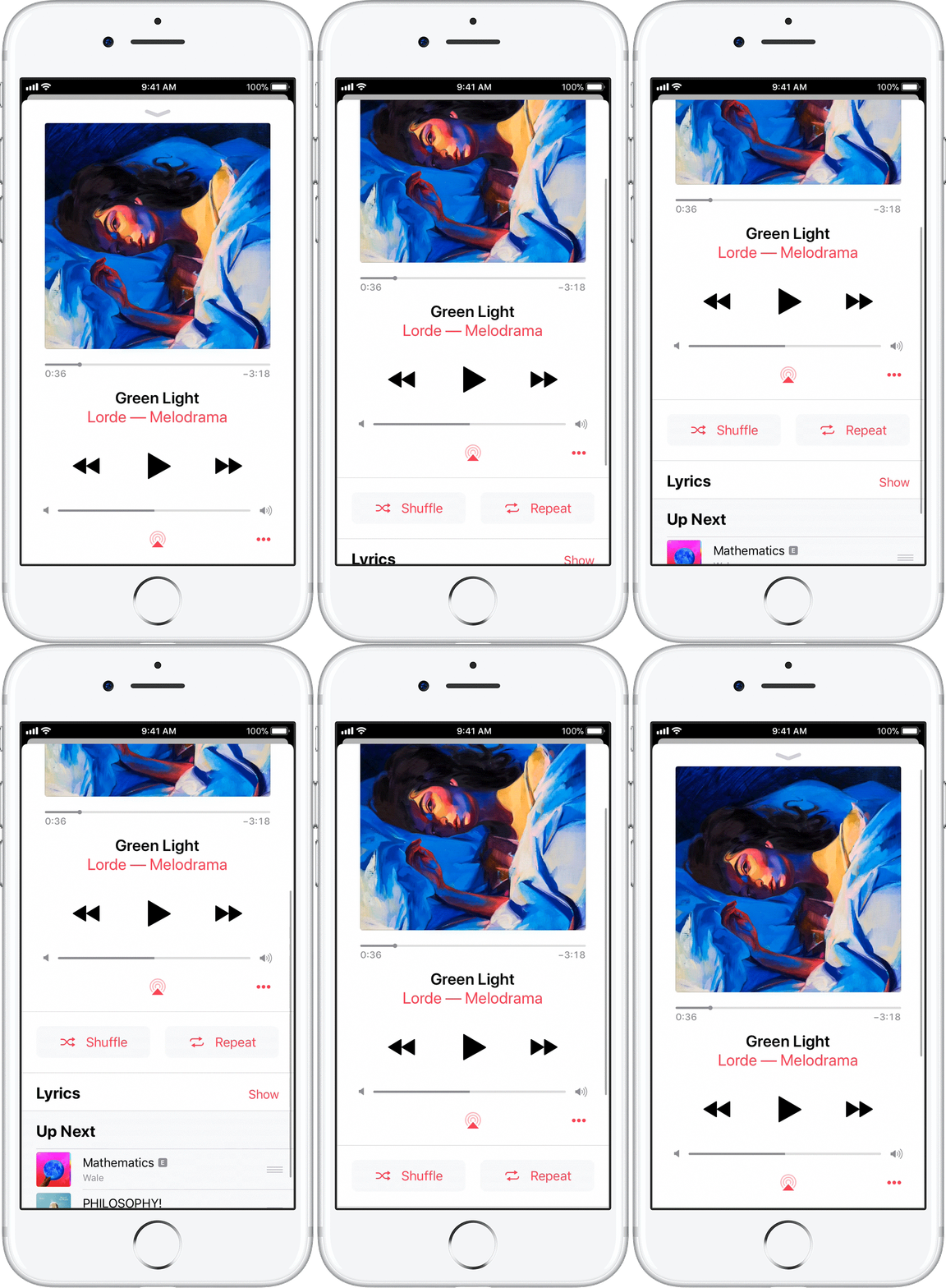

User uploaded file

Shuffle songs

Open the Now Playing screen and scroll down.

Tap User uploaded file to set Music to always shuffle a list of songs selected. Any album, playlist, or set of songs will play in a random order.

If shuffle is on, you'll see User uploaded file. To turn it off, tap the button until you see User uploaded file.



If Shuffle was on from the Now Playing screen, let us know if the behavior persists after turning it off.

Cheers!

Similar questions

1 reply
Question marked as Top-ranking reply

Jul 23, 2018 1:50 PM in response to tabathafromalexandria

Hello Tabatha,

Thank you for using Apple Support Communities! I understand that songs in playlists on your iPhone are playing on shuffle. I would be happy to help provide some steps to take so you can play your music as expected again.

Since you've already checked that shuffle was not on for your playlists, let's also confirm that shuffle has not been enabled on the Now Playing screen:

Play, repeat, and shuffle music - Apple Support

Specifically, follow the steps in this section to ensure that Shuffle is turned off:

Open Now Playing on your iPhone, iPad, iPod touch, or Android phone

When playing music on your iOS device or Android phone, a player appears at the bottom or lower-right corner of the screen. Tap the player to open Now Playing. From the Now Playing screen, you can control playback or volume, turn on shuffle or repeat, download the song, and more.


User uploaded file

Shuffle songs

Open the Now Playing screen and scroll down.

Tap User uploaded file to set Music to always shuffle a list of songs selected. Any album, playlist, or set of songs will play in a random order.

If shuffle is on, you'll see User uploaded file. To turn it off, tap the button until you see User uploaded file.


If Shuffle was on from the Now Playing screen, let us know if the behavior persists after turning it off.

Cheers!

This thread has been closed by the system or the community team. You may vote for any posts you find helpful, or search the Community for additional answers.

Playlist not playing in order

Welcome to Apple Support Community
A forum where Apple customers help each other with their products. Get started with your Apple Account.