IPhoneX Incoming Calls. Not Hearing the Caller.

I have an IPhoneX and when it rings, and I answer the phone, many times I cannot hear the other person on the other line. It's silent. I recognize the caller ID displayed on my phone, and call back. Many times they will me they could hear me saying 'hello' and they were answering. but i couldnt hear them on my phone when they called. It's happening to a lot of people who call me. What can I do to solve this? (This is not only using bluetooth or any wired/wireless device). it happens when i put my ear to the phone. (this does not happen when I initiate the call with my iphone. only incoming calls).

iPhone X, iOS 11.4.1, null

Posted on Jul 26, 2018 2:06 PM

Reply
Question marked as Top-ranking reply

Posted on Jul 27, 2018 8:59 AM

Hi ArthurBorman,

Welcome to Apple Support Communities. I understand that you're having trouble hearing callers from incoming calls on your iPhone X. I know it's important to rely on your iPhone; I'd like to help. I'd suggest that you follow the steps below to troubleshoot the behavior you're experiencing:
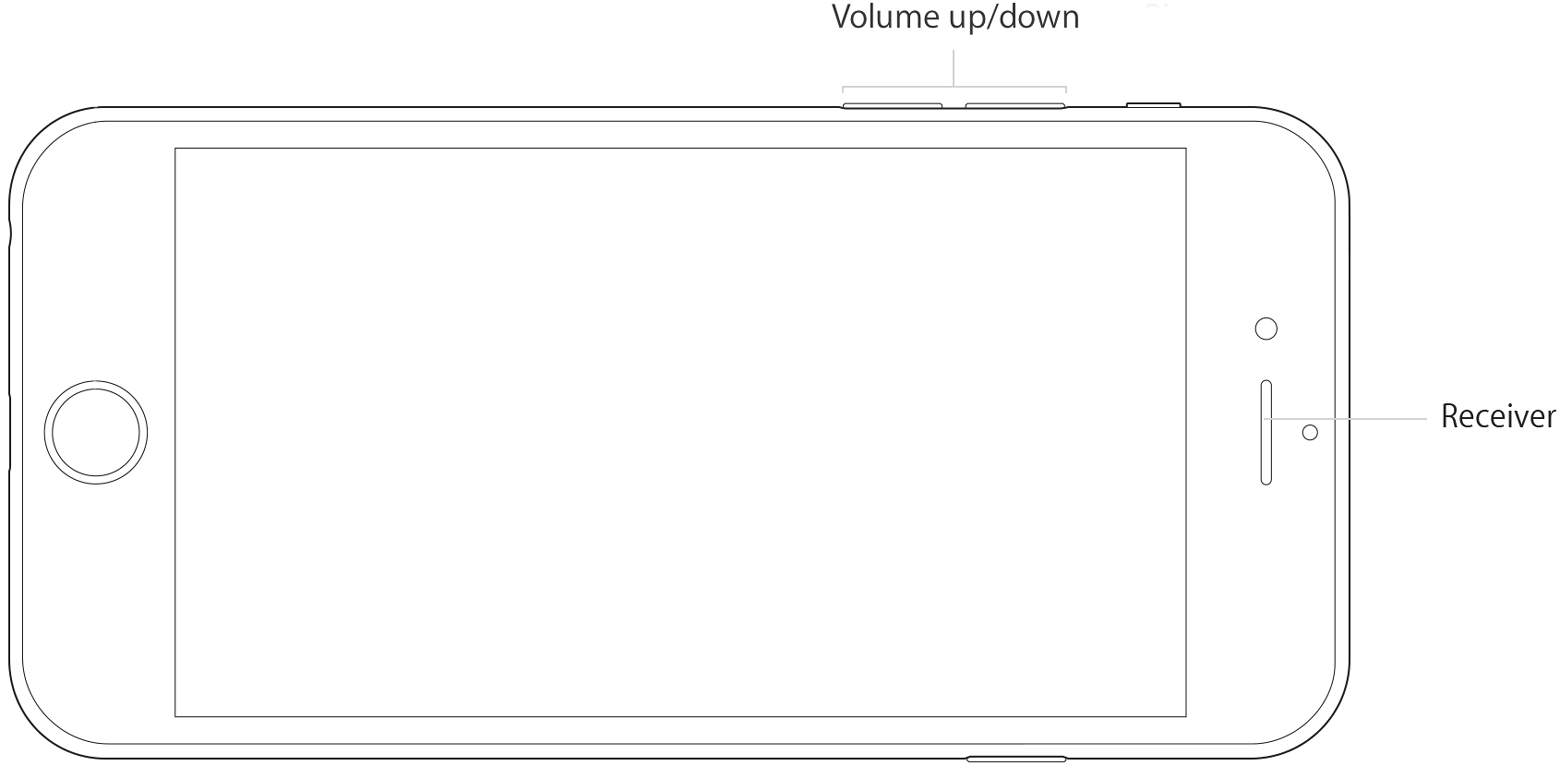
iPhone Volume and Receiver

User uploaded file

Turn up the volume

While you're on a call, adjust the volume with the volume buttons. Make sure that you can see the volume indicator on the screen when you press the volume buttons.

Check the connections

If your iPhone is connected to a headset, you won't be able to hear through the iPhone receiver or using speakerphone. Follow these steps, testing after each.

  1. Make sure that you don't have anything plugged into the headphone jack or the dock connector.
  2. Go to Settings > Bluetooth and turn off Bluetooth.

Clear the receiver

The iPhone receiver won't work properly if it's blocked or dirty.

Follow these steps, testing after each:

  • Make sure nothing is blocking the receiver, such as a case or screen protector.
    If you have a new iPhone, remove the plastic film on the front and back of the device.
  • Check the receiver opening to see if it's blocked or dirty. If necessary, clean the receiver opening with a small, soft-bristled brush. Make sure that the brush is clean and dry.
  • While you're on a call, turn on speakerphone. If you still can't hear, then your network or reception could be the issue. Try calling again later or from a different location.

User uploaded file

Check the receiver

Follow these steps to see if the issue is with your receiver or your network:

  1. Open the Voice Memos app and record a short audio clip. If you don't have the Voice Memos app, learn how to restore it.
  2. Tap User uploaded file in the upper-right corner of your screen to switch playback between the speaker and receiver.
  3. Tap User uploaded file to play the voice memo through the receiver on your device.
  4. If you hear the voice memo and it sounds normal (without distortion, crackling, or static), there might be an issue with your carrier network or voicemail system. Contact your carrier for more information.

User uploaded file

Restart and update

  1. Restart your iPhone and test again.
  2. If there's still no sound or poor sound quality, update your iPhone to the latest version of iOS.

User uploaded file

Get more help

If you tried these steps and there's still no sound or poor sound quality from your iPhone, contact Apple Support.

If you can't hear a person on a call or voicemail or if the sound isn't clear on your iPhone


Best Regards.

1 reply
Question marked as Top-ranking reply

Jul 27, 2018 8:59 AM in response to ArthurBorman

Hi ArthurBorman,

Welcome to Apple Support Communities. I understand that you're having trouble hearing callers from incoming calls on your iPhone X. I know it's important to rely on your iPhone; I'd like to help. I'd suggest that you follow the steps below to troubleshoot the behavior you're experiencing:

iPhone Volume and Receiver

User uploaded file

Turn up the volume

While you're on a call, adjust the volume with the volume buttons. Make sure that you can see the volume indicator on the screen when you press the volume buttons.

Check the connections

If your iPhone is connected to a headset, you won't be able to hear through the iPhone receiver or using speakerphone. Follow these steps, testing after each.

  1. Make sure that you don't have anything plugged into the headphone jack or the dock connector.
  2. Go to Settings > Bluetooth and turn off Bluetooth.

Clear the receiver

The iPhone receiver won't work properly if it's blocked or dirty.

Follow these steps, testing after each:

  • Make sure nothing is blocking the receiver, such as a case or screen protector.
    If you have a new iPhone, remove the plastic film on the front and back of the device.
  • Check the receiver opening to see if it's blocked or dirty. If necessary, clean the receiver opening with a small, soft-bristled brush. Make sure that the brush is clean and dry.
  • While you're on a call, turn on speakerphone. If you still can't hear, then your network or reception could be the issue. Try calling again later or from a different location.

User uploaded file

Check the receiver

Follow these steps to see if the issue is with your receiver or your network:

  1. Open the Voice Memos app and record a short audio clip. If you don't have the Voice Memos app, learn how to restore it.
  2. Tap User uploaded file in the upper-right corner of your screen to switch playback between the speaker and receiver.
  3. Tap User uploaded file to play the voice memo through the receiver on your device.
  4. If you hear the voice memo and it sounds normal (without distortion, crackling, or static), there might be an issue with your carrier network or voicemail system. Contact your carrier for more information.

User uploaded file

Restart and update

  1. Restart your iPhone and test again.
  2. If there's still no sound or poor sound quality, update your iPhone to the latest version of iOS.

User uploaded file

Get more help

If you tried these steps and there's still no sound or poor sound quality from your iPhone, contact Apple Support.

If you can't hear a person on a call or voicemail or if the sound isn't clear on your iPhone


Best Regards.

This thread has been closed by the system or the community team. You may vote for any posts you find helpful, or search the Community for additional answers.

IPhoneX Incoming Calls. Not Hearing the Caller.

Welcome to Apple Support Community
A forum where Apple customers help each other with their products. Get started with your Apple Account.