Black screen on iPad Mini 2 after iOS 12 Upgrade

Hi,


My iPad Mini 2 was working beautifully on iOS 11.etc but it automatically updated to iOS 12 during the night.


The problem I have now, is it starts up fine but as soon as I click the standby button or close the cover on my iPad to lock it, the screen goes black and never comes back.


The only way way to get the iPad to come back is through a hard reboot.


This is totally ***** as I have hard rebooted my iPad 5 times already this morning and it was totally fine before the update.


The battery is is full and this happens on power and disconnected from power as well.


Please help.


Thanks

Grant

Posted on Sep 20, 2018 12:58 AM

Reply
Question marked as Top-ranking reply

Posted on Feb 11, 2019 2:33 PM

Thank you, for this post. This was exactly what I did this weekend. I have to say that I was very impressed with the service from apple. After I called them for support and could not help over the phone, they booked me an appointment at the nearest apple store. After a few glitches and a full restore, I now have a fully working iPad mini 2 on iOS 12. The tech guy said that is may have been because I was updating form iOS 8, also it would not update on windows but was fine on the Mac. Hope this helps someone out there , who is as frustrated as I was. Also no charge by apple for the support or appointment. Thanks apple.

85 replies
Question marked as Top-ranking reply

Feb 11, 2019 2:33 PM in response to MichelPM

Thank you, for this post. This was exactly what I did this weekend. I have to say that I was very impressed with the service from apple. After I called them for support and could not help over the phone, they booked me an appointment at the nearest apple store. After a few glitches and a full restore, I now have a fully working iPad mini 2 on iOS 12. The tech guy said that is may have been because I was updating form iOS 8, also it would not update on windows but was fine on the Mac. Hope this helps someone out there , who is as frustrated as I was. Also no charge by apple for the support or appointment. Thanks apple.

Feb 19, 2019 11:10 PM in response to AususNovus

Hi AususNovus,


Glad to here your from the Philippines.

I tried restoring my iPad Mini 2 using Mac and yet same issue occurs.

Ask an apple tech support and informed me that it might be a hardware issue and I should go to the nearest Apple authorized service center because there is no Apple Store here in PH.

You can refer to the conversation I have with their tech support on the attached file below.

I will update here once Service Center will do the fix and how much will it cost me because my iPad is long due my Warranty period.


Jan 27, 2019 10:15 PM in response to Editwhiz

To Everyone in this posting,


Apple knows nothing of your iPad Mini 2/iOS 12 issues here.

There is no one in ANY of these Apple Support Communities from any Apple product teams, here.

Cognizant or responsible Apple product teams, designers and engineers do not read, nor participate in these Apple technical support communities.

These are, largely, Apple product user to user technical support communities.

I and others, in these Apple product support communities, are simply Apple product users, just like you, that volunteer our own time and knowledge here.

Apple supplies these forums for users to work out their product issues with other users, but these community forums ARE monitored/moderated by Apple Staff, as well as Apple Community Support Specialists, assigned to these community forums, but I do not think any specific user posted info is ever passed on to who/mever the cognizant parties are who would need to know if there are any mounting issues with any Apple product or software.

These ASC ONLY moderators and staffers, due to Apple privacy policies, do not forward any info contained/obtained from ANY postings within these communities to any cognizant Apple staff, teams or individuals.


You are ALL just basically communicating/grumbling amongst yourself while this issue goes completely unnoticed by Apple in Cupertino, CA.


The only way to get Apple to, DIRECTLY, listen to you is to use their feedback portion of their website.


iPad Feedback


http://www.apple.com/feedback/ipad.html


Cognizant Apple employees read ALL feedback generated from all of the various feedback pages and transfers the data to the proper and responsible Apple teams and personnel , but NO Apple employees will ever respond with any type of direct, individual replies from the feedback you post.


The more users that post product feedback about any product issue, the faster Apple is made aware and starts working on a fix/solution for a future software update.


Also, you may want to phone contact Apple, directly in Cupertino, California, and calmly talk to an Apple customer service employee about this issue via the link below.


Contact - How to Contact Us - Apple


Again, the more users with this iPad Mini 2 issue, the more Apple becomes aware that a growing amount of iPad Mini 2 users are experiencing serious issues with iOS 12.


Good Luck to You All!

Feb 3, 2019 9:04 AM in response to apslats75

Apple is NOT here and knows nothing of this issue

Did you read and post feedback per my reply 2 replies above yours?

If possible, contact Apple, directly by phone, about this issue, via the link I provided in my posting 2 replies above.

Until enough users post feedback and/or contact/call Apple about this issue, it will continue to get UNnoticed by Apple.


Best of Luck to You!


Mar 4, 2019 5:05 PM in response to viktor124

I was able to go to the authorized service center here in the Philippines. They told me because my warranty is long due already fix will cost me more than the amount I bought my Ipad Mini 2 might as well just buy a new one.

I tried asking non-apple stores if they we're able to fix such issue and yet no one can said yes.

They just told me to wait for the next iOS update and check if it will fix the issue, some say I should change my LCD screen.

I have already replaced mine and it was working fine until iOS 12 update. This is very frustrating. I hope Apple will notice and fix this issue.

Sep 20, 2018 7:23 PM in response to Editwhiz

Hi ​Editwhiz,

Thanks for reaching out in Apple Support Communities. I understand that after installing iOS 12 you're unable to wake your iPad after locking the screen. I can see why you'd reach out for assistance with this; I'd like to help. Based on the behavior you're describing, I'd recommend that you first create a backup: How to back up your iPhone, iPad, and iPod touch


Then use these steps to reinstall the iOS software to your iPad; this process will erase the software currently installed and replace it with a fresh copy. Be sure to closely follow step four during this process in order to prevent data loss:
  1. Make sure that you're using the latest version of iTunes.
  2. If iTunes is already open, close it. Connect your device to your computer and open iTunes. If you don't have a computer, borrow one from a friend or go to an Apple Retail Store or Apple Authorized Service Provider for help.
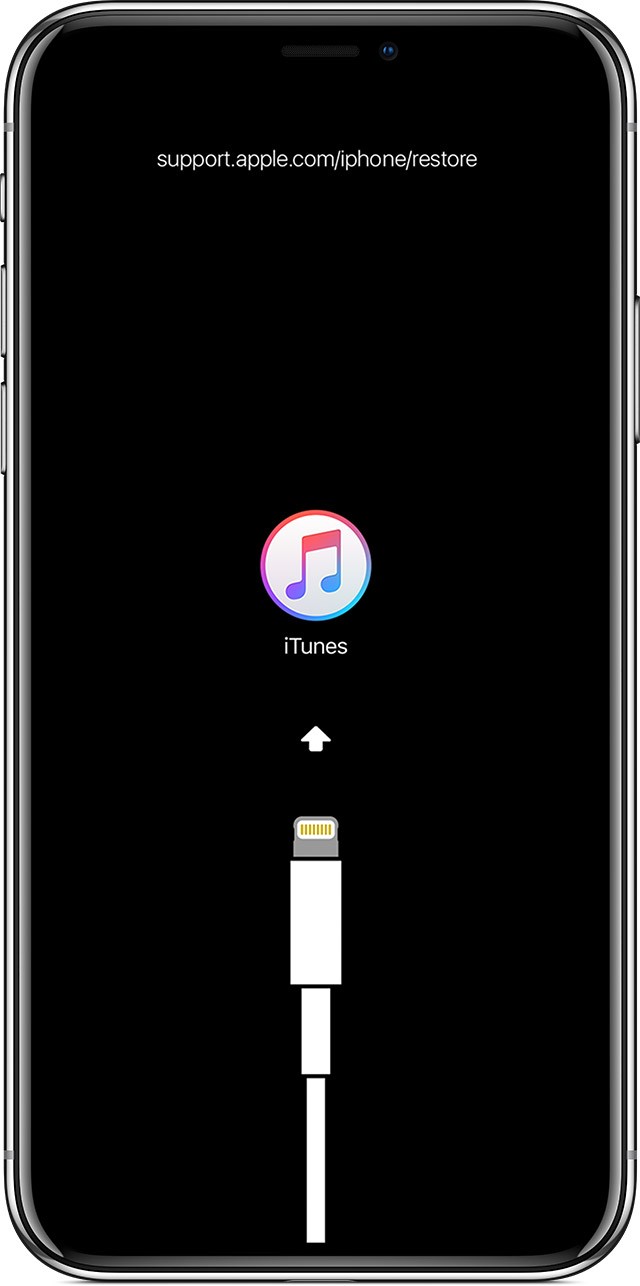
  3. While your device is connected, force restart it with these steps, but don't release the buttons when you see the Apple logo, wait until the connect to iTunes screen appears:
    • On iPhone 8 and later: Press and quickly release the Volume Up button. Press and quickly release the Volume Down button. Then, press and hold the Side button until you see the connect to iTunes screen.
    • On an iPhone 7 or iPhone 7 Plus: Press and hold the Side and Volume Down buttons at the same time. Keep holding them until you see connect to iTunes screen.
    • On an iPhone 6s and earlier, iPad, or iPod touch: Press and hold both the Home and the Top (or Side) buttons at the same time. Keep holding them until you see the connect to iTunes screen.
      User uploaded file
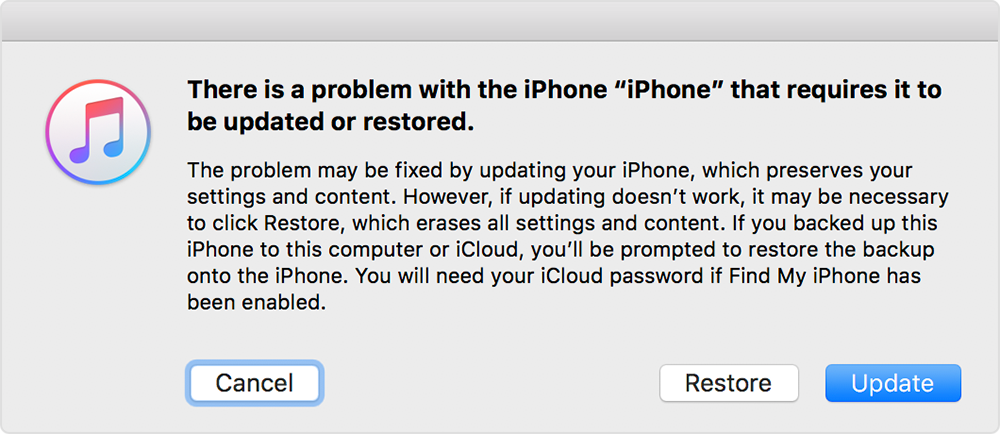
  4. When you see the option to Restore or Update, choose Update. iTunes will try to reinstall iOS without erasing your data. Wait while iTunes downloads the software for your device. If the download takes more than 15 minutes and your device exits the connect to iTunes screen, let the download finish, then repeat step 3.
    User uploaded file
  5. After the Update or Restore completes, set up your device.
If you can't update or restore your iPhone, iPad, or iPod touch

Let me know what you find.


Best Regards.

Feb 3, 2019 3:42 AM in response to Editwhiz

Still having this problem on updating a mini 2 on the 03.02.2019 - 2 months after this post. SORT THIS OUT APPLE!!! I am amazed that this issue has no official reply, other than this one in NOV.

Have updated iTunes/ windows/ disabled antivirus on temp basis and getting error 2009 on attempting upgrade on iTunes. I have tried to update on different computers and now have a wasted an entire weekend trying to sort this out. Ipad now stuck on recovery mode everytime I try to start it up.


Feb 11, 2019 3:46 PM in response to apslats75

Hi apslats75,


Great news that you got your mini 2 finally fixed. This means there's Hope after all and that there's a fix without hopelessly waiting for Apple to come up with a bug fix. :)


So the tech guy just basically updated or restored using a Mac? Was there any particular procedure he did cause I think a couple of people here already did that if I'm not mistaken? Anyways, will try the "restore using a Mac" option now. Nothing to lose anyways. Hope it works. I can't update since it's already sporting the latest 12.1.4 version.


Will update here soon. Cheers!


P.s. I can't go through the route of having tech support do it for me cause I live here in the Philippines and I am highly doubtful I could get the same after sales support you have.


Mar 4, 2019 3:35 PM in response to Editwhiz

Same problem here..... After update to ios12 recieved black screen. Rolled back to ios 11.... When it was possible... Decide to try again maybe issue got solved. Same ... But this time no possible to roll back to ios 11..... iPad Mini 2 cellular.

5 months already this issue and still no solution.... i Love Apple....

Around two years ago screen got broken and i replaced it not in apple center, because we dont have official apple centers in my place. Maybe this cause a problem? On ios 11 was OK. but on ios 12 some kind of lock?????

Nov 27, 2018 11:11 AM in response to sarossell

To everyone here,


There is no one in ANY of these Apple Support Communities from any Apple product teams, here.

Cognizant or responsible Apple product teams, designers and engineers do not read, nor participate in these Apple technical support communities.

So, no responsible Apple teams or employees are even aware of this potential iPad Mini 2 issues that may have been caused by iOS 12.

These are, largely, user to user Apple product support communities.

I and others, in these Apple product support communities, are simply Apple product users, just like you, that volunteer our own time and knowledge here.

Apple supplies these forums for users to work out their product issues with other users, but these community forums ARE monitored/moderated by Apple Staff, as well as Apple Community Supoort Specialists, assigned to these community forums, but I do not think any specific user posted info is ever passed on to who/mever the cognizant parties are who would need to know if there are any mounting issues with any Apple product or software.

These ASC ONLY moderators and staffers, due to Apple privacy policies, do not forward any info contained/obtained from ANY postings within these communities to any cognizant Apple staff, teams or individuals.


THE ONLY way to make responsible Apple employees/teams aware of this iPad Mini 2 issue is to send feedback DIRECTLY back to Apple in Cupertino, CA here.


iPad Feedback


http://www.apple.com/feedback/ipad.html


Cognizant Apple employees read ALL feedback generated from all of the various feedback pages and transfers the data to the proper and responsible Apple teams and personnel , but NO Apple employees will ever respond with any type of direct, individual replies from the feedback you post.


Good Luck to You All!

Nov 27, 2018 11:46 AM in response to sarossell

These Apple product technical support communities have always been user to ueser driven.

Been this way since the early days of Apple and has been this way for the last 15 years that I have been an active regular contributing volunteer member here.


You could try this, also.


https://www.apple.com/contact/


But, if enough iPad Mini 2 users send feedback about this potential iPad Mini/ iOS 12 issue, using the iPad feedback page link provided, the faster Apple employees will become aware of this iPad Mini 2/iOS 12 issue and faster a fix will start to be worked on and a fix issued in another iOS 12 dot/point release.


As it is right now, all everyone is doing in this post thread is just writing and discussing this issue amongst yourselves with Apple having NO clue that this iPad Mini 2/iOS 12 issue even exists, much less becoming a growing issue.

This thread has been closed by the system or the community team. You may vote for any posts you find helpful, or search the Community for additional answers.

Black screen on iPad Mini 2 after iOS 12 Upgrade

Welcome to Apple Support Community
A forum where Apple customers help each other with their products. Get started with your Apple Account.