No preview for file thumbnails • Mojave

My problem

Since installing Mojave I consistently can't see previews for file thumbnails. This is most noticeable for files such as pdf, png and jpg. Similarly, it won't load the preview when I hit the spacebar while selecting a file in Finder.

You can see what I mean in the image below, taken in Finder.

User uploaded file

What I've tried

• Regular reboots

• Reboots to safe mode

• Clearing my cache, resetting NVRAM and PRAM


Some reboots help a little and sometimes I'll suddenly be able to see previews. But adding any kind of new file will reset the issue.

MacBook Pro with Retina display, macOS Mojave (10.14)

Posted on Oct 1, 2018 7:44 AM

Reply
Question marked as Top-ranking reply

Posted on Oct 5, 2018 10:48 AM

I just renewed my Sketch license, upgraded from 50.2 to 52.1, and can confirm that was the source of the problem on my end at least. If you're a designer and having this issue with Mojave, upgrading Sketch is likely the solution to your problem. Unfortunately, it will cost you if your license is expired. It would be great if the Sketch devs release a free fix for this issue since it's such a deal breaker, but I doubt they would (but who knows!)


Thanks everyone for your input!

27 replies
Question marked as Top-ranking reply

Oct 5, 2018 10:48 AM in response to Jeroen van de Ruit

I just renewed my Sketch license, upgraded from 50.2 to 52.1, and can confirm that was the source of the problem on my end at least. If you're a designer and having this issue with Mojave, upgrading Sketch is likely the solution to your problem. Unfortunately, it will cost you if your license is expired. It would be great if the Sketch devs release a free fix for this issue since it's such a deal breaker, but I doubt they would (but who knows!)


Thanks everyone for your input!

Oct 3, 2018 9:23 PM in response to jcfive@gmail.com

I've Sketch installed on my computer and never encountered the problem before. Therefore, I didn't see this problem is related to Sketch. I've performed all the procedures as suggested from the internet, resetting the preferences, checking the disk, but no luck. Then I notice the left disk space on my Mac is low. After I cleaned up more disk space, the thumbnails come back. Therefore, for anyone who has tried everything possible for this issue but is still in no luck, cleaning up more available space on your Mac may be a shot.

Oct 2, 2018 6:54 AM in response to Jeroen van de Ruit

Hello Jeroen van de Ruit,

Thanks for being a part of Apple Support Communities. We're glad you're here. I understand your Mac does not show the small preview of your images as thumbnails after updating to macOS Mojave. I'd like to offer some information that could help you resolve this issue.

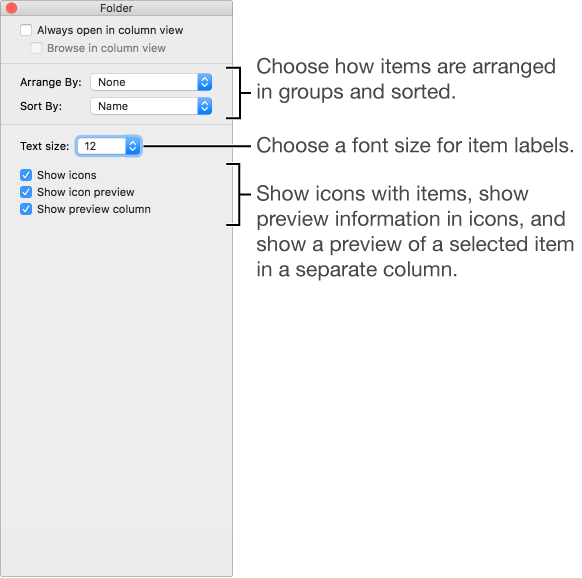
Let's start by checking your Icon view options. This article has a previous version of macOS in its title but the steps are the same.

macOS Sierra: Ways to view items in Finder windows

Select Column view options: Change the text size, and whether to display icons and a preview column. All columns display your selected options.

User uploaded file

Should the issue persist, let's try and reproduce the issue on another user account. This will help us assess whether the error occurs on a systemwide basis.

We look forward to your results and would love to assist you further.

Cheers.


Oct 2, 2018 9:16 AM in response to dialabrain

+1


No flames from me.

OnyX is a utility that has been with us for quite a long time (does anyone remember Jaguar...) and it provides a nice GUI for operations you might otherwise do from the command line.

It has nothing to do with the bad lot of apps that are (justly) disparaged here every day. It is a pity to see it sometimes mistakenly accused as if part of that lot.

I have had less and less reason to use it, but always keep it close at hand. Glad to see a new Mojave version is out.

Oct 2, 2018 9:22 AM in response to Luis Sequeira1

Well, you know how it is around here. One or two people say something negative about an app and then everyone starts repeating it. 😎


I don't use it often but it can be a useful tool. Before the "command + shift + ." shortcut, I was mostly using it to show and hide invisibles. A couple times to rebuild Launch Services. I can never remember the Terminal commands and I'm too lazy to look them up.

Oct 3, 2018 8:22 PM in response to Jeroen van de Ruit

I am having a similar issue. Icon previews show inconsistently. Previewing files with the Spacebar won't even function correctly—I just get a spinning loader. Subsequently this happens in any Finder view that also attempts to show a preview of the file. Could this be because I just recently installed Mojave, and Finder is (still) building previews of all the files? And @dialabrain or @Luis, is Onyx known to fix such issues? I do remember using that app but it's been years and years.


Any help is helpful—not having previews is proving to be a real drag on my productivity right now.


User uploaded file

Oct 3, 2018 11:44 PM in response to Jeroen van de Ruit

Thanks for all the replies so far.


I've installed and used Onyx, which seemed to partially help, although it's sometimes difficult to tell since reboots would usually temporarily help for me.

I've also updated Sketch to 52.


I can now say that, for me at least, the problem seems to have been resolved. I can't be 100% certain if Onyx or the Sketch update helped, but at least one of them did 🙂

This thread has been closed by the system or the community team. You may vote for any posts you find helpful, or search the Community for additional answers.

No preview for file thumbnails • Mojave

Welcome to Apple Support Community
A forum where Apple customers help each other with their products. Get started with your Apple Account.