How do I get the Activity App to read workout routes from activities recorded by third-party apps (iSmoothRun, Stryd, Strava, etc.)?

In Health, workouts recorded by the apple watch in the apple workout app record GPS routes in both the "workout" data, and in the "workout routes" data, but third party apps seem to only record the GPS routes in the "workout routes" data. This seems to have the effect of GPS routes not showing up in the Activity app.


Thoughts?

Apple Watch Series 4, watchOS 5.1.1

Posted on Nov 15, 2018 1:55 PM

Reply
1 reply

Nov 16, 2018 6:16 PM in response to goldenrunner

Hi goldenrunner,

Thanks for reaching out in Apple Support Communities. I understand that you have some third-party apps that record GPS routes in the Workout Routes data section of the Health app, but not in the Workouts, and doesn't seem to be syncing to your Apple Watch. I'd recommend that you use the steps below to see if you're able to allow these apps access to Workouts data in addition to Workout Routes, as well as make sure you've prioritized them as sources:

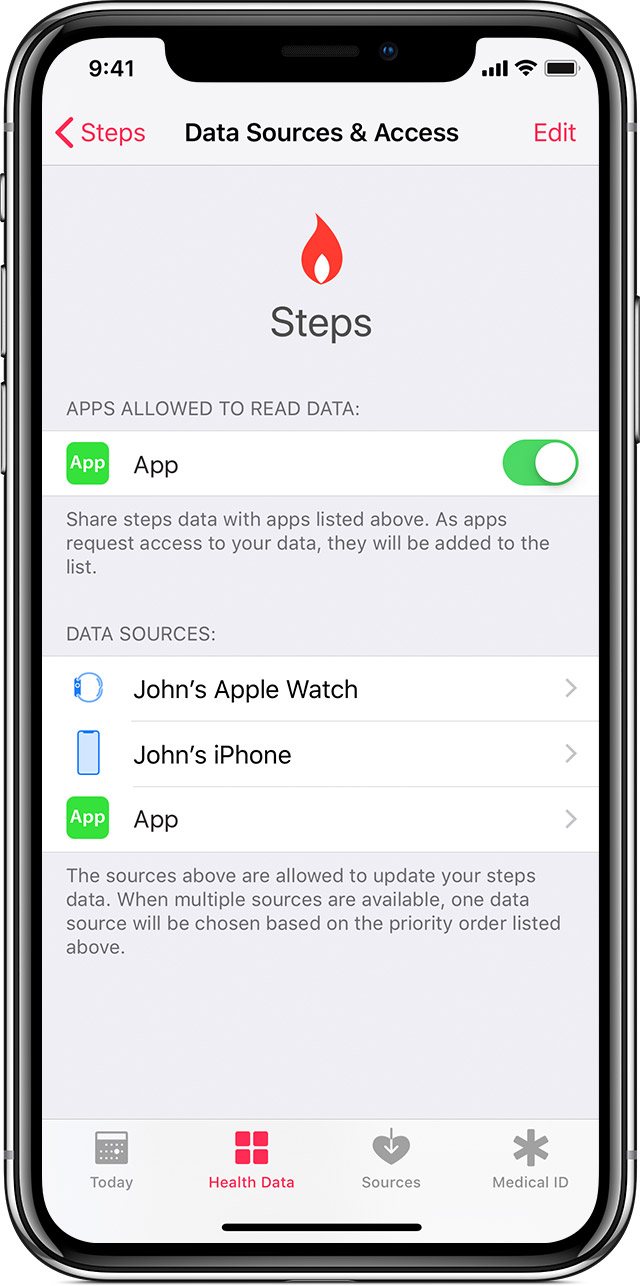
When you add a new data source, it appears above all other apps and devices that contribute data for steps in Health. You can change the order of sources at any time.

User uploaded file

User uploaded file

View your data sources

Here's how to see which sources update data for specific Health categories:

  1. Open the Health app and tap the Health Data tab.
  2. Tap a category, like Activity. If you don't see the category, swipe down to reveal the search bar, then enter a category.
  3. Tap a data type, like Steps.
  4. Tap Data Sources & Access. Only the sources that contribute to that data type will appear.

Here's how to see all of your sources:

  1. Open the Health app and tap the Sources tab.
  2. Tap an app or device.
  3. Choose categories that you want the source to access or update in the Health app.

User uploaded file

User uploaded file

Prioritize data sources

Here's how to choose the sources that Health uses first:

  1. Open the Health app and tap the Health Data tab.
  2. Tap a category, like Activity.
  3. Tap a data type, like Steps.
  4. Tap Data Sources & Access, then tap Edit.
  5. Touch and hold User uploaded file next to a data source, then drag it up or down in the list.
  6. To turn off a data source so that it doesn't contribute any more data for that category, tap the checkmark next to the source.
  7. Tap Done.

If multiple sources contribute the same data type, then the data source at the top will take priority over other sources. Any new apps or devices that you add go to the top of the list automatically, above your iPhone or iPod touch.

Manage Health data on your iPhone, iPod touch, or Apple Watch

Let me know what you find.


Best Regards.

This thread has been closed by the system or the community team. You may vote for any posts you find helpful, or search the Community for additional answers.

How do I get the Activity App to read workout routes from activities recorded by third-party apps (iSmoothRun, Stryd, Strava, etc.)?

Welcome to Apple Support Community
A forum where Apple customers help each other with their products. Get started with your Apple Account.