Mac Os Catalina do not sync photos with iOS Devices

Im using Mac OS Catalina 10.15, I have my photos on the Photos App, (I do not use iCloud photos).


To sync the photos, I connect the iPad to the Mac, open Finder (Since iTunes is gone), select the iPad from (locations) go to the right and click on Photos, select the albums and then hit sync. All the photos are not synced and apparently it syncs the albums under the root "My Albums" but is not able to sync the albums that are inside a folder.


Mac Pro

Posted on Oct 8, 2019 3:04 PM

Reply
Question marked as Top-ranking reply

Posted on Nov 3, 2019 11:27 PM

Wow. Brilliant. It won't help everyone, but this helped me. I only wanted two folders of photos on my iPhone, the one of our cats and another album of selected photos. So, by moving those albums to sit under 'My Albums' instead of being sub-folders, I was finally able to get the photos I wanted on my iPhone.


Maybe this trick will help some others as well: if you can live with just a few albums on your phone, move them under 'My Albums' and then synch your iPhone through Finder.


Thanks Diego!!!

Similar questions

1,232 replies

Aug 21, 2020 11:04 AM in response to dervatii

The good news is -- macOS to iOS syncing seems to be working now for me after completely deleting my "People" album on macOS and it's been working for about a week now when re-syncing. I did a bunch of other things over the past few months as well though...


I was getting syncing errors on certain video files off old cameras like the Canon S200. I deleted what I didn't want and combined related small clips into single files and encoded them as MP4 files with iMovie and ffmpeg. That managed to solve the video syncing errors.


The latest thing that I did was go through my music collection that has been piling-up since 1997 and fixed all the album art and metadata. Finder wasn't syncing _most_ of the album art for some reason and flagging various errors. For some tracks, I had to delete the the files from Apple Music and then re-add them for the new album art to show up. More Catalina bugs! There are so many bugs with Catalina to iOS 13 syncing on the latest releases.


Oh, and I ran into yet another iOS 13.6.1 Apple Photos bug yesterday as well. If you delete an entire photo burst, you can't remove it from the "Recently Deleted" album manually no matter what you do. I even went into "General" -> "iPhone Storage" and cleared the recently deleted photos there as well. Nothing works. That bug has existed since iOS 13 was released. Still not fixed and iOS 14 is about to drop. What are they thinking? It's crazy the number of bugs that still exist in iOS 13 right now.


As I was typing this, a big ~20k photos sync completed, and it looks to be correct with no duplicates or blank photos. Not sure why it has to copy the entire library over when I only imported six photos from iOS to macOS though. My music imported correctly again on today's sync (via a lightning cable) as well. Not sure why Finder has to copy ~20k photos when I only imported six from iOS to macOS and resync'd though. 🙃
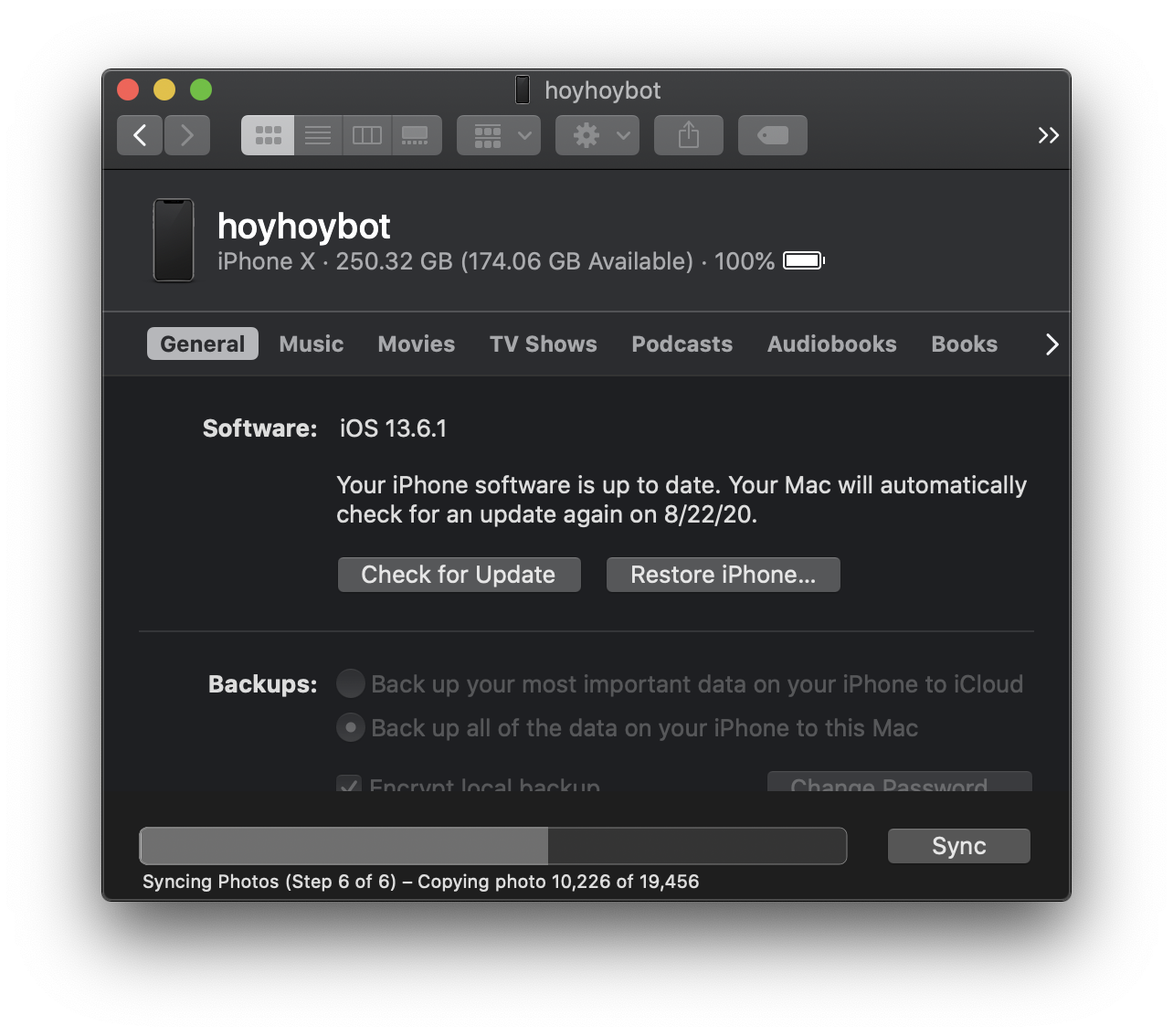
I spent over fifty hours (re)-curating my Photos and deleting regrettable and blurry photos and videos and another thirty hours curating my digital music. Everything is in much, much better shape now though. It was a good exercise to go konmari the heck out of my photos and music. I also replaced quite a few music tracks with remastered or higher-quality encoding. I basically replaced all of the album art manually because most of what was there was in 300x300 format (or worse!), and a lot of the music I have is custom-encoded stuff from my tape-trading-by-snail-mail days.


The bigger project I considered was just starting anew with Apple Music, Apple Photos, and iOS. I'm definitely starting with a new iOS 14 this year rather than restoring from a backup as I have been doing since 2008.


In fact, I did start with a new Catalina install on a new MacBook this year _without_ restoring from a Time Machine backup using the Migration Assistant, but that didn't help my syncing woes because since I just imported my legacy Photos and iTunes music libraries that had been accumulating since 2005 (and the files themselves have been accumulating since the mid-'90's!) manually from a Time Machine backup off my old MacBook.


I can't imagine a normal Apple user going through these extreme steps to make things work though. It's crazy that Catalina was released in this state and never fixed for an entire year. I've never seen Apple release anything like this before.


Oct 15, 2020 6:31 AM in response to hoyhoy

hoyhoy... I'm so sorry that all your personal work to organize your content has seems to have gone for not. I am a retired IT software person and your term "technical users" struck a chord. We adapt their technology as a baseline to optimize our usage of their products that they advertise as their "it just works" mantra. Well when the baseline doesn't work it all falls down. That's the real tragedy for us. And then, they don't even support their own product. Yes, ONE year we have dealt with this, working with their technical support to find a solution that we can share on this forum but no solution! It really is embarrassing the way they mis-handle their software releases. I have not upgraded to the new iOS yet and will cautiously wait to update my MacOS. Their quality testing is atrocious. Tim Cook said that they would focus on improving this after the Catalina fiasco. Don't see much of that so far. I'm at a loss!

Oct 26, 2020 5:03 AM in response to Sommersturm

I absolutely agree and confirm the same problems. This is absoltely unserious from Apple.

And there is more:

  1. MacOS is not able to sync my iTunes Music Library correctly to my recent iPhone 11Pro. All cover pictures of my albums are wrong. iTunes messes up the covers randomly, so my fantastic Michael Petrucciani Trio in Tokyo Album shows the Cover Picture of a boring Noa Album, Bob Marley's "I shot the sheriff" is shown as cover picture for a Pablo Casals Cello Suites album. Apple Sotware Engineers are apparently amaterus.
  2. Since I updated one of my Macs (I use 3-4 different ones covering different places and rules I have as professor and a creative professional) to MacOS 10.15.7 Catalina, my different claendars in the calendar.app are showing different colors and not the ones I did in my setup of the App (Calendar.App Syncs with Office 365/Exchange). If I change the colors with my custom colors, exiting the menu the colors turn back in MacOS basic colors, often with a bizzarre logic (Green to Violet, Brown to Orange).
  3. In 2 Years Apple was not able to provide a SIMPLE (!!!!) Photos.App Sync that is working correctly. I think this is due to the fact that Apple wants you 1. to buy iCloud Space and Sync with iCloud (but even that doesn't work correctly!), 2. Apple wants to sort your private pictures in their way and not in your way, so they can have of what's going on...they offer you self-generated presentations and sortings in which a professional is not interested.
  4. Apple Mail is not able to handle my Helvetica New Light preset for Emails. Helvetica New is shown as fat "standard" font and I have to manually change in the Fonts Menu the font to the "Light" option to have my mails looking how i want.
  5. iOS is getting worse and worse, loosing completely the particular Apple-Appeal i apreciated from 1988 to 2018...


[Edited by Moderator]

Nov 4, 2020 12:47 PM in response to dervatii

After the latest update 14.0 , 14.1 I am amazed that after a year my photos are syncing as they used to before Catalina and IOS 13!! It has been a nightmare process, with no announcement ever made by Apple, of the obvious break in the system. I am now able to add photos without getting duplicates and without having to erase all photos in order to get a semi normal sync.


Although this thread was marked solved many months ago, it obviously still had many people looking for answers. I was following it for a year, hoping to figure out something since Apple was not admitting to the problem. Am surprised there has been no activity since the apparent fix in syncing.

Nov 14, 2020 4:12 AM in response to Thamya88

not working for me with Big Sur and iOS 14.2 - it appears to sync successfully, but many photos are missing on iPad and iPhone (the "black tiles").


I tried typical remedies (SMC & PRAM reset, repairing photos library, deleting all photos on iOS and new sync) - did not help either. Needless to say: I am disappointed, yet not surprised any more...

Nov 24, 2020 11:40 AM in response to ilyashakan

The latest Catalina (and now Big Sur) are 99% working for me, but I still have a small number of photos showing up as black squares on iOS. The syncing issue don't seem totally solved, but the situation is much, much better than it was before 10.15.6 (and now 11.0.1). I had to fully resync from macOS 10.15.6 to iOS 13.7 before my problems were resolved. Still, even under macOS 11.0.1 and iOS 14.2, weird syncing problems exist. Finder seems to be syncing a thousand music tracks for no apparent reason when nothing has changed, and a small number of photos don't appear on iOS. Oh, and photo searching still doesn't work iOS when you sync with a cable, but I think that's a _feature_ to force you to pay for iCloud.

This thread has been closed by the system or the community team. You may vote for any posts you find helpful, or search the Community for additional answers.

Mac Os Catalina do not sync photos with iOS Devices

Welcome to Apple Support Community
A forum where Apple customers help each other with their products. Get started with your Apple Account.