Popup Warnings of Malware

I got two popup warnings this morning that 'ServiceRecords' and 'ReceiverHelp' will harm my computer (MacBook Pro). These are two applications that, to the best of my knowledge, have been on the computer since it was first purchased.

Having gone through the help information associated with the warnings I moved the two identified applications to the Bin.

Are the applications required for anything? Should I delete them? What happens if I do?

MacBook Pro 13", macOS 10.15

Posted on Feb 27, 2020 1:35 PM

Reply
Question marked as Top-ranking reply

Posted on Feb 27, 2020 3:01 PM

From the official Citrix webpage:


https://docs.citrix.com/en-us/citrix-workspace-app-for-mac/install-uninstall.html


I did this today and then installed Citrix Workspace for Mac, which is Citrix's official replacement for Citrix Receiver.


EDIT: Just as a precaution, I clicked on "Show in Finder", which I then simply moved the "offending" files to the Trash Bin, which I then deleted. Afterwards, I then followed the official Citrix uninstall procedure.

30 replies
Question marked as Top-ranking reply

Feb 27, 2020 3:01 PM in response to Gpc323

From the official Citrix webpage:


https://docs.citrix.com/en-us/citrix-workspace-app-for-mac/install-uninstall.html


I did this today and then installed Citrix Workspace for Mac, which is Citrix's official replacement for Citrix Receiver.


EDIT: Just as a precaution, I clicked on "Show in Finder", which I then simply moved the "offending" files to the Trash Bin, which I then deleted. Afterwards, I then followed the official Citrix uninstall procedure.

Mar 2, 2020 10:20 AM in response to GaryDK43

Hi,

I had the same problem today. I have just spoke to Apple Care who shared my screen and resolved the problem really quickly and efficiently. The advisor prompted me to bin the files and then empty my bin (this required my Mac password).


As a precaution, he suggested I scan my Mac for malware. I did so using the free version of 'Malwarebytes' as he claimed it was very reliable.


I have not recently downloaded anything from the internet which strange - the advisor suggested that due to Mac security updates, the Mac may have only recently identified these files as harmful.


I hope you find this reply useful!


:-)

Mar 23, 2020 9:25 AM in response to GaryDK43

I was also getting the two incessant pop-ups referenced here. A bit of research was performed and I quickly discovered these are files associated with the Citrix Receiver. These files have been on my Mac since 2015 (it's 2020 and we are going through the whole COVID-19 pandemic). These popups started after I upgraded my Mac OS to 10.15.3 and then performed a Malwarebytes update and then performed a malware scan. Malwarebytes itself does not see these files as malware.


To eliminate the two messages, I clicked the "Show in Finder" button on the alerts and then moved the files in question to trash. The files were located in the libexec folder.


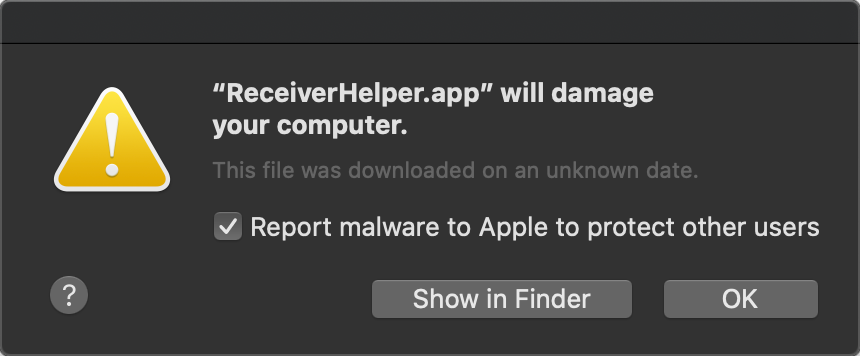
So that others can find this error via a Google search, here is the content of the messages:


"ServiceRecords.app" will damage your computer.

This file was downloaded on an unknown date.

Report malware to Apple to protect other users


"ReceiverHelper.app" will damage your computer.

This file was downloaded on an unknown date.

Report malware to Apple to protect other users
Apr 23, 2020 11:11 AM in response to GaryDK43

Call Apple customer service immediately. I tried tinkering around with mine for a couple of hours and I couldn't figure it out, despite following step by step tutorials via youtube and directions on various threads. I gave up and called Apple and they walked me through fixing the problem within 15 minutes. It's malware and it's super annoying -- if you, like me, are not tech literate, call Apple. You can share your screen with them and they'll get you fixed up.

Feb 27, 2020 9:13 PM in response to GaryDK43

I had exactly the same problem this morning! (2 pop ups warning about 'ServiceRecords' and 'ReceiverHelp'). I was not doing anything remarkable at the time other than to observe that my network had some momentary problems and my computer restarted on its own. After it came back up, I had the two messages that I could not remove. I rebuilt my HD with TimeMachine going back to last night and the problem persisted. I also tried 2 virus detection apps and they could not find the problem. After seeing this post, I deleted the two files and restarted. Problem resolved. I was not able to uninstall Citrix Receiver (uninstall program became unresponsive) but hopefully this is not a problem.

Feb 27, 2020 1:59 PM in response to GaryDK43

Did this popup come via email? If it didn't come from outside, then it was triggered by anti-malware software on the computer. macOS has built-in anti-malware software. But you stated you have none installed by you, correct? In that case I would go ahead and delete the two items. They may not be malware but they aren't part of macOS.

Apr 19, 2020 8:36 AM in response to GaryDK43

For me, these two items belong(ed) to the Citrix and Citrix Receiver programs, which I had previously used to access my employer network remotely. I now have a work laptop, so just got rid of Citrix on my Mac altogether today. Strange, though, how this error never popped up until I restarted my Mac today (and kept popping up over and over again) after trying to get a Pages update unstuck (it had been "waiting" for a literal month). I have a MacBook Pro 13-inch 2017 with the four Thunderbolt 3 ports running macOS Catalina 10.15.1, just FYI. This may pose a real problem for people working remotely at the moment r/t the pandemic. Hope this helps!

Feb 27, 2020 2:05 PM in response to Kappy

Thanks, Kappy. No, didn't come from email, Mail wasn't open at the time. The messages just popped up on the screen.

I do not have any additional Malware or virus software installed, so taking it that it was triggered by the macOS inbuilt program and the two were associated in some way with the old Word document I was opening.


Thanks for your advice and help.

This thread has been closed by the system or the community team. You may vote for any posts you find helpful, or search the Community for additional answers.

Popup Warnings of Malware

Welcome to Apple Support Community
A forum where Apple customers help each other with their products. Get started with your Apple Account.


