
iPad Pro Gen 2 10.5 constantly rebooting after updating from 13.3.1 to 13.4.1.
Ipad Pro gen 2 10.5 constantly rebooting after IpadOS update from 13.3.1 to 13.4.1. why?
[Re-Titled by Moderator]
iPad Pro 10.5-inch, Wi-Fi
Ipad Pro gen 2 10.5 constantly rebooting after IpadOS update from 13.3.1 to 13.4.1. why?
[Re-Titled by Moderator]
iPad Pro 10.5-inch, Wi-Fi
YES! I can corroborate that the current iPadOS 14 Beta update APPEARS TO FIX the 3-minute boot loop issue. As I write, I've had several hours without problems on Public Beta 3, which is the only one so far to fix the issue. As said by others, make sure you get Beta 3 to test whether it fixes this issue for you. (On my first go at this I was (automatically) given Beta 2, and was only offered the OTA update to Beta 3 the next day.)
TL;DR:
Opinions: (1) Some people posting on this forum seem to have different and/or additional symptoms to the original poster, and the majority including me (symptoms summarised below). So if this fix doesn't work for you it probably means that you have a different underlying problem that needs a different solution. (2) While I'm glad this seems fixed for now, the whole thing leaves a bad taste. Final word from Apple support at every turn has been, 'this is a hardware issue: pay £$500+ for repair'. This fix proves (if we needed proof) that iPadOSes 13.4.1 - 13.6 contained a 'bug' that unnecessarily bricked some relatively recent, top of the range (once), previously fully functional iPads FOR 2 MONTHS. There did not appear to be a mechanism for affected users to get a fair and timely resolution, so some (many?) paid for repairs or new devices. (I relied on my personal iPad for work and my employer paid for a replacement, fortunately just a week ago and so eligible for 'open-box' return.) My opinion of Apple would only be (mostly) restored if I see the bug acknowledged in 'patch notes', and hear that people affected get repair and replacement costs refunded on request. I get that affected users were 'a drop in the ocean', but the fact we've been vindicated (it's a firmware 'bug' not (just?) a 'hardware issue') shows that Apple needs a better procedure for this type of situation. Otherwise, they're accepting that some customers are going to get screwed, and they're fine with it.
Symptoms: immediately after updating to iPadOS 13.4.1 (and I assume any firmware 13.4.1 - 13.6), my iPad Pro Gen 2 10.5 reboots to Apple logo 3 minutes after sign in leaving the following in Settings>Privacy>Data Analytics: 2 x "stacks+thermalmonitord...ips" followed by "panic-full...ips" "no successful checkins from com.apple.thermalmonitord in 180 seconds..."
Timeline & attempts to fix: I upgrade to 13.4.1 on/around 10 May; posted in this forum on 19 May; had a tech support chat session in mid-May; emailed customer relations (as suggested by MichelPM) in May; had a Genius Bar appointment on 19 July (when I finally got back to London). I lost count of the number of DFU restores and iPadOS upgrades through 13.6 - none of which fixed the issue.
YES! I can corroborate that the current iPadOS 14 Beta update APPEARS TO FIX the 3-minute boot loop issue. As I write, I've had several hours without problems on Public Beta 3, which is the only one so far to fix the issue. As said by others, make sure you get Beta 3 to test whether it fixes this issue for you. (On my first go at this I was (automatically) given Beta 2, and was only offered the OTA update to Beta 3 the next day.)
TL;DR:
Opinions: (1) Some people posting on this forum seem to have different and/or additional symptoms to the original poster, and the majority including me (symptoms summarised below). So if this fix doesn't work for you it probably means that you have a different underlying problem that needs a different solution. (2) While I'm glad this seems fixed for now, the whole thing leaves a bad taste. Final word from Apple support at every turn has been, 'this is a hardware issue: pay £$500+ for repair'. This fix proves (if we needed proof) that iPadOSes 13.4.1 - 13.6 contained a 'bug' that unnecessarily bricked some relatively recent, top of the range (once), previously fully functional iPads FOR 2 MONTHS. There did not appear to be a mechanism for affected users to get a fair and timely resolution, so some (many?) paid for repairs or new devices. (I relied on my personal iPad for work and my employer paid for a replacement, fortunately just a week ago and so eligible for 'open-box' return.) My opinion of Apple would only be (mostly) restored if I see the bug acknowledged in 'patch notes', and hear that people affected get repair and replacement costs refunded on request. I get that affected users were 'a drop in the ocean', but the fact we've been vindicated (it's a firmware 'bug' not (just?) a 'hardware issue') shows that Apple needs a better procedure for this type of situation. Otherwise, they're accepting that some customers are going to get screwed, and they're fine with it.
Symptoms: immediately after updating to iPadOS 13.4.1 (and I assume any firmware 13.4.1 - 13.6), my iPad Pro Gen 2 10.5 reboots to Apple logo 3 minutes after sign in leaving the following in Settings>Privacy>Data Analytics: 2 x "stacks+thermalmonitord...ips" followed by "panic-full...ips" "no successful checkins from com.apple.thermalmonitord in 180 seconds..."
Timeline & attempts to fix: I upgrade to 13.4.1 on/around 10 May; posted in this forum on 19 May; had a tech support chat session in mid-May; emailed customer relations (as suggested by MichelPM) in May; had a Genius Bar appointment on 19 July (when I finally got back to London). I lost count of the number of DFU restores and iPadOS upgrades through 13.6 - none of which fixed the issue.
I will also confirm that public 14.2 appears to be working. Had to DFU restore as OTA updates wouldn't complete downloads before reboot. Also had to execute DFU in two "steps" as the iPad re-booted while my Mac was downloading the OS; restore was able to start during the second DFU. Wonders never cease . . .
Zero crashes since updating to iPadOS 14 Public Beta 3. My iPad is completely back to the way it was before updating to 13.4.1 - i.e. working perfectly.
I'm still monitoring posts to this forum for a few reasons:
I'd like to help people with the SAME problem: If you have the symptoms described by the original poster (and many others - see my previous post for a summary of the symptoms) then I think there is strong evidence that installing iPadOS 14 Public Beta 3 does seem to fix it.
Self interest: As there is no sign in the Beta 3 release notes that the underlying problem has been acknowledged and deliberately fixed, I'm a little worried that the 'bug' could come back in the final release of iPadOS 14 or later releases. My main concern would be upgrading from the current Beta 3 to anything else, as I assume you can never 'roll back' to a (previous) Beta version of the OS. So I'll be waiting for a braver person in this group (thanks in advance!) to report back on their experience before I upgrade again.
I'd like to nudge people with DIFFERENT problems elsewhere: Some people in this group are reporting very different symptoms - including symptoms that did not start immediately following an upgrade to iPadOS 13.4 - 13.6; different 'crash' log contents (in Settings>Privacy>Analytics & Improvements>Analytics Data); battery charging issues; reboots that happen at different or random times (not predominantly after 180 seconds up-time) etc. After my own experience, I feel a kinship with anyone having problems with their iPad. BUT, there are lots of different potential types and causes of iPad problems. If you have different symptoms and Beta 3 doesn't restore your iPad to full working order, I'd bet you have a different problem. If so, all you can get from this forum is sympathy. For practical help, you need to find other people with exactly the same problem as you - good luck!
I can confirm that 14.2 appeared to fix my boot loop. I’ve been experiencing a reboot loop for quite some time and tried various beta versions before today. I put my iPad in dfu mode, downloaded the 14.2 ipsw and forced a restore to that. I’ve had a timer going for 37 minutes now without a reboot.
Stupid autocorrect. Lol. “Scrubbed.” I just factory reset everything and then pulled things back from my ICloud. My hubs is the Techie and I had a ton of “other” storage that was filling it up anyway so that was the easiest way to handle it. I didn’t re-download apps that I haven’t been using.
I completely reset everything. Scribbled it and reinstalled from my cloud acct. it was a pain to do, but it seemed to fix the glitch. It has not restarted itself since then.
I’ve no idea “why”, but you may find that a forced-restart may clear any isolated issues:
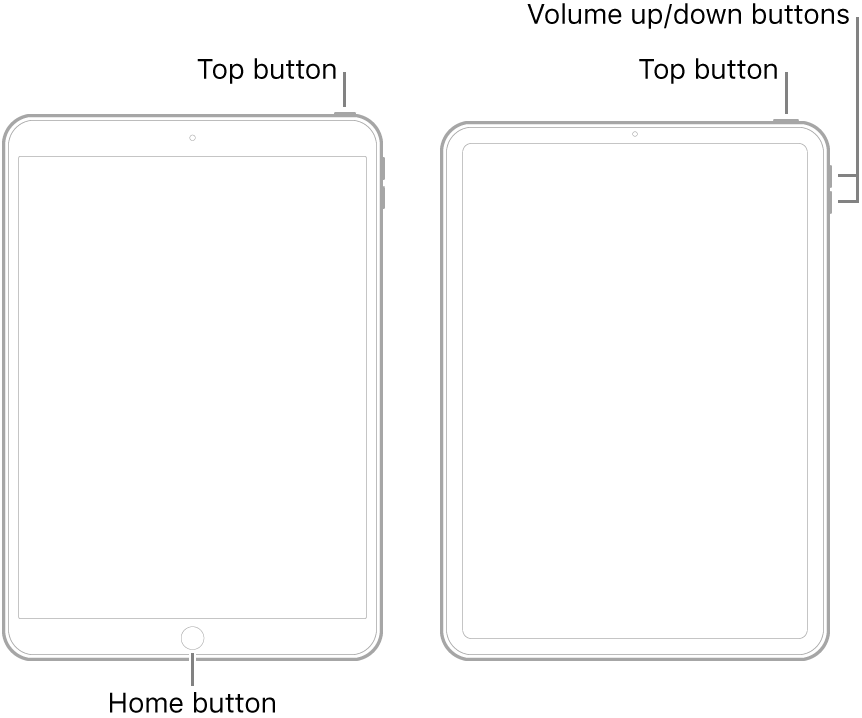
Hi jeongmin192,
Before I updated to iPadOS13.4.1. I frequently noticed that my iPad screen showed coloured stripes when I pressed the bezel left of the home button. I already suspected a loose/damaged component, especially because 2 years ago or so, I dropped my iPad and already noticed a blue haze at the bottom of the screen. But other than this issue, the iPad worked just fine. Until the upgrade to iPadOS 13.4! I also experienced the 3 minute reboot, followed all the suggestion included the DFU reinstall but nothing helped. I contacted Apple and was on the phone for at least 3 hours, following all steps again. Also a remote diagnostics test was done, showing no issues. Conclusion was I should send in my iPad for repair! A software downgrade was not possible! After some browsing I did find a way to downgrade to 13.3.1. and all was fine again. At that time, there was no mention of this issue online, so I thought I was alone and decided to accept the fact that I was stuck at 13.3.1. Until yesterday, when I accidentally charged my iPad after midnight while not on airplane mode. (which I usually do). Although the auto update switch was set to 'off', 13.4.1. was installed and the issue was back again. This time no downgrading was possible!
Luckily I found your post this morning and started squeezing my iPad at the bottom bezel, left of the home button. I also dropped it a few times on the bottom edge (on a carpeted floor) and for now the issue is gone! I'm quite puzzled by the fact that a seemingly hardware issue is influenced by the software version installed, but apparently this is an iPad Pro 10.5' issue only, possibly a limited (early) built.
Though I share my experience here, so it Might help others too. Thanks a million for the tip!!
this is the error i was getting on 13.5 before i upgraded to 13.6 and then onto 14 beta 3, where i am still getting crashes:
"build" : "iPhone OS 13.5.1 (17F80)",
"product" : "iPad7,4",
"kernel" : "Darwin Kernel Version 19.5.0: Tue May 26 20:56:31 PDT 2020; root:xnu-6153.122.2~1\/RELEASE_ARM64_T8011",
"incident" : "212A7E8E-6123-4AFF-9E29-1724F49A8043",
"crashReporterKey" : "5ab6b1dbe0d3267528a9f37dd09fe2ae903b3051",
"date" : "2020-07-01 23:01:54.17 +0100",
"panicString" : "panic(cpu 0 caller 0xfffffff01beef0ac): nvme: \"Fatal error occurred. ID=0x876 ARG1=0x0 ARG2=0x0 ARG3=0x0 EDD0=0x30602000 EDD1=0x100000 EDD2=0x0 EDD3=0x14f01000 EDD4=0x20015115 EDD5=0x0 EDD6=0x0 EDD7=0x0 NANDV=0x2, DRAMV=0x0, SSDC=256GB. FW Revision=57.18.01\\n\"@\/Library\/Caches\/com.apple.xbs\/Sources\/IONVMeFamily\/IONVMeFamily-470.100.17\/IONVMeController.cpp:5320\nDebugger message: panic\nMemory ID: 0xff\nOS version: 17F80\nKernel version: Darwin Kernel Version 19.5.0: Tue May 26 20:56:31 PDT 2020; root:xnu-6153.122.2~1\/RELEASE_ARM64_T8011\nKernelCache UUID: D4B4E6E8A5644DCAB6848E38A1C75D27\nKernel UUID: 6E872F2B-E0BD-3B6B-9ADE-7D4AD93A268B\niBoot version: iBoot-5540.120.17\nsecure boot?: YES\nPaniclog version: 13\nKernel slide: 0x0000000015434000\nKernel text base: 0xfffffff01c438000\nmach_absolute_time: 0x3ceebd35f0\nEpoch Time: sec usec\n Boot : 0x5efcdd2a 0x00046072\n Sleep : 0x00000000 0x00000000\n Wake : 0x00000000 0x00000000\n Calendar: 0x5efd07b9 0x0000ccc4\n\nPanicked task 0xffffffe0005d8200: 9281 pages, 252 threads: pid 0: kernel_task\nPanicked thread: 0xffffffe003838548, backtrace: 0xffffffe00013b490, tid: 56577\n\t\t lr: 0xfffffff01c56a11c fp: 0xffffffe00013b4d0\n\t\t lr: 0xfffffff01c569f78 fp: 0xffffffe00013b540\n\t\t lr: 0xfffffff01c668bf8 fp: 0xffffffe00013b5f0\n\t\t lr: 0xfffffff01c52d62c fp: 0xffffffe00013b600\n\t\t lr: 0xfffffff01c5698e0 fp: 0xffffffe00013b970\n\t\t lr: 0xfffffff01c569c38 fp: 0xffffffe00013b9c0\n\t\t lr: 0xfffffff01cb19134 fp: 0xffffffe00013b9e0\n\t\t lr: 0xfffffff01beef0ac fp: 0xffffffe00013ba10\n\t\t lr: 0xfffffff01beca340 fp: 0xffffffe00013bba0\n\t\t lr: 0xfffffff01caa0d94 fp: 0xffffffe00013bbd0\n\t\t lr: 0xfffffff01c5a2b74 fp: 0xffffffe00013bbf0\n\t\t lr: 0xfffffff01c5a277c fp: 0xffffffe00013bc90\n\t\t lr: 0xfffffff01c538654 fp: 0x0000000000000000\n\n",
"panicFlags" : "0x2",
"otherString" : "\n** Stackshot Succeeded ** Bytes Traced 349024 **\n",
"memoryStatus" : {"compressorSize":317,"compressions":2682,"decompressions":1241,"busyBufferCount":30,"pageSize":16384,"memoryPressure":false,"memoryPages":{"active":91418,"throttled":0,"fileBacked":167792,"wired":13479,"purgeable":2898,"inactive":51887,"free":6297,"speculative":86142}},
"processByPid" : {
Call Apple Support again and have this issue escalated up to more senior Apple product support personnel.
You do not have to just work with initial, 1st tier telephone support.
Apple customer support has different levels of product customer support.
See if they can come up with a more amiable/amenable solution to this iPad boot loop issue, but I make no guarantees, whatsoever.
Even if no acceptable resolution, Apple, AT LEAST, logs all support calls and issues.
Best of Luck to You!
IPAD PRO 10.5 update ios 13.4.1 and ios 13.5 , as the same promblem, light on screen reboot every 3 minutes, light off nothing happend, using it to listening music as a very big IPOD or a big udisk.(very fronting at office)
panic-full text as the follow
"panicString" : "panic(cpu 2 caller 0xfffffff00bf2a470): userspace watchdog timeout: no successful checkins from com.apple.thermalmonitord since wake
service: com.apple.backboardd, total successful checkins since wake (180 seconds ago): 19, last successful checkin: 0 seconds ago
service: com.apple.mediaserverd, total successful checkins since wake (180 seconds ago): 19, last successful checkin: 0 seconds ago
service: com.apple.logd, total successful checkins since wake (180 seconds ago): 19, last successful checkin: 0 seconds ago
service: com.apple.thermalmonitord, no successful checkins since wake (180 seconds ago)
service: com.apple.runningboardd, total successful checkins since wake (180 seconds ago): 19, last successful checkin: 0 seconds ago
stacks+thermalmonitord text as the follow
"reason" : "(1 monitored services unresponsive): checkin with service: thermalmonitord didn't receive a reply from the service no successful checkins since wake (60 seconds ago)",
You will NOT receive ANY replies from ANY of the Apple feedback pages.
Cognizant Apple employees read ALL feedback generated from all of the various feedback pages and transfers the data to the proper and responsible Apple teams and personnel, but NO Apple employees will ever respond with any type of direct, individual replies from the feedback you post.
The more users that post product feedback about any product issue, the faster Apple, in California, is made aware and starts working on a fix/solution for a future software update.
If no one posts feedback to Apple, Apple will have NO clue that there are any types of issues with their hardware or software products!
Also, I STRONGLY recommend actually calling/contacting/reaching out to Apple Product support and services.
Tap on the first link below and scroll down some to get to the Apple Product Support section and phone numbers for your location/region.
https://www.apple.com/contact/
OR
https://support.apple.com/en-us/HT201232
DO NOT USE THE CHAT OPTION!
If you need to, if initial 1st tier Apple customer support is of no help to you, you can calmly ask to have this issue escalated up to more responsible, senior Apple customer support employees to see if they can come up with a more amiable/amenable solution to this iPad boot loop issue, but I make no guarantees, whatsoever.
Even if no acceptable resolution, Apple, AT LEAST, logs all support calls and product issues.
Best of Luck to You!
Once again,
You are free and welcome to submit feedback about this issue to Apple.
This is only one of the few ways to directly contact Apple about ANY product issues.
iPad Feedback
http://www.apple.com/feedback/ipad.html
Cognizant Apple employees read ALL feedback generated from all of the various feedback pages and transfers the data to the proper and responsible Apple teams and personnel, but NO Apple employees will ever respond with any type of direct, individual replies from the feedback you post.
The more users that post product feedback about any product issue, the faster Apple, in California, is made aware and starts working on a fix/solution for a future software update.
If no one posts feedback to Apple, Apple will have NO clue that there are any types of issues with their hardware or software products!
Also, I STRONGLY suggest contacting/reaching out to Apple Product support and services.
Tap on the first link below and scroll down some to get to the Apple Product Support section and phone numbers for your location/region.
https://www.apple.com/contact/
OR
https://support.apple.com/en-us/HT201232
If you need to, if initial 1st tier Apple customer support is of no help to you, you can calmly ask to have this issue escalated up to more responsible, senior Apple customer support employees to see if they can come up with a more amiable/amenable solution to this iPad boot loop issue, but I make no guarantees, whatsoever, on a favorable outcome.
Even if no acceptable resolution, Apple, AT LEAST, logs all support calls and issues.
Best of Luck to You!
*Contrary to others here 13.6 has fixed the problem for me — thus far.
I just bought my iPad Pro 10.5 off someone used who described it to be perfectly functional and was dismayed to find out after getting home that it had this dreaded boot loop problem.
I have managed to find a solution that seems to be working so far.
My boot loop issue was to the extent that the iPad couldn’t even get past the ‘Power On’ Apple logo, it would reboot every 20 seconds or so in attempt to load iOS. Every once in a while it would make it past the Apple logo and into the home screen, but would have a live time span from 2 seconds to 3 minutes before it would reboot again.
The iPad was then on iOS 13.4.1. It was impossible to attempt to update to more recent firmware to see if the latest version would alleviate the issue as it the iPad wouldn’t stay on long enough to finish downloading and installing the update. I’ve tried all the solutions advised by Apple troubleshooting - force reset, recovery restore, DUF restore, none of those worked; iTunes would come up with a 4013 error. After all the attempts at troubleshooting, my iPad eventually got stuck in recovery mode and wouldn’t even return to the original boot load loop - it turned into a boot-recovery-mode loop. This led me down the track to use 3rd party Apple repair software, Fixppo, to get out of stuck recovery mode. I wasn’t ready to pay for a subscription (3uTools, free but firmware update didn’t work) to see if these 3rd party software programs may be able to bypass whatever issue was there and attempt a firmware install, so I went back to combing through old reboot loop threads and found some leads that has led to my current solution:
As detailed in this thread, the issue that seems to be causing this current round of boot looping is related to the iPad’s ‘thermomonitor’ check on boot-up/ use. Inspired by a 6 year old thread with a similar issue in which the solution provided was to put the iPad into the freezer, I attempted the same solution on my iPad Pro 10.5 13.4.1 - - and it worked!
What I did was to put the iPad into the freezer so that the entire device was cooled, this somehow prevents to boot loop. I wasn’t sure if temperature is the root issue so I wasn’t going to take my chances. With the iPad in the freezer, I took as little steps as I could to quickly get into the settings menu and go to updates. After clicking on the update button, I promptly powered off the screen and let the device download and update In sleep mode, you may have to go back into the iPad once to click the ‘Install now’ button after the update’s been downloaded. — I was very careful not to turn on the screen on unnecessarily and the entire update process was done with the iPad in the freezer.
This solution has got me past the boot loops and updated from firmware 13.4.1 to 13.6 — I am currently typing away this reply on my functioning iPad with no boot loops encountered in the past hour! Let’s see if this solution will last, or if the issue still exists with 13.6.
Something to beware of with the iPad in the freezer is that you would want to minimize the freezing time as much as possible to reduce the amount of condensation that forms when the iPad warms up; moisture damage wouldn’t be ideal in the journey to resurrecting your iPad.
————————————————
Alternatively if freezing the iPad doesn’t work for you, another solution to try out is to plug some headphones into the headphone jack while restoring/ updating. Not sure if this will help with the current issue but it’s a better solution to try out before alternate ones that poses much higher damage risk such as dropping the iPad on its corners or squeezing the battery.
TL; DR: Put the iPad into the freezer to bypass thermomonitor check and update to 13.6
Don't worry about the iPad 6.7, it's just a different classification method to identify iPad models.
Maybe that specific panic log was created while you were still on 13.6. Are you able to check that you've successfully updated to 14 Beta in General -> About, 'Software Version'? It should say 14.0 if you're on 14 Beta.
Your panic log indicates the same issue that others here were struggling with, so Beta should probably help unless there's something different about Pro 12.9".
iPad Pro Gen 2 10.5 constantly rebooting after updating from 13.3.1 to 13.4.1.



