iPhone 12 battery drain overnight

My iphone 12 is just 2 days old and I am facing really bad battery drain overnight. I had almost 90% left for couple of days before I had gone to sleep and woke up with a remaining battery of around 65%. The battery chart has nothing for these hours. And moreover my mail push is set to manual and I had turned off wifi, bluetooth, location and mobile data. Is there something I can do to stop this?


[Re-Titled by Moderator]

iPhone 12, iOS 14

Posted on Nov 1, 2020 9:33 AM

Reply
Question marked as Top-ranking reply

Posted on Jan 1, 2021 5:45 AM

After a couple days of experimenting.


Let me give you scenarios/examples with no regard to any other settings other than those mentioned being turned on or off.


iPhone 12 Pro running iOS 14.3


SIM card installed, WiFi on, Cellular On, Bluetooth in Standby (Turned off in CC to disable new connections, but still enabled)

Battery drops between 15 and 30% over an eight hour time frame while not being in use. (This was the case for a couple days, until I realized something was clearly wrong)


SIM card installed, WiFi off, Cellular off, Bluetooth standby same as before

Battery drops around 10% over the same time frame (Better, but still not satisfying)


Now get this!


SIM card taken out, Wifi on, Cellular off, Bluetooth same as before, I also turned Airplane Mode on for the sake of it

Draining between 1 and 3% , over the span of 8 hours.


I know, it seems absolutely silly to use an iPhone without a SIM card, but as long as this bug is not fixed taking out the Sim card might be your best option to prevent your battery from draining over night. Or you just simply keep it on a charger. Keeping the SIM and at least turning off WiFi and cellular or putting the device into airplane mode should make the battery drain a little less too.


Some other things you might want to switch off, if only to test for a couple days to see if battery life improves and slows the drain. Keep in mind, you can disable everything temporarily and don't have to worry about anything breaking. If something needs a certain thing enabled, iOS will most likely give you a prompt anyways. You can go back and enable everything again, but until a version of iOS 14.3.x or 14.4 is released that addresses the those kind of issues, it's the best and to be frank, the only thing you can do.


  • Location Services > System Services. Be bold and turn off EVERYTHING. Toggle the status bar icon (the switch on the very bottom) so when you slowly enable them one by one again, you can keep an eye on what triggers the location to update. With the status bar icon on, you can check and investigate closely how and when a certain service is updating. I found the Find my iPhone location feature updates like crazy.

System customization also updates in the background constantly ( if you turn it off, Dark Mode/ Appearance will still be able to work in sunset/sunrise mode, night mode however will work only when you put it on a custom schedule, and optimized battery charging will not work (even the option itself in the battery menu is enabled) if you have Significant Location and/or System Customization disabled).


  • Put Bluetooth into standby so it stops searching for new devices (Toggle it via Control Center so the icon becomes white.)


  • Turn off 'Ask to Join Networks' and set 'Auto-join Hotspot' to Never in Wi-Fi settings to stop the device from constantly checking for sources, notifying you and trying to connect to other routers.


I don't mention any of those things like turning off Background App refresh, dimming your display etc as those can be found in literary every 'iPhone battery savings' video or article.


It is clear that the issue can be pinpointed to the cellular modem, which can only be put into completely pause if there is no SIM card in the device. Airplane mode alone does not seem to fix the issue fully nor does turning off Cellular data help much if anything.

329 replies

Dec 31, 2020 8:00 AM in response to ilga144

How can the fact you don't have 4G or 5G service be an issue you are waiting for Apple to resolve? When you have your phone set on a cellular service your phone can't access, this is the issue you have with battery drain. Apple has nothing to do with the cellular service available in your country. That's why Apple gives you the option to change the service your phone connects to via the settings on the phone.

Jan 8, 2021 4:51 AM in response to Dan465

Dan465 wrote:

I have nothing in my activity overnight, no apps running and had already force restarted yet still lose 20-25% overnight, the reason I don’t plug it in is because I have the 20W power adapter and leaving it charged overnight would be no good to the battery.

The highlighted statement you made is completely incorrect. The battery in iPhone cannot be overcharged. Leaving it plugged in all night with the 20W charger will NOT harm the battery at all.

Jan 8, 2021 6:09 AM in response to Jagagator

I have charged every iPhone I've owned all night long, every night. My iPhone 11 Pro Max after 13 months had a battery health of 100%. Battery health is not based on length of time your battery is charged. It is based on the total number of complete full cycle charges. Even if you charge a battery all night that does not equate to a full cycle charge. If the battery is at 70% when you put it on its charger, and is 100% when you take it off, you will have 1/3 of a full cycle charge. It would take 3 nights of the same scenario to equal one full cycle charge.


I remain firm on my statement that charging your iPhone all night is not harmful, nor will it reduce battery health.

Jan 23, 2021 8:09 AM in response to prasaanth28

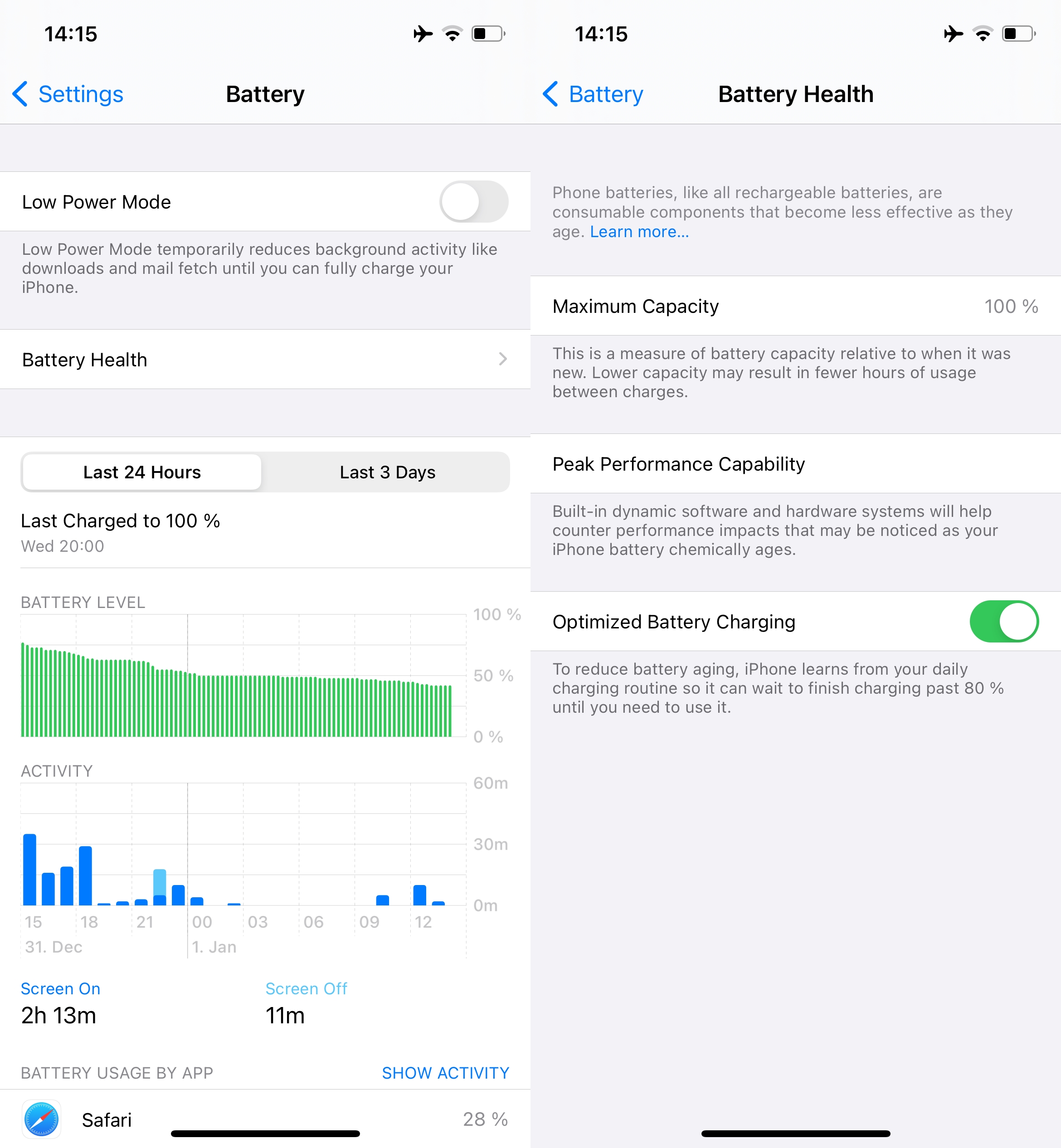
My 12 mini initially had serious standby battery drain issues. I tried different combinations of settings and nothing worked, but this week - without any update - it seems to have resolved. Starting Jan. 19 I took it off the charger at night and saw minimal drain, but daytime longevity has varied significantly, some days acting like a normal iPhone of this size and other days draining quickly. Yesterday the battery performed like a champ. As you can see here, I removed it from the charger at 12:37 am and 22.5 hours later at 10:58 PM it hit the 20% low power warning. While screen-on time of 4.3 hours isn’t great, that’s battery life I can certainly live with, and I hope this is the new normal for my mini.


Feb 6, 2021 1:03 AM in response to Loza24

Not to sound like a broken record or repeat after people, but in this case, just plug it in. Otherwise it puts an entire charge cycle on the battery every night + one cycle during the day (considering your usage) and you will have reached the very end of the expected battery lifespan in only a couple more months. (Since you most likely had the phone for at least a year already at this point)


What is running in the background (screen off) so much on your device? Especially what kicks in at night for 5+ minutes every hour. Not that I would fully suspect that to be the origin of the battery drain but still I am curious. Could you screenshot the lower portion of the usage screen?

Mar 5, 2021 5:45 AM in response to jazzrabbit

UPDATE: Last night my phone was at 100%. I woke up 8 hours later, and it was at 99%. I went into dozens of settings and turned many things off. There were a few "automatic download" type settings for apps and operating system that I found and turned off. Can't remember exactly which ones. I also turned off bluetooth, and turned off icloud backup. All I do with my phone is text, email, and make phone calls. I can manually back it up to the cloud every so often to save my contacts. Can't remember everything I turned off, but it was a lot of stuff. Was surprised how much stuff was happening in the background.


I use my iphone in a very simple way. My car bluetooth audio quality is crappy, so I don't use it. Simple is best. Then I can move on with enjoying this short life. The iphone is just a tool. I use for essential things, and beyond that it's all overkill. Essential to me is communicating with family and work. The sun is out today here in Michigan. I love putting the phone away and heading outside.

Mar 14, 2021 7:04 PM in response to lobsterghost1

I already solved it. I turned off Bluetooth and a few other things and now I don't have to plug it in for days. Goes from 100 percent at night to 98 percent in the morning. Everyone has their own way of doing things. Plugging it in works for some. But if the battery is draining dramatically at night then something is wrong, and plugging the phone in doesn't fix the problem.

Mar 15, 2021 5:24 AM in response to lobsterghost1

It doesn't take much to understand that if your battery drains from 88 percent to 30 percent while IDLE and not being used in the middle of the night, that there's a problem. Doesn't take a level 10 to understand that. It's a problem that needs fixed. This entire thread is exactly about trying to SOLVE that problem. Some level 10's dismiss any discussion about it and write people off as un-intelligent because they don't agree with your bandaid approach of constantly having to plug the phone in. Is it helpful to write people off who are looking for a real solution? Does that qualify as "helping people for many years?" And I'm about to leave this forum for good, as it seems to have some level 10s that are quite dismissive of any other opinion than theirs in regards to my comments. All I got was grief from this forum, and all because I dared to want to solve a big problem with my phone. Shame on me. I should just be quiet and plug my phone in and do as the level 10s say, because they're the smart ones.

Apr 17, 2021 2:58 AM in response to prasaanth28

I came here to find a solution because I am experiencing the same issue.

this is my very first iphone (iphone 12 mini) ever that is 3 weeks old now.

@QuickTimeKirk or other advisors who advice to charge overnight: please, be quiet and leave this conversation. you are not helping at all and only provoking aggressive behaviour.

charging the phone overnight makes no sense because the issue is not directly night related and can accure over a usual working day. so, would be the advice of level 10s to have the phone plugged in all the time?

I don't have a charging brick (I am lucky enough that I have USB-C on my computer; I refuse to buy one, I am happy with the apple product but not with the apple marketing strategies) so I am forced to charge the phone on my computer that is not running at night.

the issue accured twice now with about a week inbetween which is the rason why I now am looking for a solution.

is replacing the iphone realy the only solution?

Apr 21, 2021 5:25 AM in response to lobsterghost1

It was produced in September of 2019, so it’s not even 2 years old phone. The battery can still ran for 5 hours of screen time. So the battery drain like that is not normal behaviour. Plus 84% is not that close to be needing a replacement. In my family there is an iPhone SE which battery health has been around 84-82% for the past two years and it’s battery performs fine. I guess that this drain issue is in iOS.

This thread has been closed by the system or the community team. You may vote for any posts you find helpful, or search the Community for additional answers.

iPhone 12 battery drain overnight

Welcome to Apple Support Community
A forum where Apple customers help each other with their products. Get started with your Apple Account.


