macOS Big Sur battery drain issue

today i have upgraded to macos big sur. however, there is significant battery drain after this upgrade. battery drains in 1 hour after this upgrade. how this issue can be solved. my device is 2018 macbook pro.


[Re-Titled by Moderator]

Posted on Nov 13, 2020 5:43 AM

Reply
Question marked as Top-ranking reply

Posted on Nov 18, 2020 2:02 AM

Now my battery drain is solved.


As I mentioned a couple of days ago in this thread, I stopped using Google Chrome and I ensure "Google Chrome Helper" is not running. This solved my battery drain because "Google Chrome Helper" was constantly using 100% of CPU.


I've also configured Spotlight as mentioned by other people but in my case I think it was the Chrome issue.

828 replies

Nov 23, 2020 10:43 PM in response to arsenowitch

If your MacBook is brand new, arsenowitch, and you haven’t installed any Apps, or migrated or installed any files (like photos, movies, music, etc.), before or after upgrading to Bug Sur, then the “housekeeping” processes should “settle down” fairly quickly.


Yes. Your MacBook is doing a lot of work in the background. What I’m referring to as “housekeeping” processes: indexing, analyzing, caching, etc., all in preparation for your use!

Mar 13, 2021 12:58 PM in response to NJJackinVA

Unfortunately, NJJackinVA, the culprit third-party software is about as unique as the users experiencing the issues.


This means there is no “canned” solution, or list of “culprit” third-party software.


I do wish the solution were simpler and easier.


Fortunately, as people’s third-party software is upgraded/updated, the problems will diminish.


(Additionally, for those users that have set their systems to Automatically update their third-party software, they will experience incremental improvements, in their systems, merely by the incremental updating of their third-party software.


The definitive proof that the issue is not with Big Sur on Mac hardware is the often verified fact that truly clean installs of Big Sur exhibit no such issues: a truly clean install of Big Sur is free from any and all third-party software, including drivers for third-party add-on hardware.


The fact is that such truly clean installs of Big Sur are the most tested configurations of all!)

Apr 24, 2021 6:17 AM in response to hayrettin193

I had the same problem after upgrading macOS to Big Sur for my MacBook Air 11".

My battery used to last for almost 7-8 hours but after upgrading to Big Sur it reduced to maximum of 2 hours.


However I found the solution to my problem, by following below steps.

Restarted mac, pressed Command+R to get the Mac Recovery Mode.

Selected the option of Reinstall macOS and reinstalled Big Sur again.

This took more than 4 hours to finish but after finishing the installation the battery life increased significantly. Now I was getting 5 hours of backup.


Afterwards I disabled all the spotlight options and added folders to search blocklist as well.
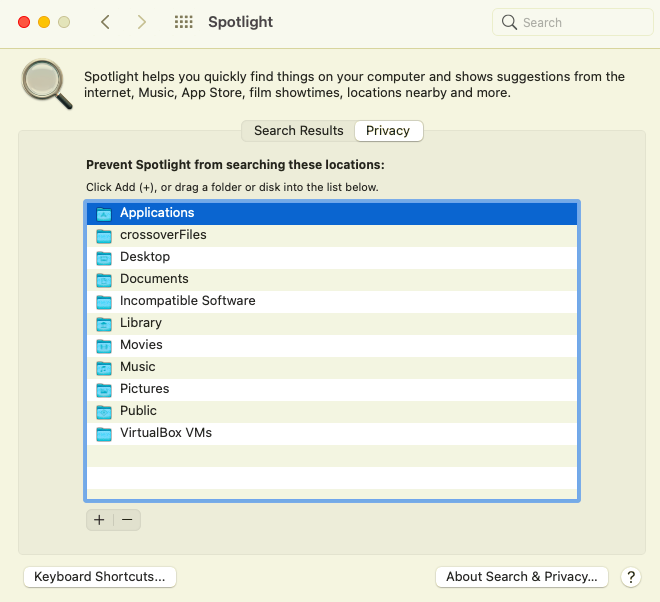

To further increase the battery life switch to dark mode. Doing all these has helped me to get the battery life close to 6-7 hours now.


After reinstalling the OS, I also noticed that now my fan is not turning on frequently and macbook is also not heating up as it was earlier.


I believe the upgrade OS is the problem. It's better to clean install the OS. All my files and applications were unharmed during the reinstallation. However I took the backup before reinstallation and it is recommended for everyone to backup data before reinstalling Big Sur.


Hope this helps others as well.

Aug 3, 2021 7:59 AM in response to Halliday

Update: I took my 2017 MacBook Pro 15" with Touch Bar to Genius Bar. After confirming my findings the serial # qualified for extended warranty. I pay $18 for new USB board and Apple covers $496 to fix battery which includes a new keyboard surface side too since battery is sintered to that. Left it at Apple store since parts where not in stock.


I assumed the computer was not going into sleep mode but that was a wrong educated guess.

Aug 3, 2021 8:12 AM in response to EarthBased

I’m glad all looks like it will work out for you, EarthBased!


There have been a few cases where the «battery drain issue» was caused by hardware. It sounds like yours falls in that category (though the hardware failure occurred later, and appeared after an update—strange, but, in no wise, impossible).


I hope, in the future, you’ll work on verifying your “educated guess[es]”, or, at least, make it clear when you are only using a guess.

Oct 15, 2021 12:40 PM in response to disillusioned2

disillusioned2 wrote:

Unfortunately, we seem to be talking past each other.
1) I have ZERO websites open. Notta, zilch.. :-)
2) If I have 2 Windows open(with zero websites) I'm over 100% (all Processes)
3) if I close one of the two Windows (with zero websites) the it goes down to 2%.
Not a website discussion what-so-ever.

What App are you seeing high CPU usage on, when you «have ZERO websites open. Notta, zilch.. :-)»?


What App are you using when you «have 2 Windows open(with zero websites) I'm over 100% (all Processes)»?


Is that «over 100% (all Processes)» the sum total of all CPU usage, for all processes? Or something else, such as the CPU Usage graph?

This thread has been closed by the system or the community team. You may vote for any posts you find helpful, or search the Community for additional answers.

macOS Big Sur battery drain issue

Welcome to Apple Support Community
A forum where Apple customers help each other with their products. Get started with your Apple Account.

