Suddenly Apple Mail is blocking email sent to myself/my email address

For years I could always send email to myself, and / or bcc myself, and /or bcc myself to same address. Now suddenly when I send email to my own email address, Apple Mail bounces it back as undeliverable with this message:

Remote Server returned '550 5.7.520 Message blocked because it contains content identified as spam. AS(4810)'


Please can anyone help me fix this?


Thank you!

PS Contacted Microsoft outlook.com Support and they report that this is an Apple issue, not Microsoft.


iPhone SE

Posted on Jul 18, 2021 11:23 AM

Reply
Question marked as Top-ranking reply

Posted on Aug 4, 2021 11:40 PM

Hi cb1946


I've recently experienced this myself, and it appears to have been due to a VPN app on my phone. Whenever I used the app, Microsoft account team would send me an email advising of unusual sign-in activity, which I promptly deleted. It appears that after several ignored emails, they blocked outgoing emails from my iPhone.


I located one of the deleted "Verify your account" requests in my Trash and followed the links, after logging in I was presented with a list of suspicious activities which I confirmed as being legitimate. Now I can send emails again.


I hope this helps. Good luck!

24 replies

Jul 18, 2021 12:48 PM in response to cb1946

Restart your Wi-Fi router.


And if you have a commercial add-on VPN client app installed, remove it. Test again.


The following was entered prior to my seeing your reply about the difference between Wi-Fi and cellular.


Which mail server is returning the 550 error? The Microsoft mail server? Or an Apple mail server?


From your first posting, I’d thought you were somehow sending the message to an Apple mail server. (To an address of yours ending in icloud.com, or me.com, or mac.com)


But if your mail account configuration is an msn account ending in msn.com, then that’s a Microsoft mail server returning the 550.


If mail to msn.com is returning a 550, then your Mail client setup is either wrong, or there’s an issue at Microsoft.


Given Microsoft sent you at Apple, I’m going to assume the former; that the Microsoft support folks suspect your mail client is misconfigured, and that something has (possibly) changed at msn to block that old setup, and the msn mail server is now rejecting your current mail client configuration.


What’s wrong? I’d guess that you are currently configured to use TCP port 25 to send to msn from within your Apple Mail configuration, and not TCP port 587, with your password, and with SSL/TLS connection security enabled. As listed below.
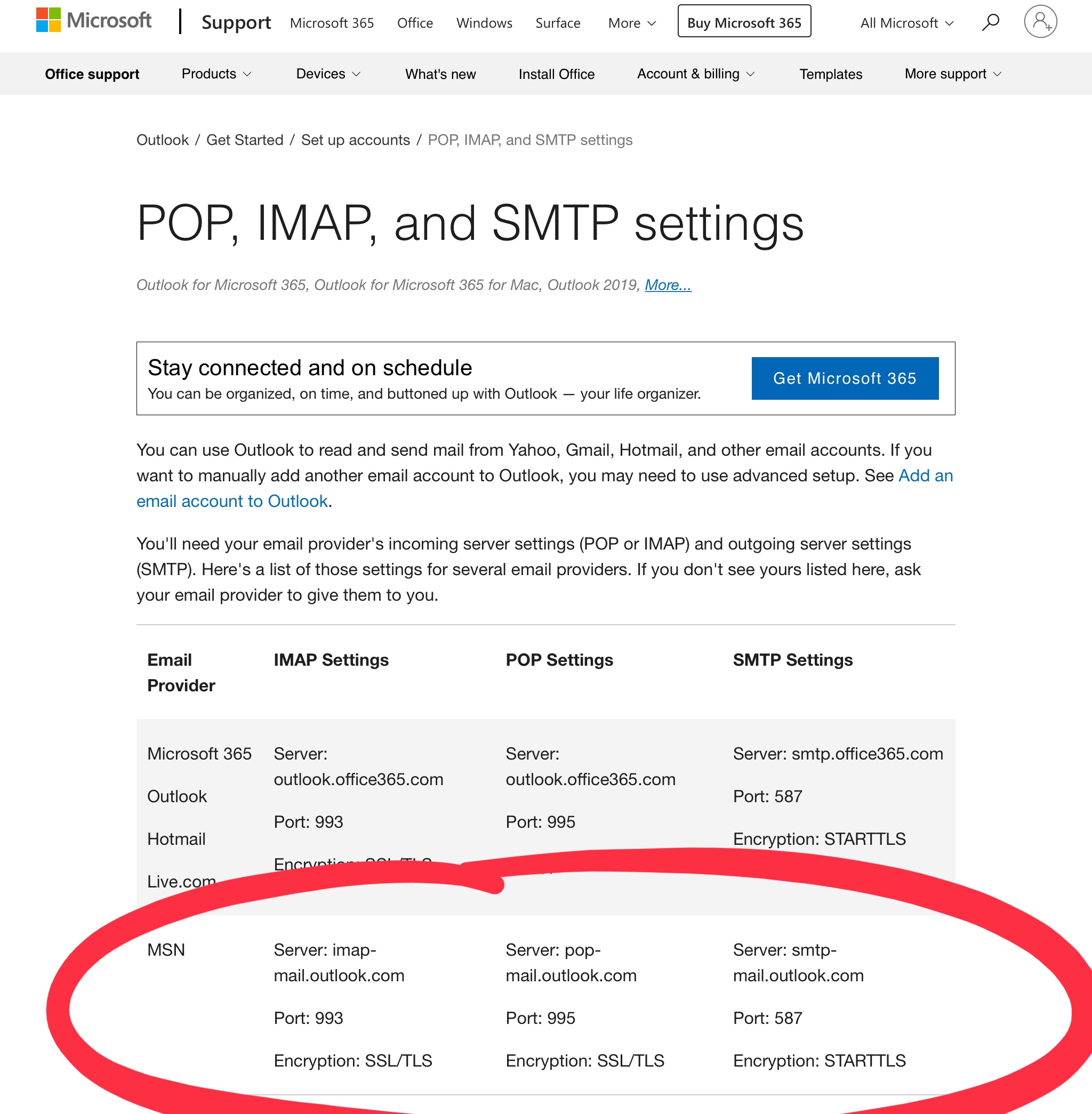


Which matches what Apple reports for msn:
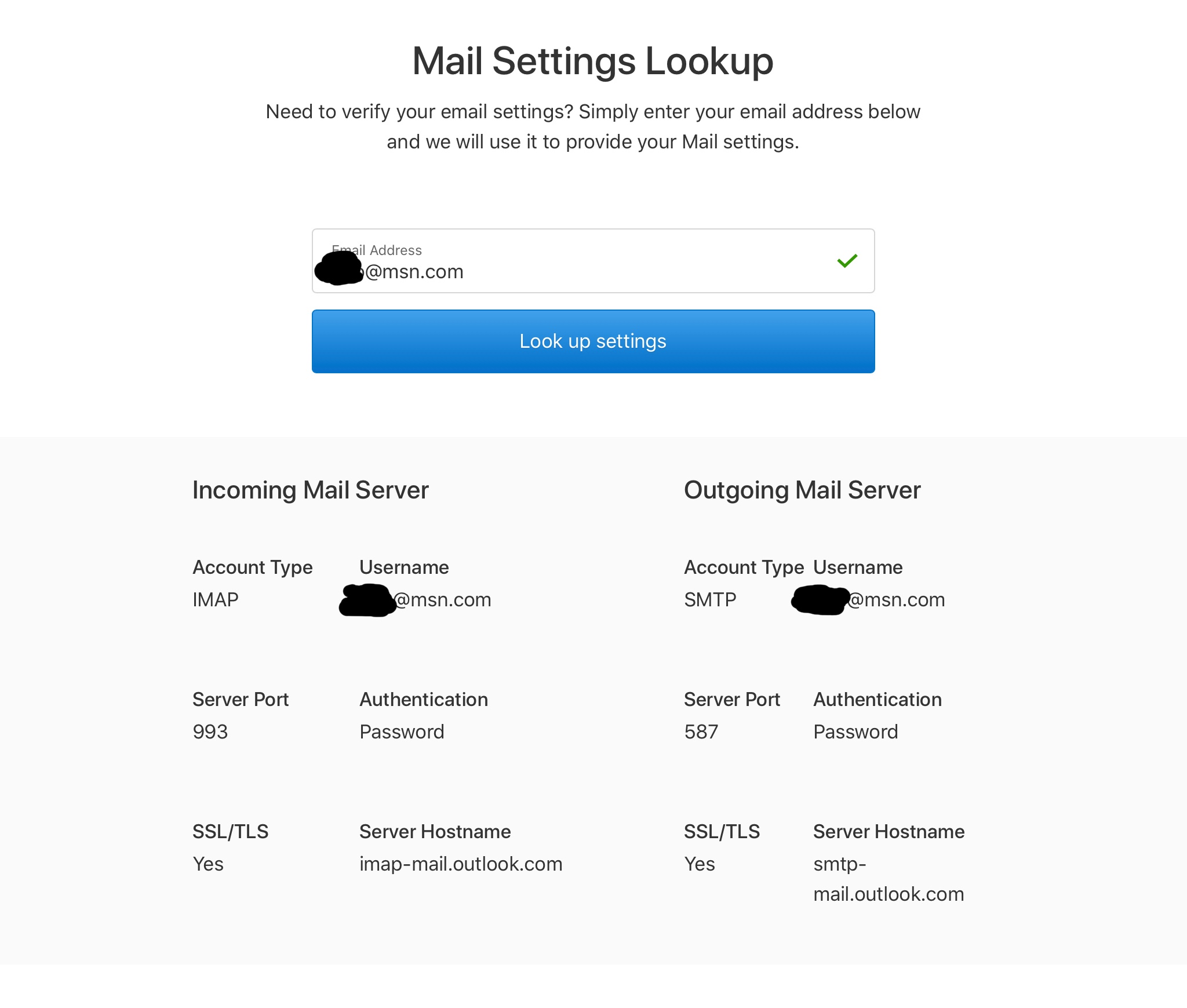


Since the above probably reads as so much techno-babble, and you’re probably not going to want to dig through the mail server settings, remove the msn mail account, and re-add it.


That remove-and-add sequence is what Apple suggests, here: If you can’t send email on your iPhone, iPad, or iPod touch - Apple Support


Above is a sequence of guesses, based on what’s been posted so far.

Jul 18, 2021 7:01 PM in response to MrHoffman

Hi Mr. Hoffmann:

Does this help us in anyway to isolate/analyze the “email to myself is suddenly rejected as spam” problem?:

I was at a different wifi address awhile ago and when sent an email to myself on my iPhone it worked fine. Then when I got home to my wifi I again I have the problem sending email to myself on my iphone and ipad - rejected with that spam error message.

????

So weird. So frustrating. And so far no word back from Microsoft. Perhaps I should send them this information also?

Jul 19, 2021 7:31 AM in response to cb1946

Spam is a problem for all mail providers.


As you are discovering, free mail hosting doesn’t have much of a budget to support the providers of the data being harvested; the end-users of the service. As close to no budget as the free mail hosting providers can achieve. Most commodity call handling is measured by the rate and speed of call closure. Not by call resolution. And the call-takers will have usually little (or no) insight into the current anti-spam algorithms.


Once your mail client connection to MSN has been verified correctly configured as described in previous replies here, your options here are to continue with Microsoft Support, to wait for the IP address or ISP or whatever other message-origin data might be triggering the 550 here to age out of the Microsoft anti-spam algorithms, to send yourself only less spammy-looking mail, to try to switch your IP address with your ISP (and I’ve met ISP-wide blocks in spam filters), or to migrate to another free mail provider, or to a paid provider.


I pay for mail serviced and related hosting, and for hosting domains. That’s far from a perfect fix, and there have been issues at the provider, but it means I do get direct support when the mail server goes sideways. And I csn relocate the domain to other hosting, if there are issues.

Jul 19, 2021 11:24 AM in response to cb1946

cb1946 wrote:

This 550 error block will sometime “age out”?

Spam processing at Microsoft operates at internet scale.


Huge.


Hosts currently spamming vary quickly, and the spam campaigns are automated and vary quickly.


This scale is well past what can be manually managed, so the sender “reputation” varies over time, based on observed activity.


I thought of changing my IP address, but yikes I don’t want to cause more problems.


Details here vary by ISP, but the residential service tier for many ISPs can feature a varying IP address over time, and varying over events potentially including a modem/router/gateway restart.


I’d gladly pay for email if I could keep my same email address.


You can’t port an MSN email address.


From an email address being migrated from, the best that can happen is email forwarding to a preferred host, or email fetching from a preferred mail host.


You can port to your own domain for email, and then subsequent porting of the email addresses associated with that domain to other hosting providers gets easier.


Or the ISP is purchased or goes bankrupt or re-brands or retires or whatever, and we all then migrate on the ISP-set timeline.

Aug 17, 2021 8:31 AM in response to MrHoffman

Sorry. Thats a bit technical for me. Its a Hotmail account which I added via the iMac emaIl setup. Its only a three step process and worked fine until I changed my Microsoft password yesterday. I can sent Hotmail to Hotmail via my Outlook and Sky (Yahoo) accounts. For some reason I keep getting this error message on the iMac when I send an email to my own Hotmail account.


Generating server: VI1PR0401MB2317.eurprd04.prod.outlook.com

****@ hotmail.com

Remote Server returned '550 5.7.520 Message blocked because it contains content identified as spam. AS(4810)'


[Edited by Moderator]

Aug 17, 2021 8:57 AM in response to pjn2767

That SMTP 550 mail message is seemingly unrelated to your password change. 550 means the message has gotten to the mail server, and is not being rejected due to credentials, but is being rejected for some other factor(s).


In short… The Microsoft Outlook mail server is rejecting your arriving mail as spam.


Which usually means the arriving mail is being detected as spam, your source IP address was previously identified with spamming or maybe login fails or such, or some other detail that Microsoft Outlook.com mail server is considering, or maybe your mail settings are incorrect and you’re trying to use TCP port 25 (and not TCP port 587) to send your mail to the Outlook.com mail server.


if you are using Outlook.com yourself and your arriving mail is being rejected as spam, confirm your mail settings are as listed here: https://support.microsoft.com/en-us/office/add-your-outlook-com-account-to-another-mail-app-or-smart-device-73f3b178-0009-41ae-aab1-87b80fa94970


Then contact Outlook.com mail support for assistance.


Some previous discussions:


https://answers.microsoft.com/en-us/outlook_com/forum/all/remote-server-returned-550-57520-message-blocked/f4b5fd62-1c86-4591-af9c-9d70f5984abb


https://discussions.apple.com/thread/252967893


https://discussions.apple.com/thread/252960974


As a very long shot possibility, restart your Wi-Fi router. This might get you a new IP address from your ISP, and which might work around a Microsoft per-IP address block that can arise within some spam detection systems. (Whether in that of Microsoft?)

This thread has been closed by the system or the community team. You may vote for any posts you find helpful, or search the Community for additional answers.

Suddenly Apple Mail is blocking email sent to myself/my email address

Welcome to Apple Support Community
A forum where Apple customers help each other with their products. Get started with your Apple Account.
