My iTunes preferences/media folder location keeps going to default

Per the question, I set iTunes Preferences/Media folder location to be "\\Volume1\Music" (which is my NAS). Songs in my library that are located there play just fine. iTunes sees the songs obviously. But every time I close iTunes (and/or shut off my computer and then open iTunes again), it keeps defaulting back to the C: drive iTunes Music folder. It's like it can't find or see the NAS. Odd, since the NAS is always on.


I've searched all over and I cannot find an answer so I'm hoping the community can provide help here.


I posted this question the other day but it was deleted for some reason so I'm re-adding it.


[Re-Titled by Moderator]

Posted on Jul 31, 2021 12:32 PM

Reply

Similar questions

178 replies

Aug 16, 2021 9:59 AM in response to turingtest2

turingtest2 wrote:

Sorry, I sent you my post directly above before I saw this response....

i,

I didn't have time to get a screenshot, but I renamed my test playlist as 1-AM Pop & Classic Rock (4-5*) #1's, copied the updated XML file, corrected to path for the NAS, then used the Playlists > ⋮ > Import from iTunes... command and it imported as expected with the new title.

That's GREAT!

The key things are to make the right edit to the XML file so that the data makes sense from the perspective of the Plex server on the NAS, tell the iTunes Plugin where the XML file is located, then use Music > ⋮ > Scan Library Files followed by Playlists > ⋮ > Import from iTunes...

Editing of the XML file is just making sure it's set to the path such as: volume1/Plex Test or "volume1/Music1 - so that each song has this in front of it. BTW, the XML as it stands already has this. Here's a song from the XML from the Music1 folder on the NAS:

<key>Location</key>string>file://localhost/volume1/Music1/Beach%20Boys/Little%20Duece%20Coupe/Beach%20Boys%20-%20409.m4a</string>


From the sound of things all you need to do for your library in the Music1 folder is remove the second // by, for example, replacing //volume1 with /volume1 and replacing all instances through the XML.

That's already been done. Here's my dilemma: I already tried this on Plex and it won't import the playlists. I'm not sure why, but it probably has to do with creating a new playlists outside of the C: drive (or maybe you don't think so). I didn't use the steps you did this weekend on this library. That said, I would just change the XML path inside Plex and then scan the library (or stop/reboot Plex on the NAS first or after, I'll look at your instructions). Since I can see the import itunes playlists, maybe that would work? My concern is that it didn't work with my Test Plex, but it's worth a shot.


Please let me know what you think.

tt2

THANKS!!

Aug 16, 2021 12:35 PM in response to turingtest2

No, I made sure I got rid of the smart playlists on the updated XML that is in the V1/Music1 folder. None exist in the iTunes Volume1 library. And I never created folders for playlists. I've never used that feature.


Anyway, I'm cleaning out some playlists to try and trim it down (I was planning on doing that anyway).


I can't believe I finally got this rolling. I just need to see why I can't get them all in there. I'd read somewhere that Plex has trouble with more than X number but I can't recall for sure. That seems odd that that would be a limitation, but perhaps it is. Worst case, I'll trim and trim to focus on just the best of the playlists.


Any other thoughts, let me know!


You ROCK! Thanks!

Aug 16, 2021 4:39 PM in response to William Richards3

You know how I have to edit the XML that's part of the iTunes volume1 library on the C:/My Music folder and remove the second slash? Since that's literally the only thing I have to modify since all my music resides on the NAS natively (so to speak), can I edit the XML and remove the second slash and then copy it back onto the C: music folder so I don't have to do that each and every time I make a change in the library and update it in Plex?


I would do as you suggest and make a COPY first and then edit it, make the change and then save it so it would get copied over the one on the C: drive. You know what I mean, right?


What do you think?


Thanks!

Aug 17, 2021 1:40 AM in response to William Richards3

William Richards3 wrote:

And I wanted to make sure you saw this query. It may be moot since I've got this far along but for my archiving - or if I need to do it again - I want to make sure I have all my notes right.

ME: What I missed was that you had a folder in your iTunes D:\iTunes 4 Plex\iTunes Media\Music
When I created my new iTunes library and made it on the D drive such as yours, it does not make a Music folder - at least it didn't do that for me. Perhaps that's my version 10.7? Did you actually go in and create this "Music" folder on the D drive? Should I do that? I just put a Paul Simon album on my D: drive.


The extra Music folder really isn't important. By default newer libraries will create a subfolder in the media folder for Music, much as iTunes always has for Movies, TV Shows, Podcasts, etc. Older libraries (created pre iTunes 9) would typically put the artist folders directly into the media folder. In the context of making the library work in Plex (which already has separate folders for different types of media) what matters is that you get the artist folders stored in the shared folder on the NAS and then adjust the XML file to have the correct paths to the media as it exists on the NAS. The exact layout of files and folders can be completely custom.


tt2

Aug 17, 2021 5:03 AM in response to turingtest2

That's good to know (on the characters on a named playlist).


Could you let me know on this question: You know how I have to edit the XML that's part of the iTunes volume1 library on the C:/My Music folder and remove the second slash? Since that's literally the only thing I have to modify since all my music resides on the NAS natively (so to speak), can I edit the XML and remove the second slash and then copy it back onto the C: music folder so I don't have to do that each and every time I make a change in the library and update it in Plex?


I can see a time where, if I can get all the playlists to import, where I'll modify something in iTunes (add a new playlist, adjust another, remove a couple, Etc.), so I'd like to not have to edit the XML that I have right now in my iTunes volume1/Music1 library. I don't want to break anything in that library (if that is even possible) - I just want to make sure.


Thanks for your other replies!!! Much appreciated. Wish me luck getting the other playlists to import.

Aug 17, 2021 5:56 AM in response to turingtest2

turingtest2 wrote:


The XML file in your library folder will be updated each time you make a change to the library, e.g. edit a playlist, add some metadata, or just play a track which increases the playcount. Plex should detect metadata changes by itself, but when you want it to update the playlists or you've moved/renamed any files, copy the XML, edit out the unwanted double slashes, save the copy in the volume1/Music1 folder as iTunes Library.xml then use Music > ⋮ > Scan Library Files followed by Playlists > ⋮ > Import from iTunes... with the option to Overwrite existing playlists. The is no point copying the updated file back to C: as Plex isn't going to change it, and you'll want the current version produced by iTunes next time you want to refresh the playlists.

Gotcha.

Tunes is producing the XML file to support your third party software. You cannot "break it" as far as iTunes is concerned as it only writes out the file. It would only read it if you explicitly tried to import the XML file. It will however routinely overwrite it as you use the library with iTunes, so you'll have to edit out the second // every time you want to refresh the playlists in Plex.

Understood. Thanks for the clarity!

tt2


Aug 17, 2021 7:31 PM in response to William Richards3

I'm going to finish up sort of a step-by-step process of what got the playlists to show the import feature option in Plex.


Do you think doing the D:/ drive portion was instrumental in this working? I never ultimately used that drive or test artist/album that you set up on your end. Meaning I did do the process and there was the Plex Test folder on the NAS and in Plex (still is). I'm just wondering if you think that has to happen?


I still am not sure how that played into things. I realize it doesn't matter but I thought I might be able to help someone down the road if I notice them having the same issue I had and wanted to know.


I know it didn't work until that happened so logic would suggest it did.


Thanks!!

Aug 31, 2021 9:26 AM in response to turingtest2

turingtest2 wrote:


If you want iTunes and Plex to be consistent you should make edits in iTunes, then get Plex to refresh its view of metadata using Music > ⋮ > Manage Library > Refresh All Metadata. Contrary to my earlier comment I am now not certain that Plex will automatically detect a change where the file name/path isn't updated at the same time. Changing the path means that one file is removed, and a new one added, and Plex will thus read the updated metadata of the "new" file.

I have not done the "refresh all metadata" because of the message that it shows " " which I was nervous about - worrying that it might replace MY metadata. Here's the message.. How would you interpret this?
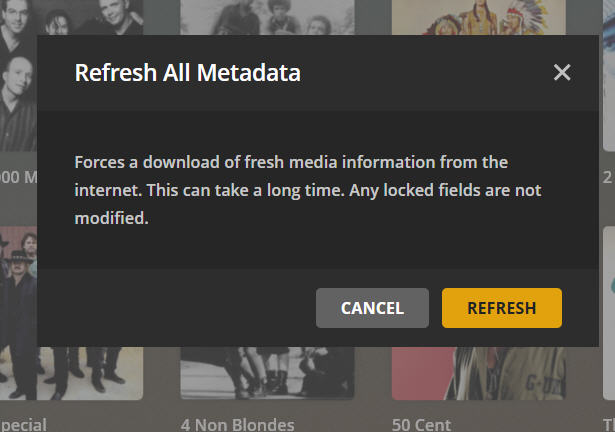
Plex will normally scan for new and removed files in the media folder on a regular basis. You can change the settings for this at Settings > Library > Scan my library periodically. You can force an update using Music > ⋮ > Scan Library Files.

I have a check next to the "scan my library periodically" (and have had the entire time I've used Plex.

To get Plex to update the imported iTunes playlists you need to make suitable edits to the XML file generated or exported from iTunes, place the edited version at the path specified under Settings > Plugins > iTunes library XML path then use Playlists > ⋮ > Import from iTunes... and select the option to Overwrite existing playlists.

I sent a post last night showing two examples of the behavior. Basically, if I have done nothing but change the name of a playlist in iTunes, it appears to replace the one prior. Meaning if I had "Bee Gees playlist 70s" and changed it to "Bee Gees 70s" but did nothing to the playlist otherwise, it imported and replaced the original in Plex. When I did some changes to a playlist (just sorted it different, the music was 100% the same) but didn't change the name and imported it, it imported it again so I had two same-name files. I did the "overwrite existing" for sure. I'm not sure but I'm guessing Plex somehow detected the change inside the playlist. Woud you expect that behavior?

If you have specific examples of tracks that are missing from a playlist after import please post back the full path and the relevant location property from the edited XML file so that I can compare the two values and, perhaps, see what might be causing an issue for Plex. I seem to be able to freely use & and ' in titles and paths without there being any issues.

So far I haven't gotten that far to test but I haven't noticed any missing files.

I believe you also mentioned that some of the details of imported tracks were incorrect in Plex. For files in mp3 format a possible explanation might be multiple tags as discussed in Repair security permissions for iTunes for Windows - Apple Community where this more than one tag, and iTunes may have updated one while Plex reads data from another. Plex also has some sort of agent that attempts to fetch missing metadata when it can fill in some of the properties. This might explain some of the values you've seen under Tags > Moods. Again a specific example that I can attempt to recreate here might help me work out what is going on and try to come up with a workaround.

The basic issue there is there's a bunch of missing album names. But as I researched it further, I noticed that the transfer of ID3 tags from the MP3 files to ALAC was either lost, or wasn't in Windows to begin with. This was a phenomenon I didn't even realize back then. I assumed that if the data was in iTunes, it should be in the ID3 tags. This was first sort of discovered when there was a lot of missing artwork. And I checked the XML file and the album title is there (I believe) so it seems to me that it should show up in Plex. Unless there's a script that can take the XML for a song and apply it to Windows Explorer for said file, then I'll likely need to either update it in Windows or in Plex. I have actually been updating it in Plex using a smart playlist for "unknown" "album title". It's arduous but it's manageable.


As for MOODS, there isn't any data in any of the songs as there was no ID3 tags for that that I ever used/entered. The ratings for the individual songs does appear to mostly be there though there are some that are missing as well (same as Album titles). Some album art is missing sporadically.

tt2

Thoughts kind sir? THANK YOU!!!

Sep 8, 2021 4:56 PM in response to William Richards3


William Richards3 wrote:

I just tested this. In Plex, the test playlist was called "#1 songs" and was sorted by Title. In iTunes, I see it's also by title. I then sorted by Artist, copied the XML, edited it, made the changes there with the forward slash, then copied it onto the NAS (or upload/overwrite onto the NAS, it works both ways). I imported itunes playlists but the order stayed Title first. I also had scanned the library and tried it again, but it didn't put it by Artist instead of title. Weirdly, I noticed a playlist that I was testing the name on yesterday had updated in Plex. Wouldn't do it yesterday. I wonder if it could be the "date" has to be different? But then there are other playlists that I changed that still aren't changed. If the behavior was consistent, it would be easier to track down.


iTunes has the ability to sort playlists in the library by various column headings, but clicking on one of these doesn't change the fundamental Play Order of the list, so selecting a new column order won't necessarily result in an update when you import to Plex. To make sure that Plex uses the order you have in iTunes right-click on the playlist name in the sidebar and click Copy to Play Order.


tt2

Sep 25, 2021 4:00 AM in response to William Richards3

William Richards3 wrote:

One more quick one for you.
I have two iTunes libraries now:
1. Mapped drive on Y:
2. Volume1/Music1 on the NAS
etc.


You can make a clone of the "current" .itl file that references tracks at \\volume1\Music and then use the script SwitchLinks to update the links so they use Y:\ instead. That should give you a parallel library that has the same metadata. I'm assuming here that Y:/ either maps to \\volume1\Music or has been/can be cloned from it. Apologies for not keeping track of all of the details.


tt2

Sep 25, 2021 1:23 PM in response to turingtest2

turingtest2 wrote:

A subscription to Apple Music shouldn't cause any changes in your locally stored media. That said I do recall an occasional issue with purchases where the store version of metadata can reassert itself over local changes. The solution there is to hide the purchase from your purchase history and then your local matched/uploaded version of the metadata will rule. When working with a synced copy of the library on another computer or device you may occasionally find that matching is imperfect, e.g. the secondary library gets a clean copy of what was originally an explicit track.

Before starting a subscription you should take a complete backup of your library. You might want to test the waters with Apple Music by creating a separate library (which will initially include all of your purchases) and then selectively add content to that library.

I'll do that.

When you have a subscription to Apple Music any content downloaded from the service goes into <Media Folder>\Apple Music. Apart from that it all works as normal. Each individual .itl file is optionally enabled for Apple Music/iCloud Music Library.

tt2

Thanks!

Sep 25, 2021 3:27 PM in response to William Richards3


William Richards3 wrote:

turingtest2 wrote:

William Richards3 wrote:

One more quick one for you.
I have two iTunes libraries now:
1. Mapped drive on Y:
2. Volume1/Music1 on the NAS
etc.

You can make a clone of the "current" .itl file that references tracks at \\volume1\Music and then use the script SwitchLinks to update the links so they use Y:\ instead. That should give you a parallel library that has the same metadata. I'm assuming here that Y:/ either maps to \\volume1\Music or has been/can be cloned from it. Apologies for not keeping track of all of the details.

tt2

You are correct. The Y: maps to \\volume1\music. The main library is not mapped but is on the NAS at \\volume1\Music1.

I had downloaded the script before and did so again just to make sure I had the latest. I had my iTunes main library open and it was on a playlist containing 360 titles. When I ran the script (just to see the first step), it asked if I wanted to change 360 songs. So I canceled of course.

I'm not sure how the ITL file comes into play. Would you mind a few quick steps on what to do?
If I clone the ITL file from the main library, I would close iTunes and then copy that ITL file onto the Y: mapped one, replacing that ITL?


Yes, unless perhaps you're already using the same .itl file regardless of which path you open it from. I would need to know the two paths to be certain, and confirm they have different modification dates. Rather than replace the current file rename it so you can easily revert to the previous file if you're not happy with the results.


I'm unsure as to when and how to affect the main library.
Does the XML enter into it at all?


No, it is the .itl file that you need to clone and then update. The XML file for each library is generated from the .itl.


Should I have Y: mapped iTunes open and highlight the entire library and then run the script?


Yes, although I would test a small list first to ensure it is behaving as desired first. The track-by-track confirmation mode can also be useful for making sure that you're setting options correctly for the required outcome.


When you clone the library you make a copy of the .itl file with a different name or on a different path. You can use the shift-start-iTunes method to switch between the two copies. Once you have two independent files changes you make in one library (such as the path to a file) won't be made in the other. Metadata changes aren't reflected either, but can be picked up later when a track is played for example. The iTunes library is the .itl file. The XML is a plain text (sort of) representation of most of the data in the .itl file and provided for use by third party software such as Plex. iTunes doesn't normally use the XML file although it can be imported and exported.


tt2

Oct 4, 2021 10:58 AM in response to William Richards3

William Richards3 wrote:

On your Sgt. Pepper example, I'm not making those kinds of changes. And if I did, they would be very minimal. Further, the tracks in one library are 99.9% the same in the other as it was a clone.

Here's an example of what I'm seeing. First, the original MP3 song which was in the original library. As you recall, the songs were scattered among a variety of folders and not in the proper structure (Artist/Album) - which they now are. As part of the work, I used various scripts and ended up with this proper structure. As well, I used the Export/Import script so that the lossless version replaced the MP3 but the metadata should have been there. Sadly, I never checked, or perhaps those I did check had it on as this is not on all tracks (missing fields). Here's the original in Windows Explorer in the folder it was in.

https://discussions.apple.com/content/attachment/08ebfd84-c980-456c-a55a-6b61e46e8537

And now here's the Lossless version of the song in Windows Explorer now after using E/I.

https://discussions.apple.com/content/attachment/919a576a-b1d0-4c18-b4c4-707d08640e34

I don't understand how the data was lost?


Me either, unless it is simply the case that Windows Explorer doesn't know how to read the tag of an Apple Lossless file. The tag might be there but not processed by Windows Explorer. To determine it was actually missing you'd need another product that can read tags from AAC/ALAC files.


Now I did create a new iTunes library (Volume1), but I kept the mapped drive (Y:) with the Artist/Album music as well and have checked there and the data is missing as well on songs such as the example above.

So I'm perplexed as to how the data was lost. It appears that maybe a bug in E/I script at some point? (You'll recall you made several updates along the way so maybe something happened there?). Or maybe it is in the registry as you pointed out to try but my gut still says that's not the issue.

So I'm at a point where I've spent several days putting this data back on songs manually and am only up to maybe the mid-B's (Artist) so it will take weeks to update these songs. It's very frustrating since the data was there to begin with.

I noticed also that there are a lot of MP3 files that I didn't have the CD files to convert to lossless are missing the Album Artist or other fields - but I don't think many of those had Album Artist on them so that makes sense. That was a later application of metadata when discovering that Plex uses Album Artist first for some reason. But it still doesn't explain the loss of other data such as the capture above.

My original library is the mapped Y: drive as I said. I cloned that library but used a script to change the location to Volume1. The original library points to the mapped drive and the volume1 (main one I use now) is pointed to the NAS.

I did try using E/I this morning on a song to see if moving the same song (without all the data) in and out might work, but as predicted, it didn't work.

Something fairly significant happened in some step along the way to lose data on some, not all, songs. And the data that's lost might only be the Album Artist for example, whereas other songs, like the capture above, lost everything but Artist/Title.

Is there a script you have that can somehow take the data in iTunes when you view "Get Info" and confirm that the data is there, and somehow "write" that to Windows Exp.? Or perhaps some other trick you know that might work? Something that forces it in there or am I simply going to have to bite the bullet and go through all these one by one?

THANKS!!!


If the data is present in iTunes, and is present in Plex, I don't think it is too important what you get to see in Windows Explorer. Are you sure this is a real problem of missing metadata rather than a display issue in Explorer?


tt2

This thread has been closed by the system or the community team. You may vote for any posts you find helpful, or search the Community for additional answers.

My iTunes preferences/media folder location keeps going to default

Welcome to Apple Support Community
A forum where Apple customers help each other with their products. Get started with your Apple Account.
