My iTunes preferences/media folder location keeps going to default

Per the question, I set iTunes Preferences/Media folder location to be "\\Volume1\Music" (which is my NAS). Songs in my library that are located there play just fine. iTunes sees the songs obviously. But every time I close iTunes (and/or shut off my computer and then open iTunes again), it keeps defaulting back to the C: drive iTunes Music folder. It's like it can't find or see the NAS. Odd, since the NAS is always on.


I've searched all over and I cannot find an answer so I'm hoping the community can provide help here.


I posted this question the other day but it was deleted for some reason so I'm re-adding it.


[Re-Titled by Moderator]

Posted on Jul 31, 2021 12:32 PM

Reply

Similar questions

178 replies

Aug 2, 2021 12:06 PM in response to William Richards3

Hi Bill,


As noted elsewhere there appears to a be a bug (in several recent builds) that prevents the media folder preference being correctly saved for some users. If you can arrange to have the library database at <somepath>\iTunes\iTunes Library.itl and the media folder at <somepath>\iTunes\iTunes Media then this bug should not be an issue.


  1. What build of iTunes are you currently running?
  2. Where is the iTunes Library.itl file for the library?
  3. What is the media folder path that you want to use?


See Make a split library portable - Apple Community for general background on the layout of the library.


tt2

Aug 9, 2021 2:13 PM in response to William Richards3

Hard to be absolutely sure without testing things locally. What happens if you type in \\volume1 in the address bar? I'm guessing Windows will find the box because you added an entry for it in hosts file at some point, but if it only advertises itself to the network as DS720 then maybe it doesn't know it is also volume1. Perhaps you should be editing the XML paths to point to file://DS720/etc. rather than file://volume1/etc.


tt2

Aug 15, 2021 7:24 PM in response to William Richards3

Experiment with the test library first. Test media folder, test XML file, scan the library files, import the playlists. Prove to yourself that it works and see how it works. Then look into fixing in the XML for the primary library, putting the edited XML in the right location, scanning that library, and then importing that set of playlists.


It's gone 3am here and I'm working later in the day. I'll have a go at making a playlist with that name if I get a chance before I go in.


tt2

Sep 25, 2021 12:54 PM in response to turingtest2

turingtest2 wrote:


William Richards3 wrote:

One more quick one for you.
I have two iTunes libraries now:
1. Mapped drive on Y:
2. Volume1/Music1 on the NAS
etc.

You can make a clone of the "current" .itl file that references tracks at \\volume1\Music and then use the script SwitchLinks to update the links so they use Y:\ instead. That should give you a parallel library that has the same metadata. I'm assuming here that Y:/ either maps to \\volume1\Music or has been/can be cloned from it. Apologies for not keeping track of all of the details.

tt2

You are correct. The Y: maps to \\volume1\music. The main library is not mapped but is on the NAS at \\volume1\Music1.


I had downloaded the script before and did so again just to make sure I had the latest. I had my iTunes main library open and it was on a playlist containing 360 titles. When I ran the script (just to see the first step), it asked if I wanted to change 360 songs. So I canceled of course.


I'm not sure how the ITL file comes into play. Would you mind a few quick steps on what to do?

If I clone the ITL file from the main library, I would close iTunes and then copy that ITL file onto the Y: mapped one, replacing that ITL?

I'm unsure as to when and how to affect the main library.

Does the XML enter into it at all?

Should I have Y: mapped iTunes open and highlight the entire library and then run the script?

Sorry, it's probably quite obvious but I'm not sure on this.


Appreciate it! Thanks!


Aug 6, 2021 8:16 PM in response to turingtest2

turingtest2 wrote:

I did NOT
tell you to replace every single space in the xml file with %20. You only need to do that with the file path.

Sorry for any confusion.

I.e. If you had Some Path With Spaces you would rewrite it as Some%20Path%20With%20Spaces. The paths in the XML file already have any spaces represented by %20. so you don't need to do anything there.

So %20 is actually a space as far as XML file is concerned? I didn't know that. I wonder why I need to remove those spaces then (or %20 in this case)?

The correct form of the file URL is file://therestofthepath. Two forward slashes, though I think you might get away with three. Four feels like too many.

Got it. I'll go with two slashes after "file:". Thanks so much once again! I'll let you know what I hear back (hopefully I'll get a reply through their forum tomorrow).

Stay safe!

tt2


Aug 7, 2021 8:18 AM in response to William Richards3

Say your existing path to a track was:

Y:\iTunes\iTunes Music\Beatles\Abbey Road\01 Come Together.m4a

Which the XML file would record as:

file://localhost/Y:/iTunes/iTunes%20Music/Beatles/Abbey%20Road/01%20Come%20Together.m4a

And you wanted to correct things such that the XML was using the media folder /volume1/iTunes/iTunes Media then you would need to use %20 instead of a space in the replacement text where it appears in iTunes Media. I.e. replace "localhost/Y:/iTunes/iTunes%20Music" with "volume1/iTunes/iTunes%20Media" so the resultant path becomes:

file://volume1/iTunes/iTunes%20Media/Beatles/Abbey%20Road/01%20Come%20Together.m4a


The point is that you must not put spaces in XML file location strings. There won't be any there already, they only way they would be added is if you didn't consider them if they feature as part of a replacement string, in which case use %20 where you would otherwise want a space.


tt2

Aug 15, 2021 2:52 PM in response to William Richards3

My NAS is called DISKSTATION2 on my network, yours is called DS270. The distinction isn't important. From the point of view of the Plex server running on the device it is called volume1, and it can see any shares created in the device that it has permissions for.


In testing I created a new empty iTunes library in the folder D:\iTunes 4 Plex\ on my Windows 7 box, imported one album, and made a playlist of that album. I also signed out of the iTunes Store to avoid cluttering up the XML file with references to my purchases though I don't know if that is relevant for iTunes 10.7. I then made sure that iTunes was creating the XML file as this is no longer enabled by default.


In my case the first entry location in the XML file was <key>Location</key><string>file://localhost/D:/iTunes%204%20Plex/iTunes%20Media/Music/The%20Beatles/The%20Beatles%20(The%20White%20Album)/1-01%20Back%20In%20The%20U.S.S.R..mp3</string>


In other words the path above the artist folders in my case is D:/iTunes%204%20Plex/iTunes%20Media/Music (when spaces are replaced with %20) and this is going to be the search term I use later when massaging the XML. I called the shared music folder I created on the server Music and gave Plex permission to read and write to it using the Control Panel > Shared Folder tool.


I copied the artist folder from D:\iTunes 4 Plex\iTunes Media\Music into \\DISKSTATION2\Music over the network.


I then made a copy of the iTunes Library.xml file (as iTunes Library (Copy).xml), edited it using Notepad++ and used the Search > Replace function to change D:/iTunes%204%20Plex/iTunes%20Media/Music to volume1/Music and replaced all, then saved the changes. Making a copy to work with ensures that iTunes doesn't overwrite the file that I am editing.


Next I copied the XML file to the network folder \\DISKSTATION2\Music and renamed it as iTunes Library.xml. I was a bit imprecise with my comment about saving it earlier, but the upshot is that file is now available for Plex to use at the path volume1/Music/iTunes Library.xml.


In Plex I had to enable the iTunes plugin and then shut down and restart the Plex server in order to activate it. I then went into the Plugin settings to set the path to the XML.
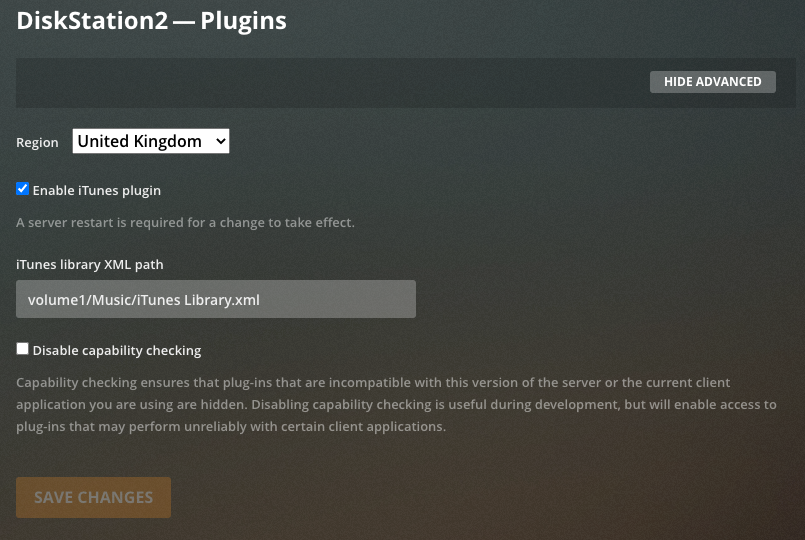


I struggled a bit to get Playlists menu to show below Music in the Plex sidebar. Creating a dummy playlist and then refreshing all metadata appeared to do the trick. I then used the menu to Import from iTunes...


First time was a bust:
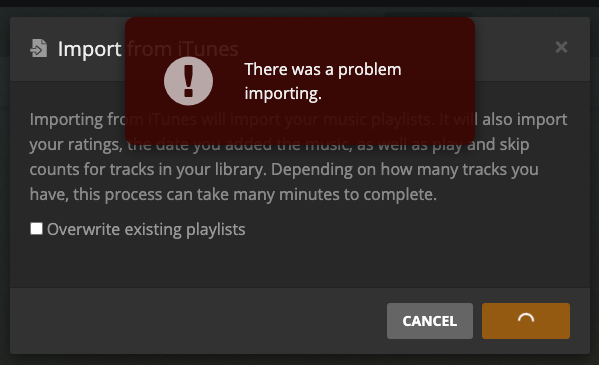


But after using Music > ⋮ > Scan Library Files and then trying again I got this:
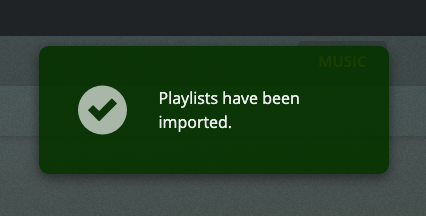


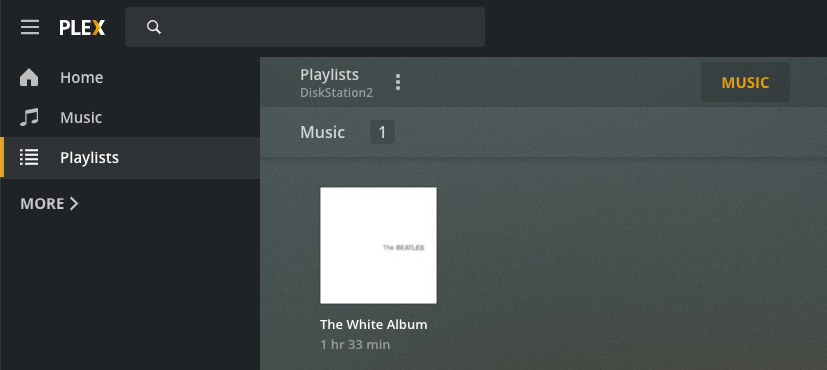
The display didn't update automatically so I had to switch to Music and back to Playlists to see this (after deleting my dummy list):


Hopefully you can see how to translate the various paths that I used so you can follow along with your library. If not then please post back with a <key>Location</key><string>file://localhost/...etc.</string> value from your XML file, along with the path to the same file when viewed from the perspective of Plex on the server, i.e. a path that starts volume1/<sharename>. With those two details I should be able to guide your use of Notepad++ to update the XML.


tt2

Aug 17, 2021 5:30 AM in response to William Richards3

William Richards3 wrote:

You know how I have to edit the XML that's part of the iTunes volume1 library on the C:/My Music folder and remove the second slash? Since that's literally the only thing I have to modify since all my music resides on the NAS natively (so to speak), can I edit the XML and remove the second slash and then copy it back onto the C: music folder so I don't have to do that each and every time I make a change in the library and update it in Plex?

I would do as you suggest and make a COPY first and then edit it, make the change and then save it so it would get copied over the one on the C: drive. You know what I mean, right?


The XML file in your library folder will be updated each time you make a change to the library, e.g. edit a playlist, add some metadata, or just play a track which increases the playcount. Plex should detect metadata changes by itself, but when you want it to update the playlists or you've moved/renamed any files, copy the XML, edit out the unwanted double slashes, save the copy in the volume1/Music1 folder as iTunes Library.xml then use Music > ⋮ > Scan Library Files followed by Playlists > ⋮ > Import from iTunes... with the option to Overwrite existing playlists. The is no point copying the updated file back to C: as Plex isn't going to change it, and you'll want the current version produced by iTunes next time you want to refresh the playlists.


iTunes is producing the XML file to support your third party software. You cannot "break it" as far as iTunes is concerned as it only writes out the file. It would only read it if you explicitly tried to import the XML file. It will however routinely overwrite it as you use the library with iTunes, so you'll have to edit out the second // every time you want to refresh the playlists in Plex.


tt2

Sep 14, 2021 2:55 PM in response to William Richards3

I was going over some notes from you and I noticed you said this:


Earlier on you posted this snippet from one of your XML files:  


file://localhost//volume1/music1/Al%20Green/Let's%20Stay%20Together/Al%20Green%20-20Let's%20Stay%20Together.m4a


Which indicates that you've got iTunes working with the shared folder music1 on your NAS. This needs almost no editing, but you should eliminate the second // in each path. To do this you would take a copy of the iTunes Library.xml file generated by iTunes and edit it with Notepad++. Use the Search > Replace... function to replace localhost// with localhost/ and replace all.


Save the edited file as volume1/music1/iTunes Library.xml


I missed that last sentence. After editing my XML file, I've been saving it simply as "iTunes Library.xml" or "iTunes Library (COPY).xml. Do you think it's critical that I name it as you indicate? Or don't you think it matters? As I was able to import playlists, I don't think that would or should matter but I wanted to ask you. And can you save a file with slashes in it? I tried doing so within the XML and also a Word document and it won't take it.


Please let me know how to do that if I should be doing that.


If you have time to reply to my last couple of posts that would be great. Thanks.!


Now

in Plex select the settings wrench, then Plugins and in the

space for iTunes library XML path type in volume1/music1/iTunes

Library.xml and save changes.


x

Oct 4, 2021 10:05 AM in response to William Richards3

Hi,


The core of any iTunes library is the iTunes Library.itl file. This is the file that knows what tracks have been added to the library, what their properties are, and what tracks belong to what playlists. When you switch from one library database file to another the new library that you have opened remembers the data from the last time you had it open. If you have two parallel copies of your library then updates you make in one don't get automatically reflected in the other, even if both libraries are connected to the same set of files. For example track 7 of Sgt. Pepper is Being For The Benefit Of Mr Kite! but my house style is to use the US version of Mr. rather the UK which is Mr without the period. If I make a change in one of libraries to Being For The Benefit Of Mr. Kite! then switch to the other library the track will still be listed as Being For The Benefit Of Mr Kite! If both libraries are connected to the same file and I now play it iTunes will spot the changed value and correct its listing, provided I didn't allow the file to be renamed. If the file was renamed following the edit then it becomes a broken track in the second library and would need to be repaired, as well as needing to pick up the changed metadata.


Whether or not these considerations come into play depends on exactly what you're doing.


tt2


Aug 2, 2021 1:48 PM in response to William Richards3

And I also need to add that when I right-click properties on the NAS for the Music folder, it is showing /volume1/Music. So that matches up with what is in Plex.


So should I redo all the music in my new iTunes library and use CR again but do this:

  1. Change the regedit file so that it shows "/volume1/music" instead of the \\volume1\music that it is showing now?
  2. Then move all the songs once again but to this new location?


I'm not sure it's possible to make a change to this registry but before I move this new music library into Plex I need to make sure this is all as it should be.


  1. Which manner of backslashes should I use?
  2. Where should I put the iTunes library on the NAS that contains the XML/ITL files per your query? Move it after iTunes first creates, and puts it in the C: Music drive by default?


Thanks.

Aug 4, 2021 7:17 PM in response to William Richards3

iTunes ratings aren't written into the tags. They are only stored in the database. This allows ratings to be synced from library to device, or vice versa without rewriting the media files. Play/skip counts/dates are treated in the same way. Grouping should be stored in the tag, but it may not be in the field that you expect. Windows Media Player used to show the iTunes grouping field as either mood or subgenre. I think your version of iTunes might pre-date the Work and Movement features introduced for classical music, which created some new fields. The field that was previously used for Grouping became Work, and Grouping got a new internal field label. Caused lots of confusion at the time.


A trick I use in my library is to create a folder called Cross Checks, into which I put smart playlists that catch inconsistencies in my library that I want to eliminate. For instance you could have a smart playlist that matches any track where Artist begins with "The " or Album Artist begins with "The " to catch The Beatles tracks you mentioned earlier. When my library is in a consistent state with my rules for it the folder will be empty. If there is stuff in it I can check the reason and make the appropriate corrections, e.g. add the missing artwork, or album artist, etc.


It ought to be possible to import your playlists into Plex, either en masse by importing the iTunes Library XML file, or individually by exporting playlists one at a time and then importing into Plex. These should work as long as both Plex and iTunes are referring to files by equivalent paths. If you've tried this and failed, then try exporting a playlist from Plex (if that is possible) and compare to one from iTunes. Perhaps there is some path manipulation that needs to be done to make an iTunes export acceptable to Plex.


tt2

Aug 5, 2021 7:50 AM in response to turingtest2

Sadly, I now have zero ability to set the XML path in Plex - therefore, there is zero chance of importing playlists. Here's where it was on a capture from February of this year. I could enable the itunes plug-in and set the XML path. Because I had an interruption in my workflow with the sale of the house and getting input to try and finish this project off, I didn't notice it. Had I done so, I wouldn't have spent the last 10 days redoing the entire library to set the volume1 path so Plex could hopefully read it.


Plex says only 2% of their users used these plug-ins so they discontinued them. Thanks Plex. I bought a lifetime pass and now the platform is basically worthless. I could try to see if I could install an older version but I think I'd be swimming up a creek and am fighting a losing battle. My NAS has Plex built-in as well so there would be no way to set the older version. And even the searches are saying that, even if you could install the older versions, they wouldn't work on your server apparently.


I'm so ******. Seriously. I can't believe I put a year into this massive major overhaul and all I can do now is play artists or a song or album via Plex through my Sonos. And the playlist creation capability inside Plex is a joke. It would take me another year just to try and tag those. Plex is really more a video platform than it is music. So like Sonos, they are taking users out of their own music ownership and wanting to use streaming platforms.


All of which brings me to my next option/question: What about Apple? I don't want to downgrade my audio quality to 256, nor let them take songs I painstakingly burned so that trailing silence is removed (...this gives me the ability to listen like it's a radio station. There's no gap between songs, or maybe a half-second at most, whereas most streaming has the trailing silence of 2-3 seconds or more depending on...). But, is there a way to use Apple to get this done? Apple Match or Apple Music? I don't use either but what I understand is that if I do Match, it basically takes my music and looks to see if the file already exists. And Sonos only supports Apple Music - which requires a monthly charge (like Spotify or whatever).


I am so seriously upset right now. This is ******** that a company can just remove a feature that was essential to me. Not your concern I realize, but I just don't know what to do.


I've never been a "give-up" kind of person, but I'm nearly there. I've been hit with more challenges with this music than I ever imagined. And it's not just that the plug-in isn't there. Plex still shows screens for "import i-tunes" (which I selected yesterday when I imported my new music library just to see how it went). Why do they leave that, and the plug-ins navigation on the left side to access if they've removed the feature???


Any suggestions or thoughts would be greatly appreciated. Thanks.


Aug 6, 2021 9:49 AM in response to William Richards3

I also just noticed that a Plex forum stated:

Note you cannot import iTunes smart playlists. Some may work but most do not, so you should remove all references to smart playlists from the .xml file before you attempt to import it.


Does my XML file contain smart playlists as well as regular ones I create? Is there a way that I can delete that from the XML file itself? Since this is a second library, I could try to delete the smart playlists that carried over when I created this second "volume1" library.


This thread has been closed by the system or the community team. You may vote for any posts you find helpful, or search the Community for additional answers.

My iTunes preferences/media folder location keeps going to default

Welcome to Apple Support Community
A forum where Apple customers help each other with their products. Get started with your Apple Account.
