My iTunes preferences/media folder location keeps going to default

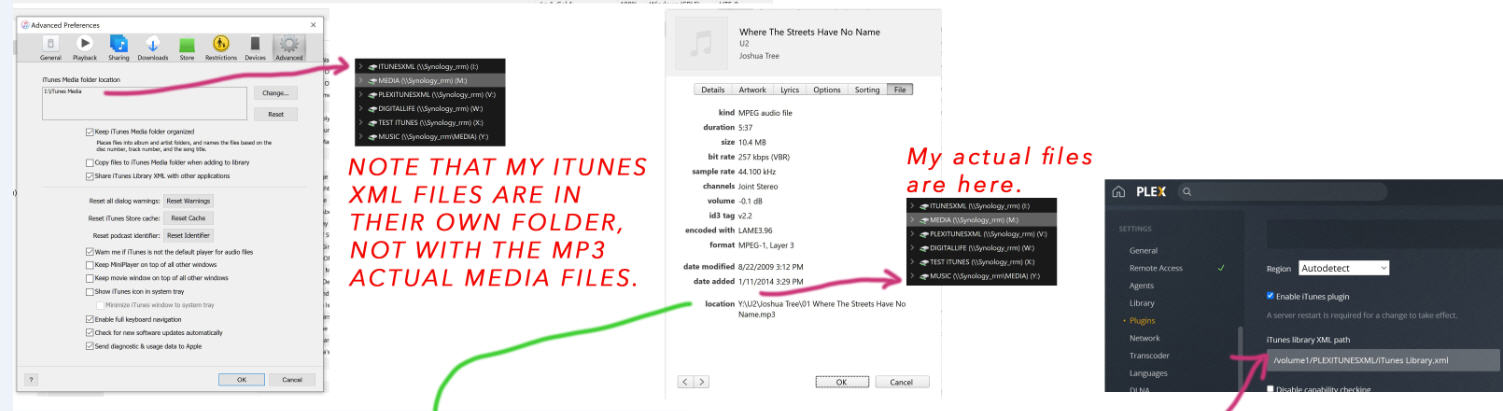
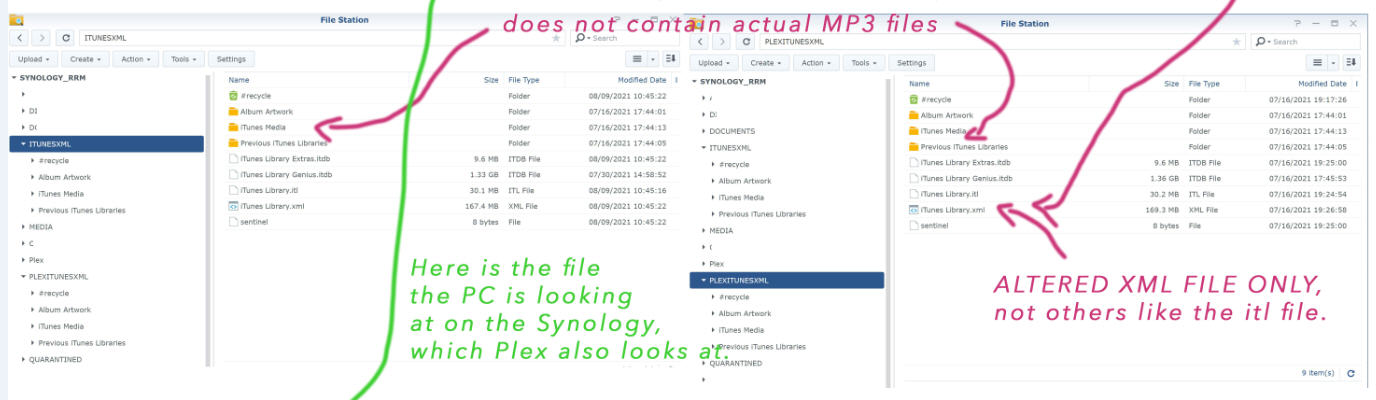
Per the question, I set iTunes Preferences/Media folder location to be "\\Volume1\Music" (which is my NAS). Songs in my library that are located there play just fine. iTunes sees the songs obviously. But every time I close iTunes (and/or shut off my computer and then open iTunes again), it keeps defaulting back to the C: drive iTunes Music folder. It's like it can't find or see the NAS. Odd, since the NAS is always on.


I've searched all over and I cannot find an answer so I'm hoping the community can provide help here.


I posted this question the other day but it was deleted for some reason so I'm re-adding it.


[Re-Titled by Moderator]

Posted on Jul 31, 2021 12:32 PM

Reply

Similar questions

178 replies

Aug 6, 2021 10:27 AM in response to turingtest2

Should I remove that file from my NAS then? I don't see that file in any of the C:/ MyMusic/iTunes folders for either library, though I do see a "Playlist" folder from the main Music folder, and a file called: untitledplaylist.wpl. I have no idea how the playlist file I asked you about got on the NAS. Maybe it was created by my NAS?


One forum says you have to:

  1. Put XML in a folder Plex does not scan
  2. Remove the <keylibrary>%20 from the XML file for the folder location?

I think that is what he meant. Here's his comment on that:

I did NOT tell you to replace every single space in the xml file with %20. You only need to do that with the file path. So maybe the file path and not Library as I highlighted above?


The guy also said in the XML path on Plex to use forward slashes. I was using \\volume1\music1 so I will change to /volume1/music (only one forward slash to start). I didn't think this was an issue but maybe it is?


I'm trying as hard as I can and having your input is invaluable. Thank you SO much.

Thoughts?

Aug 6, 2021 2:26 PM in response to William Richards3

I don't think you need to edit the highlighted line, as far as I can tell that declares that there is one library (media) folder. My guess is you have to edit the line a couple above that starts with <key>Location</key>, but for every track. What might confuse the Plex server running on the NAS is the reference to localhost. Replacing localhost with nothing wherever it appears in the XML might make something that is acceptable to Plex. You can see that in the <Location>strings the XML version is already using forward slashes as it uses the file://<somepath> form rather than the Windows standard, so there is no need to change the slashes.


tt2

Aug 6, 2021 5:58 PM in response to turingtest2

I'm pretty sure they're saying I need to eliminate the %20's in the song file location. I'll update that once I hear back from the forum Plex Ninja.

I'm sure you're right on the localhost. Makes total sense.

I did a quick test and used the find/replace option.

It ended up with:

>file:/volume1/music1/Al%20Stewart/


Would that be correct? "file:/volume1/music1/.....

Only one forward slash in front of volume1?


I did, find:

//localhost/

and replaced with nothing


It ended up with this:

file:////volume1/music1/Al%20Green/L


So the original XML line was:

file://localhost//volume1/music1/Al%20Stewart/


So I removed the two forward slashes, then localhost, then one of the two forward slashes after host.


Would that be correct?


And as far as the %20, I'll let you know, but the guy did definitely say to do that.


Thanks for being there. I appreciate it so, so much!


Thanks!!

Aug 7, 2021 12:12 PM in response to William Richards3

Yes, I think you are overthinking it.


I don't know for certain as I haven't tried to make this work, but I would assume you do a standard global search and replace where you replace localhost// with nothing throughout the XML in a single action.


The contents of smart playlists are determined by rule sets which Plex won't know how to handle, and from what you've reported actually cause it problems. You can remove all smart playlists, and perhaps playlist folders too, from the library that you're going to try to use with Plex. That way the XML will already be clear, or you manually excise the smart playlist data if you can make sense of the XML structure and can easily see what to remove.


tt2

Aug 9, 2021 1:24 PM in response to turingtest2

I don't really understand that, but as long as it works, hey, that's all that matters, right?!


I have noticed this for a while now and wonder if you have any insight. I archive a lot of things (captures) and I see I saved this from my desktop:


That was from before. And this would seem to jive with my volume1 setup kind of now? But now it never shows the volume1. Only the DS720. Do you know what that would be? Or what it means? Is there any inherent problem that I might have that I'm unaware of because of this as it relates to the work I'm doing?


Thanks.

Aug 9, 2021 3:57 PM in response to turingtest2

Quick question, do you think Plex would have trouble reading playlists with special characters in them such as those examples below? These are actual playlists from my iTunes....


-pre-1984 1 rating

#1 songs on the charts (I-TOUCH)

1967-79 (4-5*)(Am/CR)

A 4-Rating

AAA-SUMMER !!! redone mixing bunch

AM Pop (63-71) 4 &5

Beatles-/*****


I just tried to find some playlists I named that have these various characters. Or do you think I should go through and rename the ones with any special characters? It would literally be a day or two of work maybe as there's hundreds, but I'd rather make sure they're right.


Thanks!

Aug 11, 2021 1:12 PM in response to William Richards3

If my XML file for the Y: mapped drive shows this:


<key>Music Folder</key><string>file://localhost/Y:/MUSIC/</string>


And the song shows:

<key>Location</key><string>file://localhost/Y:/MUSIC/Beach%20Boys/Little%20Duece%20Coupe/Beach%20Boys%20-%20409.m4a</string>


And I want to change the song file to "....localhost/volume1/music....", do I also change the Music Folder location to this volume1/music as well?


And on the Plex forum, the guy shared his XML to get the feature working for importing playlists but he doesn't have "Music Folder" in the top portion of his XML. I've asked him why but so far, no answer.


I just thought I'd give the Y mapped drive another try to see if I can get the feature working with that one again knowing some newer information than I had before.


Any thoughts?


THANKS!

Aug 11, 2021 1:48 PM in response to William Richards3

Hi,


You've probably seen this page before, but it looks like a fairly comprehensive guide.

https://alistairphillips.com/2020/12/31/import-itunes-apple-music-into-plex/

It knocks my assumption about getting rid of localhost out of the way.


Following the guide it seems you need to edit the XML so you end up with paths of the form: file://localhost/volume1/Media/Music/<The rest of your path> and then the edited XML goes into:

volume1/Media/Music/, after which you can enable the plugin and import playlists from the XML via

Playlists > Import from iTunes.


tt2


Aug 12, 2021 2:02 PM in response to turingtest2

This guy from the forum (outside of it) exchanged this with me:


ME: Is your ITL and XML, Artwork and other folders iTunes creates when it is installed, still in the C: drive  Music/My Music folder on your desktop?

HIM: NO I told Itunes to create those files on my I partition. I explained this, bill, I told you I did that so that the path would be ALMOST the same as what I thought Plex would need with only a minor change in the path.

HIM: When I created my brand new iTunes library from my PC what I did was I told it to create the iTunes library on that I partition, it could have been anywhere but I put it on the Synology purposely so I could see the path. 

HIM: I manually copied the same structure of my music library DIRECTLY to the Synology. So, Itunes only had to create a NEW (identical) library to reindex it (in that mapped folder on my synology - also known to you as my I drive).


Huh? I'm lost. He said he created a partition, " I ", and MOVED his iTunes library to a folder called iTUNESXML. How can he keep the metadata/playlists intact, and how does iTunes program even open if you move it from you C: drive - unless I misunderstand him. Remember, this is all so that PLEX can see the XML files and then playlists feature to import into Plex will work.


Another comment I'm confused by:

HIM: You are confusing mapping of drives. You don’t see :”MUSIC” in the location for Y, because Y maps it FROM the music drive, in other words, we are already sitting INSIDE the music folder, i,e, you might say the MUSIC FOLDER = Y:

The mapping of my PC is IRRELEVANT!!! you need only concern yourself with the SYNOLOGY. So, stop asking questions about mapping. THE ONLY THING important about mapping is related to the file path that itunes creates and you must edit so that Plex knows its local/on the synology. 


Here's a layout of how he explained himself. There's a lot of missing pieces in my opinion. I appreciate he's trying to help, but I just don't get it.
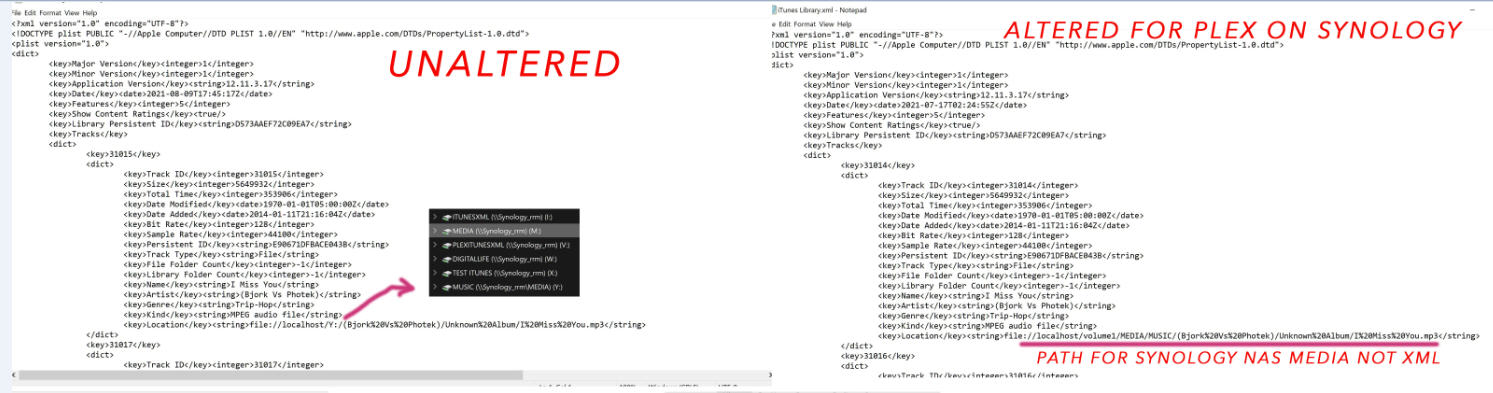

If you have any thoughts, that's great, but I understand if you don't. Deeply appreciate it.

Aug 12, 2021 2:28 PM in response to William Richards3

And this is how he started he says:


HIM: I was going from a Mac with media attached to a Drobo, to the Synology, but I went reconstructed the itunes library on a windows 10 machine with the latest itunes (which contained my playlists) and then went from there.


ME: So he apparently installed iTunes as a brand new installation? Not sure how all the metadata and playlists stuff didn't get lost or screwed up.


IDK, again, very frustrated. It shouldn't be this hard.


Thanks for any feedback you can provide.

Aug 12, 2021 2:39 PM in response to William Richards3

His reply to me Yes/No questions. Maybe this will help you help me?


How about this to yes/no to these questions:

1. On your desktop, do you have a Music/My Music/ iTunes folder containing the ITL, XML, Artwork etc. files and folders on your C drive, as would be the normal place most non-techie users would find them.

NO 

2. If not, you "moved" those to a partition you created called "I"

YES 

3. Also if there are no folders on C related to iTunes, does your iTunes program still open on your desktop because it now is finding these folders/files for iTunes on that partition.

YES 

4. The NAS has an ITUNESXML folder and all the files on "I" are in that folder.  That folder on the NAS is only a backup for safety.

YES 


  a. The NAS also has a folder called PLEXITUNESXML - and that folder has the updated "Volume1" XML file as well as the other files.

EDITED XML, YES. 

5. All your playlists, song files, etc., remained intact when you moved this.

YES 

6. Your music resides on your mapped Y drive. 

ITUNES thinks so. For Synology/Plex, it is on itself. 

  a. There are no folders on that drive, only the Artists with their respective Albums.

NO. each artist is a folder and each album therein is a folder. 

7. On your NAS you created two folders: MEDIA/MUSIC

MUSIC folder is IN the MEDIA FOLDER

8. You copied your music from the "I" drive to the MEDIA - sub-folder of "MUSIC".

NO. 

8. Your XML was modified to point to volume1 and added the MEDIA/MUSIC to the path

YES 

If you could explain this a bit more, or perhaps in a slightly different way?....

I manually copied the same structure of my music library DIRECTLY to the Synology. So, Itunes only had to create a NEW (identical) library to reindex it (in that mapped folder on my synology - also known to you as my I drive).


I copied alll of my mp3 music files from one drive (consider it a plugged in external drive) directly to my Synology. 

This thread has been closed by the system or the community team. You may vote for any posts you find helpful, or search the Community for additional answers.

My iTunes preferences/media folder location keeps going to default

Welcome to Apple Support Community
A forum where Apple customers help each other with their products. Get started with your Apple Account.