My iTunes preferences/media folder location keeps going to default

Per the question, I set iTunes Preferences/Media folder location to be "\\Volume1\Music" (which is my NAS). Songs in my library that are located there play just fine. iTunes sees the songs obviously. But every time I close iTunes (and/or shut off my computer and then open iTunes again), it keeps defaulting back to the C: drive iTunes Music folder. It's like it can't find or see the NAS. Odd, since the NAS is always on.


I've searched all over and I cannot find an answer so I'm hoping the community can provide help here.


I posted this question the other day but it was deleted for some reason so I'm re-adding it.


[Re-Titled by Moderator]

Posted on Jul 31, 2021 12:32 PM

Reply

Similar questions

178 replies

Oct 4, 2021 10:41 AM in response to turingtest2

On your Sgt. Pepper example, I'm not making those kinds of changes. And if I did, they would be very minimal. Further, the tracks in one library are 99.9% the same in the other as it was a clone.


Here's an example of what I'm seeing. First, the original MP3 song which was in the original library. As you recall, the songs were scattered among a variety of folders and not in the proper structure (Artist/Album) - which they now are. As part of the work, I used various scripts and ended up with this proper structure. As well, I used the Export/Import script so that the lossless version replaced the MP3 but the metadata should have been there. Sadly, I never checked, or perhaps those I did check had it on as this is not on all tracks (missing fields). Here's the original in Windows Explorer in the folder it was in.
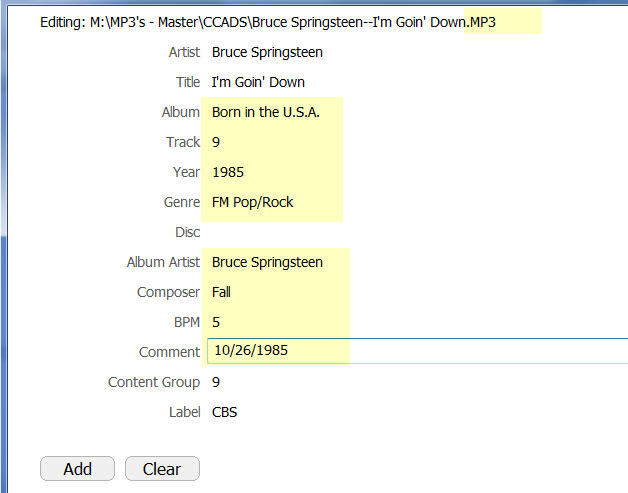

And now here's the Lossless version of the song in Windows Explorer now after using E/I.
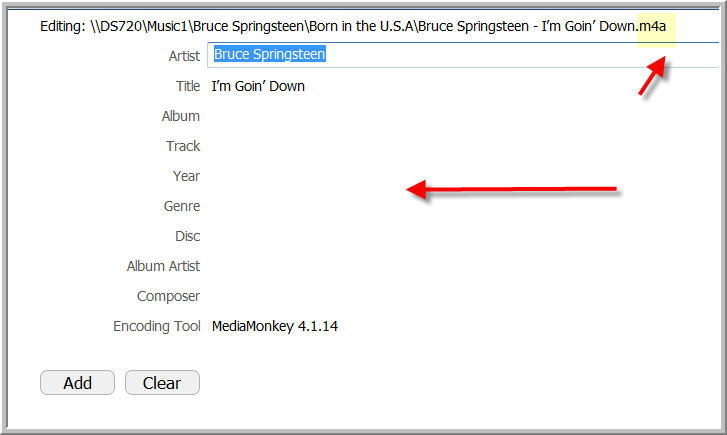

I don't understand how the data was lost? Now I did create a new iTunes library (Volume1), but I kept the mapped drive (Y:) with the Artist/Album music as well and have checked there and the data is missing as well on songs such as the example above.


So I'm perplexed as to how the data was lost. It appears that maybe a bug in E/I script at some point? (You'll recall you made several updates along the way so maybe something happened there?). Or maybe it is in the registry as you pointed out to try but my gut still says that's not the issue.


So I'm at a point where I've spent several days putting this data back on songs manually and am only up to maybe the mid-B's (Artist) so it will take weeks to update these songs. It's very frustrating since the data was there to begin with.


I noticed also that there are a lot of MP3 files that I didn't have the CD files to convert to lossless are missing the Album Artist or other fields - but I don't think many of those had Album Artist on them so that makes sense. That was a later application of metadata when discovering that Plex uses Album Artist first for some reason. But it still doesn't explain the loss of other data such as the capture above.


My original library is the mapped Y: drive as I said. I cloned that library but used a script to change the location to Volume1. The original library points to the mapped drive and the volume1 (main one I use now) is pointed to the NAS.


I did try using E/I this morning on a song to see if moving the same song (without all the data) in and out might work, but as predicted, it didn't work.


Something fairly significant happened in some step along the way to lose data on some, not all, songs. And the data that's lost might only be the Album Artist for example, whereas other songs, like the capture above, lost everything but Artist/Title.


Is there a script you have that can somehow take the data in iTunes when you view "Get Info" and confirm that the data is there, and somehow "write" that to Windows Exp.? Or perhaps some other trick you know that might work? Something that forces it in there or am I simply going to have to bite the bullet and go through all these one by one?


THANKS!!!



Oct 4, 2021 10:52 AM in response to turingtest2

turingtest2 wrote:

The iTunes Store stopped applying DRM in late 2009 if I recall correctly. Content purchased before that date remains in your purchase history unless removed by the rights holders. It will still be delivered in 128K protected AAC format. You can burn that to audio CD and rip back for a small loss of quality. For a while there was an upgrade scheme that allowed you to pay a fee to upgrade to 256K DRM-free versions but that no longer exists. Those with an iTunes Match subscription can have their purchases matched, remove the local copies, then download a 256K DRM-free version of the previously purchased tracks. These copies can be freely used thereafter but don't upgrade the copy in the purchase history. I've replaced all of mine where possible and then hidden the original purchases to avoid confusion. The odd track I couldn't replace that way I burned to CD and ripped back.
tt2

Unfortunately I don't have Music Match and don't anticipate doing so as I want MY versions of songs. As I understand it, if iTunes has "Beatles - Hey Jude" and sees it in my library, it will replace my version with theirs. Aside from the basic song itself, when I burned all my CDs years ago, I used "remove trailing silence" on my program so that my songs fade out but don't have the usual 2-4 seconds like a normal CD burn has. Aside from that, if using the Crossfade is applied, it is something I don't like. My playback from song-to-song therefore, is quite like listening to a radio station but without Crossfade. It's especially helpful when you have songs with a Cold ending (if you know what I mean). With crossfade applied, that gets very ugly (and the ending of songs are lost).

If there's a way to get Music Match for just those songs, that would be great but I doubt it's applied that way. Or maybe I could create a third library (and maybe just have those songs?) and get Music Match for those and then turn MM off?


I did go through and make a playlist of the iTunes purchased songs (somewhere around 110 songs) and burned that playlist to CD. Then made lossless versions of them. I suppose I could repurchase those at some point but don't plan on it anytime soon. And these songs are now in Plex. (Plex didn't even import the DRM versions).


Thanks!

Oct 4, 2021 11:05 AM in response to turingtest2

YOU SAID: As noted previously Plex does not write data back to tags. The corrections should be made in iTunes which does update the tag, then the updated content can be refreshed in Plex.


ME: The iTunes album titles are nearly all correct for the affected missing albums. What's missing is the data in Windows Explorer. For the few missing titles in iTunes, I noticed if I either entered it in iTunes, or entered it in Windows, it would populate one or the other if you following. Meaning that if I had a missing album title in iTunes and entered it, it automatically showed up in Windows Exp (where it was missing before). Conversely, if I entered it in Windows first, it would show up in iTunes.


YOU SAID: Again, update in iTunes, this should then show in Windows Explorer and when refreshed in Plex. In the unlikely event that updates to metadata in iTunes for mp3 files aren't reflected in Windows Explorer see my notes on multiple tags in Repair security permissions for iTunes for Windows - Apple Community.


ME: Once it shows up in Windows Exp (no matter which entry was made per my comments directly above), and I refreshed the metadata in Plex, it would come through. As for the Repair security permissions, I clicked the Volume1 library and have gotten this far but am not sure I'm on the right field?


Oct 4, 2021 11:10 AM in response to turingtest2

I'd sure appreciate it if this could be done. Perhaps taking the Export/Import in some fashion but tweaking it so songs stay but data is copied again onto the songs?

ExportImport can be used on the same set of songs the data was exported from without replacing them, although it shouldn't normally be necessary. It is only mp3 files with multiple tags, or no tag at all, where updating in iTunes might not get reflected in Windows Explorer.

tt2

I'm not clear on your reply here. What I tested was this scenario:

  1. Song is missing some metadata (but not missing in iTunes)
  2. I highlighted the song in iTunes and ran E/I
  3. I then moved the song out of the folder it was in and then moved it back
  4. I did the second step in E/I but nothing changed. The metadata was still missing.


Is that what you mean?


To your question on whether it's just MP3 songs still in iTunes that lost data now in Windows Exp., I would say that it's heavily on that side but not limited to just MP3. There are many songs that were converted from .wav to Lossless and then used to replace the MP3 (that had data on them). I'm not sure the percentage but I'd say it probably is more accurate to say that quite a large number of MP3s are missing some or even all data outside Artist/Title (and even some are missing those). I haven't come across a Lossless version that missed even Artist/Title.

Oct 4, 2021 11:32 AM in response to turingtest2

YOU SAID: Me either, unless it is simply the case that Windows Explorer doesn't know how to read the tag of an Apple Lossless file. The tag might be there but not processed by Windows Explorer. To determine it was actually missing you'd need another product that can read tags from AAC/ALAC files.


ME: Do you mean another ID3 tagging program that can read tags of AAC/ALAC files? Here's another one I use. The same missing elements in Windows Exp. are missing here:


And another (media monkey)


Or do you mean another program all together?


And I'm pointing out again that if it's not in Windows Exp., Plex won't bring it in it appears. Here's six songs in Plex. Notice that the song "I'm Going Down" is missing.


Oddly, I checked the other (mapped Y: drive) library I still have in Plex and it shows the song even though that ID3 metadata is missing in the mapped drive folder list of artist/albums:


Oddly (or maybe not), I added the missing data to the song (I'm Going Down). I didn't refresh metadata or scan library files in Plex. I simply switched from the MUSIC (mapped Y) library in Plex to the Volume1 Music1 library and it now shows up. So just like if I fill in a missing field in iTunes, W Exp picks it up and vice versa.


YOU SAID: If the data is present in iTunes, and is present in Plex, I don't think it is too important what you get to see in Windows Explorer. Are you sure this is a real problem of missing metadata rather than a display issue in Explorer?


ME: I would say with near 100% certainty that the display is correct in Explorer. As evidenced here, any time missing data is put in, it gets picked up in Windows (though the edit on this specific post was done in Windows) so that would be logical.


So I guess I'm back to trying to find a way to get Windows Exp. to recognize the data in iTunes.


YOU SAID: ExportImport can be used on the same set of songs the data was exported from without replacing them, although it shouldn't normally be necessary. It is only mp3 files with multiple tags, or no tag at all, where updating in iTunes might not get reflected in Windows Explorer.


ME: Could you clarify that? If the data on a song isn't complete in Explorer right now, then moving the song out and back in won't bring the data in as I tested earlier today. It would take more work to find the original file for each missing data on a song and trying to manipulate that somehow than it would to just enter the data by hand as I've been doing.


THOUGHTS?

Oct 4, 2021 12:43 PM in response to turingtest2

turingtest2 wrote:

ExportImport with the option Force=True (line 145) should rewrite all exported metadata back into the track tags when running in import mode. It can be run on a selection in export mode, and then immediately run again in import mode.

I made the change to line 145 to Force=True. I ran the script as follows:


  1. Highlighted the song in iTunes that had the data
  2. I ran the first part of the script and it did the usual message window showing properties copied (1 track record was processed and 40 properties were exported).
  3. I then dragged the export .txt file on top of the new E/I script with the changed line and it showed this message:


I checked and it had put the asterisk on the song title in iTunes (it wasn't there before I ran the E/I scripting) and if I said Yes, then it showed another odd screen I've not seen before so I canceled it.


Should I be dragging the song out of the folder and back in before dragging the .txt file on top of it? I'm not sure what to do.


Please advise. And THANKS as always!


t2


Oct 4, 2021 1:15 PM in response to William Richards3

I discovered that if I said "NO" and waited a short time, then it would fill in the data so I think this worked.

I tested several other songs and that's the trick (to say NO) when it asks the question on the first screen (to skip further tracing).


So since many of these titles are missing only Album Artist, I thought I'd test to see if this script would work across different artists/albums but it threw an error and no data was written in Windows Explorer. Shouldn't I be able to run the E/I across multiple artists or different albums from the same artist? Or won't that work?


Having the script does speed things up some, but I was hoping that (after proving it worked) I would be able to do 50 or so titles at a time where I would just highlight the songs (whether they had data or not - I don't know unless I went through one-by-one). Do you understand what I want to do? The arduous part is going through the artists and album(s) one at a time to see what's missing. My hope is I could just highlight a number of songs and run the script and it would leave alone what didn't need to be added, and add what did need to (if any).


Please let me know. But this is a great help even at this. But with the Artist Album which is the one field that is most missing on many, many songs, I am still having to go through Explorer one at a time to open.


THOUGHTS?

Oct 4, 2021 1:44 PM in response to William Richards3

Hi,


Line 126 Tracing=False should stop you getting the first prompt. Those are screens I use when troubleshooting issues with the script and I should really have changed that line before uploading, or commented out all of the tracing lines.


The script should work with a selection on export, and then import and update the same set of files. You can comment out various lines in the Action subroutine below line 202 so that you only export values that might need updating, which will improve the speed of the import phase. The Force=True option rewrites each exported value as <Value>* and then <Value> which takes time, but should in principle mean that the value gets written out to the tag.


tt2

Oct 4, 2021 1:44 PM in response to turingtest2

Before I test that, I noticed when running the updated script when selecting two different artists, somehow it has lost the sort order of the song. Here's the song. It sorts with the number artist (e.g. 5th Dimension, 98 Degrees) whether I sort the column once or multiple times:


And so here you see it missing in the sort of artists where it is not showing properly. I'm testing on a few titles just to see how this all works.


I didn't see this when I only selected a single song, or multiple songs from an artist and one album where some metadata was missing. Is there something in the script that needs updating, or perhaps I can't select more than an artist or songs within an album at a time? As I said, I had hoped I could highlight like 50 titles and run the script and then drag it back over the script as works with a single song or artist/album as I've tested so far.

Oct 4, 2021 1:59 PM in response to William Richards3

I removed those and ran the script again and it put them back on the song!

I also see it's not on the file after removing it once again but the sort order is still messed up in iTunes.


Hmmmm. So I finally went to iTunes / Get Info / Sorting tab and see it snuck it in there.


But it does seem to have come from running the script across two different artists.


THOUGHTS?

Oct 4, 2021 2:14 PM in response to turingtest2

Quick update, when I run the script with a file that's MP3 and ALAC (one song of each, from a different artist and album), I get an error such as this. But I can also get an error just on one MP3 file. It seems sort of hit and miss. I tried using just the line 145 script edit as well as the 126 and 145 together in a script edit of version 27 you had in our exchange.


I did two ALAC files at once and it worked okay. I can't say whether it would always happen that way or not. And I noticed sometimes that even if I get the error it might fill in one of the missing metadata in windows before it errors out.


THOUGHTS?

Oct 4, 2021 3:26 PM in response to turingtest2

YOU SAID: You can comment out various lines in the Action subroutine below line 202 so that you only export values that might need updating, which will improve the speed of the import phase.


ME: How do I comment out a line I don't need to have it check? Is it "rem" ? I don't know which to put in front of the lines such as these at 202, etc...


' Comment out details you want to omit, remove the quote to include

WriteLine "<Location>" & .Location ' Won't export a path for missing tracks

WriteLine "<DateAdded>" & .DateAdded

WriteLine "<Name>" & .Name

WriteLine "<SortName>" & SortValue(.Name,.SortName)


BACK TO THE SCRIPT testing - I have successfully done 187 tracks of various artists, albums/songs. I received no errors.


I'm nearly certain that the error messages were caused by me having the artist/song that I was testing (like one or two songs at a time) highlighted in Windows Explorer. I've done more and more songs (did about 6-10 songs a few times and then this big 187 song script test) (Of course I backed everything up first), and it worked great so I'm pretty hopeful that would continue while doing a larger batch of songs. I think for songs that already had data that were among the 187 songs, it left that data in-place, while replacing the missing metadata on the rest of the fields/songs.


I believe you've solved this -YET AGAIN! - and will save me probably a good couple of weeks.


I do need to remark out the fields I don't care about as it took nearly 10 minutes to run the script on just 187 songs. So please let me know how to do it.


THANKS!!!

Oct 4, 2021 3:46 PM in response to William Richards3

You can add a single quote mark at the start of an active line to make it a comment. For most of the action script below line 202 it is one line to export one property. Don't adjust the last section where artwork is exported. That is controlled earlier on andis the end of the customisable section.


Having Windows Explorer actively inspecting properties might prevent them being changed by iTunes.


tt2

This thread has been closed by the system or the community team. You may vote for any posts you find helpful, or search the Community for additional answers.

My iTunes preferences/media folder location keeps going to default

Welcome to Apple Support Community
A forum where Apple customers help each other with their products. Get started with your Apple Account.
