
iMovie vs Monterey - major problems
iMovie does not work if you upgrade to Monterey. Be forewarned! I opened a ticket and it is a known problem. Ugh! Must wait for new update either Monterey or iMovie app. Please Apple, you're better than this.
iMovie does not work if you upgrade to Monterey. Be forewarned! I opened a ticket and it is a known problem. Ugh! Must wait for new update either Monterey or iMovie app. Please Apple, you're better than this.
My iMovie library would not open as well. I reset my preferences and then reopened iMovie. A status bar appeared saying it was backing up library. It finally opened after about 1/2 hour. I have a 2.2TB library.
Reset iMovie
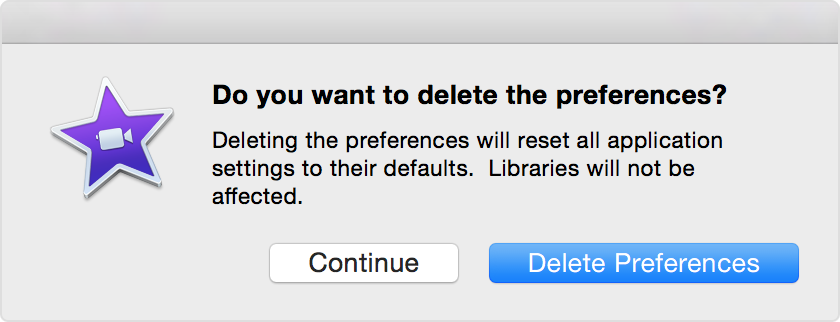
iMovie will reset your preferences and open with default settings.
My iMovie library would not open as well. I reset my preferences and then reopened iMovie. A status bar appeared saying it was backing up library. It finally opened after about 1/2 hour. I have a 2.2TB library.
Reset iMovie
iMovie will reset your preferences and open with default settings.
I cannot tell what version of iMovie. Apple said a new one is coming out. I have a ticket open. The problems are rtm808 in this thread described.
Good new to anyone who has this problem. I was able to open iMovie and have it "validating iMovie library" for about 1/2 hour. Then I opened one of my movie projects (another 1/2 hour) and I finally had access. Exported it as a file and will transfer to another Mac without Monterey. Oh yeah, it also allowed me to work on the movie project. Be patient until it's fixed.
The contributors on this forum are consumers just like yourself. We have no input into the design or functioning of Apple's software. You can communicate directly to Apple at the link below:
https://www.apple.com/feedback/imovie.html
Sorry to hear of all the problems that the folks on this thread have been experiencing.
-- Rich
Started a thread here too. I can't open projects in my iMovie library -- gets stuck on "Loading" with the spinning beach ball. Assuming that's the same thing you're seeing, I'm actually glad to hear that it's a known problem, so it's not just me...
I was using iMovie 10.3 (the version that came out a week or two before Monterey) under Big Sur without issues, so my guess is that it's something to do with Monterey.
Deleting preferences has no effect whatsoever on projects.
They are completely separate.
You may have to navigate to them and re-open them but they will still be on your computer.
A few hours ago iMovie 10.3.1 was available and may or may not help the problems.
Final Cut Pro has also received an update which has solved its similar troubles.
I found this out the hard way myself. IMovie does not work with Monterey. It's to go to another system. I have been so use to iMovie I hated to switch...Adobe Premier here I come.
Yes there is an update in the App Store and this issue is resolved for the most part. I think it’s still slightly slow compared to previous versions. But it’s fully usable now with the update.
I left mine in the "Loading..." stage for a few hours. Did my errands away from the computer (which eliminated the temptation to Force Quit). When I came back, it was usable.
Something is definitely broken, but it doesn't seem like anything has been permanently corrupted or lost. My biggest worry was that my impatience and impulsiveness to Force Quite the app when it appeared to be stuck caused permanent corruption.
I don't know if the problems we're experiencing are related to the memory leaks that others reported in certain apps, but I'm hoping Apple will have a fix out soon...
I have iMovie 10.3 (latest version) and I've found that when I open it, it can take a while to validate the library - and it seems to have to validate the library every time I open it.
Then it takes a while to open a project. I'll click on a project and a message will pop up that it's loading something completely unrelated to the project I'm trying to open and then nothing. A second or third click on the project will finally get it open.
Then dragging stuff into the timeline can take a few attempts before it will actually place it in the timeline. Click, drag, release will result in nothing on the first few attempts. If I click, drag and hold for several seconds over the time line it will finally insert the item.
But once I get it to accept one new item into the time line it seems to work okay for the rest of the time I'm using it on that project. However, once I shut it down and then reopen it, it starts with these same problems all over again. Very frustrating to say the least. Switching to a new project will also result in the same problems with trying to open the project and add items to the time line.
I’ve been lucky, I guess. After then initial delay in loading (which can be hours on my larger library), it seems to work with normal intervals after that. It’s taking about the same amount of time to export a 30 minute movie.
For now, I’m hobbling along with a new library file and forgoing using some of my earlier movie assets in the large library that takes hours to open.
I don’t have a ticket open with Apple; I know at least one other person mentioned having one. Just haven’t had the time to do it, but I know the drill: no ticket means the problem doesn’t exist for Apple.
When I started this experience, I was having delays of 30s to a minute (or longer) every time I was loading something or moving the editing cursor. The spinning beachball would eventually go away, except when I quit (then I had to force quit). I could edit, but I couldn't see the sound waveforms below the video. I reset the NVRAM and the SMC. I deleted the old iMovie and reinstalled. I started a new iMovie library and that seemed to help speed things up a bit. Detached the audio on my project and it just shows me diagonal stripes where the waveforms should be, as if it were trying to render the waveforms, but not getting it. Could really use that update!
I upload as a file on my desktop then from there upload to YouTube. Mine is an hour long in length. No problems once it's saved as a desktop file.
You might find that Adobe Premier won't work, either. No guarantee.
Be patient. If it is a Monterey problem, you can expect that Apple will fix it shortly. They are not going to just trash iMovie.
-- Rich
iMovie 10.3 moving slower than molasses on a winter day on Monterey, plus it takes hours to load a project to a file and the file is sometimes corrupted - problem due to a corrupted project. Please hurry with the fix!!!!!
Hi Rich. I'm having the same error and the application essentially won't respond at all - I have had to force quit each time and send the appropriate error logging through. I even tried deleting the application and reloading and it didn't make a difference. Just says validating library but never does anything
iMovie vs Monterey - major problems





