It's not required that you have an apple id on your mac. Will be more of a hassle to run without an apple id. Could re-install and not use an apple id. First order of business is Etrecheck.
I recommend etrecheck to assist in sorting out issues.
I'd run etrecheck. Etrecheck will analyze your machine and software and generate a report. Post results here so others can view. Experienced users have found the reported information useful when diagnosing problems. The proprietary stuff in the report gets filtered.
Install and run
-- Download etrecheck. Goto the EtreCheck download page. The download link is at the bottom of the screen
-- Install etrecheck. Goto your download folder. Double click on EtreCheckPro.zip
-- Drag the app to the application folder if you wish.
-- Turn on full disk access for EtreCheck. This was how macos used to work. Do it for etrecheck not avast as in the instructions.
Enabling Full Disk Access in macOS Mojave (10.14) and higher | Official Avast Support
-- Double click on etrecheck to run. The first five runs are free.
An alternative explanation how to install, run and report output for the EtreCheck Application
Using EtreCheck to Troubleshoot Potential… - Apple Community
Explanation of EtreCheck output by etresoft, the author.
Using EtreCheck - Apple Community
How to report etrecheck data.
1) Run etrecheck 😎 [ see above ].
2) When the report is done, click on the Export icon.
3) click on "Copy report" to copy to the clipboard
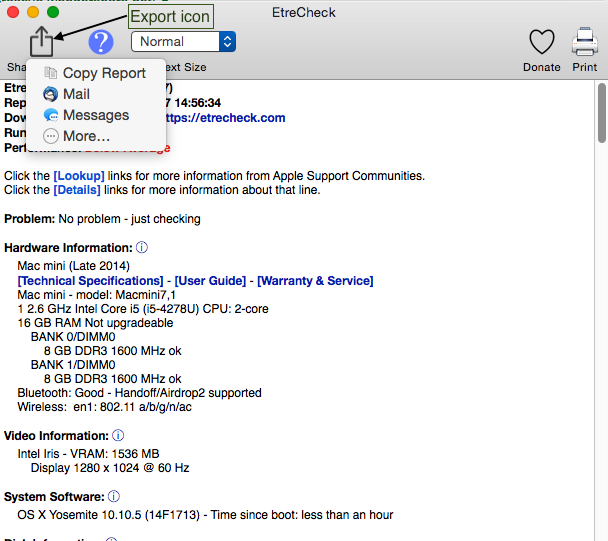
What to do with your report
4) Get back in your web browser and access your discussion. etc.
5) click on Additional text icon

which results in...
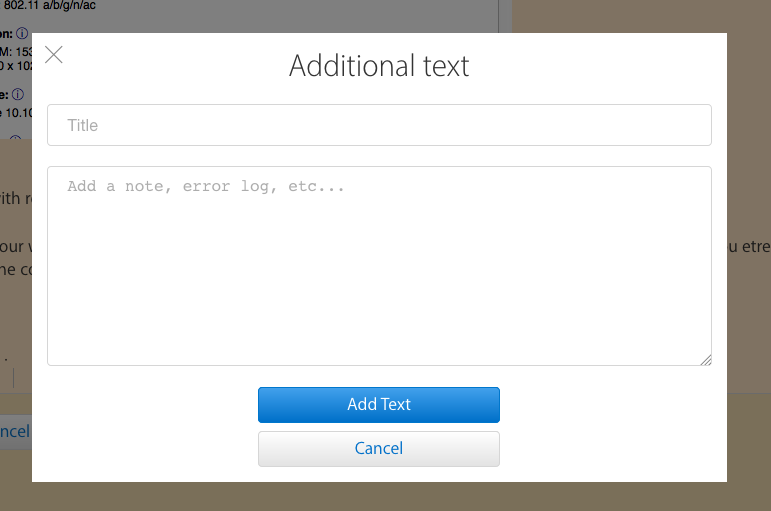
6) Paste your report and fill in a title.
7) click on "Add Text" button
8) post your post by clicking on reply or update
Robert
PS. You may also post on pastebin.com and post a link here.

