
requestarefund.com does not show my subscription in question

the POF app is nothing short of a scam. Every time I try utilizing the app there's nothing but married people and actual middle east scammers demanding I talk to them off POF to ask for money to come and marry me. I've reported it every time to POf, who doesn't care, and if I can't get Apple to notice this and provide a refund, my only recourse is to report the fraud to my credit card company.


It's highly disturbing that the requestarefund.com has such a disability as to not be effective.

iPhone 6, iOS 12

Posted on Mar 20, 2022 8:16 PM

Reply
Question marked as Top-ranking reply

Posted on Mar 22, 2022 8:07 AM

Hi missesaw,


Thank you for posting to Apple Support Communities. If you're experiencing an issue with this specific app, you can reach out to the app developer for assistance. These steps should help:


"Contact the developer of an iOS, iPadOS, or watchOS app

  1. Open the App Store on your iPhone, iPad, or iPod touch.
  2. Search for the app, then tap it. If you can't find it, tap the account button  or your photo at the top of the screen, tap Purchased, tap "Not on this [device]," then tap the app.
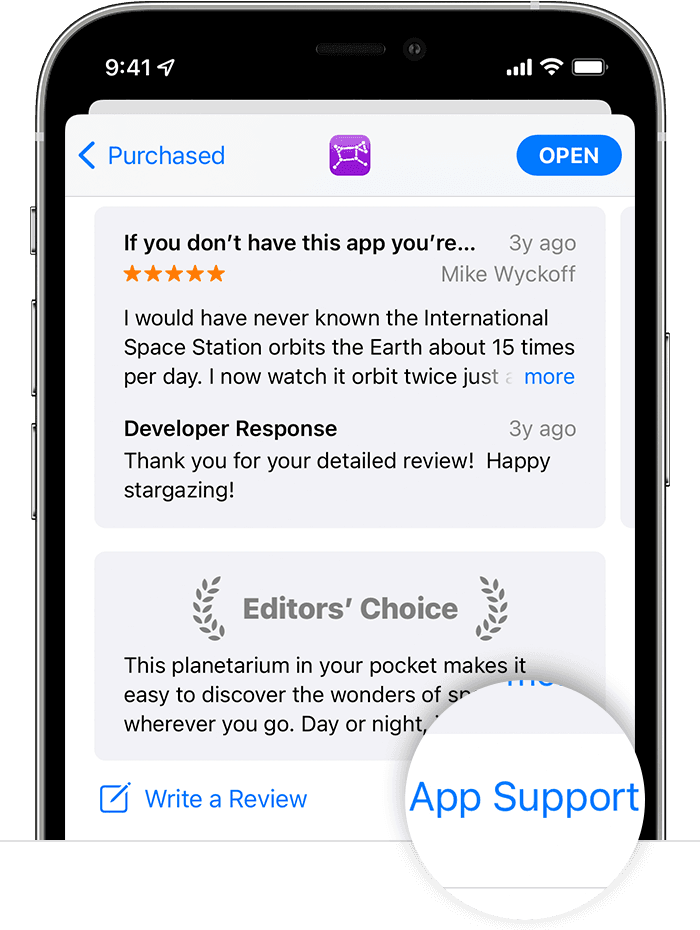
  3. The app's product page appears. Scroll to the Ratings & Reviews section, then tap App Support. If you don't see App Support, make sure that you're signed in with the correct Apple ID.

In the App Store on iPhone, the App Support button is at the bottom of the app's page."


How to contact an app developer


If more help is needed, reach out to Apple directly: Contact Apple Support


Cheers.

Similar questions

1 reply
Question marked as Top-ranking reply

Mar 22, 2022 8:07 AM in response to missesaw

Hi missesaw,


Thank you for posting to Apple Support Communities. If you're experiencing an issue with this specific app, you can reach out to the app developer for assistance. These steps should help:


"Contact the developer of an iOS, iPadOS, or watchOS app

  1. Open the App Store on your iPhone, iPad, or iPod touch.
  2. Search for the app, then tap it. If you can't find it, tap the account button  or your photo at the top of the screen, tap Purchased, tap "Not on this [device]," then tap the app.
  3. The app's product page appears. Scroll to the Ratings & Reviews section, then tap App Support. If you don't see App Support, make sure that you're signed in with the correct Apple ID.

In the App Store on iPhone, the App Support button is at the bottom of the app's page."


How to contact an app developer


If more help is needed, reach out to Apple directly: Contact Apple Support


Cheers.

This thread has been closed by the system or the community team. You may vote for any posts you find helpful, or search the Community for additional answers.

requestarefund.com does not show my subscription in question

Welcome to Apple Support Community
A forum where Apple customers help each other with their products. Get started with your Apple Account.