Disk Utility OS X

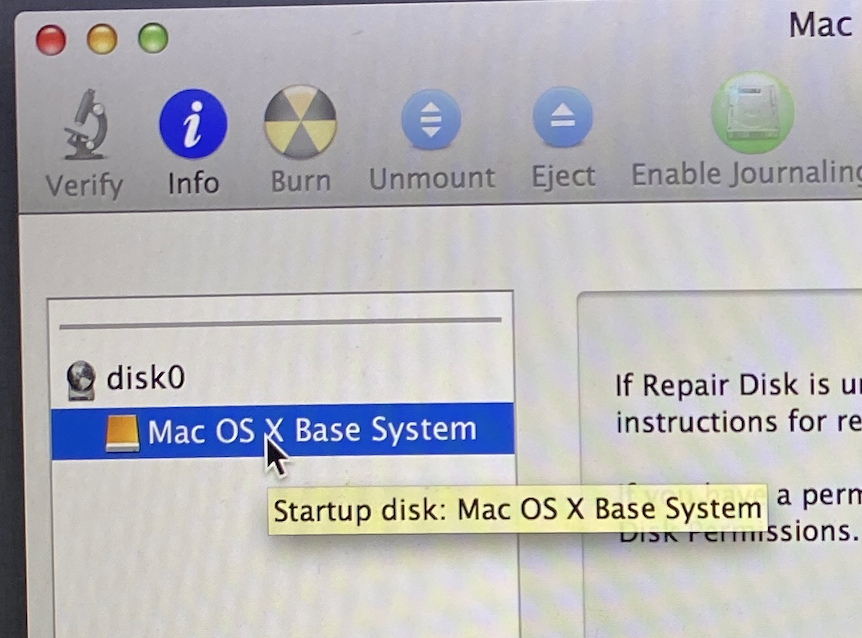
im trying to start up my macbook but when i do a white folder starts blinking so i turn it off and turn it back on using command and R, so i went to disk utility and it wont let me repair it or touch any button, i can reinstall os x or do anything, can anyone please help.
MacBook Pro

Posted on Apr 15, 2022 11:37 AM

Reply
Question marked as Top-ranking reply

Posted on Apr 15, 2022 1:09 PM

fifty11 wrote:

im trying to start up my macbook but when i do a white folder starts blinking so i turn it off and turn it back on using command and R, so i went to disk utility and it wont let me repair it or touch any button, i can reinstall os x or do anything, can anyone please help.


OSX Base Sytem is the Recovery partition.


See if under View..

DiskUtility>VIew>Show All Devices


If you do not see your HD here, I suspect your drive has failed..


Boot into Recover or Internet Recovery (Option Command R) and from the dropdown menu: Utilities>  Disk Utility> run the First Aid on your Macintosh HD (and the "Macintosh HD-Data" volume as well if Catalina/Big Sur/Monterey) If errors are found and repaired, run again until no errors reported.


Disk Utility>View>Show All Devices The best sequence is —

• Volume level

• Container level

• Parent drive


How to reinstall macOS

Recovery (both M1 and Intel) — How to reinstall macOS - Apple Support


Similar questions

1 reply
Question marked as Top-ranking reply

Apr 15, 2022 1:09 PM in response to fifty11

fifty11 wrote:

im trying to start up my macbook but when i do a white folder starts blinking so i turn it off and turn it back on using command and R, so i went to disk utility and it wont let me repair it or touch any button, i can reinstall os x or do anything, can anyone please help.


OSX Base Sytem is the Recovery partition.


See if under View..

DiskUtility>VIew>Show All Devices


If you do not see your HD here, I suspect your drive has failed..


Boot into Recover or Internet Recovery (Option Command R) and from the dropdown menu: Utilities>  Disk Utility> run the First Aid on your Macintosh HD (and the "Macintosh HD-Data" volume as well if Catalina/Big Sur/Monterey) If errors are found and repaired, run again until no errors reported.


Disk Utility>View>Show All Devices The best sequence is —

• Volume level

• Container level

• Parent drive


How to reinstall macOS

Recovery (both M1 and Intel) — How to reinstall macOS - Apple Support



This thread has been closed by the system or the community team. You may vote for any posts you find helpful, or search the Community for additional answers.

Disk Utility OS X

Welcome to Apple Support Community
A forum where Apple customers help each other with their products. Get started with your Apple Account.