HDMI adapter, prime video and iOS16…NOT working.

Anyone else having issues playing videos now after upgrading to iOS16 using the HDMI adapter? Tubi doesn’t work. Amazon doesn’t work. It plays but as if it’s in slow motion. Videos I purchased play just fine.


any help or ideas are greatly appreciated!

iPhone XS Max

Posted on Sep 13, 2022 3:29 PM

Reply
Question marked as Top-ranking reply

Posted on Oct 24, 2022 6:50 AM

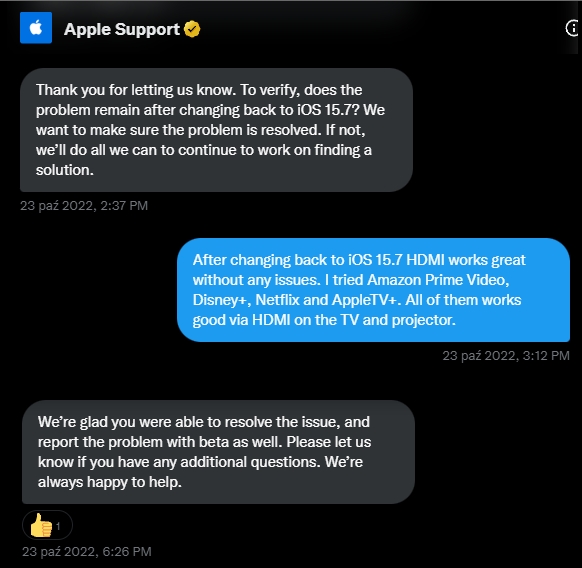
Great news, sort of. Thanks for checking. I had contacted Apple by phone in early October and they first blamed the problem on my TV and then second on the apps. Clearly it is an ios problem or firmware problem or lack of communication with app developers problem. Looks like they now think it is firmware.


Until its fixed if you're desperate and if you have an iPad on 15.7 or alternatively buy an old refurbished iPad, iPhone 8 or SE (about $150 on Amazon), download all the streaming apps and use it with the HDMI adapter while using your real phone as a hot spot to connect it to the internet. You just have to make sure the refurbished iPhone has ios 13.4 - 15.7 on it (Hulu requires 13.4 and Pluto 13.0 and Peacock 13.?). I'm doing this with my iPad that's still on 15.7.


200 replies

Dec 2, 2022 1:30 PM in response to LeverG

I’m really convinced that the issue is about drm management because :

  • no issue if you watch trailers
  • no issue if you watch an homemade video from photo app
  • no issue if using the hdmi adapter connected to a pc monitor using hdmi (I guess monitor doesn’t manage drm)


as soon as you are trying to watch drm video on a tv or videoprojector you are facing that issue !


Oct 23, 2022 1:56 PM in response to WESiii

I just spent about an hour on the phone with support. I explained the problems everyone’s been having and that Apple hasn’t responded to these questions. After resetting my network settings, countless questions about prime video, this and that, they ended up telling me that I’m not the only one having the problem and they are working on a firmware update to resolve the issue. They could’ve led with that.

Oct 10, 2022 2:40 PM in response to Sox1991

New iOS 16.0.3 version available

installed but no changes. I’m still having issue with some Apple TV original content.

im wondering if it could be a drm issue.


i tried to changed the hdmi receiver (usually screeneo videoprojector) : using a Dell screen, it works fine.


it looks like the hdmi adapter can’t recognise my videoprojector as hdcp valid receiver and the video is blocked.


im fed up with this stupid issue that is directly linked to iOS 16 upgrade !

Dec 21, 2022 1:33 AM in response to Hitahen

Ok! So I also tried to connect to a computer monitor after trying my smart tv and still did not work! And…. I haven’t upgraded to ios 16 yet I’m at 15.6.1… So, who knows! I guess you have to use the HDCP/HDMI Splitter connector in order for this to work, although I haven’t tried it but from what I’ve researched it’s the way to go. So that’s it! Hope everybody reads all of these postings so nobody has to keep saying my connection doesn’t work! Lol

Happy hunting people!

And Merry Christmas/Happy Hanukah and Happy New Year Everybody!🎄🕍

Jan 14, 2023 12:58 PM in response to bether69

How … fascinating ((sarcastic euphemism)), that they claimed an issue was resolved by undergoing a stage of diagnosis.


By confirming that it operates seamlessly on iOS 15.7 after downgrading from iOS 16 (that is, any version of iOS16), we have a proven **diagnostic** method to show that **iOS 16 is in need of serious revision, in order to fundamentally operate with at least the same functionality**, efficacy, performance, and reliability **as it’s preceding operating system**.


This **user-safety-compromising band-aid** does **not** present **a solution** to the customer.


But instead, it **clearly illustrates** — via demonstration — **a problem (worth immediate attention and remediation) to Apple.**


That again: the reply from apple is literally an admission of failure.


A failure of Apple’s current (and secure updated) Apple-signed and Apple-certified firmware — iOS 16 — to fundamentally operate with their current Apple-made and Apple-Certified Adaptor.


Their reply should have been “Thank you for clarifying the iOS-16-originating defect with regard to our current firmware operating with our current accessory — an accessory upon which many customers rely. Clearly this is due to iOS 16, as illustrated, and it is not an issue brought upon by any individual streaming application. This is our mistake, and we will attenuate it in accordance with immediate reporting, and action to repair our issue, for which we take ownership, given the direct correlation and demonstrated causation between the iOS 16 update and its respective failure to accommodate to our Lightning-to-HDMI adaptor’s most basic functionality. We will escalate this issue to our firmware team and we aim to officially resolve it within an update soon to be released. Thank you for the attention you brought to this matter.”


That would be a company with humility, like apple used to have. But in these replies of “resolution” — (bandaid without resolution or statement of reform to attenuate a permanent fix, which would be a resolution … by definition of the word resolution) — demonstrating forced blindness (via hubris) when it comes to a their absence of adaptability, and negligence to the most basic functionality of operating with baseline continuity of firmware-to-accessory functionality — illustrated by consumer needs — and demonstrated by user diagnosis — demanded by consumer masses.


Not to mention, it’s the opposite of a resolution, because everyone doing this iOS downgrade — everyone who so desperately in need of functionality of their **apple certified** lightning to HDMI adapter — is willing to compromise their essential security of firmware — backing up and restoring their phones to a less secure, no-longer-signed-by-Apple iOS operating system**, for the sake of making their **Apple -certified-and-Apple-made accessory** work.


We are their body of consumers demanding, illustrating, demonstrating, and diagnosing a problem on our own accord, to put a temporary bandaid on the issue we are presenting to Apple, en masse.


And apple fails to realize we

are diagnosing the integral pivotal common denominator of defective firmware being the cause for defective functionality of their own devices that they expect and advertise to work seamlessly (as they did before updating to iOS 16). We are compromising our security by foregoing all modern security updates inherently present within each iOS 16 update, to simply make their own company’s certified and previously-seamlessly-operating HDMI-Lightning adaptor function, at all. They call that a resolution. That is a bandaid and a diagnosis that presents a problem, not a cure that resolves the problem in any functional manner whatsoever.


Apple:


Please stop turning a blind eye to an inherent overlook and misstep, and instead, progressively attenuate the problem instead of pretending that regression is a resolution, since that makes no sense. We are diagnosing a problem, not resolving it, by admitting apple’s new iOS is a failure. By calling this downgrade a resolution, Apple is literally admitting that their failures amount to resolutions, to the degree of customers needing to compromise their own iOS devices’ most essential firmware security — not to mention, diagnose it on our own, as opposed to Apple doing the heavy lifting. They are not lifting anything. We are still bearing the weight, and they are — time and time again — operating under the guise that everything works now, in response to us showing them precisely how and why everything presented does not work at all. And with that, Apple is refusing to resolve anything, tipping their hats, denying fault, and walking away.


[Edited by Moderator]

Oct 9, 2022 2:07 PM in response to may1clay

Same thing with me. Before the iOS 16 update, everything worked fine since then I’ve had issues with Amazon prime video Xfinity streaming, Hulu, not getting any audio and slow pixelated video. The lightning to HDMI connector works fine with Netflix, YouTube, HBO max but not Amazon prime, or Xfinity streaming. Very frustrating but I hope they fix it with the next iOS update for 16.3.

Dec 2, 2022 2:03 PM in response to Thibault-fr

yeah, i think this is the case because my adapter works fine on youtube and some safari websites but i face that issue when i try to stream through this site called “criterion” which is very strict about their drm. you can’t even stream their content on their app through the adapter, you have to use the browser version of their site. before i updated to ios 16 all my streaming worked perfectly but as soon as i updated, i started facing this issue only on that particular site. that’s all i have reference for since i don’t use netflix/amazon etc.

Dec 13, 2022 6:50 AM in response to WESiii

Same here. Use apple branded lighting to HDMI to watch tv on my boat and since updating to iOS 16 Hulu, Discovery+, and Paramount+ won’t play properly on any tv. Tried several different adapters on several TVs and same issue. No sound and slow and jumping picture. Worked fine for years until iOS 16 update. Tried rebooting phone, reloading apps, and nothing works. Plays fine on the phone or iPad.


This thread has been closed by the system or the community team. You may vote for any posts you find helpful, or search the Community for additional answers.

HDMI adapter, prime video and iOS16…NOT working.

Welcome to Apple Support Community
A forum where Apple customers help each other with their products. Get started with your Apple Account.
