Swipe-up no longer shows the same features/functions on Apple Watch after the update

I just updated my Apple Watch 10 to watchOS 10.0.1 The swiping motions on the watch now bring different 'option' panels. "Swipe-up" no longer shows the same functions (battery %, vibrate phone, theater mode, etc). Where can I learn how to control my watch with OS 10?


[Re-Titled by Moderator]

Posted on Sep 23, 2023 1:37 PM

Reply
Question marked as Top-ranking reply

Posted on Sep 24, 2023 9:19 AM

You can open the Tips app (orange background light bulb) on your watch and it will guide you through this and other changes made to the operating system. The guides in that app cover the main things you'll likely be looking to do.

264 replies

Jan 26, 2024 11:30 AM in response to rbarb111

rbarb111

Did anyone find a solution for this? I ping my phone with the swipe up method 10 times a day. I can't even find that feature after the update. Pressing the side button does not give me the same screen of shortcuts. Where did it go?

"Hey Siri, Find my iPhone"


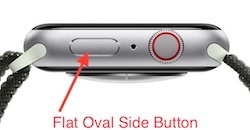
The previous Control Center swipe-up has moved to a quick press and release of the flat oval side button
Use Control Center on Apple Watch - Apple Support


DO NOT hold the button, as that brings up Emergency services and the power off icon.


Control Center should then show you the iPhone ping icon (find my iPhone), Battery percentage, Flashlight, Water Lock, Airplane mode, Alarm silence, Theater mode, and all the other Control Center services.


An alternate way to get some of the Control Center services is:


"Hey Siri, find my iPhone"

"Hey Siri, Flashlight"

"Hey Siri, Battery"

"Hey Siri, Airplane mode"

Getting the press and release timing just right can be an issue. You can make it more reliable by changing:


Settings -> Accessibility -> Side Button Click Speed


“Side Button Click Speed” can adjust the press and release timing, so you get the Control Center display every time. Adjusting The "Side Button Click Speed" is also useful for Apple Pay’s double press and release. There is “Default” (sub second timing of needed), “Slow” (up to a second between press and release), and “Slowest” (up to 2 seconds between press and release). I like the “Slow” setting.


NOTE: Slow and Slowest settings do not mean you have to wait a full second or 2 seconds between press and release. It just means you do not need to be super fast.


Nov 29, 2023 6:51 PM in response to Cobggirl

Cobggirl wrote:

Absolutely agree! I won't update anymore either. Its so annoying not to have the swipe function. Last update on the phone was awful too.

I don't know why Apple can't just update technology and LEAVE Formatting and Layout alone!!

Tap the flat oval side button

https://support.apple.com/guide/watch/control-center-apd06bc15da1/watchos


You can send Apple your feedback via

https://www.apple.com/feedback/watch


The more users send feedback, the more likely it will be seen by a decision maker.

Dec 12, 2023 8:59 PM in response to makowalski

makowalski wrote:

I finally got the side button to work to bring up the missing functions, but it is inconvenient since it also too easily triggers the SOS function.

Adjust the


Settings-> Accessibility-> Side Button Click Speed


I like Slow. My Wire likes Slowest. These settings give you more grace with how fast you press and release.


They also make it easier to reliably do the double press and release that brings up Apple Pay.

May 21, 2024 7:05 AM in response to mollyfromgold coast

mollyfromgold coast wrote:

My swipe up on my watch was so easy to see battery life and silent mode etc now it won’t work since I did the upgrade. How can I get it back.

Yes! Your “press the oval side button” is EVEN EASIER than swipe up! And it doesn’t require a watch face to be displayed, like swipe up required, so you can even use it with other apps like Workout or Music.

Dec 1, 2023 6:56 AM in response to Bebe1102

Bebe1102 wrote:

What genius at Apple messed up the most convenient part of the watch? I’m so frustrated! I used the swipe up multiple times a day, especially to quickly find my phone, the sound was much louder than the find my iPhone ping sound. As well as checking battery life and turning on the DND feature. If there is a work around for that, they need to give us a better heads up. I’ve been reading through the tips but it’s not helpful for what I want. The update was terrible!

Did you read this thread? All of those features you want are still there. All you need to do is press the flat oval button next to the Digital Crown.

Mar 4, 2024 4:15 AM in response to Kelly1818Jones

Kelly1818Jones wrote:

can you downgrade to an older version? I don’t see if anyone answered you . I would like to downgrade my watch too .

Downgrade is not possible.


What’s new in Apple Watch and watchOS 10 - Apple Support


Apple does not read this user-to-user technical support forum for feedback.


But you can send Apple feedback via:

Feedback - Watch - Apple


If enough users send feedback, it is more likely a decision maker will see it, and maybe take action.


May 21, 2024 7:10 AM in response to IdrisSeabright

IdrisSeabright wrote:


BobHarris wrote:

Finally, tap the very top edge of the watch face, will also bring up Control Center.
I have not found this to be true on my watch unless I have a timer running. What am I doing wrong?

Sometimes I get my calendar events, most times the Control Center. If on a different watch face it all depends on what complications are near the top left/right side of the screen.


But no, it is not 100%.


The flat oval side button is 100%, especially if you slow down the side button press duration.

This thread has been closed by the system or the community team. You may vote for any posts you find helpful, or search the Community for additional answers.

Swipe-up no longer shows the same features/functions on Apple Watch after the update

Welcome to Apple Support Community
A forum where Apple customers help each other with their products. Get started with your Apple Account.


