Beats Studio pro 2023 static noice in left ear (with anc)

Hello, about a month after buying the headphones, static noise started in the left earphone when the noise cancelling was turned on. When I turn off the noise - the sound disappears.


Please tell me what can be done? This static noise very annoying to me…


Posted on Oct 1, 2023 5:49 AM

Reply
Question marked as Top-ranking reply

Posted on Oct 3, 2023 7:09 AM

Hello Avt0bus,


Thank you for reaching out to Apple Support Communities, and we'll be happy to help in any way we can. We understand you're having issues with static noise in your left Beats Studio Pro. Try resetting them as described here to see if that resolves the issue: Reset your Beats on-ear or over-ear headphones - Apple Support


"Reset Beats Studio Pro, Studio, or Studio Wireless

  1. Press and hold the power button for 10 seconds.
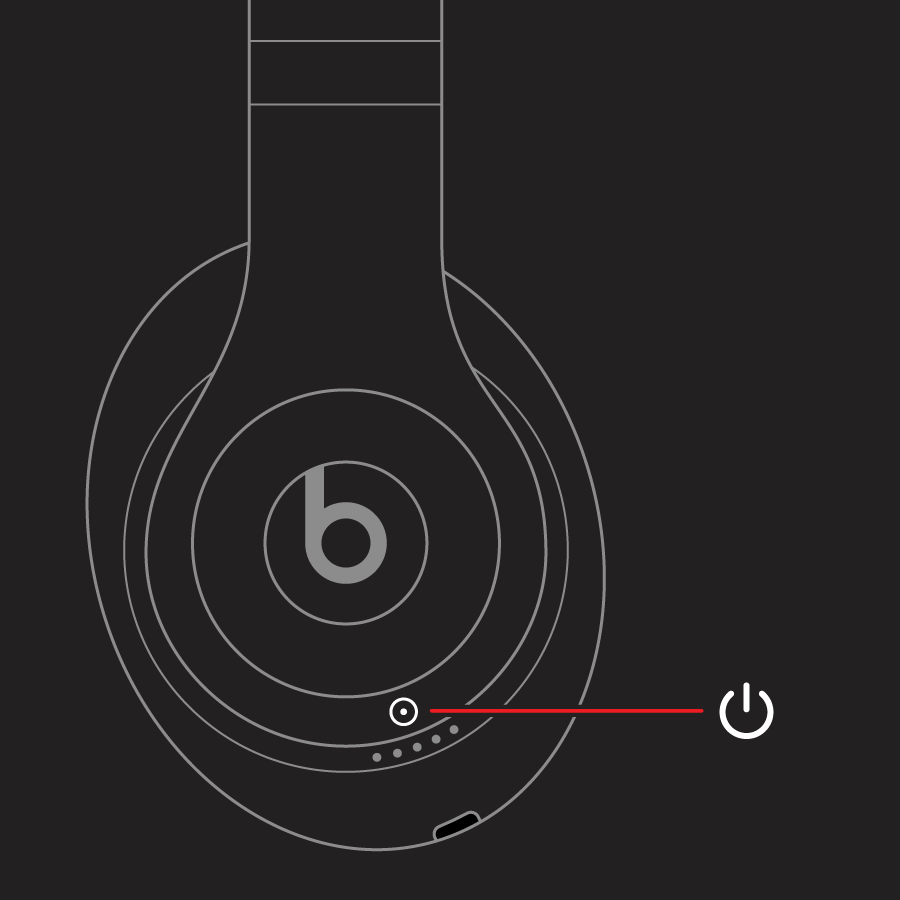
  2. Release the power button.
  3. All of the Fuel Gauge LEDs blink white, then one LED blinks red. This sequence happens three times. When the lights stop flashing, your headphones are reset.

Your Studios will automatically power on after a successful reset."


We hope this helps.


Cheers!


88 replies

This thread has been closed by the system or the community team. You may vote for any posts you find helpful, or search the Community for additional answers.

Beats Studio pro 2023 static noice in left ear (with anc)

Welcome to Apple Support Community
A forum where Apple customers help each other with their products. Get started with your Apple Account.
