Copy Paste from Google Sheets to Numbers not working

I am copying 4 columns and about 30 rows.


When I paste the strangest thing happens. Only the first column appears, but with empty rows between each line, starting with 4 empty rows, then 5 empty rows, then 6 empty rows, and at 9 empty rows the data stops completely.


None of the other columns paste whatsoever.


I found a workaround by pasting to Excel, then copy and paste again back into Numbers.


[Edited by Moderator]

MacBook Pro 13″, macOS 14.0

Posted on Oct 11, 2023 6:27 AM

Reply
Question marked as Top-ranking reply

Posted on Oct 20, 2023 11:25 AM

After copying from Google sheet, switch to Numbers but make sure no table is selected. Just do a Paste, it will create a brand-new table and usually data is correctly laid out. If that data has to be put into a larger existing table you can then copy from that new table into the other one.


If some conversions are not correct (like your decimal separator is different than in the imported data) you can select the table and adjust import parameters in Format / Table / Adjust import rules.

Similar questions

19 replies
Question marked as Top-ranking reply

Oct 20, 2023 11:25 AM in response to AaronWinsor

After copying from Google sheet, switch to Numbers but make sure no table is selected. Just do a Paste, it will create a brand-new table and usually data is correctly laid out. If that data has to be put into a larger existing table you can then copy from that new table into the other one.


If some conversions are not correct (like your decimal separator is different than in the imported data) you can select the table and adjust import parameters in Format / Table / Adjust import rules.

Nov 14, 2023 4:28 PM in response to AaronWinsor

As I explained before (October 20th) you can skip the trip to Excel. In Numbers, click in the white space outside any table then paste. It will create a brand-new table where data is usually correctly laid out. You can keep a scratch pad Numbers file on the side if you don't want to paste into your main file.


It might a bug in the way Numbers interprets the content of the clipboard, we'll see if it's fixed in future releases. Or it could be Google that doesn't put the right data.


I have one of those Clipboard extenders that keep a log of everything that is copied, the very old ClipMenu. If I use it to paste, data comes up correctly laid out, but just the data, no cell formatting at all.

Nov 28, 2023 7:53 AM in response to lucastherrien

I've struggled with this since last week, ever since I upgraded to Sonoma 14


For months I have been able to copy data tables in Google sheets and add them to my Numbers files, ongoing spreadsheets. Nothing else changed just this software update.


The fastest workaround I have used today:

copy data in Google sheets

paste into new note, on mac notes app


Copy that table from notes, into your numbers and it works well.

I hope that helps your data.

Cheers.


Dec 5, 2023 8:30 AM in response to AaronWinsor

I encountered identical issues with copying and pasting from Google Sheets to Numbers following recent updates. I discovered a workaround by utilizing a free third-party app called "Get Plain Text," available on the App Store. This app features a convenient shortcut and toggle that automatically converts clipboard text into plain text, resolving the formatting issues when pasting into Numbers. Give it a try; it might help streamline your copy-paste process.

Dec 11, 2023 11:34 PM in response to AaronWinsor

For me also since around the time I moved to Sonoma, I've no longer been able to copy and pasted in the expected way from Google Sheets to Numbers or to Notes. I have workarounds though.


He's my demo Google Sheet:


For some context, pasting that into TextWrangler shows TSV formatting (3 lines with two tab separators on each line).


With Notes app, a paste of a rectangle of cells from Sheets into body format used to make a nice table, but now it makes a strange set of 1x1 tables (one for each copied cell, but with a value only in the first one). See the first part of this screenshot:
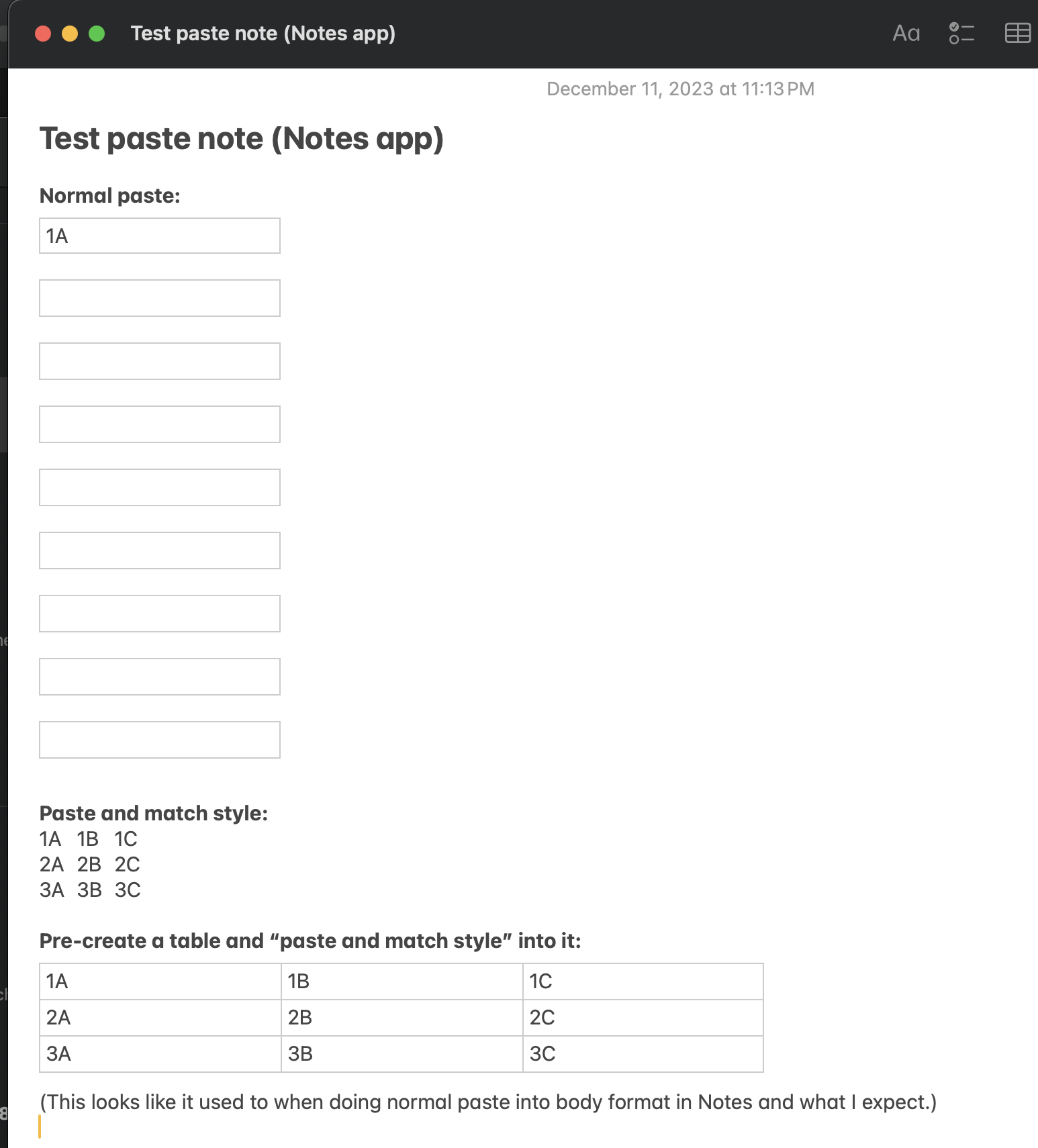
The workaround I just found is to create an empty table in Notes (can be undersized), the do a paste into that as shown at the bottom of that screenshot (there is an error in the screenshot, it is a normal paste into the table, not a paste and match style).


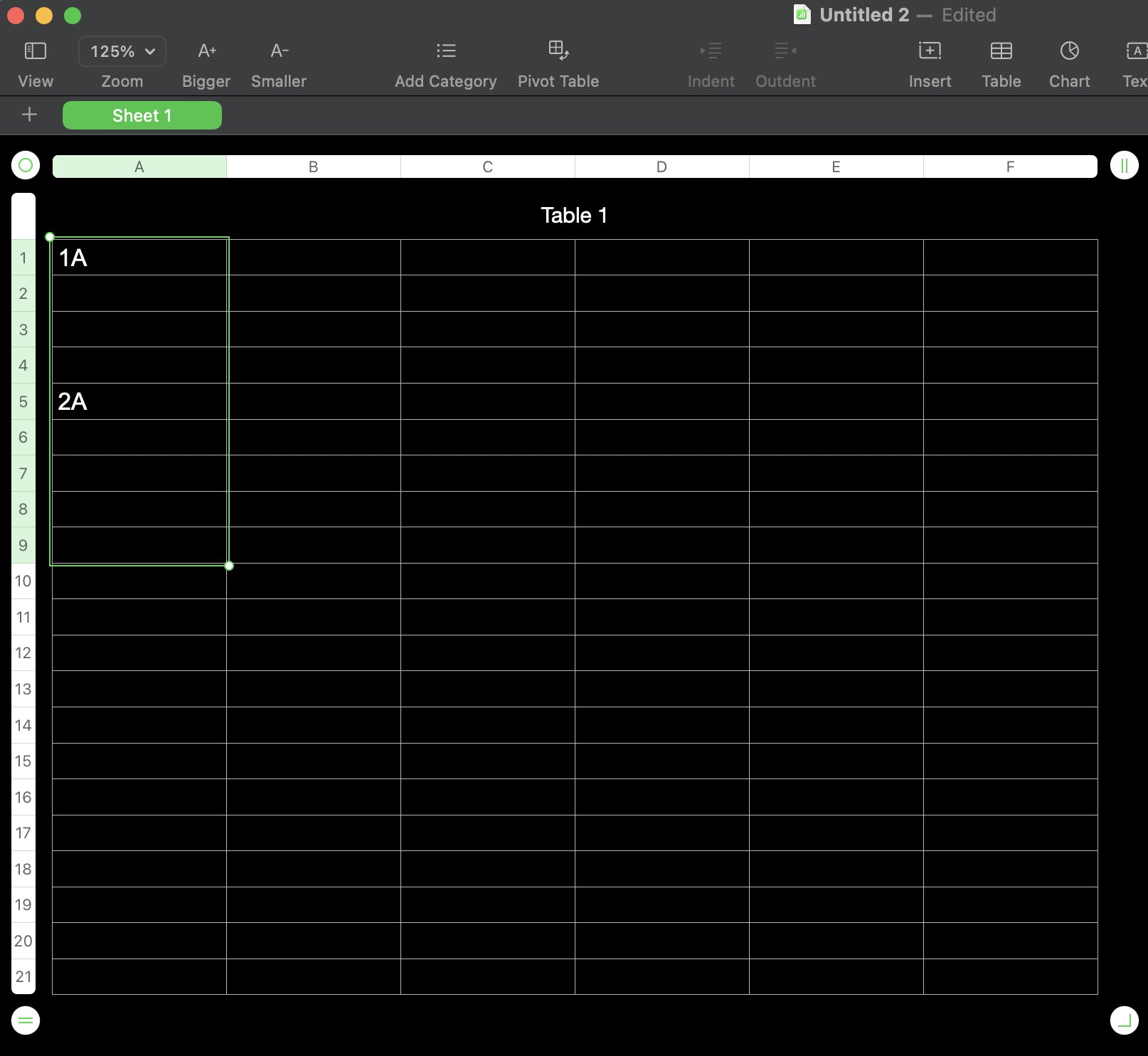
This is pasting those same 9 cells into Numbers, when cell A1 in a table was selected:
It gets even stranger when pasting this when no table is selected:
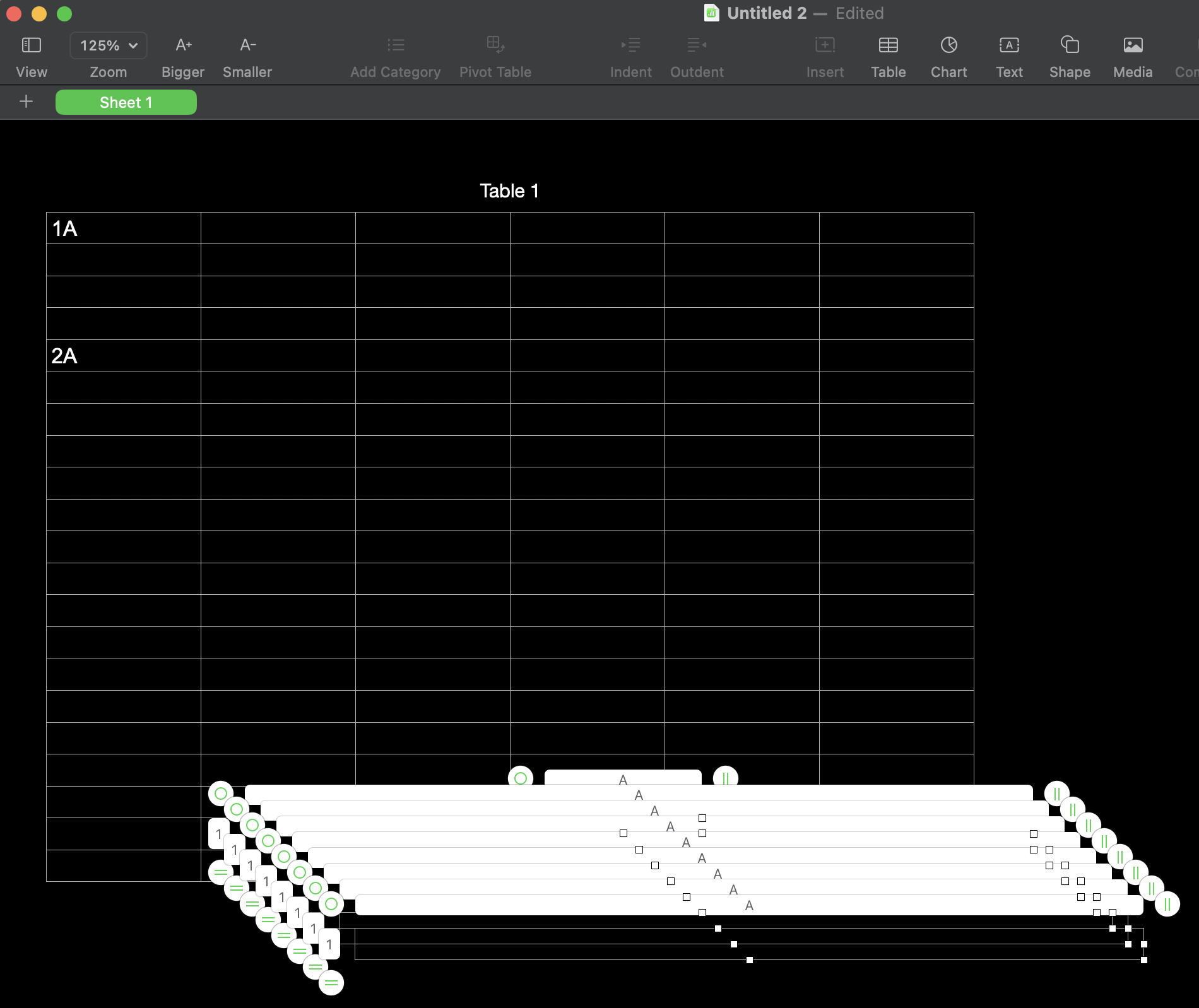
(9 new 1x1 tables were added.)

Workaround: use the workaround for the paste into Notes, then copy and paste from Notes into Numbers. Bit painful.


I don't think anything changed in Sheets, just that there are some kinks in the way Notes and Numbers handle it the paste with the new OS update.



Dec 4, 2023 1:11 AM in response to AaronWinsor

Same here. Super frustrating.


If you have the file on your iCloud, you can still paste into a browser version of apple numbers. It's not any quicker than the other suggestions here - just something I figured out while trouble shooting this.


Best option, as someone else suggested, is to not have any cells selected as you paste into numbers (Click off the table). This will paste a whole new table onto the sheet which thankfully, behaves as you'd expect it to.

Nov 14, 2023 3:29 PM in response to 1ssmith

I have been copying data from Google Sheets for years. I am only having issues with pasting to Numbers and it only just started happening. A few updates later and same problem. Presently I am pasting to Excel then copy and paste again from excel to numbers. Since I can't replicate the issue in any other software it seems reasonable to look to numbers as the problem

This thread has been closed by the system or the community team. You may vote for any posts you find helpful, or search the Community for additional answers.

Copy Paste from Google Sheets to Numbers not working

Welcome to Apple Support Community
A forum where Apple customers help each other with their products. Get started with your Apple Account.
