Pages to ePub conversion

In 2023 I created an ePub document, and published it in Apple Books, in fixed layout, including end notes, created in Pages. My end note numbers appeared in the resulting text body where they should. Now I have done the same thing today in the same formats, from a different Pages document, and there are no end note numbers (I've not published). I am on Ventura 13.6.2 with a 2023 MacBook Pro M2 computer. The recorded end note numbers in the back of the book appear, since this is in fixed layout and are being considered just text. Both of these were Word > Pages > ePub. Why isn't this working, this time?

MacBook Pro (M2 Pro, 2023)

Posted on Feb 11, 2024 10:08 AM

Reply

Similar questions

44 replies

Feb 12, 2024 10:02 AM in response to VikingOSX

Hello again. Yes, both Word versions (last year and this) were from the same Office for Mac version 16.81. Yes, both Pages versions were from Pages version 13.2. The font on both Word and Pages documents (all 4) was Times New Roman throughout, a common font recognized by both applications. And Yes, the end notes are correct both in the text (the triggering numbers) and in End Notes in my documents. The only missing numbers are in the 2024 ePub. Since this is a fixed layout document (due to the 121 .jpg maps included and their formatting concerns), I do not need the reader to click on each number for information, they can simply scroll to the end. I have gone ahead as a test and replaced the end note numbers in one chapter in Pages with straight text (bold, italicized, 13 font, superscript). The result is the numbers appear as they should in an ePub. BTW the automatic Table Of Contents function is working perfectly in all Pages and ePub versions. I also notice in that doing this exercise the result in Pages is that the next sequential text number ahead changes to end note 1, renumbering them all till I get them all retyped. Makes sense. If we can't seem to resolve this, with some time used I can do the same to the total of 170 end notes. They'll just be regular text.

Feb 13, 2024 2:14 PM in response to richardfromhawthorne

Something else that can generate an EPUB directly from a Word .docx document is the free Pandoc utility. It will install into /usr/local/bin, and is run from the command-line.


pandoc -s --metadata title="Sample EPUB" --metadata author="Mr. Magoo" -f docx -t epub3 -o sample.epub sample.docx


That generates an EPUB that can be opened in Apple Books and it would be interesting to know how it treats your 2024 Word document in the final result — especially your end notes.

Feb 18, 2024 7:08 AM in response to richardfromhawthorne

I don't use Dropbox.


I am starting with a sample document of my own:
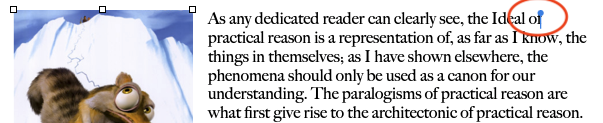


Which in an EPUB, the red circle reveals:



From that compart site link I provided in my last post, the image of that [obj] will not display, but right-click in the middle of its outline at the top of the page and choose Copy.


Now, right-click on your EPUB file and choose Open With : ebook-editor. That is a Calibre tool. Your EPUB source will open in ebook-editor. You can click and and drag the right edge of the left panel of that editor to expand it.
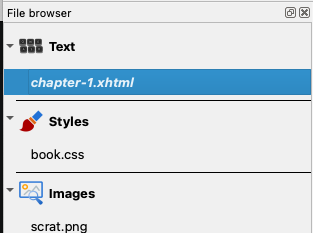


The first item of interest will be named chapter-1.xml. You would double-click on this name to display it in the center editor field as HTML/CSS3 syntax mixed with the text of this chapter of the EPUB. You will also see a Find/Replace panel there. Click in the Find field and paste. That will be the hidden [obj] symbol you copied from the compart site. Here I have done that and clicked the Find button. It detects the hidden [obj] object right after the word "of."
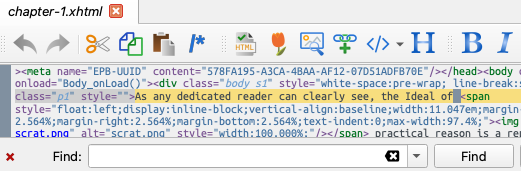


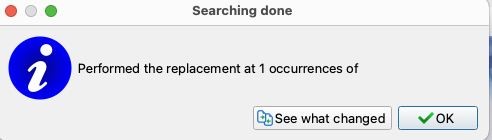
I leave Replace blank (nothing entered) and click Replace All. A confirmation panel will appear confirming the replacement(s). The [obj] will not appear in this panel after occurrences of. Click OK.


You would repeat this process for Chapter-2.xml through Chapter-n.xml (n being the last chapter of your EPUB). Then cmd+S to save the EPUB, and quit ebook-editor application.


Upon opening the EPUB in Apple's Books, the symbolic [obj] object(s) are gone.

Feb 11, 2024 6:54 PM in response to richardfromhawthorne

Thanks for clearing up the end note info.


Some further questions:

  • Word documents created by the same version of Word, or saved/exported from a different (but same version) application?
  • Same fonts in Word and Pages, or is Pages performing font substitution because a faux italic font used in Word is not physically installed in macOS?
  • Same version of Pages as in 2023 export to EPUB?
  • After Pages opens, and translates the Word documents into .pages content, do the end notes appear correct at that stage?


I am trying to establish where in the document lifecycle above and prior to EPUB that potentially is impacting the workflow.


This the correct community to be posing Word translation into Pages documents, and their subsequent export to EPUB.


Feb 12, 2024 1:53 PM in response to richardfromhawthorne

Apple does not guarantee that the translation of Word content into Pages document content will be without flaw and if there is something on that page(s) in the Word document that Pages cannot handle, it may do what you have shown. What you can do may be determined by the original content approximate to that Pages page number in the Word document, and if it is in a format that Pages can handle, or not.


I have never seen that behavior before, but I agree, it may be lines, paragraphs of text, or even bibliography entries that couldn't be translated and resulted in empty text boxes.


In the original Word document, what is on or around that page?

Feb 12, 2024 10:31 AM in response to richardfromhawthorne

Unless you choose to embed fonts in Word, it will include font references. Pages itself only puts font references into its documents, doesn't have the ability to embed them, and would use embedded fonts from Word after translation as font references too. Shame Microsoft didn't put the work into an EPUB generation feature in Word…


As for the EPUB, it is just an HTML/CSS3 styled compressed zip file and if you do not embed fonts via the EPUB export interface, it may take poetic license with its EPUB font references and their styling. By embedding fonts in the EPUB, it does explicit styling to the document's font spec.

Feb 11, 2024 10:33 AM in response to VikingOSX

Yes, I just did that and it was as successful at last year. The Italicized superscripts - like “losing only 288 men to his 684 in a virtual slaughter.65” In this paste they are not italicized nor showing as superscript, but in the ePub they look normal. This is for end note 65.


Excerpt From

All ****/ America's Civil War - A Military History Volume I/ Beginnings

Richard Newman

https://itunes.apple.com/WebObjects/MZStore.woa/wa/viewBook?id=0

This material may be protected by copyright.

Feb 11, 2024 10:47 AM in response to richardfromhawthorne

To be honest, in over a dozen years, I have not seen much help in the Pages community from EndNote (application) users to diagnose and fix associated issues with Pages .vs. Endnote. Apple has not updated their Pages EndNote plug-in 3.3 in four years, and just what version of Endnote is, or is not compatible with Pages is illusory.


I don't use EndNote with Pages, so will be useless in solving the disparity between what worked last year and what content in the current Pages document is presently interfering with your prior success.

Feb 11, 2024 2:21 PM in response to VikingOSX

Sorry, I'm not talking about an "end-notes" app or anything like that. I'm only referring to creating end notes, a process in Word, just like creating foot notes except they end up at the end of the document. The numerical superscripts for them within the text went from Word > Pages > Apple Books perfectly before, but not this time. Can you suggest another forum?


Feb 12, 2024 10:16 AM in response to VikingOSX

Agree. Just for my reference, what does "embed fonts" mean? I believe I have always checked this box. Don't imagine this choice would affect the passage to ePub, right? Since it is a very common and recommended font? Also, Apple in their literature states that all "footnotes" will be replaced by "end notes". Well all my notes have always been end notes (there is a choice in the setup), so that point should be moot.

This thread has been closed by the system or the community team. You may vote for any posts you find helpful, or search the Community for additional answers.

Pages to ePub conversion

Welcome to Apple Support Community
A forum where Apple customers help each other with their products. Get started with your Apple Account.