
Where are my apps in the new iTunes?
iTunes seem to have update itself and now my Apps have disappeared. Where are my apps in the new iTunes (v 12.7.0.166)?
MacBook Air (13-inch, Early 2014), OS X Yosemite (10.10.1), 16 GB Ram; 480 GB SSD
iTunes seem to have update itself and now my Apps have disappeared. Where are my apps in the new iTunes (v 12.7.0.166)?
MacBook Air (13-inch, Early 2014), OS X Yosemite (10.10.1), 16 GB Ram; 480 GB SSD
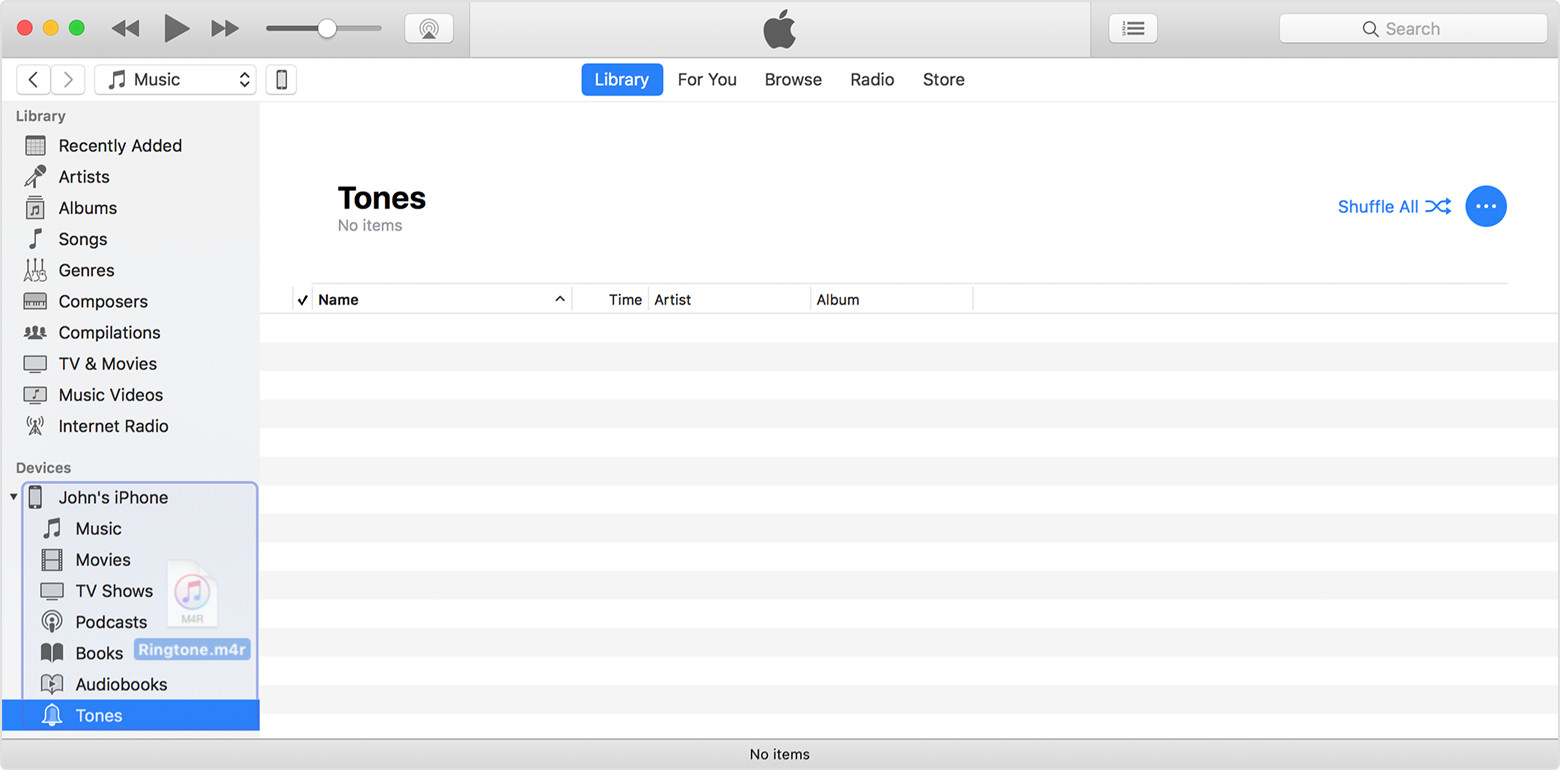
The idea is that all app management takes place on the device. If you have any apps that are no longer in the store that you want to put on your device these will still be in the old Mobile Applications folder and can be manually dragged & dropped to the device. Likewise with ringtones.
From Manually manage content on your iPhone, iPad, or iPod touch using iTunes - Apple Support:
Manually add items from your computer
If you have media on your computer that you can't redownload from the App Store or iTunes Store directly on your iOS device, such as custom ringtones or iOS apps, you can drag and drop the media from your computer to your iOS device using iTunes.
tt2
The idea is that all app management takes place on the device. If you have any apps that are no longer in the store that you want to put on your device these will still be in the old Mobile Applications folder and can be manually dragged & dropped to the device. Likewise with ringtones.
From Manually manage content on your iPhone, iPad, or iPod touch using iTunes - Apple Support:
Manually add items from your computer
If you have media on your computer that you can't redownload from the App Store or iTunes Store directly on your iOS device, such as custom ringtones or iOS apps, you can drag and drop the media from your computer to your iOS device using iTunes.
tt2
With iTunes 12.7 or later apps are no longer listed in the iTunes interface. See Managing apps with iTunes 12.7 or later for details. Apps previously downloaded to your computer can normally be found inside the Mobile Applications folder inside your iTunes Media folder.
tt2
https://www.macrumors.com/2017/10/09/apple-itunes-with-app-store-included/
The above article is the one that lead me to the version of iTunes that release quietly to bring the functionality you are looking for.
https://support.apple.com/en-gb/HT208079
Above link is where you can download the version of iTunes that has the ability to control your apps.
Hope this helps.
/madapakaz
Management of apps, books, and tones has been removed from iTunes 12.7. See Changes in the new iTunes - Apple Support for details. The intention is clearly that management of these generally takes place on the device.
See the Manually add items from your computer section of Manually manage content on your iPhone, iPad, or iPod touch using iTunes - Apple Support for the control that remains. This can be used to copy apps (including apps that have been withdrawn from the store), ePubs, iBooks, PDFs, and tones from your computer to your device. The File Sharing feature for copying data between apps and the computer is still there. You can also use iCloud Drive, or Dropbox to move content to and from the device.
A long time criticism of iTunes, at least from some quarters, is that has been that it has become bloated. Perhaps this is an attempt to address that. I let both my iOS devices update automatically when there is an updated app, and I'm not interested in hanging on to old apps that a developer has withdrawn, nor do I need to rearrange my apps often, so while the change is drastic, I don't think it really affects me much. I'm more irritated by the changes to iTunes U, and iBooks in iTunes for Windows.
See Deploy apps in a business environment with iTunes - Apple Support for access to iTunes 12.6.3 if you want to revert to a build with app management features. Windows users need to uninstall the current copy of the iTunes application first. See Empty/corrupt iTunes library after upgrade/crash for steps to revert to a pre-iTunes 12.7 version of your iTunes database.
tt2
Perhaps you missed this bit in one of my more recent posts to this thread:
See Deploy apps in a business environment with iTunes - Apple Support for access to iTunes 12.6.3 if you want to revert to a build with app management features. Windows users need to uninstall the current copy of the iTunes application first. See Empty/corrupt iTunes library after upgrade/crash for steps to revert to a pre-iTunes 12.7 version of your iTunes database.
tt2
Nobody on here can reinstate anything, we are just fellow users. You can use iTunes 12.6.3 if you want to manage apps and books via your computer's iTunes. If you want to leave feedback to Apple : http://www.apple.com/feedback/
Where have you been? This change happened back in September. You can manage your apps directly on your devices, or revert to iTunes 12.6.3.6 if you're really wedded to managing things through your computer.
tt2
See Managing apps with iTunes 12.7 or later. The intention is that you now manage apps entirely on the device. If you wish to manage apps in iTunes you can install iTunes 12.6.3.6.
tt2
The new iTunes give no explanation at all about what happened to your library of apps or where to find it. There are articles showing up explaining simply that Apple removed all iOS apps from iTunes and that you are supposed to now manage your apps on your iOS device. However, your library of purchased iOS apps is not visible on your iOS device.
Well apparently it went away... I don't understand why Apple bury's stuff and forces us to go find the answer. We're still going to ***** about it whether they announce or bury it but whatever...
Here is the link:
Well, I will consider the iTunes12.6.3 as an enterprise edition that has an additional feature than the current version.
First, You just need to, de-install the latest version of iTunes from your MAC or PC before proceeding with the install.
Works great with my iPhone 6S.
As stated in the message immediately before yours, NOBODY on here can reinstate anything, we are just fellow users. You can use iTunes 12.6.3 if you want to manage apps and books via your computer's iTunes. If you want to leave feedback to Apple: http://www.apple.com/feedback/
I don't know why an Apple policy make would think dropping this is what customers want. Sure some may be happy to manage their devices on the latest product but 1) We should be able to choose 2) Not everyone wishes to keep forking out hundreds of pounds buying the latest hardware so you can do what you used to do and some of us find it very convenient and civilised to manage devices form a desktop/ laptop.
You can revert to a working version of iTunes 12.6.3.6, if using High Sierra and it restores you apps and access to the App Store.
http://osxdaily.com/2017/10/09/get-itunes-12-6-3-with-app-store/
How is removing something a bloat? Actually, iOS apps were removed from iTunes for exactly that reason. They don't really belong there. Here is a support article that explains how to get your purchased apps to your device:
Changes in the new iTunes - Apple Support
GB
Valmon wrote:
Giorgio, spot on! Did you solve it? I have been at it for 1/2 day and cannot seem to find the apps in iTunes 12.7.4.76 on Mac Yosemite 10.10.5. Thanks!
That's because they are not housed in iTunes anymore: Changes in the new iTunes - Apple Support
And really, it would have taken you no more time to find the answer than it did to type your question. It's on the first page. We are users just like you. We volunteer our time here. I understand that having a sick pet can be not only time-consuming, but extremely stressful and draining. But, if you post to a forum looking for an answer, you have to be willing to make at least a small effort to find the answer, rather than echoing what was basically a rant.
Best of luck,
GB
Where are my apps in the new iTunes?



