
Where are my apps in the new iTunes?
iTunes seem to have update itself and now my Apps have disappeared. Where are my apps in the new iTunes (v 12.7.0.166)?
MacBook Air (13-inch, Early 2014), OS X Yosemite (10.10.1), 16 GB Ram; 480 GB SSD
iTunes seem to have update itself and now my Apps have disappeared. Where are my apps in the new iTunes (v 12.7.0.166)?
MacBook Air (13-inch, Early 2014), OS X Yosemite (10.10.1), 16 GB Ram; 480 GB SSD
The idea is that all app management takes place on the device. If you have any apps that are no longer in the store that you want to put on your device these will still be in the old Mobile Applications folder and can be manually dragged & dropped to the device. Likewise with ringtones.
From Manually manage content on your iPhone, iPad, or iPod touch using iTunes - Apple Support:
Manually add items from your computer
If you have media on your computer that you can't redownload from the App Store or iTunes Store directly on your iOS device, such as custom ringtones or iOS apps, you can drag and drop the media from your computer to your iOS device using iTunes.
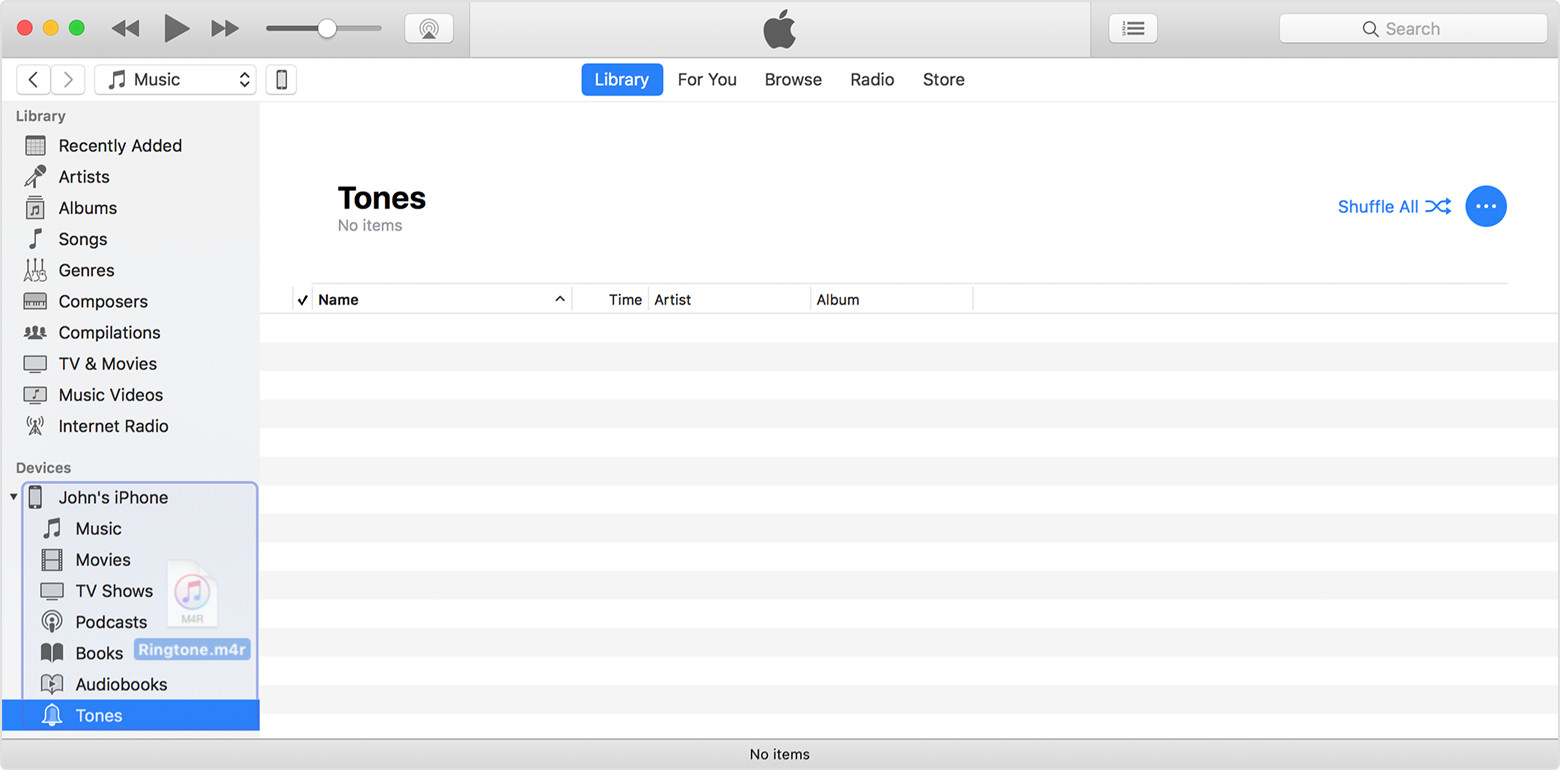
tt2
They re not in the new iTunes.
I believe it tells you to re download them, if you want them on your computer.
I was responding the particular post at the bottom of the previous page. Reverting to iTunes 12.6.3.6 is an option for those that still want to manage apps with iTunes.
tt2
I would NOT recommend going backwards to earlier iTunes versions just to recover the app management feature. I don't think is wise in this situation. Apple is making many changes across the entire spectrum of their OS and iOS operating systems and especially iTunes.
Like many people in this thread have said, we strongly recommend that everyone send your feedback directly to APPLE. They do read the feedback. If enough of us speak up about this concern, it will be heard and, maybe, it will lead to some better way to manage iOS apps... Let the people's voice be heard... Go to:
Apple are not here, these are just user forums - if you want to leave feedback to them use the feedback posted previously on this thread.
iTunes 12.6.3, see previous posts on this thread, lets you manage apps in iTunes
You will see a list of the apps that support file sharing, This area lets you add or remove data to or from those apps. It doesn't allow you to add, remove or organize the apps on the device, which is what people are concerned about.
tt2
disfasia wrote:
It is not easy to do from the iphone for anyone over 40. Sorry but this is a bad decision. Most people like to do such operations from the desktop as eye strain is a real thing and you can't organise from a small screen.
It may be time to admit you need reading glasses. 😉
I don't think you can say for certain that "most" people used iTunes to arrange their apps. Based on the comparatively low level of outcry, I'd guess that's incorrect. For an increasingly large number of people, their smart phone is their computer.
Make sure you submit your feedback. And, in the meanwhile, use iTunes 12.6.3.
Not only does the new iTunes 12.7 no longer show the apps that are on my iPhone, but it thinks that there is nothing there at all.
iTunes now shows that I have an extra 25GB free space on my iPhone, but I actually have 25GB of APPS on my iPhone that I WANT TO MANAGE IN ITUNES.
THIS IS THE STUPIDEST CHANGE SINCE THE LAST STUPIDEST CHANGE EVER. THANKS FOR CRAP, APPLE.
Yes, I sent iTunes feedback to Apple directly. Thanks.
Valmon wrote:
Giorgio, spot on! Did you solve it? I have been at it for 1/2 day and cannot seem to find the apps in iTunes 12.7.4.76 on Mac Yosemite 10.10.5. Thanks!
If you had spent 30 seconds reading the thread you just posted to you could have saved yourself a half a day. Apple hasn't supported apps in iTunes 12.7.x for almost a year. if you read the thread now you will even find workarounds.
Apple,
Please just put the apps back into iTunes.
Apple are not here, these are user forums.
Apps are available in iTunes 12.6.3, you could update to that - see the post immediately above yours.
See Managing apps with iTunes 12.7 or later. Install iTunes 12.6.3 to restore the familiar app management tools.
tt2
go to apple.com/feedback and give your feedback to bring it back. I use our Mac to manage the Apps for my kids. Now that won't be possible to monitor what they are downloading. The more feedback the better of a chance getting it back.
I just posted my frustration with this problem in Apple's feedback and suggest that everyone let apple know that we want this feature back: Product Feedback - Apple
Why take away such a useful tool without at least polling the community? I have multiple devices and was managing the apps on a 27" iMac... MUCH easier to move apps around and organize in folders than on the device itself. I've just stopped doing that on the devices. One song to sing for the geniuses who came up with the idea to remove this feature and not let the users know in advance, or offer a workaround... "...if I only had a brain..."
Went there :
"I want to add my voice to the large and still growing choir of folks who are dumbfounded over the decision to eliminate the function that enabled users to view / arrange Apps on their mobile devices via iTunes, on their large screen Mac's !
This is one of the dumbest decisions I have seen in a long time, and rivals the decision to remove the ability to insert links in Preview documents.
If radical changes like these are part of a new update to any app, it should at least be CLEARLY announced, so people have a chance to decide for or against the "update", and also a chance to voice their opinion about odd and radical changes .
Shame on Apple to sneak stuff like this in through the back door, only for folks to discover after the fact.
I am thoroughly disappointed with this kind of actions by Apple!"
Thank you all for clarifying this.
To Apple's software developers - this is literally THE DUMBEST and most ridiculous decision you guys have made. I assume Jonny Ives had nothing to do with this UI change - I'm an industrial designer myself and any self-respecting designer would never do something stupid like that. The ability to manage apps in Itunes, on my desktop, with my mouse on a large monitor wasn't just a great feature, it was essential, expected, and natural. Remember guys - when you release new updates you're supposed to make your product BETTER, NOT WORSE. You've just made it decidedly worse. And to add insult to injury, you've totally skipped any notices, explanations or anything to just clue in millions of us who updated Itunes that app management feature is gone. Talk about missing Steve Jobs' thinking when you need it.
Where are my apps in the new iTunes?






