
Where are my apps in the new iTunes?
iTunes seem to have update itself and now my Apps have disappeared. Where are my apps in the new iTunes (v 12.7.0.166)?
MacBook Air (13-inch, Early 2014), OS X Yosemite (10.10.1), 16 GB Ram; 480 GB SSD
iTunes seem to have update itself and now my Apps have disappeared. Where are my apps in the new iTunes (v 12.7.0.166)?
MacBook Air (13-inch, Early 2014), OS X Yosemite (10.10.1), 16 GB Ram; 480 GB SSD
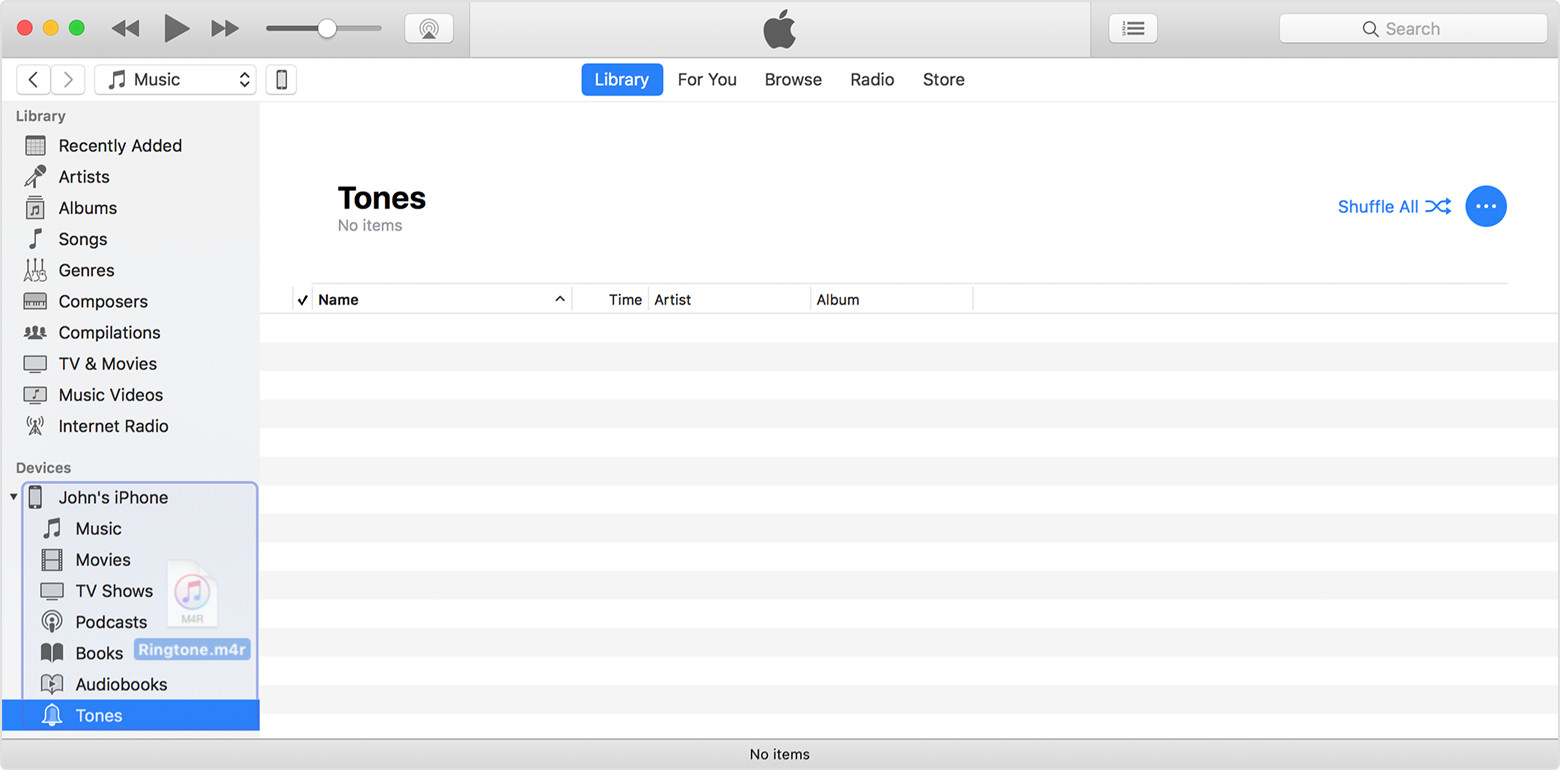
The idea is that all app management takes place on the device. If you have any apps that are no longer in the store that you want to put on your device these will still be in the old Mobile Applications folder and can be manually dragged & dropped to the device. Likewise with ringtones.
From Manually manage content on your iPhone, iPad, or iPod touch using iTunes - Apple Support:
Manually add items from your computer
If you have media on your computer that you can't redownload from the App Store or iTunes Store directly on your iOS device, such as custom ringtones or iOS apps, you can drag and drop the media from your computer to your iOS device using iTunes.
tt2
Until if/when Apple announce something nobody on here will know if, going forwards, there will two versions. If there is it's doubtful that one will be paid-for, so far iTunes has always been a free download
rosalinda_baez wrote:
hi, I work for Dell and run their communities but admittedly am an Apple user-- IF THEY ARE NOT READING COMMUNITY POSTS, THEY ARE NOT DOING THEIR JOBS. PERIOD> SOCIAL LISTENING IS CRITICAL.
The Hosts are doing exactly the job they were hired to do, and doing it very well, I might add. Apple doesn't do business in the same way that Dell does. And, based on recent performance, I'd say that's a wise move on Apple's part.
This forum is one of the largest of its kind in the world. I'm sure that a small forum such as Dell's might be easier to use a suggestion site. It's simply not practical for one this size.
Apple provides a page on which people can provide feedback:
They also have a twitter account if you're so inclined.
Are you this Rosalinda Baez?
http://www.nydailynews.com/news/crime/bomb-remark-lands-executive-cuffs-article- 1.282336
on android eg my super old "note4" you can just copy paste music/movies/pictures and immediately are viewable on my phone example using VLC player. No conversion no syncing it just does it. You can even create folders just like windows explorer
All apple has going for it is aesthetics, very poorly designed options and mechanics
p.s i'm not biased i own both samsung phone tablets and apple aswell
Hi
Yes i agree with AMCarter3
Apps in my itunes library was far better than messing about on iphone screen!
Also, my purchased books from itunes have gone from my library too???
PLEASE REINSTATE APPS & BOOKS? TO LIBRARY as all has gone backwards in current format!
I agree that this was an idiotic decision. How many lines of code or memory space would it have used to keep the feature to be able to actually see and move around the pages and pages of app icons on the computer? On a screen that is actually easy to see and work with a mouse instead of the assinine and clumsy method of doing it on the device itself. Clumsy should not be in the Apple dictionary!! Leave that to the Microsoft legions.
Please reinstate the access to the app pages through iTunes where one can easily and efficiently manage the layout of the iPhone's (and iPad's) multiple pages.
Insanely cretinous. I now have to use my tiny little screen on my iphone to access the iTunes store with my secure password that requires me to flip constantly to get the characters on a screen that needs a microscope only to get the unable to sign in message.
Very stupid Apple!
carangova wrote:
Very poor judgement from Apple. One more reason to look for a different smartphone.
Please let us know which one you find that lets you manage and organize your apps on your computer.
Having this feature was one of the factors to remain as an iPhone customer, if Apple decides to be as any other brand that is ok. You also can fight me for not liking Apple decisions but at the end it's how iPhone environment has worked is what has made it desirable for me.
carangova wrote:
Having this feature was one of the factors to remain as an iPhone customer, if Apple decides to be as any other brand that is ok. You also can fight me for not liking Apple decisions but at the end it's how iPhone environment has worked is what has made it desirable for me.
I honestly have no interest in what you like or don't like and even less interest in fighting you. However, as this seems to be an important issue for many people, I think they might find it useful if someone did post back that they'd found a phone that supports this. But whether or not you decide to be that magnanimous is entirely up to you.
I just this very moment discovered this 'change'. It is a bad idea. I use this function to maintain my library and purge old apps, etc. It is not easy to do from the iphone for anyone over 40. Sorry but this is a bad decision. Most people like to do such operations from the desktop as eye strain is a real thing and you can't organise from a small screen.
disfasia wrote:
I just this very moment discovered this 'change'. It is a bad idea. I use this function to maintain my library and purge old apps, etc. It is not easy to do from the iphone for anyone over 40. Sorry but this is a bad decision. Most people like to do such operations from the desktop as eye strain is a real thing and you can't organise from a small screen.
Over 40? I'm 75, and I have no trouble managing apps on my iPhone or iPad.
AMCarter3 wrote:
It really helps if you send your feedback to Apple: http://www.apple.com/feedback/
I won't speak for Lawrence but, I don't intend to submit such feedback because I agree with Apple's decision to start removing functions from iTunes. It had become virtually unusable for its original purpose: managing and listening to music.
Reading glasses are not the issue. There are certain tasks that are just done with a larger screen. Maybe not for you, but many people.
Many people have not yet complained because like me, they work a lot, don't have time to manage the iphone but once a year--if that.
disfasia wrote:
Many people have not yet complained because like me, they work a lot, don't have time to manage the iphone but once a year--if that.
Or, many people haven't complained because they don't care. It's really rather difficult to say. But, based on my experience, many people rearrange, download, and delete apps far more than once a year. My experience in this area is broader than most. I used to do customer support and training for a major U.S. cellular carrier. I certainly would not say I know what everyone does or wants, though.
Its interesting to me to note that most of the comments on here are from Level 1 participants. The defenders of the Apple party line appear to be more like Level 8 & 9. Those of you who have your devices glued to your body at all times undoubtedly have the better grasp on the minuscule features of your Apple devices. For me and my family and sphere group, I'd say that maybe 2 in 100 have any idea how to tweak the settings on their device, or do so regularly. We just want to use it for the tool that it is!
Yes, I have submitted my concern to Apple as I want my voice to be heard.
If iTunes is not the proper place to view your Apps on your computer, then why wouldn't it be logical to see them on your App Store on your computer? Somewhere on one's computer one should be able to view a summary of his purchased and downloaded apps. If you have many devices & family members it would be nice to have!
Where are my apps in the new iTunes?





