Apple watch series 1 keeps restarting after 4.2 update

Since I updated my apple watch series 1 to watchos 4.2 it keeps restarting alone mostly every time i check time or try to use it and its killing the battery in the process. I restored it as a new watch and it keeps doing the same thing. Any tips?

Apple Watch, watchOS 4.2

Posted on Dec 11, 2017 10:28 AM

Reply
44 replies

Jan 8, 2018 11:43 PM in response to othoncll

I have the same issue too both on my two series 2 apple watches after updating to watch os 4.2.

I tried many solutions that I found on the internet like repairing the watch, erasing the watch, uninstalling all the 3rd party apps, erasing the iphone, all of them dont solve the problem. The watch will begin randomly restarting since u first put it on the charger.


Since the first time I found out putting the watch on the charger after repairing the watch will make the watch misbehave. The only change on the watch is the "music syncing" action...


Try stopping all the music sycning may solve the random rebooting problem on watch os 4.2, hopefully.


Please report if this method works

Thank you!!
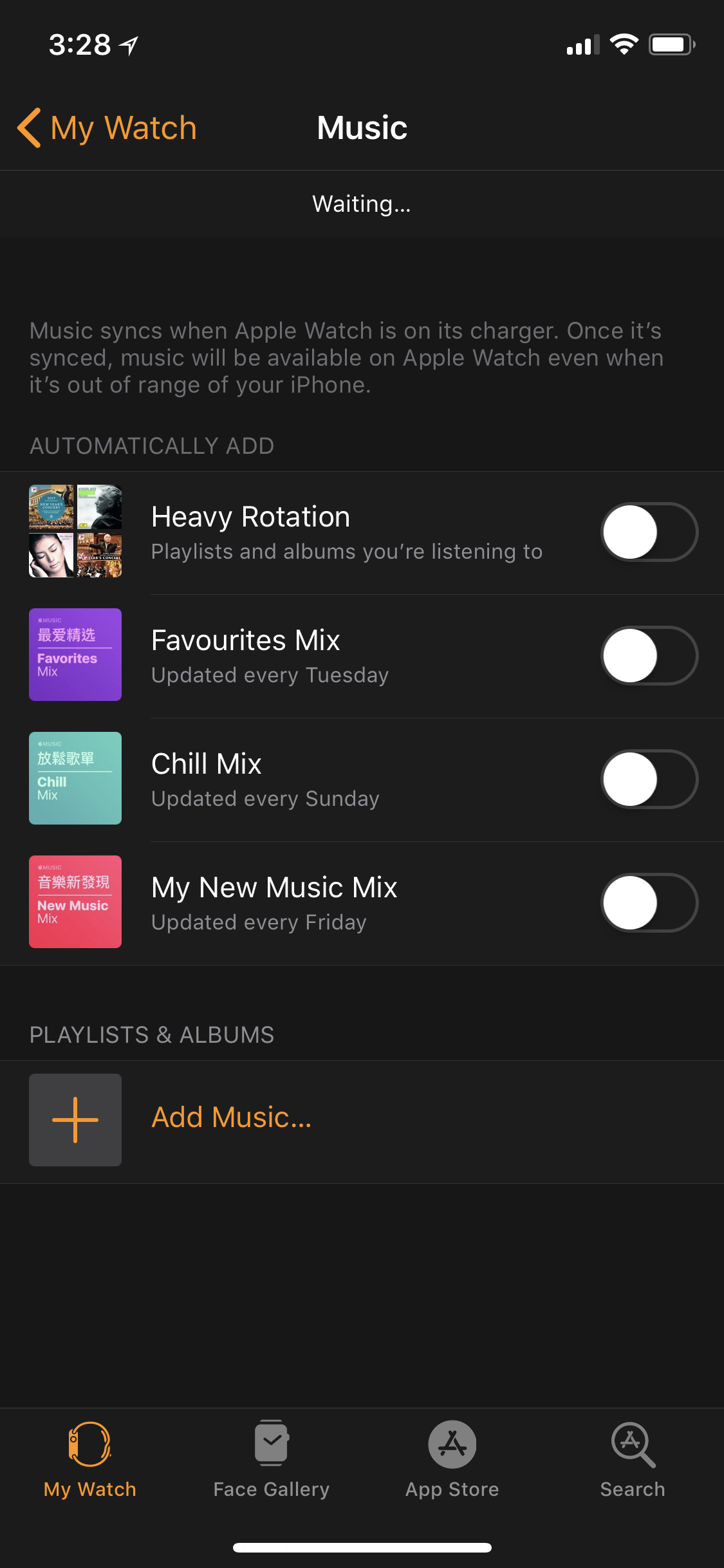
User uploaded file

Feb 7, 2018 6:52 AM in response to drwjs

drwjs wrote:


.. Apple, please come clean about this if it is a software glitch and tell us how to go back to the previous version of software until your engineers can come up with a fix. Thanks


It is not possible to downgrade watchOS.


Note also that you are not talking to Apple here - this is a user-based technical support community.


In addition to the steps suggested in my previous reply, it may help to test by turning off notifications for third-party apps and testing performance after re-enabling them one at a time:


If the issue persists, then I suggest that you contact Apple Support (remote diagnostics and/or mail-in service may be available, if required), make a Genius Bar reservation or visit an Apple Authorised Service Provider for assistance:


Feb 7, 2018 2:31 PM in response to 7NINE3

If I had to guess, they are not finding anything and when they re-pair it to the phone the problem comes back. I have read threads with people getting new replacement watches and the same problem occurs. I think it has not been solved as they have not been able to reproduce it. I have been in the software business for many years and know firsthand that you have to be able to reproduce it to find the root cause. They probably are only looking at the watch and not all the items related to it. In my example, I restored what was not working, so it had something to do with a settings for an app or Instagram (the only app I removed based on a comment I read) as everything else was still in place. I plan to re-install Instagram so that I can see what happens. I might do that tonight, although it has been so stable that I'm hesitant. My watch is still at 80% and it has been on since around 8AM this morning. Working perfectly now.

Feb 24, 2018 10:09 AM in response to scarrone

Good afternoon everyone,


I woke up this morning to Watch OS 4.2.3 waiting to be installed. It states this is an update to fix a character issue that is causing the watch to crash. I have updated my watch with the latest software. I have now turned back on all of the notifications that I use. Fingers crossed let's see what happens. Has anyone else updated to OS 4.2.3? I would like to know how everyone else is making out with this new update for our buddies at Apple.

Jan 16, 2018 2:50 AM in response to Dante_Fuentes

Yeah it definitely has to do with the notifications cause since I turned off them through the watch app on my phone. I haven’t had anymore resets the main notifications messages and emails still work with no faults. I would say if you have Facebook Twitter or Instagram try to turn those off cause they are always sending notifications like every minute so it they could be the cause of the failure.

Jan 5, 2018 1:58 PM in response to othoncll

Hey,


I've been having the same issue as well, I restored from an old backup from July and after the first charge, that restarting thing would happen. I tried unpairing with that old 4.1 and then later pair with the new ios without a restore and still the same issue. I went to the apple store and they sent in my watch but I didn't answer an email in time and my watch was sent back, this was right before xmas. I got the watch back and had to go through the whole explaining thing and just this past Thursday 12/28 of last week, sent it back again. As of today, 01/05/18 the have my watch and going to TRY and replicate the problem. As a suggestion, you may need to get a video recording to prove that your not crazy. Hopefully they can sort this out with a 4.3 update.


Best,

Steven

Jan 16, 2018 1:39 AM in response to Jonathan UK

I'm almost positive that it’s an issue with notifications. When I take the Watch from its charger in the morning, it's already rebooting most of the times. When it’s back up, there are many notifications in the Notification Center (should be all the missed notifications from the night), but it seems like the Watch can’t handle it. It’s often times restarting when I try to delete them all at once and even if it works, it still shows the red dot even though there are no more notifications displayed. And usually a few minutes after that, some of the old notifications from the night come through in bunches. Just strange why everything is fine sometimes and a day later the issue is back.

Jan 26, 2018 8:14 AM in response to Dante_Fuentes

Good morning everyone,


Just wanted to provide a quick update. I saw a watch OS 4.2.2 update last night on my phone. As always it only stated bug fixes and etc. My series two has had all the third party app notifications turned off since discovering it was some cause of my constant resetting issue. So last night I updated the watch and this morning I turned back all my third party notifications. As or right now 11 am eastern time, The watch has had no resets and still holding at 83% battery it been in use since 4 am. I will continue to monitor and if anything happens I will share an update with you all. Have a good weekend everyone.

Feb 25, 2018 6:27 AM in response to 7NINE3

Good morning everyone,


Well, I am sad to report that watch OS 4.2.3 has NOT fixed the issue. I had to return back to my configuration of shutting down all notifications in order to allow the watch to be usable and not kill the battery. How some of you had better results. as of right now Apple watch and watch OS is pretty much not playing nice with each other. I am very disappointed with Apple in regards to this matter. As I type this the watch has rest 4 times within the last 10 minutes. SMH!!!😠

Jan 27, 2018 4:43 AM in response to Dante_Fuentes

Ok so halfway through yesterday, it started back up again with the resets and it killed my battery quick. I attempted to one by one turn off the notifcations. So I could possiblity pin point which one is causing the conflict. Being that i was running out of power I was unable to complete my testing. So I restored the watch last night and set it up as a new watch. Right now all the app notifications are currently on. Im basically waiting for a reset to happen to start my testing again.To see if I can find which app or notification is the problem. And I'm going to let Apple know I want a paycheck if I find it lol😁. I will follow up as I discover more everyone.

Jan 31, 2018 6:05 PM in response to 7NINE3

Have you received any resolution? Your example shows that there is something and it has to be software and related to the interaction with the iPhone, as not everyone is seeing this. I updated yesterday to the new WatchOS and starting last night I could not stop it from rebooting and drained the battery in a couple of hours. Today while on the charger, it was constantly rebooting about every 5 minutes.


I am about to send it back to Apple through a store on Friday. I am 99.998% sure that it is not a hardware issue. Interesting that as soon as I un-paired it from my iPhone a short time ago, it has not rebooted since. It is is just waiting for me to connect to a phone. The reboot is happening while paired. I did not think about shutting off the phone to see if it stops. Experiment for later tonight after re-pairing (again).


So frustrated with this, can't imagine yours with getting a new one and problem still existing.

Feb 7, 2018 6:48 AM in response to othoncll

Both my husband & I have apple watches (his series 3, mine series 2) that have been rebooting ever since the software update to 4.2.2. Seems to be connected to notifications (especially our security camera and remote door bell) but it is hard to be 100% sure.
Apple, please come clean about this if it is a software glitch and tell us how to go back to the previous version of software until your engineers can come up with a fix. Thanks

Feb 7, 2018 7:02 AM in response to drwjs

Hello drwjs,


I was seeing this constantly also. I do not believe that it is the OS version, there is something that is conflicting and I for the first time since December have got it working. Follow the post I left earlier today with a link to another thread with details of what I tried and have been successful. Not sure that it will do the same, it cannot hurt though.

Feb 7, 2018 10:40 AM in response to 7NINE3

7NINE3, I hope you have success. I had done all of the things suggested including setup as a new device, no success, there was still an issue. I believe that it is related to an app already on the phone, not the setup of the watch itself. If it were the watch setup, then a new device setup would have worked. I had done that twice already.

This thread has been closed by the system or the community team. You may vote for any posts you find helpful, or search the Community for additional answers.

Apple watch series 1 keeps restarting after 4.2 update

Welcome to Apple Support Community
A forum where Apple customers help each other with their products. Get started with your Apple Account.

