iMessage “i” not auto correcting to “I”

I remember in previous iOS versions before iOS 11 that when typing in iMessage, or anywhere, a lowercase “i” alone would always autocorrect to an uppercase “I”. I know this seems lazy but it’s convenient when typing fast. Is there any solution to this? I tried text replacement but that never seems to work. Anything helps.

MacBook Pro (Retina, 13-inch, Mid 2014), OS X Yosemite (10.10.2)

Posted on Apr 27, 2018 4:55 AM

Reply

Similar questions

1 reply

Apr 28, 2018 8:42 AM in response to Kscheif1983

Greetings, Kscheif1983.


I see that you're having an issue with one particular key when using the keyboard on your iPhone. Typing a lowercase letter that's supposed to be capitalized doesn't automatically correct. I'm happy to help.


How to use Auto-Correction and predictive text on your iPhone, iPad, or iPod touch

User uploaded file

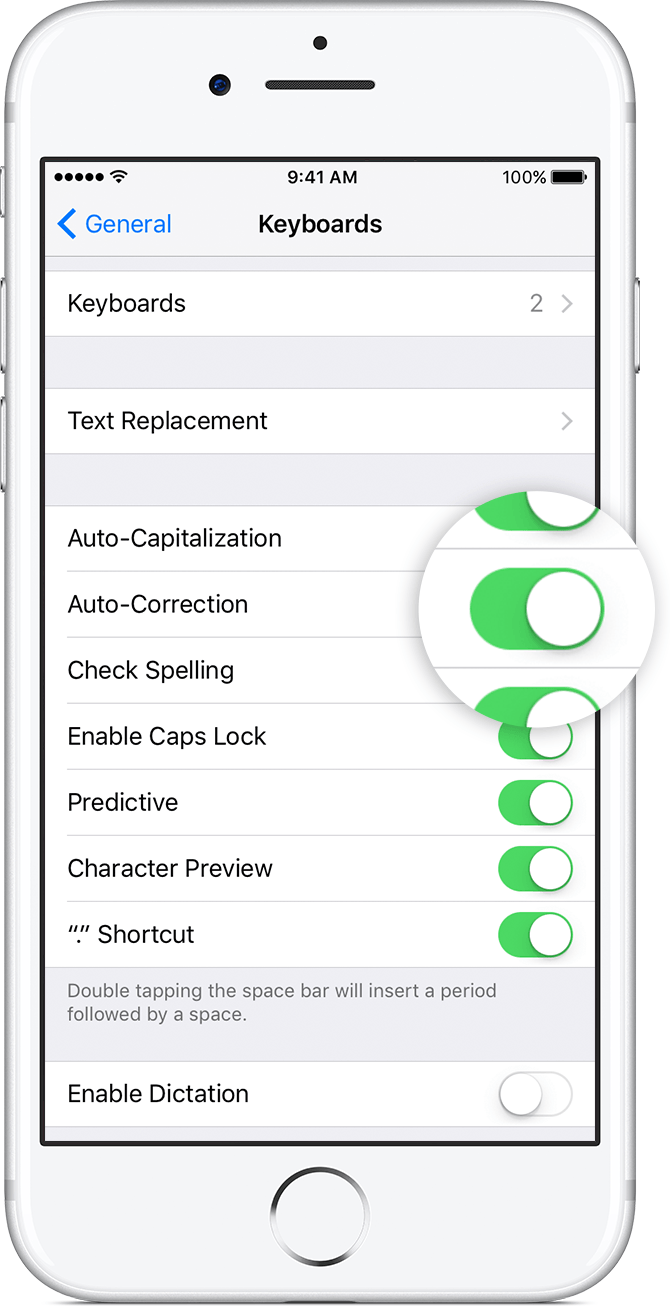
Use Auto-Correction

Auto-Correction uses your keyboard dictionary to spellcheck words as you type, automatically correcting misspelled words for you. To use it, just type in a text field.

To make sure that this setting is turned on, use these steps:

  1. Open the Settings app.
  2. Tap General > Keyboard.
  3. Turn on Auto-Correction. By default, Auto-Correction is on.


Take care!

This thread has been closed by the system or the community team. You may vote for any posts you find helpful, or search the Community for additional answers.

iMessage “i” not auto correcting to “I”

Welcome to Apple Support Community
A forum where Apple customers help each other with their products. Get started with your Apple Account.