Voice memo stuck downloading

I just got my new iPhone 11 pro max and downloaded my backup from the cloud. Well most of my voice memos came through but the most recent ones are stuck saying downloading and have been for hours with no progress. How to I force them to finish downloading?

iPhone

Posted on Sep 21, 2019 11:59 AM

Reply
Question marked as Top-ranking reply

Posted on Oct 21, 2019 4:21 PM

i have the same problem after purchasing iPhone 11 Pro Max. Then they all disappeared. However, I could see them on my older devices and when I do a recording on the new one, it shows up everywhere. Apple needs to fix this, ASAP.


Solution found by accident:

  1. I deleted the Voice App and Reinstalled It.
  2. Accept the Terms again and it should show downloading again.
  3. Press the record button, record for a few seconds and stop.
  4. Wait a second and all your recording should be there like normal.

* I was on WiFi when doing all of this. And I also notice that my voice recordings was showing 4 gigs of storage space before I proceeded. It seems they were downloaded but couldn’t be recognised. Hope this works for everyone.

92 replies
Question marked as Top-ranking reply

Oct 21, 2019 4:21 PM in response to Peachez82

i have the same problem after purchasing iPhone 11 Pro Max. Then they all disappeared. However, I could see them on my older devices and when I do a recording on the new one, it shows up everywhere. Apple needs to fix this, ASAP.


Solution found by accident:

  1. I deleted the Voice App and Reinstalled It.
  2. Accept the Terms again and it should show downloading again.
  3. Press the record button, record for a few seconds and stop.
  4. Wait a second and all your recording should be there like normal.

* I was on WiFi when doing all of this. And I also notice that my voice recordings was showing 4 gigs of storage space before I proceeded. It seems they were downloaded but couldn’t be recognised. Hope this works for everyone.

Dec 23, 2019 2:35 AM in response to Peachez82

The fix:

1.) must be using the latest version of iOS i.e. 13.2 or later.

2.) it is essential that you backup to iTunes, not just iCloud.

3.) delete voice memos after completing iTunes backup.

4.) turn iPhone off then back on, no need to force shut down.

5.) ensure after powering on that your plugged in and connected to WiFi.

6.) go to App Store and download voice memos again.

7.) open memos app and record for 3 seconds.

8.) allow an hour or two depending on the size of data store in voice memos.

9.) success, you now have all of your memos back!

Nov 20, 2019 11:55 AM in response to Peachez82

I have an iphone 8 plus. Most of my memos got stuck downloading after the update from iOS12 to iOS13. I've always primarily used iPhones and I have a lot of love for Apple but it's absolutely pathetic they have not released official information on how to deal with this and a definite fix.


Thanks to the users on here I was able to get my memos back though- I backed up my phone via iTunes to my computer (not icloud), deleted the voice memos app, shut my phone down, booted it back up, made sure I was on wifi, re-downloaded the voice memo app, recorded a 3 sec voice memo, within an hour all my memos were back on my phone.


Thanks y'all! (not you Apple)

Jan 11, 2020 10:38 AM in response to Jennipoole

Peace and Greetings,


In the past I posted a comment stating how I got mines back. The solution was simple.

1.) I uninstall the voice memo app;

2.) Re-install the app;

3.) Record for about 3 seconds and stop.

After that all the voice memos returned...... This seems to be the best solution that was discovered by accident. Hope this help.


**Note make sure you are on wifi and for safety precaution you may want to backup any recent ones.**


Oct 22, 2019 5:00 PM in response to alstemp

You may be in luck. There may be a solution and it involves a few clicks. Fairly simple.


Disclaimer: This is a third-party software. I am not affiliated nor do I receive any benefits. This if for educational and research purpose only. Use at your own discretion.


After searching online for a solution to your problem I came across some software but only one stood out to be the best solution. This is a paid program, however, it does you "full-limited access" to "a specific data file" (i.e. Voice Memo). DO NOT SELECT ANY OTHER FILE!!!!!!!!!!!!!!!


Assuming you are using a Mac:

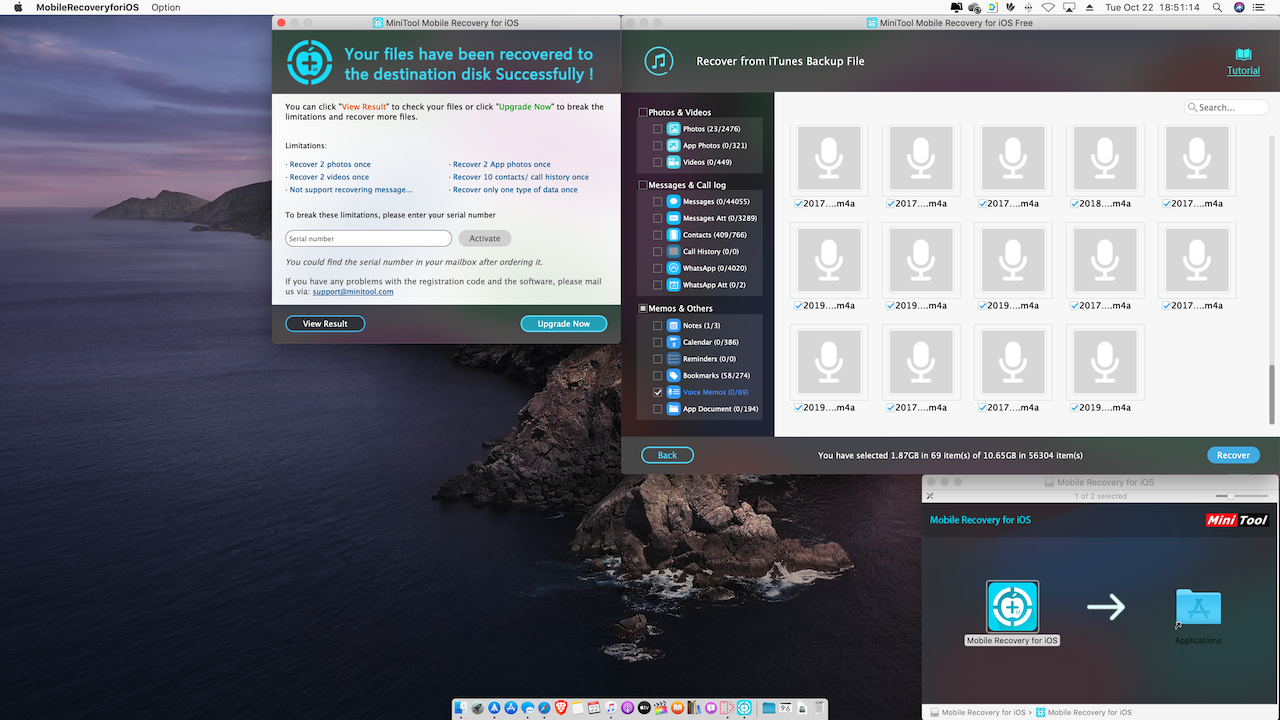
1.) Download the third-party app (https://www.minitool.com/download-center/) MiniTool Mobile Recovery (OS Recovery for Mac 1.4)

2.) Run it (You DO NOT HAVE TO MOVE IT over to your application folder)

3.) Select your backup location (iPhone/Table, iTunes, *iCloud - you will need to sign into your iCloud if you select this option)

4.) Select backup file and it will start to scan. It may take over 5 minutes to complete. Patient. (If your backup is encrypted, you need to put in your password)

5.) Under "Memos & Others, SELECT "VOICE MEMOS" ONLY. DO NOT SELECT ANYTHING ELSE!!!!!!!!!!!!!

6.) Press Recover and Select were you to want save your memos.


After completing these steps you should be able to AirDrop or Move to iCloud, or other media device for safe keepings.


Hope this helps. Let me know.
Dec 10, 2019 9:57 AM in response to Peachez82

Here's the workaround I found --


I got ahold of an old iphone 7 that I had upgraded from to an iphone X. I setup as new and backed up the iphone 7 from an iCloud backup that I had made right before I switched. Luckily the backup was still there. After setting up from the old backup, I went into voice memos, found my "downloading" memos that matched on my iphone X, and then I shared them to my dropbox / airdropped them to my new phone. That managed to recover all of the missing forever-downloading items.

Jan 12, 2020 7:41 AM in response to Sicurella38

Just to be clear, I am not stating to erase you phone, just the "voice memo app only". After you deleted it, reinstall the voice memo app. Then do a recording for about 3 seconds and stop. All of the memos should repopulate themselves. Make sure you're on a wifi connection or have internet access. [Please update us on the status. Hopefully, Apple didn't close patch this fix]. :)


***If you want to retrieve the memos from a "backup only" look at a solution I posted on "Page 3" of the forum.***


***** Everything comes with a risk and there is no absolute resolution that will guarantee that anything will work until Apple release an official permanent fix. Solutions on here are from people who had experience same to similar issues and found a workaround that "may be" an remedy. Please take caution to always backup anything that is important to mitigate the risk of loss.*****

This thread has been closed by the system or the community team. You may vote for any posts you find helpful, or search the Community for additional answers.

Voice memo stuck downloading

Welcome to Apple Support Community
A forum where Apple customers help each other with their products. Get started with your Apple Account.
